
/goal - Ultimate Guide
AI features
- Views
- 614K
- Likes
- 705
- Reposts
- 79
- Comments
- 15
- Bookmarks
- 2.3K
TL;DR
This guide explains how to use the /goal command in AI tools like Codex and Claude Code to create autonomous agents that research, code, and debug without manual intervention.
Reading the ESPAÑOL translation
Learning this single slash command will completely change how you use AI.
Anthropic, OpenAI, and other major AI players are all shipping the same feature right now.
That's not a coincidence; the /goal command is fundamentally changing how we interact with AI agents in real time.
By learning this command, you're essentially activating a 24/7 AI agent that can work on your behalf with zero manual intervention.
It's genuinely one of the most powerful AI features that's shipped recently.
In this guide, I'll teach you exactly what /goal is, how it works, how to optimize it, & show you some real-world examples to get you started.
By the time you're done reading, you'll have a 24/7 mini AI employee that completes any task for you autonomously.
Note: I'll focus on using /goals in Codex as the primary tool for this article, but many of the principles discussed can be applied to other AI tools, such as Claude Code.
What even is /goal?
In one line: /goal allows AI agents to work in a "loop" to complete tasks without needing permission (like the Ralph loop that went viral months ago).
Example: You tell Claude Code "/goal create a landing page," and it completes the entire task on your behalf. The research, coding, debugging & so on, and then it returns a final product to you.
It's like telling an employee to complete a task and only return when it's done.
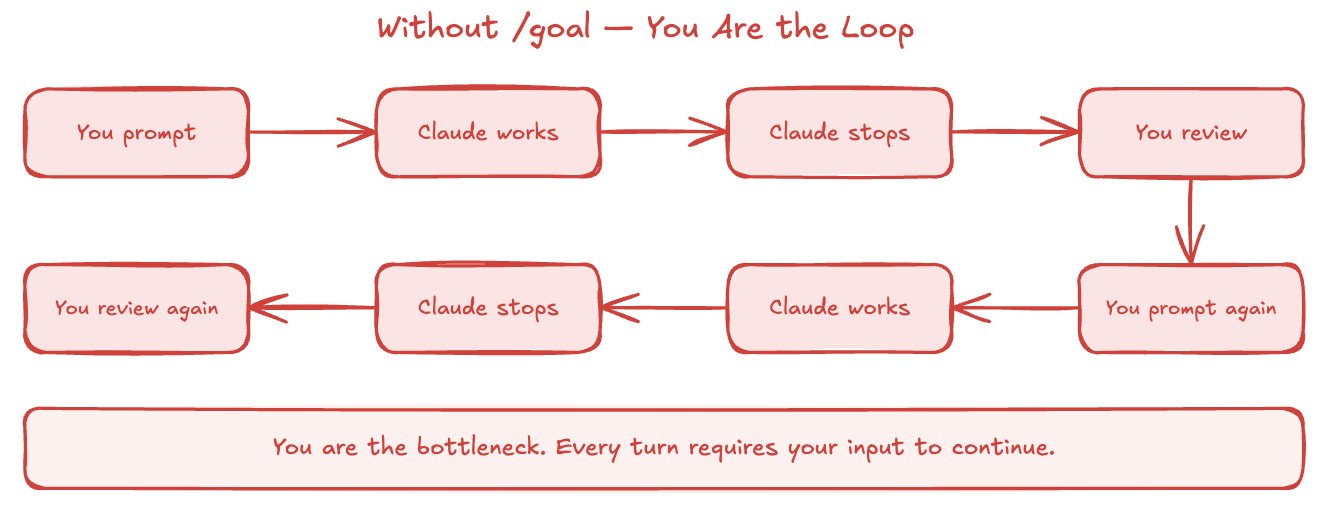
Without /goal, we are the "bottleneck," as we have to approve, send prompts, tell the agent to continue, and that loop repeats.
With the introduction of /goal, Claude validates everything on its own and "closes" the loop.
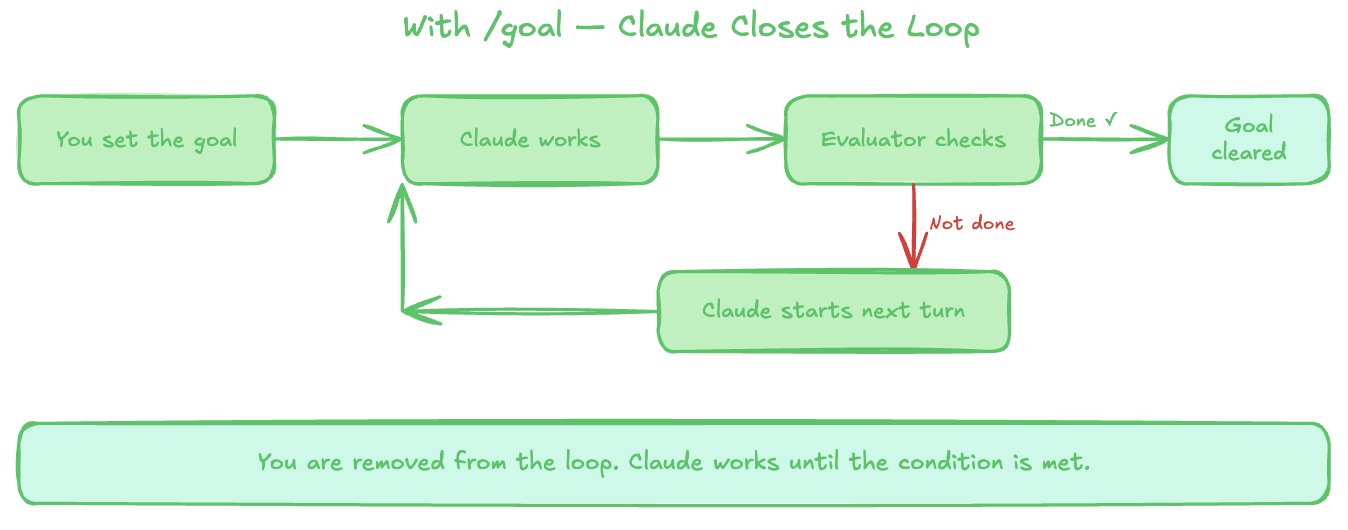
This works because a fast, small model validates whether the conditions are met to proceed to the next step.
How to use /goals
Using /goals is extremely simple.
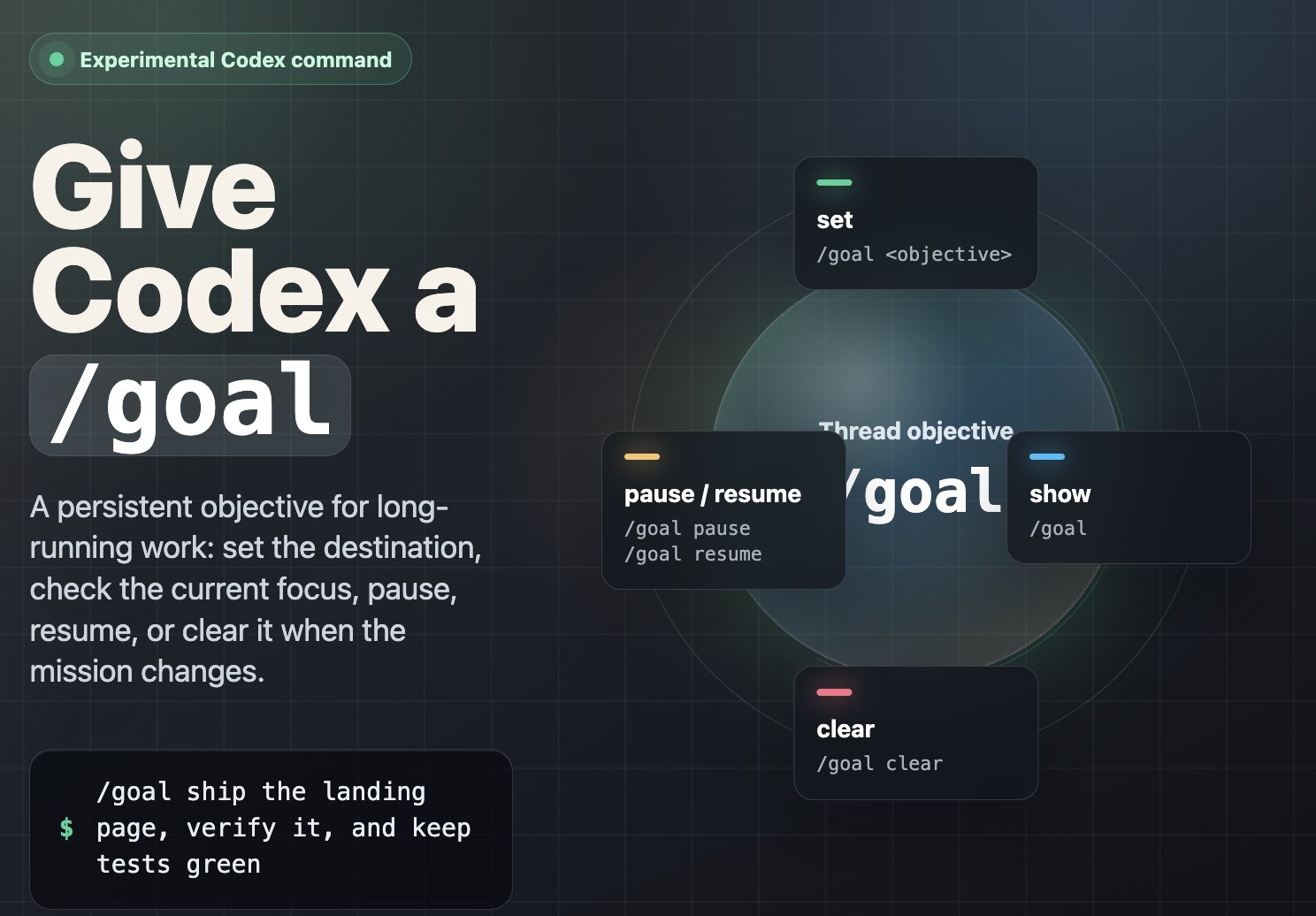
You just type: /goal [your task/goal] inside your AI tool of choice (CLI/desktop), and it actively works towards the new goal you set.
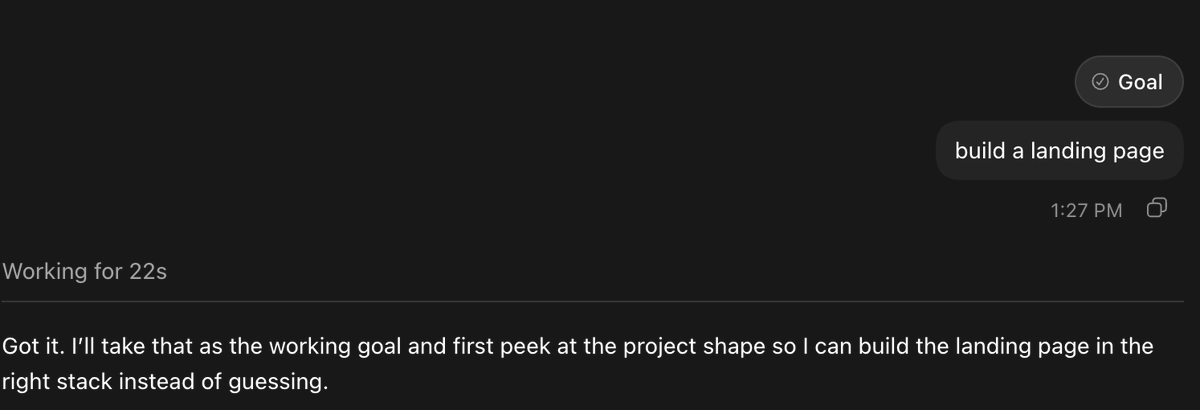
Once you set your goal, you'll receive confirmation that it was set, and in this case, Codex will begin working toward completion.
This works in the Claude Code CLI, Codex CLI, Hermes agent, and now even in the Codex app (as shown above).
I recommend most non-technical people start with /goal inside the Codex desktop, but if you're setting it up in Codex CLI, follow these steps:
- Enable goals
Codex desktop → Settings → Configuration and ensure goals = true
2. Open Terminal & launch Codex in full-auto mode if you want fewer approval prompts
3. Start prompting
If you're using Claude Code, just make sure to launch Claude Code CLI and start prompting for the /goal you want to set (the steps are similar to Codex):
https://code.claude.com/docs/en/goal
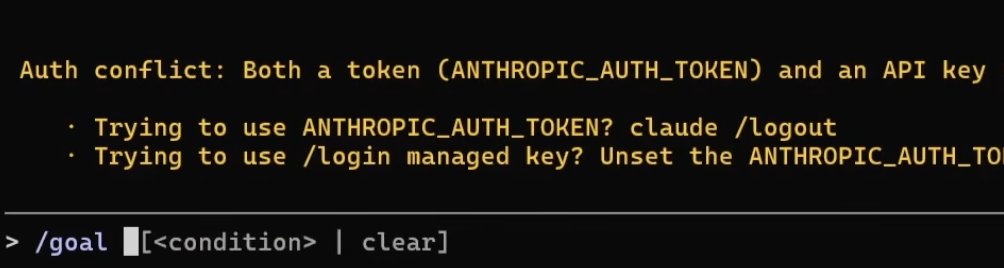
Keep in mind: if you run into issues during setup, you can ask Codex/Claude Code for help.
Building effective /goal prompts
The difficult part isn't writing the syntax - it's writing good prompts so that your AI tools actually come back to you with the result you want.
At the bare bones, your /goal prompts should have three things:
- Your goal: your task/goal in one line
- Measurable end state: define what done actually looks like
- Constraints: rules and constraints the model must abide by
Putting these three things together, your /goal prompts should look like this:
/goal [do the work] until [measurable end state] without [constraints that must hold]
Real example:
"/goal fix every failing test until npm test exits 0 without modifying any file outside the /auth directory."
Of course, you can make your prompts much more detailed by adding context, success criteria, and other details.
For complex projects, I recommend following this advanced /goal prompting structure (save this):
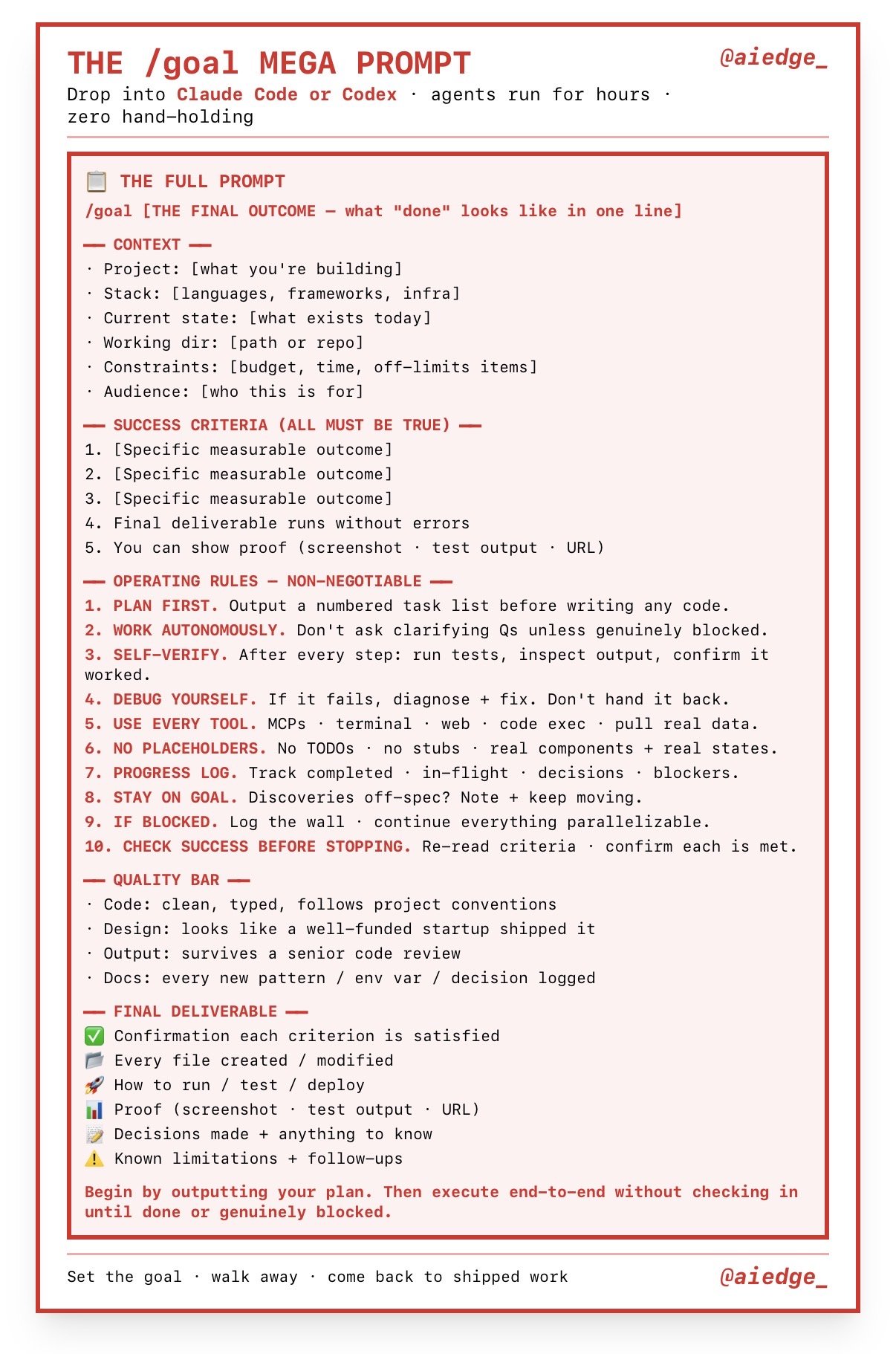
At its core, this is how you use /goal, and it's relatively simple!
/goal examples + prompting examples
You can use /goal for a variety of tasks (not just coding).
This section should give you some good ideas for what you can use /goal for - specifically in Codex.
- Research
"/goal research everything recent about the new /goal command"
2. Visuals
"/goal create a cool visual for everything related to the new /goal command."
3. Local Files
Some cool prompts I experimented with for accessing local files/folders:
"/goal Improve the README so a new contributor can install, run, test, and understand the project."
"/goal Find dead code, unused dependencies, and stale files, then propose what can be safely removed."
"/goal Turn the current notes and markdown files into a clean one-page summary document."
4. Coding
"/goal Add a dark/light theme toggle to this project, persist the choice in localStorage, update the UI styles to support both themes, and verify it works in the browser."
"/goal Add a command palette that can search pages/actions and open with Cmd+K."
Essentially, any project or task you have can now be handed to Codex/Claude Code/Hermes for autonomous completion.
Pro Tips
A section on /goal pro tips:
- Only one /goal can be set at a time - use it wisely
- In Claude Code, you can see how many tokens the goal is actively taking up, and the progress bar of the task
- /goal shines on long-running work. For a small one-off, a normal prompt is enough.
- Pair it with /plan. A nice workflow is /goal → /plan → /goal clear
- Utilize /pause to pause goals, and /goal clear to reset your goals
- Don't be afraid to use /goal for unconventional use cases - you'd do yourself a disservice by only using /goal for coding/technical work
- You can get the model to set its own /goal (it will likely write better prompts than you anyway)
- Provide a "checklist" in your prompts
- Give your agent .md files for tracking
This is a good article to read on optimizing /goal inside Codex for those interested:
Closing
I hope you found this /goals quickstart guide valuable.
If you did, be sure to follow me @aiedge_ - I post AI articles just like this 2-3x/week!
If you enjoy written AI content, feel free to subscribe to my free weekly newsletter.
100% free, no spam ever & unsub anytime
Lastly, if you can, please Like/Repost this article so others can find it.💙

![[Excuses] Regarding the Absence of the Vocaloid Version of "Chururira" in Project Sekai](/cdn-cgi/image/width=3840,quality=95,format=auto,metadata=none/https%3A%2F%2Fcms-assets.youmind.com%2Fmedia%2F1778778759077_4bbwj4_HIMzQgUaYAAFgTL.jpg)

