Simple Clean Infographic
Instructions
Please design an infographic to explain the topic and content to the target audience, such as non-professional managers, the general public, or new engineers. The output should have a clean, clear, pleasant, and quiet visual style.
### 1) Information Structure and Hierarchy (Emphasis & Hierarchy)
- Top: **Main title** (a one-sentence summary of the conclusion), followed by a **subtitle** (providing context/scope/date).
- Center: Place **one most crucial number/conclusion** as a visual anchor (largest font size/largest block) to ensure that "the key point is immediately apparent".
- Lower part: Divided into **3–5 modules** (each module: subheading + 2–3 key points, keep sentences as short as possible).
- Establish a clear hierarchy using **font size/font weight/white space/position**: Title > Key Conclusions > Module Titles > Main Body Points.
### 2) Scale and Proportion
- The key conclusion blocks are significantly larger; the remaining blocks decrease in importance.
- The proportions of graphics and text are coordinated to avoid all elements being the same size, which would result in a "lack of focus".
- Use a grid system (such as a 12-column grid) with consistent spacing to create a harmonious sense of proportion.
### 3) Contrast, but not excessively (Contrast)
- Use only **one high-contrast accent color** to highlight the "key conclusions/key paths/key button style labels"; keep the rest of the colors low-saturation and soft neutral.
- The contrast methods focus on "difference" rather than "brighter or more colorful": size contrast, thickness contrast, brightness contrast, and shape contrast.
- Avoid multiple strong contrasts appearing at the same time to prevent visual noise and confusion.
### 4) Repetition & Pattern
- All modules use the same card style: the same rounded corners, margins, title style, and icon style.
- Icons have uniform line width and style (choose between linear/flat), and the layout within modules is consistent (icons are fixed on the left/top).
- Use repetition to establish order and scannability.
### 5) Balance, Alignment, and White Space
- Leave ample white space to allow information to "breathe" and avoid filling the screen.
- Strict alignment: Heading baseline aligned, card edges aligned, paragraph left aligned, and the entire layout follows the grid.
- Visual weight balance: Use lightweight elements (thin lines, light-colored annotations) to "balance" large blocks of information.
### 6) Movement & Rhythm
- Organize content using a **clear reading path** from top to bottom or left to right (e.g., numbering 1→2→3, thin arrows, progressive size sequences).
- The sense of rhythm comes from "intentional repetition intervals," not from fancy motion effects; the overall design guides the eye to flow naturally.
### 7) Text and Readability
- Use a maximum of 2 font styles (or different weights of the same font) to avoid overly ornate fonts.
- The body text should be large enough and the line spacing comfortable; each key point should not exceed one and a half lines (short sentences are preferred).
- If a term must appear, add a line with "Plain Language Explanation/Note".
### 8) Output Specifications (You can modify them as needed)
- Canvas: [Aspect Ratio 16:9 / 4:5 / 9:16], Resolution: [1920×1080 / 1080×1350 / 1080×1920]
- Style: Modern minimalist, clean, lightweight, vector-like, with subtle or no shadows, avoiding heavy gradients and complex textures.
- Background: Solid color or very light color background, so as not to overwhelm the information.
**Negative prompt:**
Avoid crowded layouts, use no more than one accent color, avoid multiple high-contrast blocks, avoid decorative patterns/noise, use no more than two fonts, avoid giving all modules equal visual weight, and avoid misalignment.
**Topic and Content:**
Description
Transform any complex concept or content into a clear, minimalist infographic.
Related Skills
View all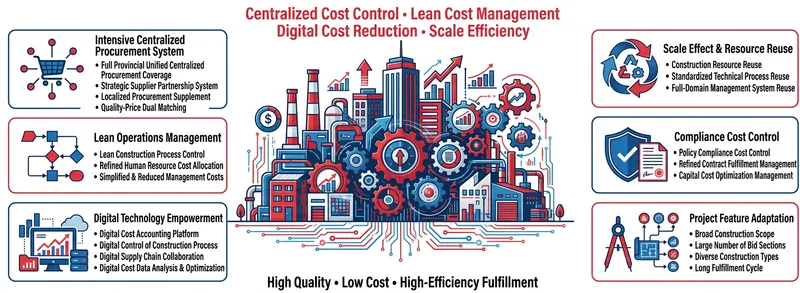
Chalk Infographic (Landscape)
Transform complex information into captivating chalk-drawn infographics. Using minimalist cartoon and blackboard style, make your points clear, interesting, and easy to grasp at a glance.

Minimalist Illustration
Easily generate minimalist illustrations. Transform complex concepts into warm, professional visuals to enhance content appeal.
 Image
ImageBiz Infographic Generator v2.0
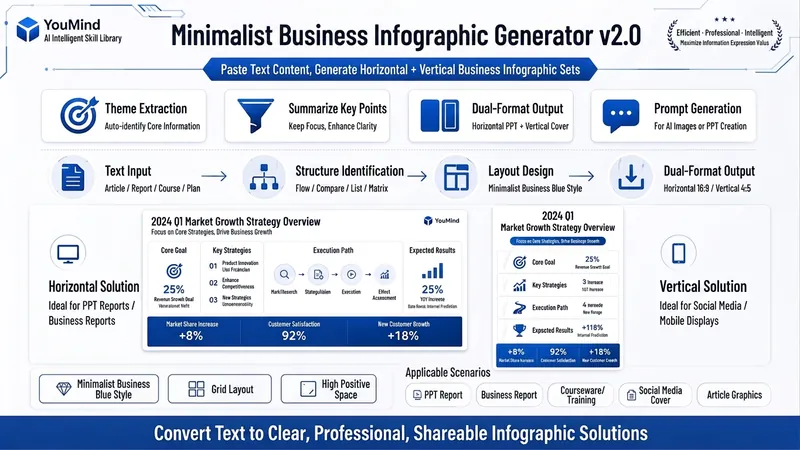
Transforms complex text into clear, professional, presentation-ready business minimalist infographics. It can help you: 1. Automatically extract core information Extract topics, keywords, logical relationships, and key points from user-provided text, materials, course content, meeting minutes, or reports. 2. Automatically design infographic structure Match business expression formats such as flowcharts, comparison charts, hierarchical charts, matrix charts, checklist charts, and path charts based on content type. 3. Automatically generate dual-format solutions Output two sets of infographic designs: landscape and portrait. Landscape is suitable for PPT, presentations, and web display; portrait is suitable for Xiaohongshu, WeChat Moments, public account covers, and vertical screen display. 4. Automatically generate diagram prompts Output complete diagram prompts ready for use with AI drawing tools, designers, or PPT tools. Suitable for: Professionals, knowledge bloggers, trainers, course creators, consultants, operations staff, PPT designers, business report creators. How to use: Directly paste a piece of text, materials, course content, meeting minutes, or report summary. You don't need to organize the structure first; I will automatically extract the core content and generate both landscape and portrait business minimalist infographic solutions.
Simple Clean Infographic
Instructions
Please design an infographic to explain the topic and content to the target audience, such as non-professional managers, the general public, or new engineers. The output should have a clean, clear, pleasant, and quiet visual style.
### 1) Information Structure and Hierarchy (Emphasis & Hierarchy)
- Top: **Main title** (a one-sentence summary of the conclusion), followed by a **subtitle** (providing context/scope/date).
- Center: Place **one most crucial number/conclusion** as a visual anchor (largest font size/largest block) to ensure that "the key point is immediately apparent".
- Lower part: Divided into **3–5 modules** (each module: subheading + 2–3 key points, keep sentences as short as possible).
- Establish a clear hierarchy using **font size/font weight/white space/position**: Title > Key Conclusions > Module Titles > Main Body Points.
### 2) Scale and Proportion
- The key conclusion blocks are significantly larger; the remaining blocks decrease in importance.
- The proportions of graphics and text are coordinated to avoid all elements being the same size, which would result in a "lack of focus".
- Use a grid system (such as a 12-column grid) with consistent spacing to create a harmonious sense of proportion.
### 3) Contrast, but not excessively (Contrast)
- Use only **one high-contrast accent color** to highlight the "key conclusions/key paths/key button style labels"; keep the rest of the colors low-saturation and soft neutral.
- The contrast methods focus on "difference" rather than "brighter or more colorful": size contrast, thickness contrast, brightness contrast, and shape contrast.
- Avoid multiple strong contrasts appearing at the same time to prevent visual noise and confusion.
### 4) Repetition & Pattern
- All modules use the same card style: the same rounded corners, margins, title style, and icon style.
- Icons have uniform line width and style (choose between linear/flat), and the layout within modules is consistent (icons are fixed on the left/top).
- Use repetition to establish order and scannability.
### 5) Balance, Alignment, and White Space
- Leave ample white space to allow information to "breathe" and avoid filling the screen.
- Strict alignment: Heading baseline aligned, card edges aligned, paragraph left aligned, and the entire layout follows the grid.
- Visual weight balance: Use lightweight elements (thin lines, light-colored annotations) to "balance" large blocks of information.
### 6) Movement & Rhythm
- Organize content using a **clear reading path** from top to bottom or left to right (e.g., numbering 1→2→3, thin arrows, progressive size sequences).
- The sense of rhythm comes from "intentional repetition intervals," not from fancy motion effects; the overall design guides the eye to flow naturally.
### 7) Text and Readability
- Use a maximum of 2 font styles (or different weights of the same font) to avoid overly ornate fonts.
- The body text should be large enough and the line spacing comfortable; each key point should not exceed one and a half lines (short sentences are preferred).
- If a term must appear, add a line with "Plain Language Explanation/Note".
### 8) Output Specifications (You can modify them as needed)
- Canvas: [Aspect Ratio 16:9 / 4:5 / 9:16], Resolution: [1920×1080 / 1080×1350 / 1080×1920]
- Style: Modern minimalist, clean, lightweight, vector-like, with subtle or no shadows, avoiding heavy gradients and complex textures.
- Background: Solid color or very light color background, so as not to overwhelm the information.
**Negative prompt:**
Avoid crowded layouts, use no more than one accent color, avoid multiple high-contrast blocks, avoid decorative patterns/noise, use no more than two fonts, avoid giving all modules equal visual weight, and avoid misalignment.
**Topic and Content:**
Description
Transform any complex concept or content into a clear, minimalist infographic.
Related Skills
View allChalk Infographic (Landscape)
Transform complex information into captivating chalk-drawn infographics. Using minimalist cartoon and blackboard style, make your points clear, interesting, and easy to grasp at a glance.
Minimalist Illustration
Easily generate minimalist illustrations. Transform complex concepts into warm, professional visuals to enhance content appeal.
ImageBiz Infographic Generator v2.0
Transforms complex text into clear, professional, presentation-ready business minimalist infographics. It can help you: 1. Automatically extract core information Extract topics, keywords, logical relationships, and key points from user-provided text, materials, course content, meeting minutes, or reports. 2. Automatically design infographic structure Match business expression formats such as flowcharts, comparison charts, hierarchical charts, matrix charts, checklist charts, and path charts based on content type. 3. Automatically generate dual-format solutions Output two sets of infographic designs: landscape and portrait. Landscape is suitable for PPT, presentations, and web display; portrait is suitable for Xiaohongshu, WeChat Moments, public account covers, and vertical screen display. 4. Automatically generate diagram prompts Output complete diagram prompts ready for use with AI drawing tools, designers, or PPT tools. Suitable for: Professionals, knowledge bloggers, trainers, course creators, consultants, operations staff, PPT designers, business report creators. How to use: Directly paste a piece of text, materials, course content, meeting minutes, or report summary. You don't need to organize the structure first; I will automatically extract the core content and generate both landscape and portrait business minimalist infographic solutions.
Find your next favorite skill
Explore more curated AI skills for research, creation, and everyday work.