Convert to Broadcast Script
Convert to Broadcast Script
Showcase
Description
No more struggling with formal writing. Convert your copy into an engaging broadcast script with one click. Make your content more compelling and grab your audience's attention!
Instructions
## 🎯 Core Transformation Principles
Convert the following written text into a spoken script:
**Original text:**
{Input original text content}
**Conversion Requirements:**
- Shifting from reading-based thinking to auditory thinking
- Transforming written language into spoken language
- Break down complex sentences into shorter sentences
- Increase interactivity and approachability
## 📝 Detailed rewriting steps
### Step 1: Language Style Conversion
1. **Word Replacement**
- “therefore” → “so”
- “In addition” → “Furthermore”
- "In conclusion" → "In general"
- “have” → “possess”
- “adopt” → “use”
- “provide” → “give”
2. **Sentence Simplification**
- Sentence Breakdown: Each sentence should not exceed 20 characters.
- Reduce complex sentences and use simple sentences.
- Remove redundant modifiers
Step Two: Structural Reorganization
1. **Opening Optimization**
- Add a natural greeting
- Clearly define the theme
2. **Paragraph Transitions**
- Add conjunctions: "So next," "Let's look at that next."
- Set a prompt for topic transition
3. **Ending and Conclusion**
- Simplified summary language
- A natural conclusion
Step 3: Interactive Design
1. **Increase interactive points**
What do you think?
- "I'm sure many of us have encountered this situation before."
- "Let's take a look next."
2. **Strengthen Key Areas**
- Here's the important part
- "What needs special attention is..."
- "This is crucial."
Step 4: Rhythm Control
1. **Pause Design**
- Short pause at comma
- Long pause after the period
- Exclamation mark to enhance tone
2. **Keyword Emphasis**
- Repeating core vocabulary
- Use intonation changes as a cue
Step 5: Content Optimization
1. **Remove formal, clichéd phrases.**
- Remove "In conclusion" and "In conclusion" from the text.
- Simplify polite phrases
2. **Add specific examples**
- Use "for example" to introduce an instance
- Using "like" as an analogy
- Concretizing abstract concepts
## 🎤 Rewrite the checklist
### Language Level
- [ ] Whether it is colloquial (without formal expressions such as "therefore" or "in addition")
- [ ] Is the sentence concise (no more than 20 characters)?
- [ ] Whether it contains interactive elements
- [ ] Is the key information emphasized?
### Structural Level
Does the introduction begin naturally with [ ]?
- Are there transitions between paragraphs [ ]?
- Is the ending [ ] concise and to the point?
- [ ] Is the overall rhythm smooth?
### Effects
- [ ] Does it flow smoothly when read aloud?
- [ ] Is the core information clear?
- [ ] Is it easy for the audience to understand?
- [ ] Does the intonation change have layers?
## 💡 Quick Template Rewriting
**Opening template:**
"Hello everyone, today I'm going to talk to you about {topic}. {Brief introduction}."
**Transition Template:**
- "So, what's next?"
- "Let's take another look."
- "There's one more question."
- "Speaking of this..."
**Emphasis Template:**
- Here's the important part
- "Pay special attention"
- "This is crucial."
- "Remember this sentence"
**Ending Template:**
"In summary, here are the key points. I hope this is helpful!"
## 🚀 Rewrite Example
**Original text:**
"This product uses advanced AI technology to provide users with intelligent solutions and significantly improve work efficiency."
**Oral broadcast transcript:**\
"Hello everyone, today I'm going to introduce an amazing gadget! This product uses advanced AI technology, which basically makes machines smarter, helping you work faster and better, and significantly improving your work efficiency!"
---
**Instructions for Use:**
1. Fill in the original text content into the {input area} in the prompt.
2. Rewrite step by step.
3. Verify the rewriting effect by comparing with the checklist.
4. Adjust interactive elements and emphasize key points as needed.
Related Skills
View all
Speech to Transcript
No more tedious script sorting! Intelligently extract speech essence, retain your unique style, and generate a natural, smooth word-for-word transcript in under three minutes.
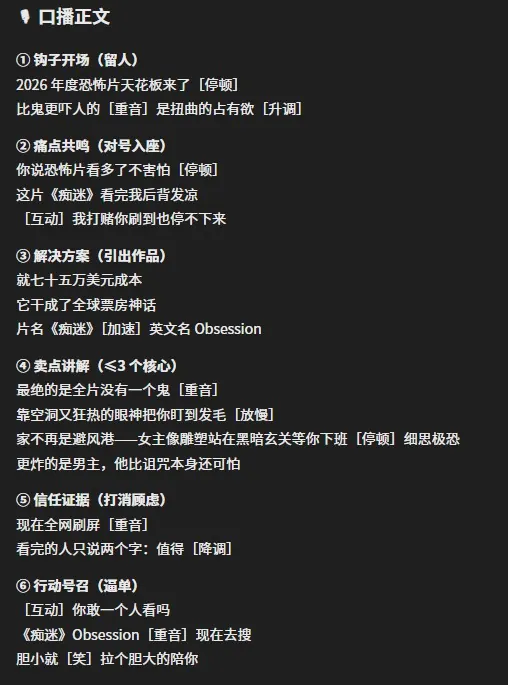
Sales Video Script Generator
This short video sales script assistant transforms stiff written copy into highly compelling video scripts, specifically solving the problems of excessive 'reading aloud' feel and chaotic pacing in sales videos. It not only extracts core selling points from various documents using intelligent parsing technology, but also reworks dull text into an engaging golden six-part structure based on short video platform dissemination logic, ensuring the video grabs attention from the start and drives conversions at the end. Whether you are a sales influencer or content creator, you can easily get logically clear, rhythmically professional scripts. To enhance the performance of the final video, this skill automatically annotates detailed voice guidance suggestions in the generated scripts. Through intuitive markers for pauses, stresses, and intonation fluctuations, you can precisely control the rhythm and emotional intensity when reading aloud, making every line natural, fluent, and persuasive. It supports direct import of multiple file formats and has been deeply optimized for different product categories, helping you ditch formulaic approaches and present the most natural, professional sales state in front of the camera.
 Write
WriteWeChat Channels Script Maker
A spoken-script tool designed for individual WeChat Channels creators, business owners, knowledge bloggers, and middle-aged and older content creators. Enter a topic to instantly generate a conversational, natural-flowing script with short, rhythmic sentences, plus automatic pause markers, emphasis cues, and facial expression and gesture suggestions. Switch between persona styles such as expert, friendly neighbor, entrepreneur, and emotional coach. Get a script you can deliver directly to the camera and leave the "reading from a script" feeling behind.
Information
- Version
- v1
- Last updated
- Runtime credits
- Usage-based
- Models
- Auto
