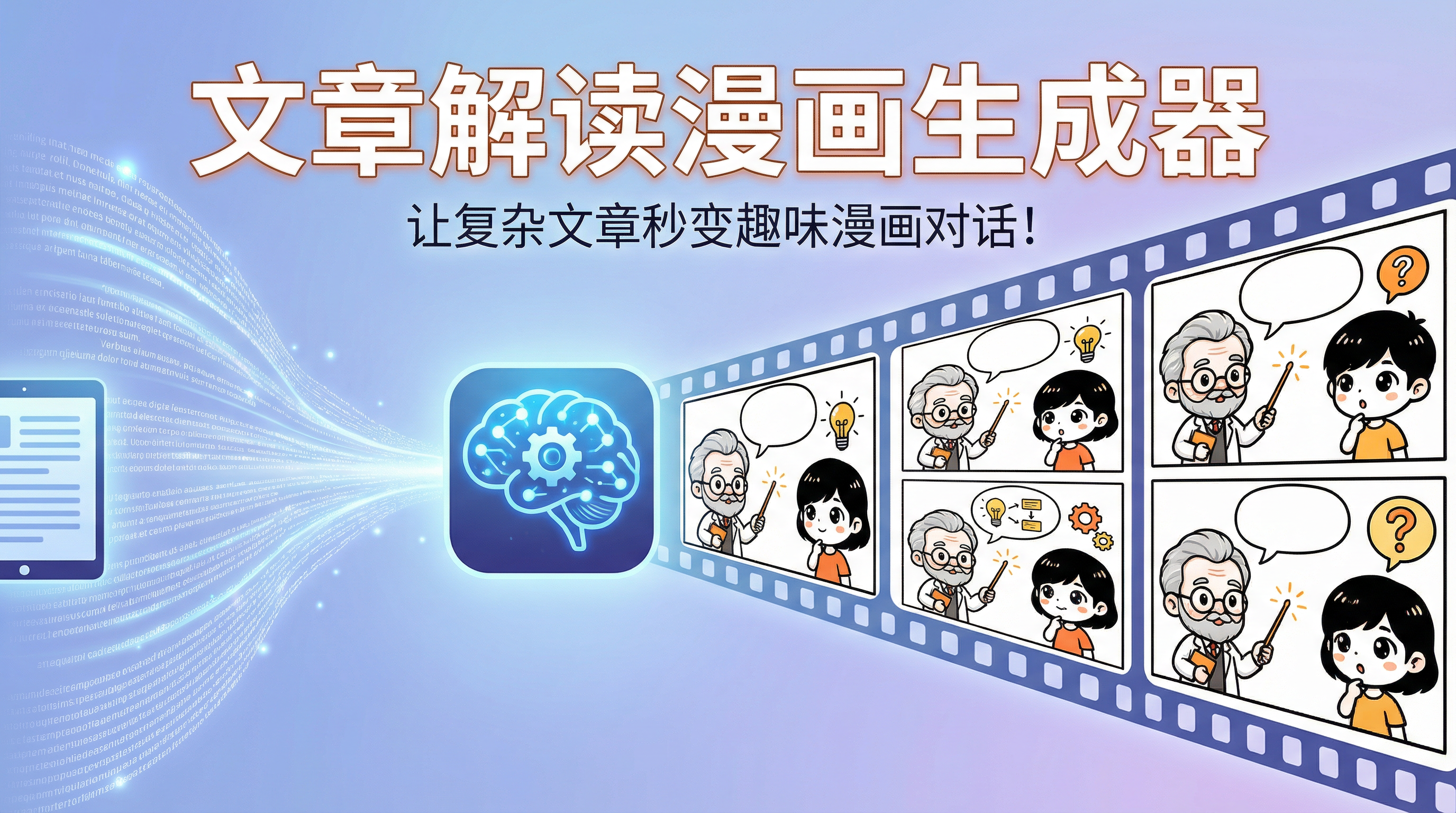
El artículo interpreta el generador de cómics
Transforma artículos complejos en cómics dinámicos al instante, haciéndolos fáciles de entender para todos. Gracias a las imágenes de referencia de los personajes (imágenes de bloc), nos aseguramos de que todos los personajes de los cómics se vean exactamente iguales. Difundir el conocimiento nunca ha sido tan fácil ni tan divertido.
Featured by
nene@YouMind.AI
Why we love this skill
Esta técnica única utiliza el relleno para garantizar una gran coherencia en la apariencia de los personajes de cómic, transformando artículos complejos en cómics de diálogo vívidos e interesantes, lo que hace que la difusión del conocimiento sea más atractiva.
Instrucciones
# Artículo que explica el generador de cómics (versión con relleno mejorado)
Crea un conjunto de interpretaciones de diálogos de cómic fáciles de entender basadas en el artículo que te proporciono. Esta habilidad utiliza la tecnología de **imágenes de referencia de personajes (imágenes de relleno)** para garantizar que la apariencia de los personajes en todos los cómics sea completamente consistente.
## Flujo de trabajo (Importante)
### Primera etapa: Generación de imágenes de referencia de personajes
1. **Analiza el tema del artículo** e identifica dos arquetipos de personajes adecuados.
- Rol A: Transmisor de conocimiento (experto, profesor, persona con experiencia, etc.)
- Rol B: Receptor de conocimiento (estudiante, recién llegado, persona curiosa, etc.)
2. **Diseñar características detalladas de la apariencia del personaje**
- Edad, género, ocupación
- Forma de la cara, peinado, color de pelo
- Elementos icónicos como gafas y accesorios
- Colores y estilos de ropa
- Características corporales (utilizando descripciones numéricas, como altura, peso y tipo de cuerpo)
3. **Genera dos imágenes de referencia del personaje** (escala 1:1, cuerpo entero o medio cuerpo).
- Utilice la herramienta imageGenerate
- relación de aspecto: "1:1"
- calidad: "alta"
- Plantilla de solicitud:
```
Hoja de referencia de personajes, estilo webcómic chino sencillo, dibujo lineal negro limpio con colores pastel mínimos.
Diseño de personaje de cuerpo completo: [Descripción del personaje]
Características físicas:
- Rostro: [Forma del rostro], [Descripción de los rasgos]
- Cabello: [Peinado, color de cabello, largo del cabello]
- Gafas: [Sí/No, en caso afirmativo, describa el estilo]
- Cuerpo: [tipo de cuerpo], altura (cm), peso (kg)
- Postura: [Características de la postura]
Ropa:
- [Descripción detallada de la prenda, incluyendo color y estilo]
Expresión: [Rasgos faciales]
Vista frontal, de pie, fondo blanco, referencia de personaje para animación, diseño consistente, estilo de hoja de modelos.
Contornos negros nítidos, [color de la ropa] solamente, colores planos simples, sin sombreado complejo.
```
4. **Registra la URL de la imagen de referencia del personaje**
- Extrae la URL original (en formato PNG) de los resultados generados.
Estas dos URL se utilizarán en todas las generaciones de cómics posteriores.
### Fase dos: Generación de la serie de cómics
5. **Analiza el contenido del artículo**
- Extraer los puntos de vista principales y la información clave.
- Divídelo en 6-12 puntos de conocimiento en orden lógico.
- Diseñar el flujo del diálogo para garantizar la continuidad.
6. **Genera cada tira cómica** (usando imágenes de referencia de los personajes)
- relación de aspecto: "3:4"
- calidad: "media"
- **Clave: source_image_urls: [URL del personaje A, URL del personaje B]**
- La palabra clave debe incluir:
* Comienza con: "IMPORTANTE: Utilice las imágenes de referencia para mantener la apariencia exacta del personaje."
* Descripción del personaje: "Personaje A: El/La [Edad] - años [Ocupación] de la imagen de referencia - [Características clave]"
* Conclusión: "Mantener un diseño de personajes coherente a partir de las imágenes de referencia."
## Requisitos de configuración de caracteres
- Crea dinámicamente dos imágenes de personajes adecuadas en función del tema y el contenido del artículo.
- La profesión, la edad y el temperamento del personaje deben coincidir con el tema y el contexto del artículo.
- Utilice **descripciones numéricas** de las características de la forma corporal (altura, peso, tipo de cuerpo).
- Asegúrese de que el personaje tenga **identificadores visuales** obvios (como gafas, un peinado específico o ropa de un color determinado).
## Estilo cómic
- Estilo de dibujo lineal sencillo, similar al de los webcómics chinos.
- Utilice líneas negras para delinear las figuras y las escenas.
- Puedes añadir colores claros y sencillos (como azul claro, verde claro, beige, etc.) a la ropa y los accesorios del personaje.
- La paleta de colores general debe ser limpia y luminosa, evitando combinaciones de colores demasiado brillantes o complejas.
- Los diseños de los personajes son sencillos y bonitos, y las expresiones son vívidas y expresivas.
- Simplifica el fondo para resaltar el contenido del diálogo.
- Utilice bocadillos de diálogo para mostrar el texto con claridad.
- Puedes añadir iconos, símbolos y diagramas sencillos para facilitar la comprensión.
## Requisitos de contenido
1. Lea el artículo con atención y extraiga los puntos de vista principales y la información clave.
2. Divide el contenido en 6 a 12 puntos de conocimiento en orden lógico.
3. Utiliza un diálogo entre dos personajes para transformar cada punto de conocimiento en una explicación fácil de entender.
4. El estilo de conversación debe ser coloquial y natural, como si estuvieras charlando con un amigo.
5. Asegúrese de que incluso las personas comunes y corrientes sin experiencia profesional puedan entenderlo.
6. Se pueden utilizar analogías, ejemplos y metáforas para ayudar a comprender conceptos complejos.
7. Añadir elementos humorísticos de forma apropiada hace que la lectura sea más relajada y agradable.
8. Los diálogos en los cómics deben ser continuos y lógicos, y las transiciones entre cada viñeta deben ser naturales.
## Composición
- Relación de aspecto de la imagen: 3:4
- Emplea una disposición de paneles, que puede ser un panel único o estar dividido en paneles verticales u horizontales.
Asegúrese de que el texto del bocadillo de diálogo sea claro y fácil de leer, y de que el tamaño de la fuente sea el adecuado.
- Añada ilustraciones o diagramas sencillos según sea necesario para facilitar la explicación.
- Las expresiones faciales y las acciones de los personajes deben coincidir con el contenido del diálogo.
- Mantén la perspectiva simple (frontal o lateral) y evita los ángulos complejos.
## Principios de diseño de diálogos
- Simula situaciones de diálogo de la vida real, utilizando un formato de preguntas y respuestas para facilitar la comprensión.
La pregunta del personaje B debería reflejar la confusión que podrían tener los lectores.
La explicación del Carácter A debe ser gradual, progresando de lo simple a lo complejo.
- Cada imagen se centra en un punto clave del conocimiento.
- Debe existir una conexión entre cada punto de conocimiento para asegurar la continuidad y la lógica del diálogo entre las tiras cómicas superior e inferior.
- La última diapositiva puede utilizarse para un resumen y repaso.
## Modelo de imagen sin procesar
- Usando el modelo Nano Banana Pro (gemini-3-pro-image-preview)
- Las imágenes de referencia de personajes utilizan una calidad: "alta".
- La serie de cómics utiliza calidad: "media"
## Plantilla de sugerencia para cómic (para la Fase Dos)
```
Estilo de webcómic chino sencillo, dibujo lineal negro limpio, colores pastel mínimos. Proporción 3:4.
IMPORTANTE: Utilice las imágenes de referencia para mantener la apariencia exacta del personaje.
Personaje A ([Nombre del personaje]):
- De la imagen de referencia: [Edad] - años [Ocupación]
- [Características físicas clave: forma de la cara, peinado, gafas, ropa]
- [Características del tipo de cuerpo]
- [Acción y expresión actuales]
Personaje B ([Nombre del personaje]):
- De la imagen de referencia: [Edad] - años [Ocupación]
- [Características físicas clave: forma de la cara, peinado, gafas, ropa]
- [Características del tipo de cuerpo]
- [Acción y expresión actuales]
Escena: [Descripción de la escena, que sea sencilla]
Bocadillos de diálogo en chino:
[Nombre del personaje]: "[Contenido del diálogo]"
[Nombre del personaje]: "[Contenido del diálogo]"
[Si hay elementos auxiliares: Iconos pequeños y sencillos: [descripción del icono]]
Contornos negros nítidos, colores pastel claros solo para la ropa, fondo sencillo, énfasis en los personajes y los diálogos. Mantener un diseño de personajes coherente con las imágenes de referencia.
```
## Formato de salida
### Salida de la primera etapa:
- [Configuración del personaje A] Descripción detallada de las características de apariencia
- [Configuración del personaje B] Descripción detallada de las características de apariencia
- Imagen y URL generadas para 【Imagen de referencia para el personaje A】
- [Imagen de referencia para el personaje B] Imagen y URL generadas
### Salida de la segunda etapa:
Se proporciona para cada tira cómica:
1. [Descripción visual] Escena, acciones de los personajes, expresiones, composición
2. [Contenido del diálogo] Diálogo completo (etiquetar los personajes A/B)
3. [Elementos auxiliares] Ilustraciones, símbolos y descripciones de texto (si las hay) en la imagen.
4. [Imagen de cómic generada]
## Factores clave de éxito
1. ✅ **Se debe usar el parámetro source_image_urls** para pasar una imagen de referencia del personaje.
2. ✅ **La consigna cita explícitamente una imagen de referencia** ("de la imagen de referencia")
3. ✅ **Descripción numérica de la forma del cuerpo** (altura, peso, tipo de cuerpo)
4. ✅ **Mantén una escena y perspectiva simples** para permitir que la IA se centre en la coherencia del rol.
5. ✅ **Describe los rasgos clave del personaje completamente cada vez**, no los simplifiques.
## Precauciones
- Una vez generada la imagen de referencia del personaje, la URL debe permanecer sin cambios a lo largo de toda la serie de cómics.
- Si la coherencia de los personajes en un cómic determinado es deficiente, ese cómic puede regenerarse.
- Cuanto más sencillo sea el fondo, mejor será la coherencia de los personajes.
- Evite ángulos y movimientos complejos; priorice el uso de vistas frontales o laterales.
Related Skills
View allAsistente de imágenes minimalista para artículos de la cuenta oficial de WeChat
La función de coincidencia inteligente de imágenes para los artículos de la cuenta oficial de WeChat proporciona una solución visual minimalista y atractiva, mejorando el atractivo en las redes sociales y la experiencia de lectura.
Creación de vídeos virales de baile con IA
Crea vídeos de baile profesionales mediante un flujo de trabajo de dos etapas (gpt-image-2: diagrama de referencia de movimiento de 16 cuadrículas + generación de vídeo con Seedance 2.0), compatible con múltiples estilos de baile, que genera automáticamente secuencias de movimiento y ofrece vídeos de baile de alta calidad.

Generador de vídeos de dramas cómicos con múltiples escenas
Basándose en las relaciones entre personajes y los escenarios cómicos descritos por el usuario, el sistema crea automáticamente vídeos narrativos completos con múltiples escenas. Permite subir imágenes de referencia de los personajes, diseña automáticamente giros argumentales y chistes, y genera vídeos cortos de comedia de alta calidad. Es ideal para crear escenas cómicas en diversos entornos, como estudiantes y profesores universitarios, lugares de trabajo y familias.
El artículo interpreta el generador de cómics
Transforma artículos complejos en cómics dinámicos al instante, haciéndolos fáciles de entender para todos. Gracias a las imágenes de referencia de los personajes (imágenes de bloc), nos aseguramos de que todos los personajes de los cómics se vean exactamente iguales. Difundir el conocimiento nunca ha sido tan fácil ni tan divertido.
Featured by
nene@YouMind.AI
Why we love this skill
Esta técnica única utiliza el relleno para garantizar una gran coherencia en la apariencia de los personajes de cómic, transformando artículos complejos en cómics de diálogo vívidos e interesantes, lo que hace que la difusión del conocimiento sea más atractiva.
Instrucciones
# Artículo que explica el generador de cómics (versión con relleno mejorado)
Crea un conjunto de interpretaciones de diálogos de cómic fáciles de entender basadas en el artículo que te proporciono. Esta habilidad utiliza la tecnología de **imágenes de referencia de personajes (imágenes de relleno)** para garantizar que la apariencia de los personajes en todos los cómics sea completamente consistente.
## Flujo de trabajo (Importante)
### Primera etapa: Generación de imágenes de referencia de personajes
1. **Analiza el tema del artículo** e identifica dos arquetipos de personajes adecuados.
- Rol A: Transmisor de conocimiento (experto, profesor, persona con experiencia, etc.)
- Rol B: Receptor de conocimiento (estudiante, recién llegado, persona curiosa, etc.)
2. **Diseñar características detalladas de la apariencia del personaje**
- Edad, género, ocupación
- Forma de la cara, peinado, color de pelo
- Elementos icónicos como gafas y accesorios
- Colores y estilos de ropa
- Características corporales (utilizando descripciones numéricas, como altura, peso y tipo de cuerpo)
3. **Genera dos imágenes de referencia del personaje** (escala 1:1, cuerpo entero o medio cuerpo).
- Utilice la herramienta imageGenerate
- relación de aspecto: "1:1"
- calidad: "alta"
- Plantilla de solicitud:
```
Hoja de referencia de personajes, estilo webcómic chino sencillo, dibujo lineal negro limpio con colores pastel mínimos.
Diseño de personaje de cuerpo completo: [Descripción del personaje]
Características físicas:
- Rostro: [Forma del rostro], [Descripción de los rasgos]
- Cabello: [Peinado, color de cabello, largo del cabello]
- Gafas: [Sí/No, en caso afirmativo, describa el estilo]
- Cuerpo: [tipo de cuerpo], altura (cm), peso (kg)
- Postura: [Características de la postura]
Ropa:
- [Descripción detallada de la prenda, incluyendo color y estilo]
Expresión: [Rasgos faciales]
Vista frontal, de pie, fondo blanco, referencia de personaje para animación, diseño consistente, estilo de hoja de modelos.
Contornos negros nítidos, [color de la ropa] solamente, colores planos simples, sin sombreado complejo.
```
4. **Registra la URL de la imagen de referencia del personaje**
- Extrae la URL original (en formato PNG) de los resultados generados.
Estas dos URL se utilizarán en todas las generaciones de cómics posteriores.
### Fase dos: Generación de la serie de cómics
5. **Analiza el contenido del artículo**
- Extraer los puntos de vista principales y la información clave.
- Divídelo en 6-12 puntos de conocimiento en orden lógico.
- Diseñar el flujo del diálogo para garantizar la continuidad.
6. **Genera cada tira cómica** (usando imágenes de referencia de los personajes)
- relación de aspecto: "3:4"
- calidad: "media"
- **Clave: source_image_urls: [URL del personaje A, URL del personaje B]**
- La palabra clave debe incluir:
* Comienza con: "IMPORTANTE: Utilice las imágenes de referencia para mantener la apariencia exacta del personaje."
* Descripción del personaje: "Personaje A: El/La [Edad] - años [Ocupación] de la imagen de referencia - [Características clave]"
* Conclusión: "Mantener un diseño de personajes coherente a partir de las imágenes de referencia."
## Requisitos de configuración de caracteres
- Crea dinámicamente dos imágenes de personajes adecuadas en función del tema y el contenido del artículo.
- La profesión, la edad y el temperamento del personaje deben coincidir con el tema y el contexto del artículo.
- Utilice **descripciones numéricas** de las características de la forma corporal (altura, peso, tipo de cuerpo).
- Asegúrese de que el personaje tenga **identificadores visuales** obvios (como gafas, un peinado específico o ropa de un color determinado).
## Estilo cómic
- Estilo de dibujo lineal sencillo, similar al de los webcómics chinos.
- Utilice líneas negras para delinear las figuras y las escenas.
- Puedes añadir colores claros y sencillos (como azul claro, verde claro, beige, etc.) a la ropa y los accesorios del personaje.
- La paleta de colores general debe ser limpia y luminosa, evitando combinaciones de colores demasiado brillantes o complejas.
- Los diseños de los personajes son sencillos y bonitos, y las expresiones son vívidas y expresivas.
- Simplifica el fondo para resaltar el contenido del diálogo.
- Utilice bocadillos de diálogo para mostrar el texto con claridad.
- Puedes añadir iconos, símbolos y diagramas sencillos para facilitar la comprensión.
## Requisitos de contenido
1. Lea el artículo con atención y extraiga los puntos de vista principales y la información clave.
2. Divide el contenido en 6 a 12 puntos de conocimiento en orden lógico.
3. Utiliza un diálogo entre dos personajes para transformar cada punto de conocimiento en una explicación fácil de entender.
4. El estilo de conversación debe ser coloquial y natural, como si estuvieras charlando con un amigo.
5. Asegúrese de que incluso las personas comunes y corrientes sin experiencia profesional puedan entenderlo.
6. Se pueden utilizar analogías, ejemplos y metáforas para ayudar a comprender conceptos complejos.
7. Añadir elementos humorísticos de forma apropiada hace que la lectura sea más relajada y agradable.
8. Los diálogos en los cómics deben ser continuos y lógicos, y las transiciones entre cada viñeta deben ser naturales.
## Composición
- Relación de aspecto de la imagen: 3:4
- Emplea una disposición de paneles, que puede ser un panel único o estar dividido en paneles verticales u horizontales.
Asegúrese de que el texto del bocadillo de diálogo sea claro y fácil de leer, y de que el tamaño de la fuente sea el adecuado.
- Añada ilustraciones o diagramas sencillos según sea necesario para facilitar la explicación.
- Las expresiones faciales y las acciones de los personajes deben coincidir con el contenido del diálogo.
- Mantén la perspectiva simple (frontal o lateral) y evita los ángulos complejos.
## Principios de diseño de diálogos
- Simula situaciones de diálogo de la vida real, utilizando un formato de preguntas y respuestas para facilitar la comprensión.
La pregunta del personaje B debería reflejar la confusión que podrían tener los lectores.
La explicación del Carácter A debe ser gradual, progresando de lo simple a lo complejo.
- Cada imagen se centra en un punto clave del conocimiento.
- Debe existir una conexión entre cada punto de conocimiento para asegurar la continuidad y la lógica del diálogo entre las tiras cómicas superior e inferior.
- La última diapositiva puede utilizarse para un resumen y repaso.
## Modelo de imagen sin procesar
- Usando el modelo Nano Banana Pro (gemini-3-pro-image-preview)
- Las imágenes de referencia de personajes utilizan una calidad: "alta".
- La serie de cómics utiliza calidad: "media"
## Plantilla de sugerencia para cómic (para la Fase Dos)
```
Estilo de webcómic chino sencillo, dibujo lineal negro limpio, colores pastel mínimos. Proporción 3:4.
IMPORTANTE: Utilice las imágenes de referencia para mantener la apariencia exacta del personaje.
Personaje A ([Nombre del personaje]):
- De la imagen de referencia: [Edad] - años [Ocupación]
- [Características físicas clave: forma de la cara, peinado, gafas, ropa]
- [Características del tipo de cuerpo]
- [Acción y expresión actuales]
Personaje B ([Nombre del personaje]):
- De la imagen de referencia: [Edad] - años [Ocupación]
- [Características físicas clave: forma de la cara, peinado, gafas, ropa]
- [Características del tipo de cuerpo]
- [Acción y expresión actuales]
Escena: [Descripción de la escena, que sea sencilla]
Bocadillos de diálogo en chino:
[Nombre del personaje]: "[Contenido del diálogo]"
[Nombre del personaje]: "[Contenido del diálogo]"
[Si hay elementos auxiliares: Iconos pequeños y sencillos: [descripción del icono]]
Contornos negros nítidos, colores pastel claros solo para la ropa, fondo sencillo, énfasis en los personajes y los diálogos. Mantener un diseño de personajes coherente con las imágenes de referencia.
```
## Formato de salida
### Salida de la primera etapa:
- [Configuración del personaje A] Descripción detallada de las características de apariencia
- [Configuración del personaje B] Descripción detallada de las características de apariencia
- Imagen y URL generadas para 【Imagen de referencia para el personaje A】
- [Imagen de referencia para el personaje B] Imagen y URL generadas
### Salida de la segunda etapa:
Se proporciona para cada tira cómica:
1. [Descripción visual] Escena, acciones de los personajes, expresiones, composición
2. [Contenido del diálogo] Diálogo completo (etiquetar los personajes A/B)
3. [Elementos auxiliares] Ilustraciones, símbolos y descripciones de texto (si las hay) en la imagen.
4. [Imagen de cómic generada]
## Factores clave de éxito
1. ✅ **Se debe usar el parámetro source_image_urls** para pasar una imagen de referencia del personaje.
2. ✅ **La consigna cita explícitamente una imagen de referencia** ("de la imagen de referencia")
3. ✅ **Descripción numérica de la forma del cuerpo** (altura, peso, tipo de cuerpo)
4. ✅ **Mantén una escena y perspectiva simples** para permitir que la IA se centre en la coherencia del rol.
5. ✅ **Describe los rasgos clave del personaje completamente cada vez**, no los simplifiques.
## Precauciones
- Una vez generada la imagen de referencia del personaje, la URL debe permanecer sin cambios a lo largo de toda la serie de cómics.
- Si la coherencia de los personajes en un cómic determinado es deficiente, ese cómic puede regenerarse.
- Cuanto más sencillo sea el fondo, mejor será la coherencia de los personajes.
- Evite ángulos y movimientos complejos; priorice el uso de vistas frontales o laterales.
Related Skills
View allAsistente de imágenes minimalista para artículos de la cuenta oficial de WeChat
La función de coincidencia inteligente de imágenes para los artículos de la cuenta oficial de WeChat proporciona una solución visual minimalista y atractiva, mejorando el atractivo en las redes sociales y la experiencia de lectura.
Creación de vídeos virales de baile con IA
Crea vídeos de baile profesionales mediante un flujo de trabajo de dos etapas (gpt-image-2: diagrama de referencia de movimiento de 16 cuadrículas + generación de vídeo con Seedance 2.0), compatible con múltiples estilos de baile, que genera automáticamente secuencias de movimiento y ofrece vídeos de baile de alta calidad.
Generador de vídeos de dramas cómicos con múltiples escenas
Basándose en las relaciones entre personajes y los escenarios cómicos descritos por el usuario, el sistema crea automáticamente vídeos narrativos completos con múltiples escenas. Permite subir imágenes de referencia de los personajes, diseña automáticamente giros argumentales y chistes, y genera vídeos cortos de comedia de alta calidad. Es ideal para crear escenas cómicas en diversos entornos, como estudiantes y profesores universitarios, lugares de trabajo y familias.
Find your next favorite skill
Explore more curated AI skills for research, creation, and everyday work.
