Academic Diagram Prompt Expert
Academic Diagram Prompt Expert
Showcase
Description
Draw professional framework diagrams like an academic expert. The Banana Pro research flexible edition makes complex theories and data visualizable, generating high-quality drawing prompts with one click.
Why we love this skill
This skill is an ideal assistant, intelligently converting academic text into rigorous AI diagram prompts. It offers multiple chart types, logic levels, and visual styles, generating three focused prompts to help you create framework diagrams for publication, boosting research efficiency.
Related Skills
View all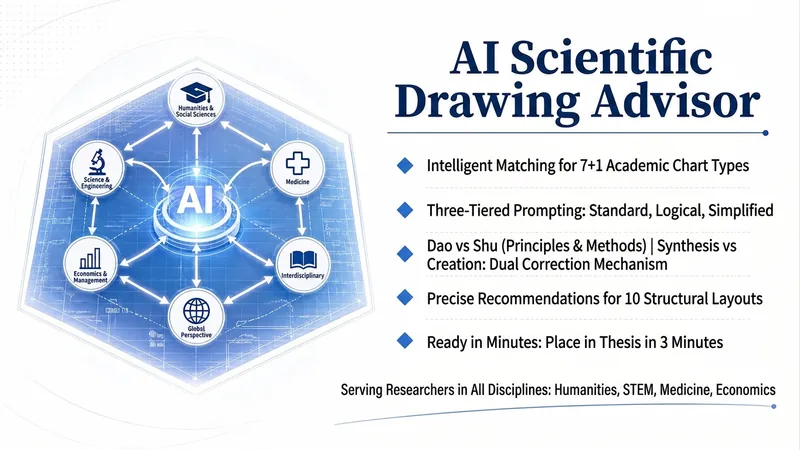 Write
WriteAI Academic Chart Consultant
An AI chart generation consultant designed specifically for academic researchers. Input your research topic or paper paragraph, and it will automatically parse core variables and logical relationships, accurately matching from 7+1 types of academic chart types (content framework diagram, technical roadmap, research approach diagram, theoretical framework diagram, analysis framework diagram, research conclusion diagram, grounded theory model diagram), and then recommend the best solution from 10 structural layouts (linear process, closed-loop cycle, center-radial, matrix quadrant, etc.). Finally, it outputs three tiers of complete prompts: standard balanced, logical emphasis, and visual minimalism. Built-in dual corrections of 'Dao vs Shu' and 'Borrow vs Create' ensure you never confuse a technical roadmap with a research approach diagram.

Academic Illustration for HSS
This skill is designed for researchers in the humanities and social sciences, aiming to generate high-quality AI illustration prompts suitable for academic publication. It covers 10 core chart types: theoretical framework diagrams, conceptual relationship diagrams, research design flowcharts, mechanism diagrams, impact pathway diagrams, multi-dimensional integrated analysis frameworks, comparative research diagrams, historical evolution timelines, stakeholder network diagrams, and project proposal demonstration diagrams. Whether you are writing SSCI/CSSCI journal papers, dissertations, policy reports, or creating cover images for grant proposals, this skill provides professional illustration support. Simply provide your research topic and chart type, and the skill will automatically populate content and generate bilingual prompts in Chinese and English. It emphasizes academic rigor, ensuring all generated images use solid figures, concise English labels, a three-dimensional texture, and strictly avoid decorative elements. In terms of style, the skill offers two modes: Domestic Track (Track A) for CSSCI journals and national social science fund projects, focusing on black-and-white printing friendliness and zero decoration; International Track (Track B) for SSCI/SCI journals, using low-saturation functional colors that remain clear and readable in grayscale. This dual-track design ensures charts meet both domestic academic standards and international publication requirements, presenting your research results in the most professional and clear manner.
One-Click Research Diagrams
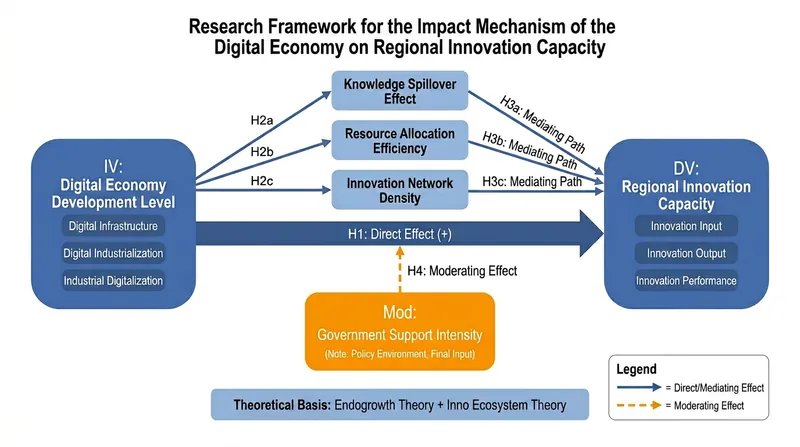
Designed for university faculty and anyone who demands high-quality diagrams. This skill can instantly generate diagrams for research grant applications, teaching cases, paper arguments, etc. It is a visualization tool you'll love to use once you try it. Input your topic and research details, and the AI directly generates downloadable high-definition image attachments, including but not limited to the following styles: • Research Framework Diagram: Three-column layout (Research Ideas | Research Content | Research Methods), academically formatted • Technical Roadmap: Multi-stage flowchart with method tools, innovation highlights, and timeline • Variable Relationship Diagram: IV→MV→DV paths, H1-H4 hypothesis labeling, blue-gray academic color scheme Suitable for: Journalism & Communication, Education, Management, STEM, etc. Output: Directly generates image attachments that can be embedded into grant proposals, PPTs, etc.
Information
- Version
- v1
- Last updated
- Runtime credits
- Usage-based
- Models
- Auto
