
Automated Text Annotation
AI text tagging: sentiment, intent, and more
Automated Text Annotation
AI text tagging: sentiment, intent, and more
Showcase
Description
🏷️ **One-line value**: Upload text data, and AI automatically handles multi-dimensional annotation including classification, sentiment, and intent, greatly reducing manual labeling time. 🔍 **Core features**: - **Multiple annotation tasks**: Supports single-label classification, multi-label classification, sentiment analysis, intent recognition, entity extraction, custom scoring. - **Smart label system**: When no labels are provided, AI automatically analyzes the data and recommends a classification scheme. - **Three annotation modes**: Zero-shot (no training), few-shot (10-100 examples), iterative refinement (continuously improving quality). - **Quality control system**: Confidence scoring, consistency checks, contradiction detection, edge-case flagging. - **Dual-format output**: Annotation results in Excel + quality report in Markdown. 🎯 **Use cases**: - 📊 User comment analysis: Automatically label sentiment (positive/negative/neutral). - 🛒 Customer service ticket classification: Automatically identify intents such as inquiry, complaint, return, suggestion. - 🔍 Social media monitoring: Automatically tag topics (tech/entertainment/sports/finance). - 📋 Data governance: Convert unstructured text into structured labeled data. - 🧪 Training dataset construction: Quickly generate large-scale labeled data. 👩💼 **Who it's for**: Data annotators, product managers, market analysts, AI engineers, researchers, content operators—anyone who needs to process text classification in bulk.
Related Skills
View all
Research Report Generator
📝 Value in one sentence: Enter a topic or upload materials, and AI handles the entire process from organizing sources to drafting. 🔍 Core features: Smart source integration: Upload multiple documents and AI automatically extracts key viewpoints, critical data, and representative cases, while removing duplicates and flagging conflicts. Automatic outline generation: Based on the topic or source content, it creates a logically clear and well-structured article outline. One-click draft writing: Generates content section by section according to the outline, with every data point and case study source-tagged and traceable. Five writing styles: Supports formal reports, WeChat articles, Xiaohongshu notes, academic papers, and business briefings. Transparent citations: Every figure and viewpoint is marked with its source—no fabrication or invention. Automated content workflow: Source parsing → viewpoint extraction → outline generation → writing in five styles. 🎯 Use cases: 📊 Industry research: Enter "Humanoid Robot Industry 2026" to generate a draft analysis report with data and case studies. 📝 Content creation: Upload 3 related articles to combine into an in-depth WeChat article. 📚 Academic writing: Upload multiple paper abstracts to create a literature review draft. 📋 Competitor analysis: Upload several competitor documents to instantly generate a comparative analysis report. 🧠 Personal learning: Enter a new-domain topic to quickly generate a knowledge overview. 💼 Business decisions: Input business data and background information to produce a decision brief for the CEO. 👩💼 Who it's for: Researchers, analysts, content creators, product managers, students, and consultants—anyone who needs to quickly produce high-quality first drafts.
 Image
ImageAI One-Photo Ad Maker
Upload one product photo and let AI create e-commerce advertising materials for you! No professional design experience is needed. AI first identifies the product’s appearance, colors, quantity, and key details, then plans four advertising visuals for different marketing purposes based on the product’s characteristics. **Core features:** - Analyzes your product and recommends marketing styles and advertising concepts. - Plans four images for different purposes by default, with options to adjust them as needed. - Review the plan first and authorize generation afterward to reduce unnecessary credit usage. - Tries to preserve the product’s original colors, structure, material, and quantity. - Reviews product fidelity and image quality after generation, and provides marketing copy suggestions. **Best for:** E-commerce sellers, department store owners, social media operators, and businesses without design experience. **How to use:** Upload a product photo → Review the advertising plan → Authorize generation → Check the review results → Get your marketing materials. **Please note:** AI-generated images may contain inaccuracies in product details, so check them manually before official use. Image generation may consume platform credits. Sales or advertising performance is not guaranteed.
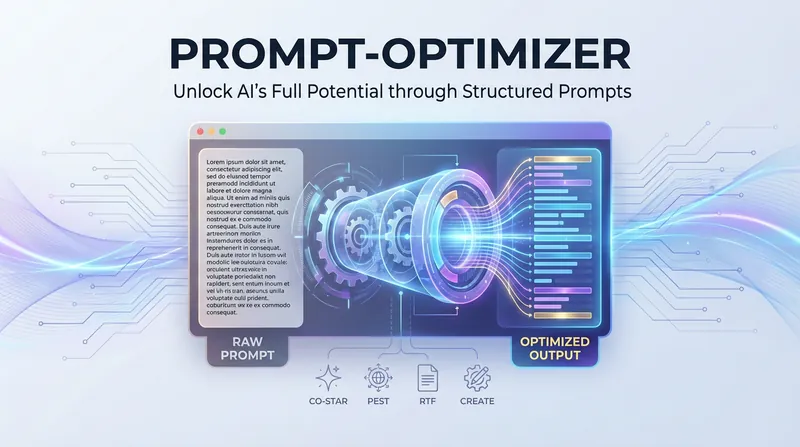
AI Prompt Optimization Expert
The AI Prompt Optimization Expert focuses on improving prompt quality through a systematic framework, helping you convey your intent precisely and making AI output more stable and predictable. Whether you need to refine existing prompts, build complex task descriptions from scratch, or find professional templates for specific scenarios, this skill provides comprehensive support. It can not only restructure vague requests into structured prompts, but also identify and fix common logical flaws through a diagnostic process. The skill includes a variety of proven optimization frameworks and can flexibly switch strategies based on the nature of the task. For example, for formal documents and professional content, it strengthens the background and audience dimensions; while for code generation or data processing tasks, it focuses more on role definition and specific constraints. In this way, it ensures every prompt has a clear goal, a defined style, and a well-structured output format. In addition, it covers specialized templates for a wide range of high-frequency scenarios, from copywriting and data analysis to technical documentation. You can directly use these proven structures and quickly fill in key details such as core selling points, data descriptions, or reader background. During optimization, the skill also checks against a quality checklist and uses multiple iterations and side-by-side comparisons to help you master essential prompt engineering techniques, significantly reducing communication costs and boosting productivity.
Information
- Version
- v2
- Last updated
- Runtime credits
- Usage-based
- Models
- Auto
