Slides to Lecture Scripts
PPT to 30,000+ Character Scripts
Slides to Lecture Scripts
PPT to 30,000+ Character Scripts
Showcase
Description
Enter a paginated courseware PDF or PPT to automatically generate detailed, conversational lecture scripts in batches, matched page by page. Each page includes “Goal and Suggested Time,” “Ready-to-Deliver Script,” “Classroom Interaction,” “Wrap-Up and Transition,” and “Preparation Notes.” The Skill automatically identifies the subject and adds enhanced explanations of formulas and derivations for math-focused courseware. It supports continuation, targeted deepening, and time-limited compression.
Best for
Teachers and course designers who want to turn concise courseware into page-by-page scripts ready for classroom delivery.
How to use this Skill
Provide your input
Upload a paginated courseware PDF or PPT. You can also provide class length, students’ background, or specify pages and requirements for continuation, deepening, or compression.
Run the Skill
The system reads the courseware, analyzes its structure in file order, and expands each page with explanations, interactions, transitions, and preparation tips. Longer content is generated in batches.
Review your result
Receive a detailed, conversational lecture script matched to each page, including teaching goals, ready-to-deliver text, classroom interaction, page wrap-ups, and necessary preparation notes.
Related Skills
View all
Complete Lesson Pack & Slides
Enter the topic and basic information (textbook scope, learners, class hours, and lesson type) to generate a complete five-part lesson preparation package in one go, following a fixed framework and a consistent academic handout style: a word-for-word lesson plan, classroom activities and interactive question design, a board plan, and in-class exercises, plus an approximately 40-slide competition-ready PPT. Document structures are fixed while content adapts to the topic. The PPT follows the same visual system across lessons and is produced in two steps: generate images first, then assemble them with slidesCompose. Course memory is updated automatically. Suitable for all subjects and grade levels.
Lesson Prep Script V1.0
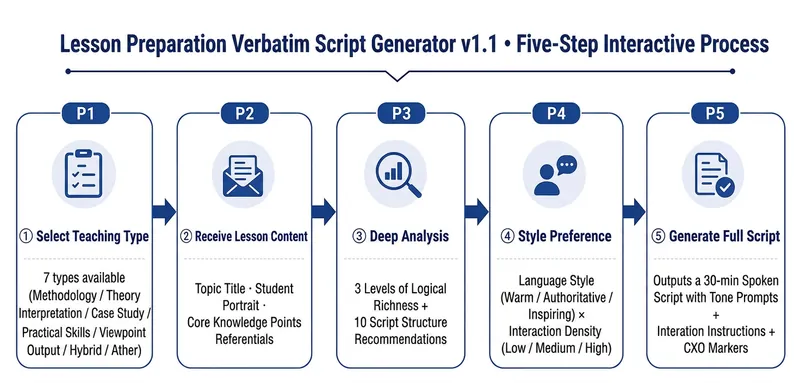
Helps instructors/knowledge IPs directly turn lesson preparation topics into a ready-to-use 30-minute spoken-word script—just pick it up and read, not secondary prompts. What it solves Traditional lesson preparation requires instructors to go through "ideation → break into modules → write script → mark pacing → design interactions", which is time-consuming and easy to miss details. This Skill compresses this process into a 5-step interaction. Instructors only need to provide the topic and key knowledge points, and the rest is automated. Core capabilities ① Five-step structured interaction: Select lesson type → Receive preparation content → Deep analysis with option presentation → Ask for style preference → Directly generate a complete spoken-word script. Each step waits for user confirmation before proceeding. ② CXO three-dimensional teaching verification: Each module is annotated with teaching dimensions — C (Content/Knowledge), X (Experience/Practice), O (Objective/Output), ensuring full coverage throughout. ③ Spoken-word script template: Each segment follows the framework of Hook → Key Point → Structure → Call to Action. The structure supports four modes: reason, method, situation/reaction, and chronological order. ④ Complete output includes: 7 modules totaling approximately 7,900 words of spoken text + tone cues (【Pause 2 seconds】【Emphasis】) + audience interaction instructions + CXO paragraph annotations + full statistics. ⑤ Seven-dimensional quality check: Word count deviation / Spoken style / Template completeness / CXO coverage / Logical coherence / Pacing / Reusability — each dimension is checked, and if any fails, it is corrected and regenerated.
 Webpage
One-Click Courseware to Web
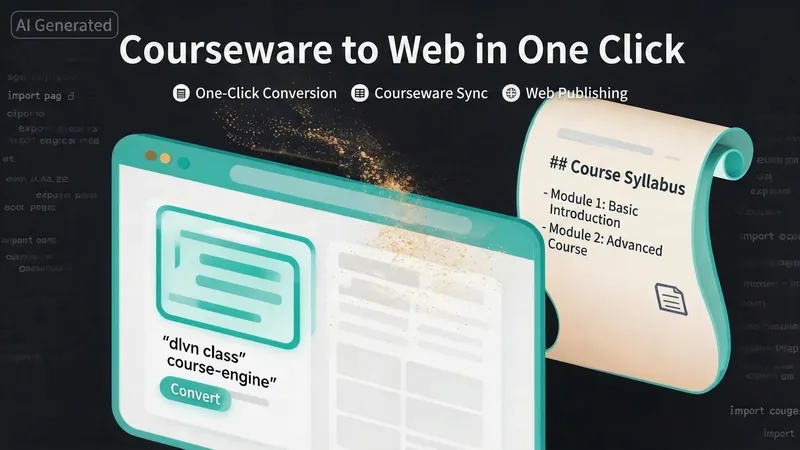
Turn your courseware into a viewable website. Whether you have a Markdown note, a PDF paper, a PPT slides, or a plain text script, or even a public account link, One-Click Courseware to Web can automatically convert it into a clear, beautifully designed online course display webpage. You don't need to write a single line of code—just provide the content. Two display styles: - Course training content → generates a scrolling long page, like flipping through a book. - Paper/report content → generates a PPT-style page-turning website, like browsing slides one by one. Responsive design adapts to mobile and desktop. What you need to do: Just one step: provide your courseware content. Supported formats: .md Markdown files, .pdf PDF documents, .pptx PPT presentations, .txt plain text. You can also paste course content directly in the conversation. Example commands: "Turn these lecture notes into a webpage" "Make this PDF paper into a PPT-style website" "Here is my courseware content, generate an online display page" What you get: A directly accessible online course display website, with the display mode automatically determined. Your content automatically selects the effect: - Course outlines, training handouts, textbooks → scrolling long pages, modules naturally connected, scroll to browse. - Academic papers, research reports → PPT-style slide flipping, each page focuses on one point. - Speeches, meeting reports → PPT-style page-by-page display, supports keyboard/click navigation. If you explicitly request "scrolling" or "PPT", your request is respected. Content extraction capability: For information-dense papers and long texts, the skill automatically performs: - Structure decomposition: splits continuous discourse into independent chapters/slides. - Information condensation: condenses three paragraphs into three key points, each within 20 characters. - Thesis-first: each page gives the conclusion first, then supporting arguments. - Framework visualization: models and classification systems are presented with charts instead of plain text. - Data highlighting: key numbers and metrics are displayed on separate pages prominently. Subsequent modifications: After the website is generated, you can request adjustments at any time: "Update the content of module three" "Change the color scheme to warm tones" "Add a course roadmap" "Change this module to a timeline layout" Modifications only affect the corresponding part; you don't need to regenerate the entire website. What it does not do: This skill currently focuses on course content display and does not include the following LMS (Learning Management System) features: - User login/registration - Learning progress tracking - File download - Online quizzes/practice If you need these features, they are separate extensions.
Information
- Version
- v2
- Last updated
- Runtime credits
- Usage-based
- Models
- Auto
- Use cases
- Writing & contentLearning & education
- What you get
- Document
