
Plain Talk
Complex ideas, simply said.
Description
Translate any complex content into language a smart 12-year-old can fully understand. Don't reduce the information—only remove the barriers to understanding. You can use it: • Turn academic articles into something people can read • Make product manuals feel like a friend explaining • Translate your boss's vague emails into 'what they really mean' • Drop in anything that feels like every word makes sense but together it's not human speech
Related Skills
View all
Viral Content Creation Engine
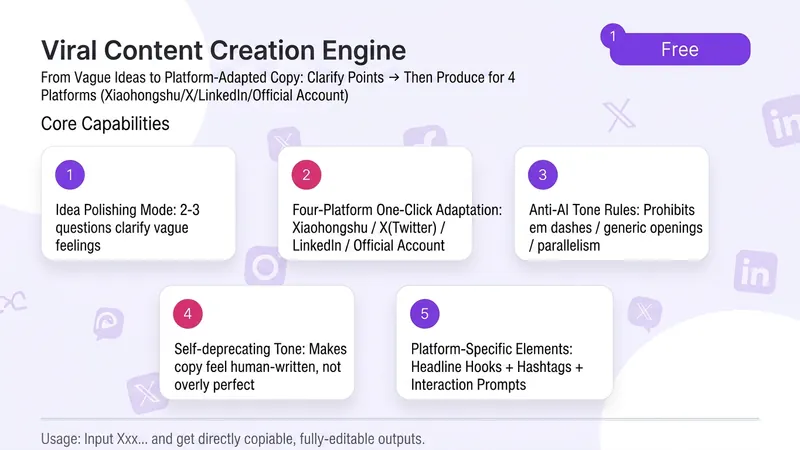
Sometimes you have a brilliant idea in your head, but when you open the editor, you don't know where to start. After agonizing for an hour, you end up posting something that feels flat—the insight that initially excited you gets buried under 'formal' expression. Feed it a vague idea, and it first helps you sharpen it—asks a few pointed questions to turn your insight from 'sounds plausible' to 'that's exactly it.' Then it translates it into Xiaohongshu friend-sharing, X founder insights, WeChat Official Account warm know-how. ✨ Core Capabilities 1. Idea Refinement Mode: 2-3 questions to turn vague feelings into shareable insights 2. One-click adaptation for 4 platforms: Xiaohongshu / X (Twitter) / WeChat Official Account / LinkedIn — tone, rhythm, and format all switch automatically 3. Anti-AI flavor mandate: No dashes, generic openings, hollow parallelisms, or abstract wisdom. Each sentence under 30 characters. 4. Self-deprecating tone: Makes your copy sound like it's written by a real person, not a grammatically correct robot. 5. Each platform includes: headline hook + hashtags + engagement prompt 📱 Use Cases - Personal brands/entrepreneurs who want to post consistently but often get stuck on 'how to say it' - Marketers who need multi-platform distribution but don't want to rephrase for each platform - Professionals with industry insights but no time to polish copy - Content creators looking to level up from 'writing articles' to 'making an impact' Good expression isn't 'writing beautifully'—it's 'making people feel that you get them.'
Minimal Explainer Diagram
Turn selected text, articles, files, or project information into a clear, compact explainer diagram. It extracts key nodes and relationships to help you organize processes, hierarchies, comparisons, timelines, or connections between different approaches. It’s suited to project presentations, team communication, content summaries, and organizing ideas. You can specify the diagram type, focus, layout direction, or accent color. Or simply provide the material, and it will determine a suitable way to present the content. It supports flowcharts, structure diagrams, comparison diagrams, timelines, and solution relationship diagrams. Before drawing, it lets you confirm the diagram type, layout, and colors to help prevent misunderstandings about the information’s focus. The finished diagram uses a white background, generous whitespace, fine lines, and flat geometric shapes, with a single low-saturation accent color. Short node labels and clear connecting lines show the relationships. It doesn’t crowd the original text or add people and decorative illustrations, so readers can quickly understand the content structure without first reading lengthy explanations.

Chinese Jargon & SVO Review
Rewrites Chinese materials that “sound professional but leave readers unsure who needs to do what” into language readers can understand, act on, and verify directly. It applies to reports, proposals, notices, articles, product documentation, project updates, policy training, customer service content, official WeChat articles, and AI-generated text, with a focus on Chinese jargon, vague slogans, abstract nouns, and writer-centered framing. Without changing facts, quantities, dates, names, scope, the strength of conclusions, or the boundaries of the evidence, this Skill turns difficult-to-act-on phrases such as “empower,” “strengthen management,” “drive implementation,” “close the loop,” and “align through collaboration” into more specific people, actions, objects, conditions, and outcomes. It also checks whether key sentences clearly state the subject, action, and object, so readers know who is responsible for what, what is affected, and how to determine whether the work is complete. When necessary, it retains specialized terms from regulations, standards, and products while adding explanations in plain language. The output typically includes a ready-to-use rewrite, the key changes that affect understanding, and any people responsible, timelines, data, evidence, or specialized definitions that cannot be confirmed from the original. It does not invent information or rewrite suggestions, records, or system statuses as facts that are completed, resolved, or verified. It is suited to writers, editors, and business teams who want to improve the readability, accuracy, and actionability of Chinese materials.

Plain Talk
Complex ideas, simply said.
Description
Translate any complex content into language a smart 12-year-old can fully understand. Don't reduce the information—only remove the barriers to understanding. You can use it: • Turn academic articles into something people can read • Make product manuals feel like a friend explaining • Translate your boss's vague emails into 'what they really mean' • Drop in anything that feels like every word makes sense but together it's not human speech
Related Skills
View all
Viral Content Creation Engine
Sometimes you have a brilliant idea in your head, but when you open the editor, you don't know where to start. After agonizing for an hour, you end up posting something that feels flat—the insight that initially excited you gets buried under 'formal' expression. Feed it a vague idea, and it first helps you sharpen it—asks a few pointed questions to turn your insight from 'sounds plausible' to 'that's exactly it.' Then it translates it into Xiaohongshu friend-sharing, X founder insights, WeChat Official Account warm know-how. ✨ Core Capabilities 1. Idea Refinement Mode: 2-3 questions to turn vague feelings into shareable insights 2. One-click adaptation for 4 platforms: Xiaohongshu / X (Twitter) / WeChat Official Account / LinkedIn — tone, rhythm, and format all switch automatically 3. Anti-AI flavor mandate: No dashes, generic openings, hollow parallelisms, or abstract wisdom. Each sentence under 30 characters. 4. Self-deprecating tone: Makes your copy sound like it's written by a real person, not a grammatically correct robot. 5. Each platform includes: headline hook + hashtags + engagement prompt 📱 Use Cases - Personal brands/entrepreneurs who want to post consistently but often get stuck on 'how to say it' - Marketers who need multi-platform distribution but don't want to rephrase for each platform - Professionals with industry insights but no time to polish copy - Content creators looking to level up from 'writing articles' to 'making an impact' Good expression isn't 'writing beautifully'—it's 'making people feel that you get them.'
Minimal Explainer Diagram
Turn selected text, articles, files, or project information into a clear, compact explainer diagram. It extracts key nodes and relationships to help you organize processes, hierarchies, comparisons, timelines, or connections between different approaches. It’s suited to project presentations, team communication, content summaries, and organizing ideas. You can specify the diagram type, focus, layout direction, or accent color. Or simply provide the material, and it will determine a suitable way to present the content. It supports flowcharts, structure diagrams, comparison diagrams, timelines, and solution relationship diagrams. Before drawing, it lets you confirm the diagram type, layout, and colors to help prevent misunderstandings about the information’s focus. The finished diagram uses a white background, generous whitespace, fine lines, and flat geometric shapes, with a single low-saturation accent color. Short node labels and clear connecting lines show the relationships. It doesn’t crowd the original text or add people and decorative illustrations, so readers can quickly understand the content structure without first reading lengthy explanations.

Chinese Jargon & SVO Review
Rewrites Chinese materials that “sound professional but leave readers unsure who needs to do what” into language readers can understand, act on, and verify directly. It applies to reports, proposals, notices, articles, product documentation, project updates, policy training, customer service content, official WeChat articles, and AI-generated text, with a focus on Chinese jargon, vague slogans, abstract nouns, and writer-centered framing. Without changing facts, quantities, dates, names, scope, the strength of conclusions, or the boundaries of the evidence, this Skill turns difficult-to-act-on phrases such as “empower,” “strengthen management,” “drive implementation,” “close the loop,” and “align through collaboration” into more specific people, actions, objects, conditions, and outcomes. It also checks whether key sentences clearly state the subject, action, and object, so readers know who is responsible for what, what is affected, and how to determine whether the work is complete. When necessary, it retains specialized terms from regulations, standards, and products while adding explanations in plain language. The output typically includes a ready-to-use rewrite, the key changes that affect understanding, and any people responsible, timelines, data, evidence, or specialized definitions that cannot be confirmed from the original. It does not invent information or rewrite suggestions, records, or system statuses as facts that are completed, resolved, or verified. It is suited to writers, editors, and business teams who want to improve the readability, accuracy, and actionability of Chinese materials.
Find your next favorite skill
Explore more curated AI skills for research, creation, and everyday work.
