Instant Report Slides
Turn work notes into editable Slides
Instant Report Slides
Turn work notes into editable Slides
Showcase

妇科疾病知识 · 关爱女性妇科健康
妇科疾病知识 · 关爱女性妇科健康
妇科疾病知识 · 关爱女性妇科健康
妇科疾病知识 · 关爱女性妇科健康
Description
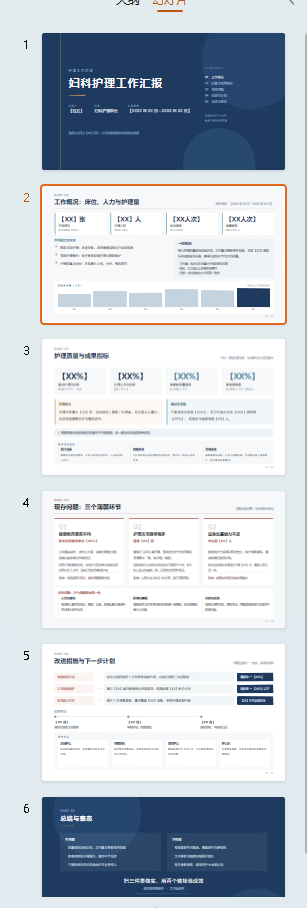
Work report presentation generator: input a report title or raw materials to first receive a paginated script (each page includes a title, body text, speaker notes, and image suggestions), then directly generate a .pptx file. Features 6 page types (cover, overview, metrics, issues, improvements, summary), a business blue theme, auto-mode placeholders, and a content organization mode that never invents data. Triggered when users say "make a work report presentation", "generate report Slides", "performance review Slides", "turn report script into Slides", "nursing work report", "year-end summary Slides", or "quarterly report pptx". Red lines: never fabricate personal data, keep body text concise, use standard terminology for medical and public service roles, and ensure every page passes layout and whitespace checks.
Best for
Professionals and teams who need to create performance reviews, quarterly updates, or end-of-year summary presentations.
How to use this Skill
Provide your input
Provide your presentation title, topic, or raw work materials, along with any preferences for page count, audience, and style.
Run the Skill
Organizes your materials into a paginated structure, generates slide text, speaker notes, and image suggestions, and creates an editable presentation.
Review your result
Receive an openable, editable work presentation complete with a checklist of placeholder items to replace.
Related Skills
View all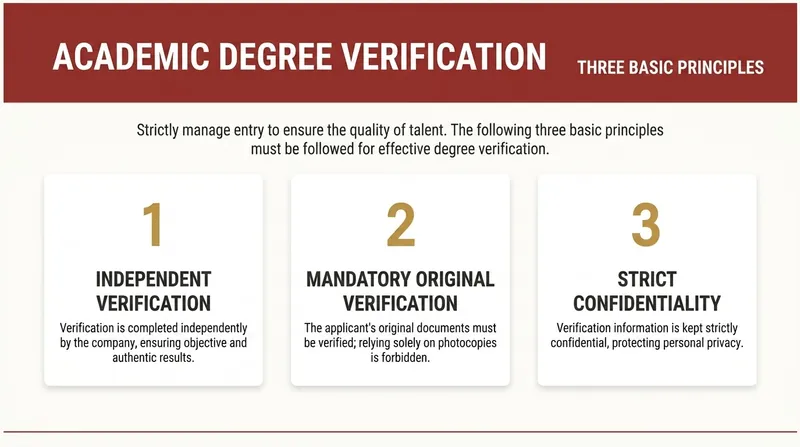 Slides
Work Report Slides
Automatically convert work report text into editable Slides with a minimalist business report style. Supports two modes: structured input and free-text speech drafts. First confirm the structure, then generate page by page, outputting only one slide at a time. Example: Input a slide speech script to output multiple Slide versions. No exaggeration, no flashy techniques—consistent, high-quality output that makes it easy to produce a series of uniformly styled Slide versions. Example image generation prompt: In the current complex employment environment, resume padding and false academic credentials are increasingly common. Verifying the authenticity of academic degrees is a necessary compliance procedure for hiring, serving as the bottom line for guarding the entry gate and protecting talent quality. This is not only responsible for the company but also a reflection of the professionalism of every HR worker. So, how to do a good job of academic credential verification? First, we must keep in mind three basic verification principles: First, independent verification, using official public channels; second, verify original documents, focusing on authenticity of anti-counterfeiting features, embossed seals, and official stamps; third, strict confidentiality, compare and archive verification information.

PPT Copywriting V2.0
PPT Copywriting Description: Professional PPT copywriting generation capability, covering 6 major scenarios: Business reports / Product launches / Training / Investor pitches / Annual summaries / Project approvals. Includes a 5-step generation method (Target → Structure → Key phrases → Storyboard → Layout), 6 types of presentation scenario templates, 10 PPT structures (Problem-Solution / Comparison / Timeline / Data-Insight / Pyramid / Flowchart, etc.), key phrase extraction, chart selection, color scheme and layout suggestions, and pitfalls guide. Applicable to: (1) Business report PPT, (2) Product launch PPT, (3) Training PPT, (4) Investor pitch PPT. Trigger keywords: PPT, slides, presentation, deck, business report, product launch, investor pitch, annual summary, key phrase, storyboard.

PPT to Report
📋 **Formal presentation materials, from PPT to final draft in one step** Upload a PPT, automatically extract all content, and reorganize it into conversational presentation text using a standard five-section structure (Overview → Key Technology → Innovations → Practice → Project Summary). Page markers, time markers, and bolded innovation points are applied automatically. ✨ **Core Capabilities** - 🔍 **Smart Extraction**: Automatically reads titles, body text, tables, and notes from each slide - 📐 **Five-Section Restructuring**: Standard appraisal presentation framework for clear logic - 🗣️ **Conversational Rewriting**: Transforms PPT bullet points into coherent narrative, not verbatim copying - 🏷️ **Precise Markers**: Page markers + time markers for easy reference to the original PPT - ✍️ **Innovation Points in Bold**: Highlights key points so reviewers instantly see the highlights - 📄 **Dual Format Output**: Ready-to-use Markdown + Word document archive 👥 **Target Users** - Project leads → Presentation materials for appraisal/review meetings - Technical experts → Achievement appraisal/acceptance presentations - Anyone who needs to convert PPT into formal presentation text
Information
- Version
- v2
- Last updated
- Runtime credits
- Usage-based
- Models
- Auto
- Use cases
- Presentations & reporting
- What you get
- Slides
- Visual styles
- Corporate
