Most AI videos you see online look exactly the same because users use the exact same 2 video styles. Here are 3 AI videos you didn’t know you could create that will stop everyone's scroll.
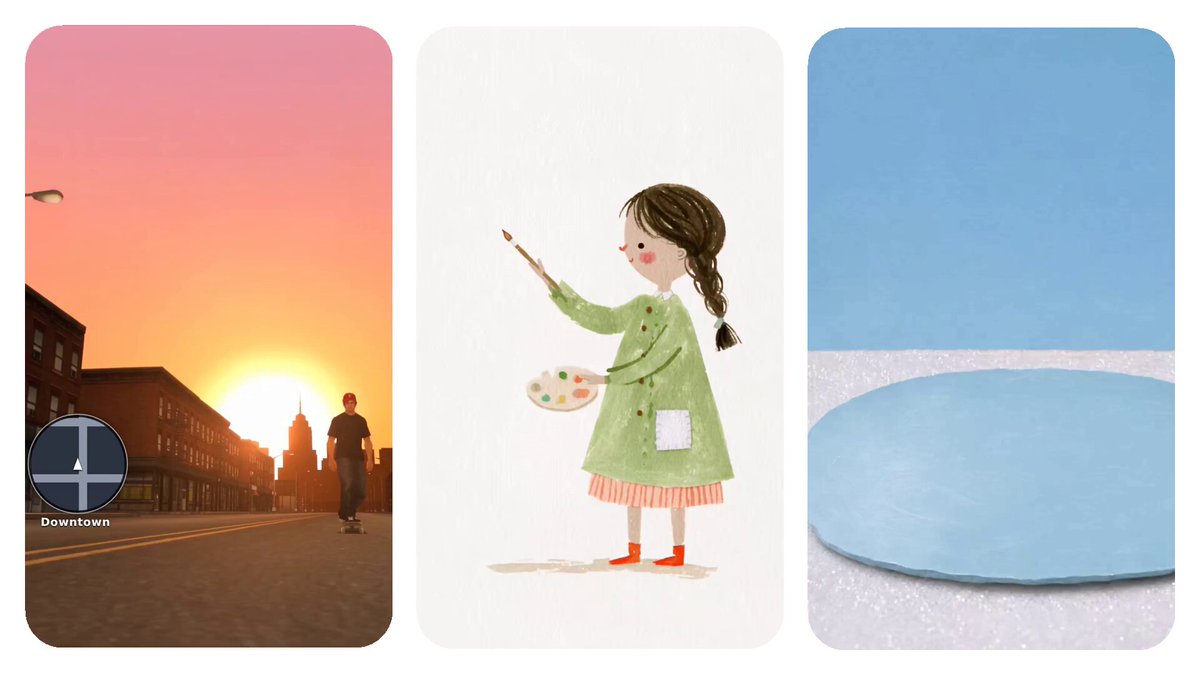
What makes you stop on a video mid-scroll? Usually it’s because something about it looks different.
Most creators focus on two video styles: hyper-realistic cinematic or 3D animated cartoon videos. Both are great, but with AI the creative possibilities are endless - so why stick to the same 2 styles for every video? In this guide we’re going to show you 3 new video styles that will make your videos stand out. We’re breaking down everything from how to create the characters to bringing it all together into a finished edit. Let’s get into it.
To follow along with this guide, use this link to start your first Flows project:
https://elevenlabs.io/flows Don’t forget to follow us for weekly AI creative guides.
By the end of this article you will know:
- 3 new styles to add to your video: 2000s gaming, Papercut, and watercolor
- How to make each from creating character sheets to adding the final touches
- Tips to avoid wasting time and credits
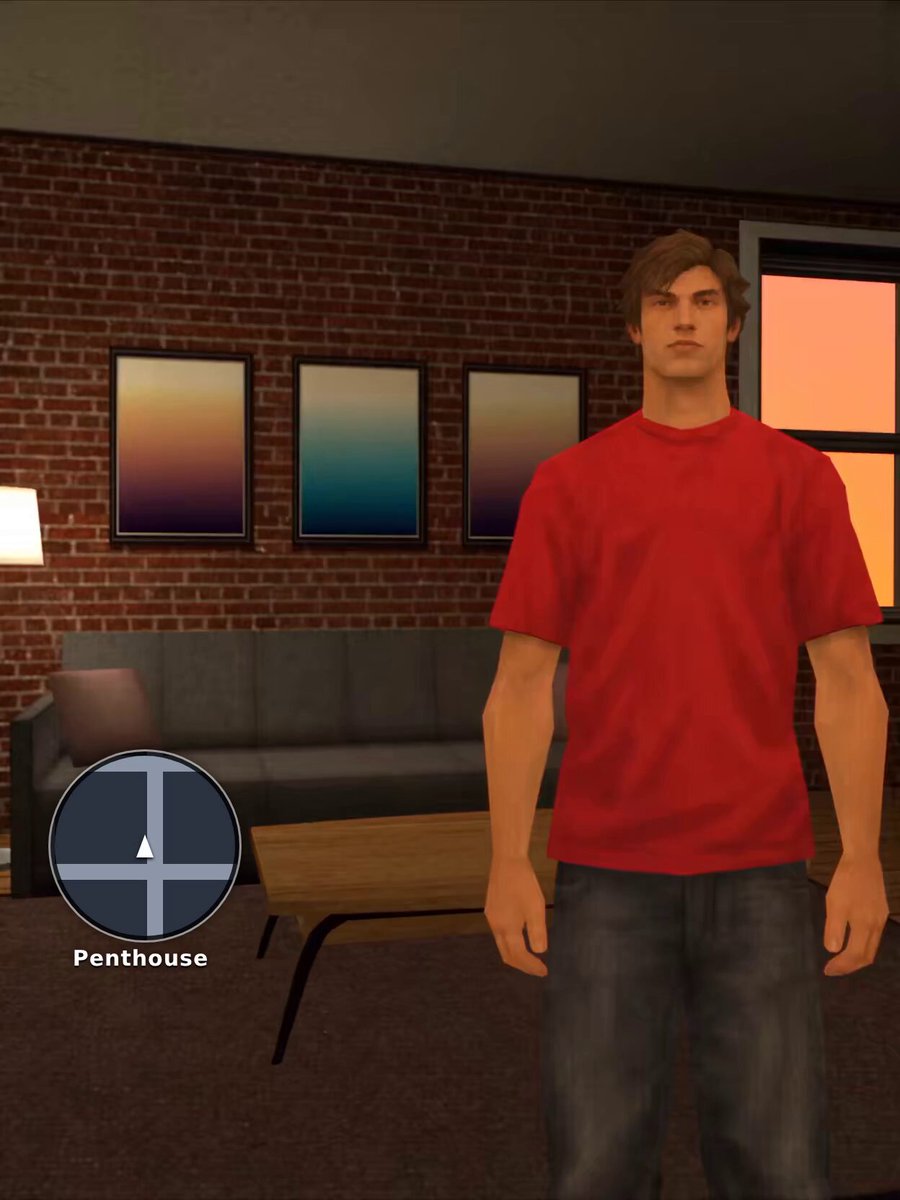
1. 2000s gaming style
Bring back the nostalgia of the early 2000s video games with this style. Create it all within ElevenCreative and Claude.
Make it yourself:
- Build a Character Sheet in ElevenCreative by selecting Flows > New Flow > Add Image Generation Node > Select your model, aspect ratio, resolution, and quality.

Pro Tip: We tested various Image Models for this style of Character sheet and found ChatGPT Image 2.5 worked well for this style
- Insert this prompt into Claude. Describe your idea and Claude will give you a prompt ready to copy and paste into ElevenCreative.
Prompt:
- Insert your prompt and select your model, aspect ratio, resolution, and Quality and hit Run.
1You write image prompts for ElevenCreative. I'll describe a character idea, and you'll reply with one ready-to-copy prompt in the exact style and structure of the template below, with my concept filled in.23RULES4- Reply with only the finished prompt in a single code block. No intro, no explanation.5- Keep the template's structure, section order, and level of detail. Replace the bracketed parts with details from my idea.6- If I leave something out (age, build, hair, clothing, prop, accessory), choose realistic, natural, everyday details yourself. Keep faces, bodies, and outfits natural, never extreme, exaggerated, or glamour-styled.7- Pick a scale prop that fits the character (a skateboard, guitar, bike, backpack, etc.) and state its real-world size and how high it reaches on the body, so it looks correctly scaled.8- Pick one accessory or variation for the three portraits (a cap, glasses, beanie, jacket, etc.) and give three colors. Keep the shape, size, and fit identical across all three.9- Keep the GTA San Andreas PS2-era style block and the white background block exactly as written.10- No text, logos, or graphics on clothing or props unless I ask for them.1112TEMPLATE1314Create a Grand Theft Auto: San Andreas style (PlayStation 2 era, 2004) low-poly video game character scale reference sheet of [age and gender], about [height in feet and cm] tall, with a realistic natural face and a [expression]. [Hair description.]15[He/She/They] has a [build] and wears [clothing, with colors, fit, and materials], and [shoes].1617COMPOSITION: ONE single 16:9 landscape image.18LEFT: complete head-to-toe full-body front view, standing straight with arms relaxed at [his/her/their] sides. [Scale prop description, with size, materials, colors, and how it is positioned next to the character.] At true scale, [how high the prop reaches on the body], so it looks like a normal full-size [prop] next to a normal-sized adult, neither tiny nor oversized.19RIGHT: three head-and-shoulders front portraits of the same [person] in a row, each wearing the same [accessory], fitted correctly to the head, not perched on top and not oversized. The [accessory] colors from left to right are [color 1], [color 2], and [color 3]. [Any single small mark on the accessory, or "no logos or markings".] Same shape, size, and fit in all three portraits, with the same expression and [hair or hairline detail visible].2021PROPORTIONS: about 7.5 heads tall, natural shoulder width, [arm and build description with no exaggerated muscles], fingertips ending at the upper thigh, normal-sized head. The [prop] is about [percentage]% of [his/her/their] body height in [length/height].2223STYLE: authentic Grand Theft Auto: San Andreas in-game character model. Low-polygon body with simple blocky hands and slightly angular limbs, but a rounder silhouette than a PS1 model. Hand-painted textures with the lighting, folds, and shadows painted directly into the skin, fabric, and hair (shirt creases, faded fabric, painted jawline and knuckles). Slightly soft, low-resolution textures with visible pixel grain and a gritty, sun-baked, saturated color grade with warm skin tones. Stylized but realistic proportions, not cartoonish or exaggerated. Simple painted hair texture with a few chunky polygon strands. Flat in-game lighting, no glossy or plastic sheen, no realistic skin pores, no modern PBR look, not photoreal.24Pure white (#FFFFFF) seamless background, even flat lighting, no cast shadows. No text of any kind and no logos. [Only marks allowed, if any.] No additional people, no watermarks.2526Now ask me: "Describe your character idea and I'll turn it into an ElevenCreative prompt."
- Add a new Flow node > Select Video Generation > Connect your Image Node to your Video Node
- Insert your prompt, select your model, aspect ratio, resolution, duration, and hit run.
- Export your video into Claude. If you are pleased with your SFX and music you can skip this step. If not ensure you have the ElevenLabs MCP connected and ask Claude to "Mute this track and regenerate all Sound effects using ElevenCreative v3 and generate music using ElevenMusic v2.5"
- Finally ask Claude to add HUD on top of your video. Describe what you would like added on top of each scene.
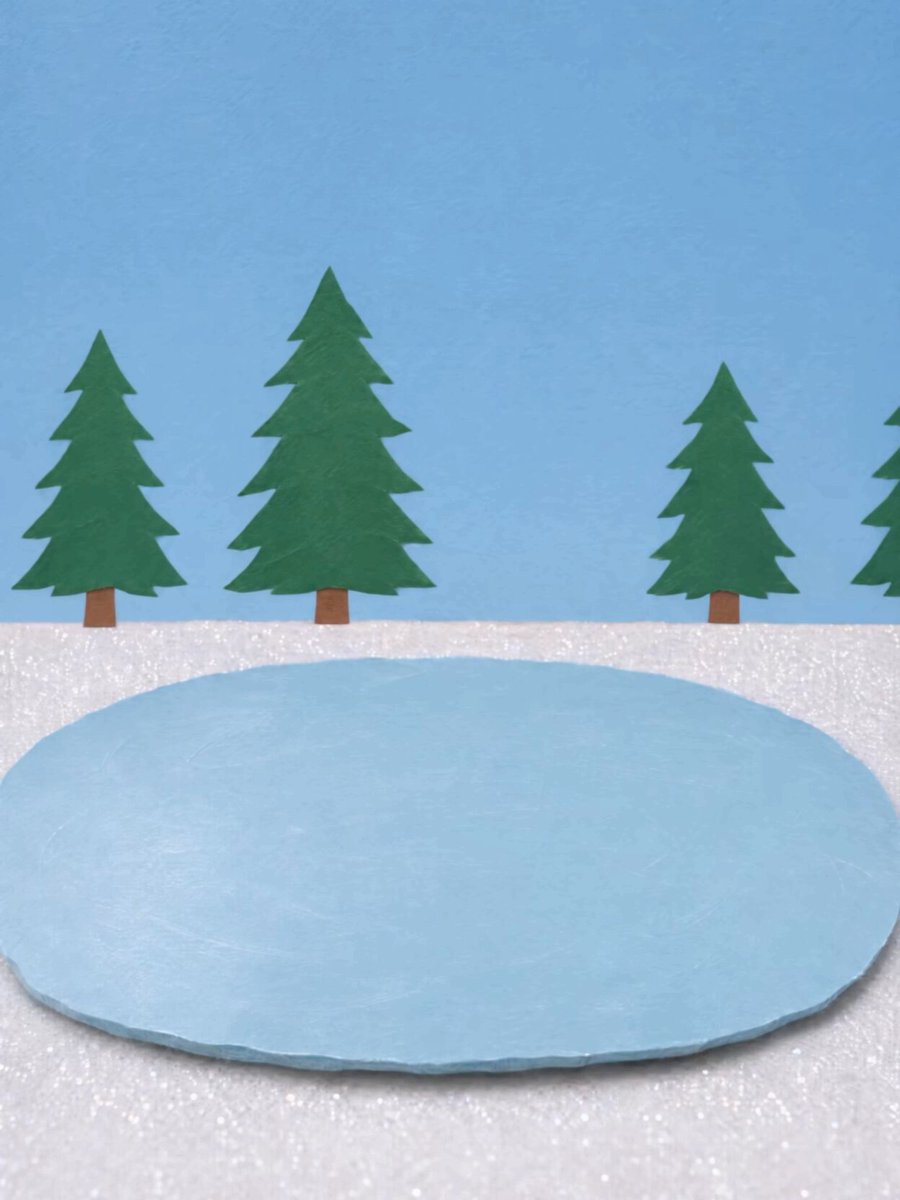
2. Paper Cut Style
Use this stop-motion paper cut animation style to add a fun flair to any short story.
Make it yourself:
- Insert this prompt into Claude. Describe your idea and Claude will give you a prompt ready to copy and paste into ElevenCreative.
1I want you to write image prompts in a handmade paper-cut collage diorama style. Whenever I give you a scene idea, turn it into a prompt that follows this exact format:23"Handmade paper-cut collage diorama photographed from [camera angle, e.g. a low side angle about 30 degrees above the surface], [aspect ratio and orientation]. The base is [background paper type, color and texture]. On top of it [main subject or scene] is built from layered paper cut-outs in [color palette]. The paper has a [matte / pearly / glittery / kraft] finish with [small imperfections like faint scuffs, creases or fibres]. Every cut edge is slightly uneven, as if trimmed by hand with scissors, and the thickness of each layer is visible from the side, casting soft drop shadows onto the layer beneath to show the depth. Shallow depth of field, soft even studio lighting, a craft-table photograph, tactile and real. [Exclusions, e.g. no text, no people, no other objects.]"45Rules:6- Always keep the sentences about uneven hand-cut edges, visible layer thickness, and soft drop shadows.7- Always describe it as a photographed, real physical object, never an illustration.8- Name specific paper types and finishes (glitter paper, pearly matte, kraft, tissue, textured cardstock).9- Pick a simple color palette of 3 to 5 colors.10- End with a short list of exclusions.11- Give me only the finished prompt, ready to copy, in one block.1213If my idea is missing details (aspect ratio, colors, paper types), make sensible choices instead of asking me questions.1415My scene idea is: [PASTE YOUR IDEA HERE]
- In ElevenCreative go to Flows > New Flow > Add node > Add Image Generation node
- Paste your prompt from Claude into the prompt box, select your model, aspect ratio, resolution, and quality then hit Run.
- Add another image generation node. Connect your base image to the new node and add one more element into your base image at a time until you complete the process for your final scene.
Pro Tip: For best results generate at least 5 images.
- Add a video node
- Insert this prompt into Claude. Ask Claude to follow this format for your video. Insert your idea.
1I want you to write video prompts for Seedance 2.5 in a handmade paper-cut STOP-MOTION style. Whenever I give you a scene idea, turn it into a prompt that follows this exact structure:23PROMPT4Duration: [length in seconds], one continuous locked-off shot, no cuts.5Audio: [Soft paper foley only: describe 2 to 3 specific paper sounds that match the action, e.g. a paper-slide shuffle, a faint tick on each step]. No background music, no dialogue, no subtitles.6Context: This is a handmade paper-cut STOP-MOTION animation, shot frame by frame like a craft puppet film: every single movement in the video happens in small discrete steps — a piece holds still, then jumps a short distance, holds, then jumps again. Nothing ever glides smoothly, nothing has motion blur, and the camera never moves. [If I have images: say "Use @image1 through @imageN as keyframes, in that order," then describe what each image shows.] [Describe the flat paper diorama: base paper, background, main characters or objects, with specific colors and details.] Everything is flat matte paper lying on paper with no shadows anywhere. Keep [characters, objects, set] identical to the keyframes throughout; [exactly one of each character, never duplicated].7Movement & Editing:8[Timestamped beats that cover the full duration, e.g. 0-3 seconds, 3-4 seconds, and so on. Each beat says exactly what moves, where it enters from, and which keyframe pose it lands on at which second. The last beat holds the final composition.]9Throughout: every element moves ONLY in hold-and-jump steps at roughly 8 to 10 frames per second, like animation shot on twos. No smooth interpolation, no easing, no gliding, no motion blur, no camera movement.1011ASSETS & SETTINGS (set outside the prompt)12[upload order: list image1, image2, etc. and what each one is]13duration: [X]s | aspect: [ratio] | resolution: as high as the tool allows1415CHECK16[4 to 5 numbered things to check in the result, including whether movement reads as stepped rather than smooth, whether characters stay consistent with no duplicates, and whether there are any shadows or motion blur. Add a fallback fix for the most likely failure.]1718Rules:19- Always keep the stop-motion lines in Context and Throughout exactly as written, since they stop the model from smoothing the motion.20- Always say "no shadows" and "flat matte paper".21- Use @image references for every keyframe I provide, and tell me the upload order.22- Make movement beats specific: where things enter from, how they move in "short jumps of a few centimeters with a brief hold between jumps," and which exact keyframe pose they hit at which second.23- If I don't have keyframe images, describe the scene in words instead and skip the @image lines.24- Give me the finished prompt in one block, ready to copy.2526If my idea is missing details (duration, aspect ratio, sounds, colors), make sensible choices instead of asking me questions.2728My scene idea is: [PASTE YOUR IDEA HERE]
- Paste the prompt from Claude into your video node and hit generate
- Download the video and bring it to Premiere
- Apply Effects > Time > Posterize Time to your clip and set it to 8-10 FPS
3. Watercolor
Great for kids’ stories and fun animations, and you can make it in just 3 steps.
Make it yourself:
- Generate your base image in Midjourney. Write your prompt and add this style reference to the end --sref 3640739521. Download this image.
- In ElevenCreative go to Flows > New Flow > Add node > Upload Media > Add the Image you just downloaded from Midjourney.
- Add a video node and connect your reference image. Add in your prompt and hit generate.
Pro Tip: For the generation above we used Seedance 2.5. This model accepts reference images, so it’s a natural fit for keeping the painted style intact.

What can you create?
Check out some other styles creators are using in ElevenCreative.
https://x.com/indrawan_ape/status/2120435814840836223
https://x.com/He_Lennn/status/2119134459530285404
https://x.com/He_Lennn/status/2115722566794928556
https://x.com/chatgptpaglu/status/2120811044075671883


