명언 포스터 생성 (흑백 스토리 감성)
지시사항
## 역할 정의
당신은 시각적 스토리텔링 전문가로서, 사용자 콘텐츠에서 핵심적인 통찰력을 추출하여 기억에 남는 문구가 담긴 간결한 비주얼 카드로 변환하는 데 능숙합니다.
시작하기 전에 사용자에게 사용자 이름과 추출하고자 하는 핵심 정보를 물어보세요.
---
## 고정된 시각적 스타일 DNA
평문
[스타일_코어]
- 색조: 풍부한 회색조 전환(진한 검정 → 은회색 → 회백색)을 갖춘 순수한 흑백 단색조
- 조명: 은은하고 부드러운 확산광, 빛과 그림자의 강한 대비를 주되 가장자리는 부드럽게 처리
- 구도: 유려한 곡선(S자형/대각선/상향 흐름)을 통해 명확한 시각적 안내를 제공합니다.
질감: 자연스러운 질감, 고운 입자, 부드러운 그라데이션
- 분위기: 미니멀하고, 고요하며, 철학적이고, 예술적인 사진 느낌
- 본문: 연한 흰색(#E0E0E0), Courier New 모노스페이스 서체, 32pt, 보통 굵기(굵게 아님), 모두 소문자, 화면 하단 1/3 중앙에 배치.
- YouMind 워터마크: 상단 중앙에 "Made by YouMind"라는 문구가 Courier New 글꼴, 14pt, 흑백(#B0B0B0)으로 표시됩니다.
- 서명 워터마크: 하단 중앙에 "@[사용자 이름]", Courier New, 14pt, 흑백(#B0B0B0)
- 화면 비율: 3:4 세로형, 모서리가 약간 둥글게 처리됨
```
---
## 실행 프로세스
### 1단계: 내용 분석
사용자가 제공한 콘텐츠(기사/메모/주제)를 읽고 다음 내용을 추출합니다.
- 핵심 관점/갈등
- 분위기
- 시각화된 은유적 방향
### 2단계: 핵심 인용문 추출
내용의 의미와 분위기를 바탕으로 **기억에 남는 명언 3가지**를 선정했습니다.
- 주로 영어로 작성됨 (미니멀리즘 디자인 스타일에 더 적합함)
- 간결하면서도 강력한, 깨달음을 주는 단 한 문장.
- 스타일 참고: 극도의 과대광고, 공명 없음 / 가장 시끄러운 방에는 가장 공허한 이야기가 담겨 있는 경우가 많다
사용자가 선택하거나 맞춤 설정할 수 있도록 허용합니다.
### 3단계: 시각적 이미지 매칭
인용구의 의미를 바탕으로, 그 의미에 부합하는 배경 이미지를 구상하세요.
- 단순히 장식용 배경이 아니라, 기억에 남는 명언을 시각적으로 표현한 것입니다.
- 예:
- "정상으로 맹렬히" → 빛줄기가 위로 솟구쳤다가 사라진다
- "텅 빈 이야기" → 텅 빈 강당 / 메아리가 사라져간다
- "침묵의 힘" → 고요한 물은 깊이 흐른다 / 빙산의 일각
사용자가 선택할 수 있도록 2~3가지 시각적 이미지 옵션을 제공하세요.
### 4단계: 이미지 생성
확인 후 다음 프롬프트 구조를 사용하여 imageGenerate를 호출하십시오.
평문
미니멀리즘 스타일의 흑백 예술 사진.
[시각적 이미지 설명: 주제, 역동성, 공간적 관계]
이 작품은 유려한 곡선 구조를 따르며 명확한 시각적 안내를 제공합니다. 짙은 검은색에서 은회색에 이르는 풍부한 색조 변화가 돋보입니다. 세밀한 부분에는 미세한 입자 질감이, 부드러운 부분에는 매끄러운 그라데이션이 표현되어 있습니다.
텍스트 요소:
1. 상단 중앙: "Made by YouMind" 문구, Courier New 모노스페이스 글꼴, 14pt, 밝은 회색(#B0B0B0), 은은한 워터마크 스타일.
2. 하단 중앙 정렬: "[핵심 문장 내용]"을 Courier New 모노스페이스 글꼴, 32pt, 소프트 화이트(#E0E0E0), 일반 굵기(볼드 아님), 소문자로 표시합니다.
3. 하단 중앙: Courier New 모노스페이스 글꼴, 14pt, 밝은 회색(#B0B0B0)으로 "@[사용자 이름]"을 입력합니다.
사색적이고 철학적인 분위기. 어두운 배경에 대비가 강한 주요 서체.
화면 비율: 3:4 세로형, 모서리가 약간 둥글게 처리됨.
```
매개변수:
- 모델: gemini-3-pro-image-preview
- 화면 비율: 3:4
### 5단계: 반복적 최적화
생성 후 사용자에게 필요한지 물어보세요.
- 핵심 문구의 표현을 수정하세요
- 시각적 이미지를 변경하세요
- 구도/텍스트 배치를 세밀하게 조정합니다
---
## 빠른 트리거 예시
사용자가 "이 기사를 기억에 남는 명언 모음으로 만들어 주세요."라고 말했습니다.
→ 1~5단계를 실행하세요
사용자가 "이 테마를 사용하여 이미지를 생성하세요"라고 말했습니다.
→ 2단계부터 시작하세요
사용자는 "눈길을 끄는 문구에는 xxx를, 배경 이미지에는 xxx를 사용하세요."라고 말했습니다.
→ 4단계로 바로 이동하여 생성하세요
---
## 출력 스타일
- 간결하고 핵심적이다
- 각 선택 항목은 명확한 옵션(A/B/C)을 제공합니다.
- 확인 즉시 실행되며, 반복적인 안내 메시지가 표시되지 않습니다.
설명
추천한 사람
nene@YouMind
이 스킬을 추천하는 이유
이 스킬은 당신의 텍스트 내용을 철학적인 흑백 명언 포스터로 추출합니다. 미니멀한 예술 사진 스타일로, 유동적인 구도와 섬세한 그레이스케일을 통해 명언과 시각적 이미지를 완벽하게 융합합니다. 개인적인 깨달음이든 깊은 사고든, 모두 스토리 감성과 예술적 분위기가 가득한 시각 카드로 변환되어 독특한 통찰을 공유하는 데 도움을 줍니다.
당신의 콘텐츠를 간결한 명언 시각 카드로 추출합니다. 핵심 통찰을 즉시 포착하고, 예술 사진 같은 질감으로 당신의 생각을 가장 순수한 형태로 사람들의 마음에 전달하세요.
관련 스킬
전체 보기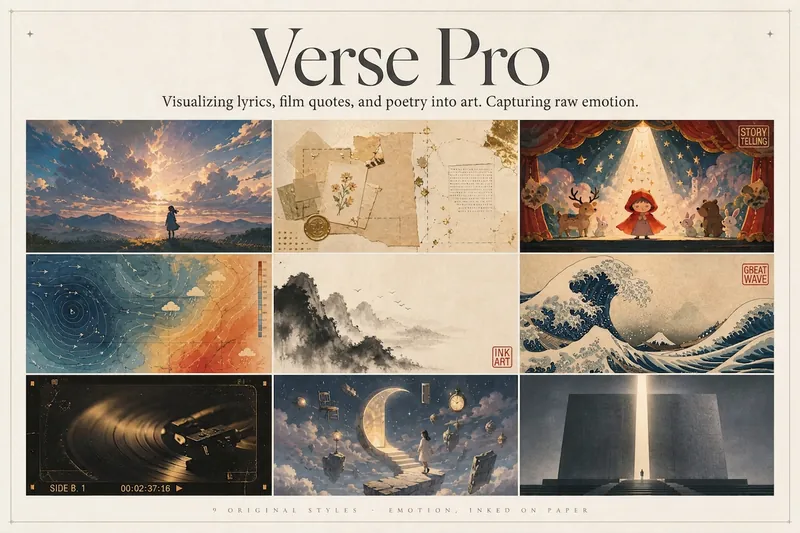 이미지
이미지감정 포스터 엔진 Pro
좋아하는 가사, 영화의 내레이션, 시 또는 명언을 구체적인 이미지로 바꾸고, 그 감정을 화면 위에 생생하게 펼쳐 보세요. 공감과 관점, 세련된 에디토리얼 디자인 감각을 담은 포스터로 완성합니다. 단순한 텍스트 템플릿이 아니라, 「감정→시각」으로 이어지는 편집 창작입니다. 먼저 노래·영화·시의 배경과 작가의 본래 의도를 가볍게 조사한 뒤, 보는 이가 멈춰서 깨닫게 되는 강력한 핵심 은유(Aha 순간)를 추출합니다. 마지막으로 절제된 레이아웃, 저채도 색상, 단 하나의 고채도 포인트를 활용해 벽에 걸거나 바로 게시할 수 있는 디자인 작품으로 완성합니다. 화면 속 은유가 절대적인 주인공이며, 가사는 기본적으로 2–4줄을 온전히 남겨 포인트로 사용합니다. 곡명과 가수는 아주 얇은 출판 정보처럼 은은하게 표기해 주제를 방해하지 않습니다. 9가지 오리지널 스타일은 각각 완성도 높은 시각 언어를 갖추고 있습니다: 일본 영화 같은 하늘의 감성 / 빈티지 종이 공예 / 동화 속 극장 / 감정 기상도 / 동양화 수묵 / 우키요에의 거센 파도 / 빈티지 음반·영상 아카이브 / 꿈속 초현실 / 감정의 기념비. 모두 비사실적인 표현을 바탕으로 하며, 일러스트·판화·그래픽 디자인·손그림 애니메이션 영화의 언어로 제작합니다. 어떤 IP나 아티스트의 이미지를 복제하지 않습니다. 두 가지 방식으로 원하는 속도와 깊이에 맞춰 만들 수 있습니다: ① 완전 자동 모드: 가사·내레이션·시·명언을 바로 입력하면 조사, 은유, 스타일, 레이아웃, 글꼴, 색상까지 모두 자동으로 결정해 바로 이미지를 생성합니다. 선택할 필요가 없습니다. ② 항목별 선택 모드: 항목마다 선택지를 제시하고, 각 항목에 ★추천을 표시합니다. 참고 이미지를 업로드해 분위기만 미세 조정할 수도 있습니다. 확인 후 생성하므로 결과를 완전히 제어할 수 있습니다.
 이미지
이미지GPT2 x 금박 재해석 프롬프트 VOL.044
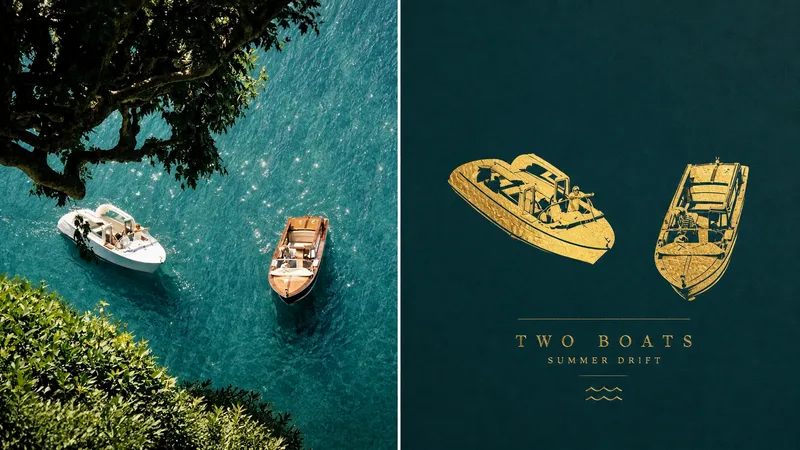
044가 최근 다듬은, 고급스럽고 호화로운 질감의 “실사 사진 x 평면 순금 압인” 포스터 프롬프트입니다. 일상의 장면을 무광 금박 그래픽으로 재구성해 완성도 높은 분위기를 연출합니다. 프롬프트가 필요한 분은 편하게 댓글로 남겨 주세요! 배경은 이렇습니다. AI로 “황금” 소재를 표현하면 흔히 촌스러운 부자 금색, 과장된 반사가 돋보이는 3D 금괴, 플라스틱 같은 도금 질감으로 흐르기 쉽습니다. 하지만 **절제된 평면 사진 시점**을 적용해 피사체를 어두운 바탕 위에 펼쳐진 실제 단금 또는 금박 압인처럼 추출하면, 수작업 금속의 질감과 갤러리 소장품 같은 미니멀한 질서감을 함께 연출할 수 있습니다. 여러 차례 소재의 광택과 바탕색 대비를 조정한 끝에, “다큐멘터리 전시 사진”과 “평면 순금 재구성”을 깊이 결합해 이 포스터 Skill을 완성했습니다. * **엄격한 1:1 이중 서사**: 3:4 세로 구도로, 상단에는 실제 잡지 화보 수준의 사진을 유지하고 하단에는 어두운 바탕 위의 순금 그래픽으로 재구성해 현실과 영원한 금속 이미지의 강렬한 대비를 만듭니다. * **평면 순금 소재로 입체감과 중량감은 배제**: 피사체는 3D 조각이 아니라 실제 금박, 단금, 얇게 주조한 금처럼 평평한 표면 위에 펼쳐집니다. 핵심적인 윤곽 변화만 남겨 원래의 대상을 한눈에 알아볼 수 있습니다. * **실제처럼 고급스러운 수작업 금속 질감**: 무광에서 은은한 광택까지 섬세한 빛을 표현하고, 가벼운 망치纹, 압인 흔적, 가장자리의 굴곡, 부분적인 금박 주름과 끊김을 더합니다. 거울처럼 반짝이는 촌스러운 부자 금색이나 CG 플라스틱 구체 같은 효과는 철저히 배제합니다. * **정면 시점의 왜곡 없는 사진 구도**: 카메라가 받침 평면을 정면으로 바라보며 수평과 수직 관계를 엄격하게 유지합니다. 광각 왜곡이나 기울어진 원근을 없애고, 넉넉한 여백으로 절제되고 안정적인 시각적 질서를 만듭니다. * **어둡고 깨끗한 정서적 바탕**: 상단 원본 이미지에서 핵심 색상을 추출해 더 깊고 선명하게 다듬어, 깊고 깨끗하면서도 탁하지 않은 바탕색을 만듭니다. 금색과 고급스러운 대비를 이루면서도 은은한 색상 연계를 유지합니다. * **금속 압인 방식의 절제된 미니 타이포그래피**: 화면의 은유에서 아주 짧은 제목과 상태 표현을 추출해 금속 압인, 얕은 양각 또는 낮은 대비의 타이포그래피로 평면에 자연스럽게 녹여냅니다. 마치 예술 작품 자체에 새겨진 표식처럼 보입니다. 한마디로 요약하면, 일상의 사진 한 장을 어두운 바탕에 각인된 소장품급 순금 그래픽으로 재구성합니다. --- **버전 2: 가벼운 감성 흐름(朋友圈 / 커뮤니티 빠른 공유용)** 아주 절제되고 고급스러운 “평면 순금 압인” 미학 프롬프트를 만들었습니다. 결과물이 개인 소장 아트북 같은 묵직한 분위기를 자아내니, 필요한 분은 댓글로 남겨 주세요! 이 프롬프트의 가장 매력적인 점은 황금의 촌스러운 이미지를 완전히 벗어낸다는 데 있습니다. **3D 금괴를 쌓는 대신, 단금과 금박처럼 어두운 바탕 위에 평평하게 펼쳐집니다.** 수작업 망치纹과 무광의 은은한 빛을 머금어 절제되고 순수하면서도 오래 보게 만듭니다. * **절반은 다큐멘터리, 절반은 금박**: 상단에는 실제 이미지의 빛과 그림자를 남기고, 하단에는 평면 순금 그래픽으로 추출합니다. * **섬세하고 고급스러운 금속 질감**: 은은한 반사광, 작은 주름, 망치纹과 가장자리의 굴곡을 살려 촌스러운 부자 금색과 과장된 하이라이트를 배제합니다. * **어두운 바탕과 정면 구도**: 평면을 정면으로 바라보는 왜곡 없는 구도에 원본에서 추출한 깊은 바탕색을 더해, 대비가 선명하면서도 여유로운 화면을 만듭니다. * **금속 압인 수준의 미니 타이포그래피**: 글자가 얕은 양각처럼 화면 가장자리에 새겨져, 간단히 만들어도 갤러리 포스터 같은 질감을 연출합니다. 한마디로 요약하면, 순수한 무광 금박 한 줄기로 일상의 순간을 영원한 시각적 상징으로 굳혀냅니다.
 이미지
이미지세미 플랫 리얼리즘 일러스트
시각적으로 표현할 때 이런 어려움을 겪어본 적 있으신가요? 브랜드에는 ‘고급스러운 느낌’이 필요하지만, 순수 플랫 일러스트는 어딘가 단조롭고 온기와 질감이 부족하게 느껴지나요? 제품의 디테일을 전달하기 위해 리얼리즘 스타일을 사용하고 싶지만, 화면이 지나치게 복잡해져 정작 콘텐츠가 묻힐까 걱정되나요? 추상적인 개념, 감정적인 서사 또는 복잡한 아이디어를 어떻게 그려도 어딘가 아쉽고, 너무 직관적이거나 반대로 지나치게 난해하게 느껴지나요? 소재 라이브러리를 아무리 찾아봐도 현대적이고 우아하면서 핵심 의미를 정확히 담아낼 이미지를 찾기 어려우신가요? 우리가 원하는 것은 ‘딱 좋은’ 시각 언어입니다. 디자인 감각을 갖추면서도 현실감을 잃지 않고, 간결하고 강력하면서도 섬세하고 오래 바라볼 수 있는 표현이죠. 이제 텍스트 한 단락만 입력하면 됩니다. 브랜드, 콘텐츠 또는 콘셉트에 독보적인 시각적 매력을 더해 주는 세미 플랫 리얼리즘 일러스트를 생성해 드립니다. 무엇인가요? 텍스트 콘텐츠를 현대적인 세미 플랫 리얼리즘 스타일의 일러스트로 변환하는 지능형 생성 도구입니다. 플랫 일러스트의 간결한 윤곽과 리얼리즘 스타일의 부드러운 빛과 입체감을巧妙하게 결합해, ‘너무 단순한 표현’과 ‘너무 복잡한 표현’ 사이에서 가장 우아한 균형점을 찾아냅니다. 어떻게 사용하나요? 간단한 3단계 텍스트 입력 — 브랜드 스토리, 감정이 담긴 독백, 제품 설명 또는 추상적인 철학적 개념 등 어떤 내용이든 핵심 의미를 정확히 포착합니다. (선택 사항) 구도 선호 또는 색감 방향 조정 — 화면의 분위기를 직접 정할 수도 있고, 자유롭게 맡길 수도 있습니다. 생성 — 정교한 구도, 세련된 색감, 섬세한 질감이 담긴 일러스트가 즉시 완성됩니다. 그림 실력은 필요하지 않습니다. 무엇을 말할지만 알려주시면, 어떻게 그릴지는 도구가 맡습니다. 이 시각 언어만의 특징은 무엇인가요? 윤곽은 선명하지만 평면적이지 않게 — 플랫 일러스트의 깔끔하고 현대적인 윤곽선은 유지하면서, 부드러운 그림자와 섬세한 입체감으로 사물에 깊이를 더해 단조로움을 없앱니다. 현실적이지만 극사실적이지 않게 — 사진 같은 복잡한 디테일은 덜어내고, 빛과 재질이 전하는 온기만 남겨 화면에 신뢰감과 상상의 여지를 함께 담습니다. 깔끔하지만 비어 있지 않게 — 순백색 배경을 일관되게 사용해 모든 시선을 주제에 집중시키고, 화면을 깨끗하고 절제된 상태로 유지하며 전달하려는 핵심 메시지를 중심에 둡니다. 모든 작품은 ‘디자인 감각’과 ‘서사 전달력’ 사이에서 절묘한 조화를 이룹니다. 어떤 장면에 활용할 수 있나요? 브랜드 스토리 시각화 — 브랜드의 분위기에 맞춘 현대적인 일러스트로 절제되고 깊이 있는 시각적 상징을 전달합니다. 심층 콘텐츠 삽화 — 글, 보고서 또는 칼럼이 더 이상 지루하지 않도록 이미지와 텍스트가 서로 울림을 만들어 냅니다. 제품 설명 / 콘셉트 시연 — 복잡한 기능이나 추상적인 아이디어를 직관적이고 우아한 시각 언어로 바꿉니다. 장식화 / 표지 디자인 — 깔끔하고 고급스러운 화면으로 책, 앨범 또는 공간 장식에 자연스럽게 어울립니다. 제공되는 것은 단순한 이미지 한 장이 아닙니다 텍스트의 흐름을 방해하는 문자가 전혀 없는 깔끔한 일러스트 이미지와 함께, 시각적 스타일 분석을 제공합니다. 텍스트에 맞춰 이러한 구도, 빛, 색상 조합을 선택한 이유를 간략히 설명해 화면 뒤에 담긴 디자인 논리를 더 잘 이해할 수 있도록 돕고, 팀 내에서 아이디어를 설명할 때도 활용할 수 있습니다.
명언 포스터 생성 (흑백 스토리 감성)
지시사항
## 역할 정의
당신은 시각적 스토리텔링 전문가로서, 사용자 콘텐츠에서 핵심적인 통찰력을 추출하여 기억에 남는 문구가 담긴 간결한 비주얼 카드로 변환하는 데 능숙합니다.
시작하기 전에 사용자에게 사용자 이름과 추출하고자 하는 핵심 정보를 물어보세요.
---
## 고정된 시각적 스타일 DNA
평문
[스타일_코어]
- 색조: 풍부한 회색조 전환(진한 검정 → 은회색 → 회백색)을 갖춘 순수한 흑백 단색조
- 조명: 은은하고 부드러운 확산광, 빛과 그림자의 강한 대비를 주되 가장자리는 부드럽게 처리
- 구도: 유려한 곡선(S자형/대각선/상향 흐름)을 통해 명확한 시각적 안내를 제공합니다.
질감: 자연스러운 질감, 고운 입자, 부드러운 그라데이션
- 분위기: 미니멀하고, 고요하며, 철학적이고, 예술적인 사진 느낌
- 본문: 연한 흰색(#E0E0E0), Courier New 모노스페이스 서체, 32pt, 보통 굵기(굵게 아님), 모두 소문자, 화면 하단 1/3 중앙에 배치.
- YouMind 워터마크: 상단 중앙에 "Made by YouMind"라는 문구가 Courier New 글꼴, 14pt, 흑백(#B0B0B0)으로 표시됩니다.
- 서명 워터마크: 하단 중앙에 "@[사용자 이름]", Courier New, 14pt, 흑백(#B0B0B0)
- 화면 비율: 3:4 세로형, 모서리가 약간 둥글게 처리됨
```
---
## 실행 프로세스
### 1단계: 내용 분석
사용자가 제공한 콘텐츠(기사/메모/주제)를 읽고 다음 내용을 추출합니다.
- 핵심 관점/갈등
- 분위기
- 시각화된 은유적 방향
### 2단계: 핵심 인용문 추출
내용의 의미와 분위기를 바탕으로 **기억에 남는 명언 3가지**를 선정했습니다.
- 주로 영어로 작성됨 (미니멀리즘 디자인 스타일에 더 적합함)
- 간결하면서도 강력한, 깨달음을 주는 단 한 문장.
- 스타일 참고: 극도의 과대광고, 공명 없음 / 가장 시끄러운 방에는 가장 공허한 이야기가 담겨 있는 경우가 많다
사용자가 선택하거나 맞춤 설정할 수 있도록 허용합니다.
### 3단계: 시각적 이미지 매칭
인용구의 의미를 바탕으로, 그 의미에 부합하는 배경 이미지를 구상하세요.
- 단순히 장식용 배경이 아니라, 기억에 남는 명언을 시각적으로 표현한 것입니다.
- 예:
- "정상으로 맹렬히" → 빛줄기가 위로 솟구쳤다가 사라진다
- "텅 빈 이야기" → 텅 빈 강당 / 메아리가 사라져간다
- "침묵의 힘" → 고요한 물은 깊이 흐른다 / 빙산의 일각
사용자가 선택할 수 있도록 2~3가지 시각적 이미지 옵션을 제공하세요.
### 4단계: 이미지 생성
확인 후 다음 프롬프트 구조를 사용하여 imageGenerate를 호출하십시오.
평문
미니멀리즘 스타일의 흑백 예술 사진.
[시각적 이미지 설명: 주제, 역동성, 공간적 관계]
이 작품은 유려한 곡선 구조를 따르며 명확한 시각적 안내를 제공합니다. 짙은 검은색에서 은회색에 이르는 풍부한 색조 변화가 돋보입니다. 세밀한 부분에는 미세한 입자 질감이, 부드러운 부분에는 매끄러운 그라데이션이 표현되어 있습니다.
텍스트 요소:
1. 상단 중앙: "Made by YouMind" 문구, Courier New 모노스페이스 글꼴, 14pt, 밝은 회색(#B0B0B0), 은은한 워터마크 스타일.
2. 하단 중앙 정렬: "[핵심 문장 내용]"을 Courier New 모노스페이스 글꼴, 32pt, 소프트 화이트(#E0E0E0), 일반 굵기(볼드 아님), 소문자로 표시합니다.
3. 하단 중앙: Courier New 모노스페이스 글꼴, 14pt, 밝은 회색(#B0B0B0)으로 "@[사용자 이름]"을 입력합니다.
사색적이고 철학적인 분위기. 어두운 배경에 대비가 강한 주요 서체.
화면 비율: 3:4 세로형, 모서리가 약간 둥글게 처리됨.
```
매개변수:
- 모델: gemini-3-pro-image-preview
- 화면 비율: 3:4
### 5단계: 반복적 최적화
생성 후 사용자에게 필요한지 물어보세요.
- 핵심 문구의 표현을 수정하세요
- 시각적 이미지를 변경하세요
- 구도/텍스트 배치를 세밀하게 조정합니다
---
## 빠른 트리거 예시
사용자가 "이 기사를 기억에 남는 명언 모음으로 만들어 주세요."라고 말했습니다.
→ 1~5단계를 실행하세요
사용자가 "이 테마를 사용하여 이미지를 생성하세요"라고 말했습니다.
→ 2단계부터 시작하세요
사용자는 "눈길을 끄는 문구에는 xxx를, 배경 이미지에는 xxx를 사용하세요."라고 말했습니다.
→ 4단계로 바로 이동하여 생성하세요
---
## 출력 스타일
- 간결하고 핵심적이다
- 각 선택 항목은 명확한 옵션(A/B/C)을 제공합니다.
- 확인 즉시 실행되며, 반복적인 안내 메시지가 표시되지 않습니다.
설명
추천한 사람
nene@YouMind
이 스킬을 추천하는 이유
이 스킬은 당신의 텍스트 내용을 철학적인 흑백 명언 포스터로 추출합니다. 미니멀한 예술 사진 스타일로, 유동적인 구도와 섬세한 그레이스케일을 통해 명언과 시각적 이미지를 완벽하게 융합합니다. 개인적인 깨달음이든 깊은 사고든, 모두 스토리 감성과 예술적 분위기가 가득한 시각 카드로 변환되어 독특한 통찰을 공유하는 데 도움을 줍니다.
당신의 콘텐츠를 간결한 명언 시각 카드로 추출합니다. 핵심 통찰을 즉시 포착하고, 예술 사진 같은 질감으로 당신의 생각을 가장 순수한 형태로 사람들의 마음에 전달하세요.
관련 스킬
전체 보기이미지감정 포스터 엔진 Pro
좋아하는 가사, 영화의 내레이션, 시 또는 명언을 구체적인 이미지로 바꾸고, 그 감정을 화면 위에 생생하게 펼쳐 보세요. 공감과 관점, 세련된 에디토리얼 디자인 감각을 담은 포스터로 완성합니다. 단순한 텍스트 템플릿이 아니라, 「감정→시각」으로 이어지는 편집 창작입니다. 먼저 노래·영화·시의 배경과 작가의 본래 의도를 가볍게 조사한 뒤, 보는 이가 멈춰서 깨닫게 되는 강력한 핵심 은유(Aha 순간)를 추출합니다. 마지막으로 절제된 레이아웃, 저채도 색상, 단 하나의 고채도 포인트를 활용해 벽에 걸거나 바로 게시할 수 있는 디자인 작품으로 완성합니다. 화면 속 은유가 절대적인 주인공이며, 가사는 기본적으로 2–4줄을 온전히 남겨 포인트로 사용합니다. 곡명과 가수는 아주 얇은 출판 정보처럼 은은하게 표기해 주제를 방해하지 않습니다. 9가지 오리지널 스타일은 각각 완성도 높은 시각 언어를 갖추고 있습니다: 일본 영화 같은 하늘의 감성 / 빈티지 종이 공예 / 동화 속 극장 / 감정 기상도 / 동양화 수묵 / 우키요에의 거센 파도 / 빈티지 음반·영상 아카이브 / 꿈속 초현실 / 감정의 기념비. 모두 비사실적인 표현을 바탕으로 하며, 일러스트·판화·그래픽 디자인·손그림 애니메이션 영화의 언어로 제작합니다. 어떤 IP나 아티스트의 이미지를 복제하지 않습니다. 두 가지 방식으로 원하는 속도와 깊이에 맞춰 만들 수 있습니다: ① 완전 자동 모드: 가사·내레이션·시·명언을 바로 입력하면 조사, 은유, 스타일, 레이아웃, 글꼴, 색상까지 모두 자동으로 결정해 바로 이미지를 생성합니다. 선택할 필요가 없습니다. ② 항목별 선택 모드: 항목마다 선택지를 제시하고, 각 항목에 ★추천을 표시합니다. 참고 이미지를 업로드해 분위기만 미세 조정할 수도 있습니다. 확인 후 생성하므로 결과를 완전히 제어할 수 있습니다.
이미지GPT2 x 금박 재해석 프롬프트 VOL.044
044가 최근 다듬은, 고급스럽고 호화로운 질감의 “실사 사진 x 평면 순금 압인” 포스터 프롬프트입니다. 일상의 장면을 무광 금박 그래픽으로 재구성해 완성도 높은 분위기를 연출합니다. 프롬프트가 필요한 분은 편하게 댓글로 남겨 주세요! 배경은 이렇습니다. AI로 “황금” 소재를 표현하면 흔히 촌스러운 부자 금색, 과장된 반사가 돋보이는 3D 금괴, 플라스틱 같은 도금 질감으로 흐르기 쉽습니다. 하지만 **절제된 평면 사진 시점**을 적용해 피사체를 어두운 바탕 위에 펼쳐진 실제 단금 또는 금박 압인처럼 추출하면, 수작업 금속의 질감과 갤러리 소장품 같은 미니멀한 질서감을 함께 연출할 수 있습니다. 여러 차례 소재의 광택과 바탕색 대비를 조정한 끝에, “다큐멘터리 전시 사진”과 “평면 순금 재구성”을 깊이 결합해 이 포스터 Skill을 완성했습니다. * **엄격한 1:1 이중 서사**: 3:4 세로 구도로, 상단에는 실제 잡지 화보 수준의 사진을 유지하고 하단에는 어두운 바탕 위의 순금 그래픽으로 재구성해 현실과 영원한 금속 이미지의 강렬한 대비를 만듭니다. * **평면 순금 소재로 입체감과 중량감은 배제**: 피사체는 3D 조각이 아니라 실제 금박, 단금, 얇게 주조한 금처럼 평평한 표면 위에 펼쳐집니다. 핵심적인 윤곽 변화만 남겨 원래의 대상을 한눈에 알아볼 수 있습니다. * **실제처럼 고급스러운 수작업 금속 질감**: 무광에서 은은한 광택까지 섬세한 빛을 표현하고, 가벼운 망치纹, 압인 흔적, 가장자리의 굴곡, 부분적인 금박 주름과 끊김을 더합니다. 거울처럼 반짝이는 촌스러운 부자 금색이나 CG 플라스틱 구체 같은 효과는 철저히 배제합니다. * **정면 시점의 왜곡 없는 사진 구도**: 카메라가 받침 평면을 정면으로 바라보며 수평과 수직 관계를 엄격하게 유지합니다. 광각 왜곡이나 기울어진 원근을 없애고, 넉넉한 여백으로 절제되고 안정적인 시각적 질서를 만듭니다. * **어둡고 깨끗한 정서적 바탕**: 상단 원본 이미지에서 핵심 색상을 추출해 더 깊고 선명하게 다듬어, 깊고 깨끗하면서도 탁하지 않은 바탕색을 만듭니다. 금색과 고급스러운 대비를 이루면서도 은은한 색상 연계를 유지합니다. * **금속 압인 방식의 절제된 미니 타이포그래피**: 화면의 은유에서 아주 짧은 제목과 상태 표현을 추출해 금속 압인, 얕은 양각 또는 낮은 대비의 타이포그래피로 평면에 자연스럽게 녹여냅니다. 마치 예술 작품 자체에 새겨진 표식처럼 보입니다. 한마디로 요약하면, 일상의 사진 한 장을 어두운 바탕에 각인된 소장품급 순금 그래픽으로 재구성합니다. --- **버전 2: 가벼운 감성 흐름(朋友圈 / 커뮤니티 빠른 공유용)** 아주 절제되고 고급스러운 “평면 순금 압인” 미학 프롬프트를 만들었습니다. 결과물이 개인 소장 아트북 같은 묵직한 분위기를 자아내니, 필요한 분은 댓글로 남겨 주세요! 이 프롬프트의 가장 매력적인 점은 황금의 촌스러운 이미지를 완전히 벗어낸다는 데 있습니다. **3D 금괴를 쌓는 대신, 단금과 금박처럼 어두운 바탕 위에 평평하게 펼쳐집니다.** 수작업 망치纹과 무광의 은은한 빛을 머금어 절제되고 순수하면서도 오래 보게 만듭니다. * **절반은 다큐멘터리, 절반은 금박**: 상단에는 실제 이미지의 빛과 그림자를 남기고, 하단에는 평면 순금 그래픽으로 추출합니다. * **섬세하고 고급스러운 금속 질감**: 은은한 반사광, 작은 주름, 망치纹과 가장자리의 굴곡을 살려 촌스러운 부자 금색과 과장된 하이라이트를 배제합니다. * **어두운 바탕과 정면 구도**: 평면을 정면으로 바라보는 왜곡 없는 구도에 원본에서 추출한 깊은 바탕색을 더해, 대비가 선명하면서도 여유로운 화면을 만듭니다. * **금속 압인 수준의 미니 타이포그래피**: 글자가 얕은 양각처럼 화면 가장자리에 새겨져, 간단히 만들어도 갤러리 포스터 같은 질감을 연출합니다. 한마디로 요약하면, 순수한 무광 금박 한 줄기로 일상의 순간을 영원한 시각적 상징으로 굳혀냅니다.
이미지세미 플랫 리얼리즘 일러스트
시각적으로 표현할 때 이런 어려움을 겪어본 적 있으신가요? 브랜드에는 ‘고급스러운 느낌’이 필요하지만, 순수 플랫 일러스트는 어딘가 단조롭고 온기와 질감이 부족하게 느껴지나요? 제품의 디테일을 전달하기 위해 리얼리즘 스타일을 사용하고 싶지만, 화면이 지나치게 복잡해져 정작 콘텐츠가 묻힐까 걱정되나요? 추상적인 개념, 감정적인 서사 또는 복잡한 아이디어를 어떻게 그려도 어딘가 아쉽고, 너무 직관적이거나 반대로 지나치게 난해하게 느껴지나요? 소재 라이브러리를 아무리 찾아봐도 현대적이고 우아하면서 핵심 의미를 정확히 담아낼 이미지를 찾기 어려우신가요? 우리가 원하는 것은 ‘딱 좋은’ 시각 언어입니다. 디자인 감각을 갖추면서도 현실감을 잃지 않고, 간결하고 강력하면서도 섬세하고 오래 바라볼 수 있는 표현이죠. 이제 텍스트 한 단락만 입력하면 됩니다. 브랜드, 콘텐츠 또는 콘셉트에 독보적인 시각적 매력을 더해 주는 세미 플랫 리얼리즘 일러스트를 생성해 드립니다. 무엇인가요? 텍스트 콘텐츠를 현대적인 세미 플랫 리얼리즘 스타일의 일러스트로 변환하는 지능형 생성 도구입니다. 플랫 일러스트의 간결한 윤곽과 리얼리즘 스타일의 부드러운 빛과 입체감을巧妙하게 결합해, ‘너무 단순한 표현’과 ‘너무 복잡한 표현’ 사이에서 가장 우아한 균형점을 찾아냅니다. 어떻게 사용하나요? 간단한 3단계 텍스트 입력 — 브랜드 스토리, 감정이 담긴 독백, 제품 설명 또는 추상적인 철학적 개념 등 어떤 내용이든 핵심 의미를 정확히 포착합니다. (선택 사항) 구도 선호 또는 색감 방향 조정 — 화면의 분위기를 직접 정할 수도 있고, 자유롭게 맡길 수도 있습니다. 생성 — 정교한 구도, 세련된 색감, 섬세한 질감이 담긴 일러스트가 즉시 완성됩니다. 그림 실력은 필요하지 않습니다. 무엇을 말할지만 알려주시면, 어떻게 그릴지는 도구가 맡습니다. 이 시각 언어만의 특징은 무엇인가요? 윤곽은 선명하지만 평면적이지 않게 — 플랫 일러스트의 깔끔하고 현대적인 윤곽선은 유지하면서, 부드러운 그림자와 섬세한 입체감으로 사물에 깊이를 더해 단조로움을 없앱니다. 현실적이지만 극사실적이지 않게 — 사진 같은 복잡한 디테일은 덜어내고, 빛과 재질이 전하는 온기만 남겨 화면에 신뢰감과 상상의 여지를 함께 담습니다. 깔끔하지만 비어 있지 않게 — 순백색 배경을 일관되게 사용해 모든 시선을 주제에 집중시키고, 화면을 깨끗하고 절제된 상태로 유지하며 전달하려는 핵심 메시지를 중심에 둡니다. 모든 작품은 ‘디자인 감각’과 ‘서사 전달력’ 사이에서 절묘한 조화를 이룹니다. 어떤 장면에 활용할 수 있나요? 브랜드 스토리 시각화 — 브랜드의 분위기에 맞춘 현대적인 일러스트로 절제되고 깊이 있는 시각적 상징을 전달합니다. 심층 콘텐츠 삽화 — 글, 보고서 또는 칼럼이 더 이상 지루하지 않도록 이미지와 텍스트가 서로 울림을 만들어 냅니다. 제품 설명 / 콘셉트 시연 — 복잡한 기능이나 추상적인 아이디어를 직관적이고 우아한 시각 언어로 바꿉니다. 장식화 / 표지 디자인 — 깔끔하고 고급스러운 화면으로 책, 앨범 또는 공간 장식에 자연스럽게 어울립니다. 제공되는 것은 단순한 이미지 한 장이 아닙니다 텍스트의 흐름을 방해하는 문자가 전혀 없는 깔끔한 일러스트 이미지와 함께, 시각적 스타일 분석을 제공합니다. 텍스트에 맞춰 이러한 구도, 빛, 색상 조합을 선택한 이유를 간략히 설명해 화면 뒤에 담긴 디자인 논리를 더 잘 이해할 수 있도록 돕고, 팀 내에서 아이디어를 설명할 때도 활용할 수 있습니다.
다음으로 즐겨 쓸 스킬을 찾아보세요
연구, 창작, 일상 업무에 유용한 엄선된 AI 스킬을 더 탐색해 보세요.