Recently I hired another design engineer at DuckDuckGo. After reviewing 100s of portfolios I put together a skill you can use to improve your portfolio today ↓
Quick experiment: How many seconds does it take someone reviewing your portfolio to get to “wow”? If your answer is more than 30s, you’ve got some work to do...
When I’m reviewing a portfolio, I’m trying to understand whether someone could do the work we’re hiring them to do. And sometimes I’ll get through a bunch of impressive projects and still struggle to answer that.
The work looks good, but I can’t quite tell what they contributed, which decisions were theirs, or how their experience relates to what our team needs. They might be perfectly capable; I’m left trying to work that out from whatever they’ve chosen to show me.
I think this is something we miss when we talk about improving portfolios. There’s plenty of advice about presentation, case studies, and making the site itself look great.
But you can spend a lot of time on those things without making it any easier to understand why someone should hire you.
Keep your title/headline simple
Danny at Decimals made a useful connection when we were discussing this: there are some really clear parallels between positioning a product and positioning yourself as a designer.
A company describes its product as an “AI-powered operating system”, and you’re left wondering what you’d actually use it for.
The technology might be interesting, but you came to the website because you have something you’re trying to do. You need to understand whether this thing will help.
Danny pointed me towards Matt Lerner’sarticle on language-market fit, which explores how to describe a product in language that connects with what customers are already trying to achieve.
I think that’s a useful way to look at your title and the headline in your portfolio too.
The person reviewing it has a team with particular needs, and your work needs to make sense in that context.
Danny’s practical example is his own startup. Decimals.
We previously told people we were “disrupting recruiting with an expert model based on proof of work”. It didn’t land
at all
. We simplified massively to “a scout network for hiring designers”. If I’m asked to expand I talk through how scouting in Hollywood, Sports and Music works and tell them we’re building that for hiring designers. It suddenly clicks.
It turns out that keeping things simple goes a long way. Calling yourself an “AI designer” might sound cool, but to everyone else it’s a bit strange. It reminds me of the Webflow Designer or Framer Designer period; you end up describing yourself through the tool, and that narrows how people understand what you can do.
If you’re using AI to prototype ideas, build products, or explore things you couldn’t previously, I want to see that. Explain what you made and how you used it. There’s a much more interesting story there than the label gives you room to tell.
Help me understand the work
Two companies can advertise a design engineering role and be looking for quite different things. One might need someone to build complex product interfaces, whilst another wants someone with more creative development experience.
So if I’m hiring for the product role and your portfolio mostly shows marketing websites, I’ll have questions. I can appreciate the craft, but I still need to understand how your experience would translate to our product.
Sometimes the relevant experience is already there and just needs explaining. A project might have involved complicated interaction work, technical constraints, and a bunch of decisions that would be useful for me to understand. If all I see is the finished page, I’m missing quite a lot of what you did.
The same happens when a case study describes everything the team shipped without making your contribution clear. I don’t need you to have done everything yourself, I just need to understand where you were involved.
And this doesn’t need to become an enormous process essay. A short explanation beside the work can answer quite a lot.
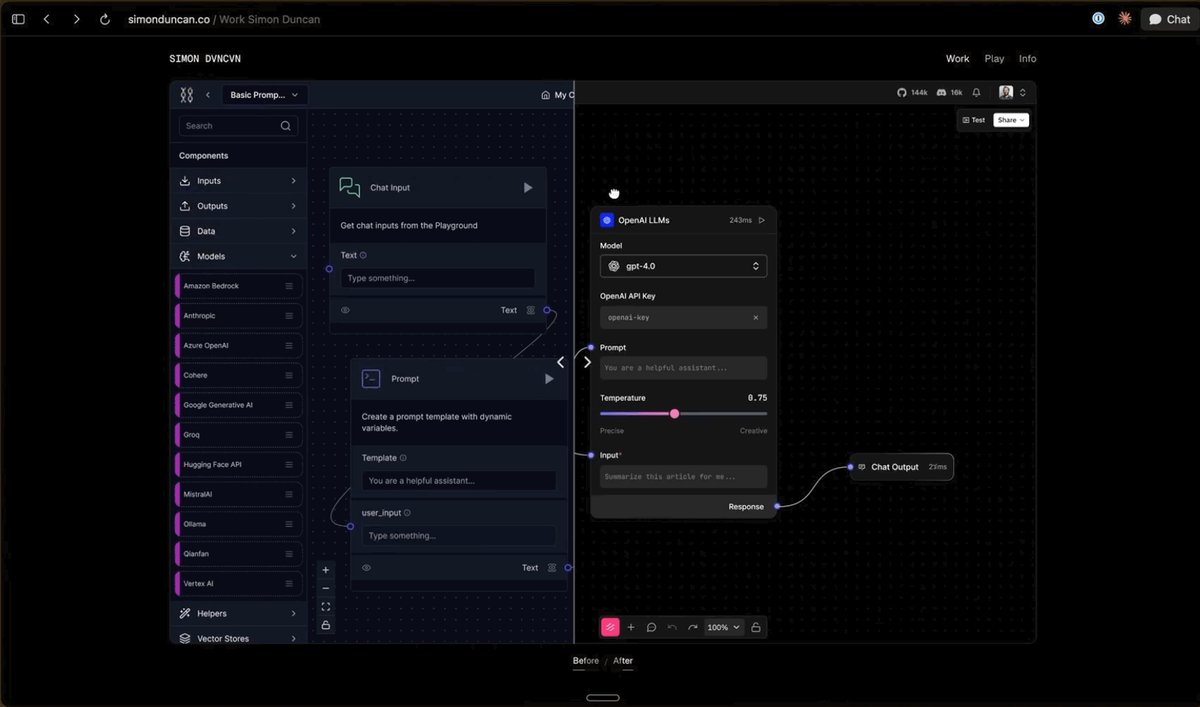
Here’s a masterful example from Simon Duncan. Note how he leads with the work and adds in actual prototypes within his portfolio. You can even drag a slider from left to right to see before and afters of his work.
GIF
A slider-powered preview of before and after examples from Simon Duncan's portfolio.
Read your portfolio against a real role
Before you spend another weekend rebuilding your site, pick a role you actually want and read your portfolio with that job in mind.
Which projects help explain why you’d be suited to it? Can someone find those projects easily? And once they’re there, can they understand what you made, what you were responsible for, and the judgement involved?
You might need to move a relevant project further up the page or explain a decision you’d previously skipped over. You might also find there’s something the role requires that your portfolio doesn’t demonstrate yet. At least then you know what you need to work on.
That’s the kind of review I built my Hiring Manager Bar skill to help with.
Give it your portfolio and the role you’re targeting, and it reviews how easily someone can find and understand the work, assess your contribution, and take the next step. It then recommends specific changes in order of importance.
You can quickly and easily run it by asking your agent (from inside your website's codebase): Install https://github.com/kemiljk/skills/tree/main/skills/dxe-hiring-manager-bar for me and run it on my portfolio. No other steps necessary.
Some examples from my personal website:
Stronger headline positioning

Leading with a clearer headline.
Making the work easier to understand

Demonstrating what case studies relate to, at a glance.
Providing a call to action

A clear CTA to drive the conversion I wanted.
After reviewing hundreds of portfolios, I’ve realised that the people who stand out aren’t always the ones with the most impressive websites. They’re the ones who make it easy for me to understand what they’re capable of.
You might already have the right experience. You might already have the work to prove it. But if someone has to spend ten minutes figuring that out, you’re making things harder for yourself.
Try the skill, make a few changes, and see how much closer you can get to that “wow” in the first 30 seconds.


