
Instruction Designer PPT Style
Top-tier Training & Courseware
Description
Recommended by
nene@YouMind
Why we love this skill
This skill is built around the ADDIE model, integrating P-I-E structure and narrative path design, ensuring that the output courseware is not only visually friendly but also learner-centered and interactive, truly achieving knowledge transfer and behavioral change.
Make every slide a “wow” moment for your learners! Are you still suffering through training sessions like these? Learners scrolling on their phones while you deliver a one-person stand-up comedy? You prepare valuable content, only to get blank stares and yawns? After the course, learners are “excited when listening, moved when thinking, but back to square one when leaving”? The problem isn’t your knowledge—it’s how you deliver it! ✨ Now, install the “ADDIE Interactive Courseware Designer” skill 👉 Turn any training content (Word, PPT, mind map) into: ✅ Learner-centered – No more lecturing. Ignite engagement with icebreakers, interactions, and hands-on activities. ✅ ADDIE model compliant – Analysis → Design → Development → Implementation → Evaluation, a complete learning loop. ✅ P-I-E modular structure – Each slide: Present → Interact → Exercise, so learning sticks. ✅ Instruction-friendly visual aesthetics – Bright colors, flat illustrations, clear layout—even the back row can see. ✅ Complete narrative path – From welcome to action plan, driving knowledge into real behavior. 💎 Install it, and you’ll get: 🔥 An expert assistant that helps you design courses—no need to study instructional design theories. 🔥 Class atmosphere where learners actively participate and rush to practice—interactive sessions keep everyone engaged. 🔥 SMART action plans that are actionable after class—training results visible, bosses and learners satisfied. 🔥 “Premium courseware” that impresses peers—top-notch in both visual and structural design, maxing out professionalism. 🎯 Who is it for? Corporate trainers / Training managers Instructional designers / Course developers Knowledge bloggers / Educators Anyone who wants “learning to truly happen” ⚡️ Install “ADDIE Interactive Courseware Designer” now Turn your next training into an experience where learners “chase after learning.” “Not to instill, but to ignite.” This skill is the torch in your hand. 👇 Click to install and become the teacher that learners remember as “the one who can really teach”!
Related Skills
View all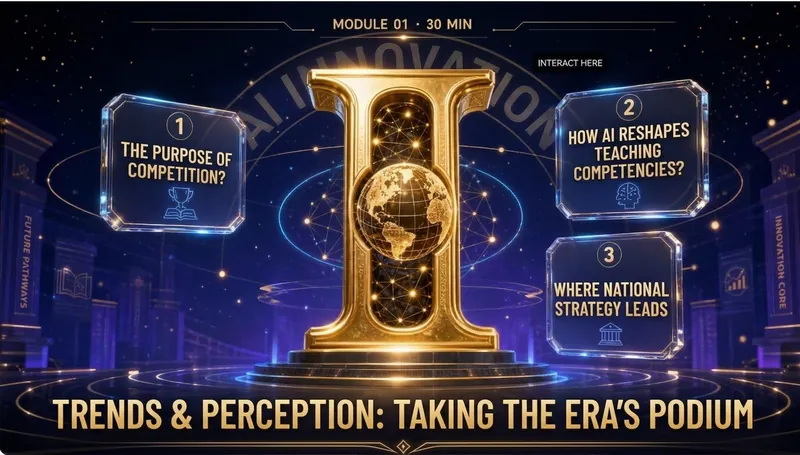
Elite Tech Slide Designer
Make every slide a breathtaking moment for the audience! Are you still suffering through presentations like these? 😴 Your carefully prepared content ruined by a template-heavy PPT? 😩 Judges or clients think "another ordinary presentation" at first glance, losing interest instantly? 😵 You want to convey authority, cutting-edge, and trustworthiness, but it looks like a "township enterprise brochure"? 😞 Others' PPTs look like an Apple launch, yours like a 1998 Office default template? The problem isn't your content—it's your visual authority! ✨ Now, equip the Elite Tech Slide Designer skill 👉 Turn any content (speech, report, whitepaper, policy briefing) into: An elegant film-like chapter structure that gives the audience breathing rhythm 💎 With this skill, you'll gain: 🔥 A design master assistant that builds your authority—no more struggling with colors, fonts, or alignment 🔥 A cover that makes judges/clients "hold their breath" at first sight—winning their expectations in 3 seconds 🔥 Never flashy or cheap 🔥 A "premium template library" that peers secretly copy—isometric 3D + glassmorphism + gold fine lines, max visual impact 🔥 Get asked "Can you send me that PPT?" after your speech—your presentation will be remembered because of the slides 🎯 Who is it for? 🎙 Seasoned speakers / TED-style presenters—keynotes, industry conferences, product launches 💼 Senior consultants / investment managers—investor roadshows, board meetings, client proposals 🎓 University professors / academic authorities—academic lectures, research reports, policy briefings 📊 Corporate strategy leads / CMOs—annual strategy meetings, brand launches, media communications 🏆 Any professional participating in national competitions/reviews—teaching competitions, innovation contests, project defenses ⚡️ Install Elite Tech Slide Designer now Turn your next presentation into a visual ritual that makes the audience "hold their breath and rush to save." "Not just conveying information, but creating a sanctuary." This skill is your scepter of visual authority. 👑 👇 Click to install and become the speaker that makes your peers say, "That's the one who made the audience hold their breath!"
 Slides
AI Training Design Engine
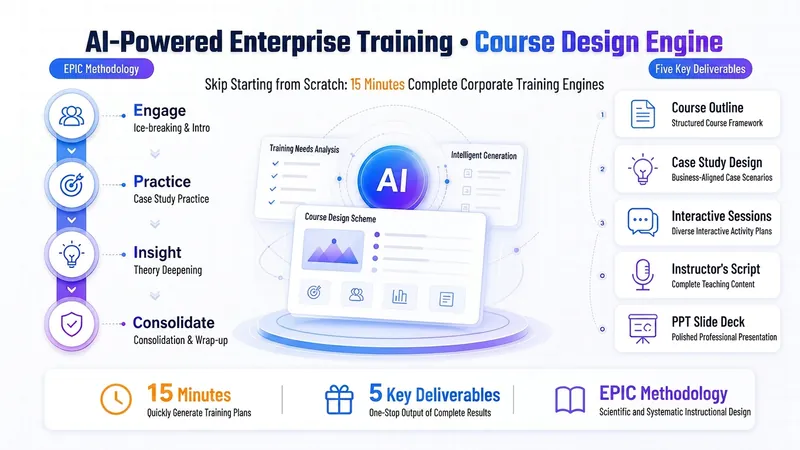
Design a complete "AI-powered" corporate training course in 15 minutes—fully delivered and ready to use. 🎯 Questionnaire-style needs collection—check to start, zero learning curve 📋 Auto-generates EPIC-structured course outline: pain-point activation → practice first → theory embedded → sense of achievement wrap-up 🛠 Supplies AI hands-on cases for each module—includes complete prompt templates that learners can copy and use directly 📝 One-click output of page-by-page speaker script + Slides—ready to present immediately 💎 Save 1–2 days of prep time (trainer hourly rate 200–500 RMB, value 1,600–8,000 RMB) ✨ Based on 10 years of corporate internal training experience, serving middle-manager training scenarios at state-owned enterprises. The original EPIC teaching method specifically addresses the pain points of 'learners don't like listening, won't get hands-on.' Iterated over a dozen versions, optimized through feedback from multiple users. 🔍 Trigger scenarios: Designing corporate training courses / Creating AI training plans / Lesson preparation / Writing training outlines / Corporate internal trainer lesson prep
 Research
Flagship 3-Step Lesson Planner
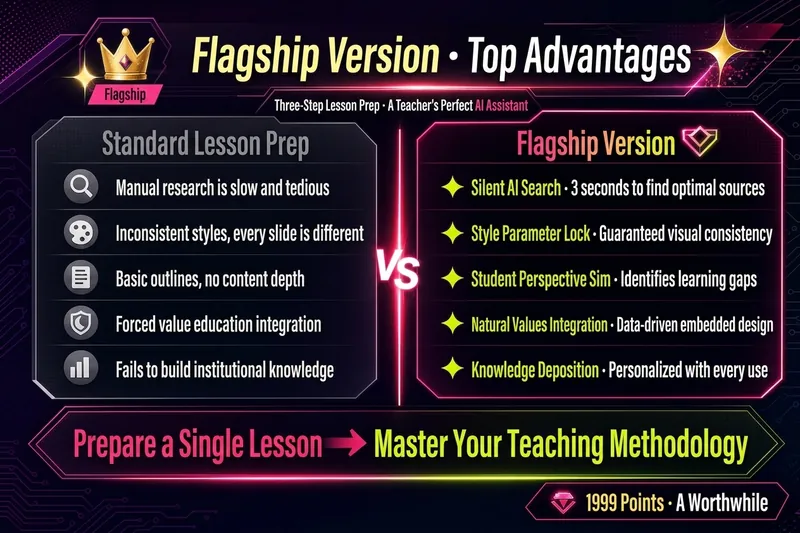
🔥【Back-to-School Limited-Time Offer】1,599 points from August 27 to September 5 (regularly 1,999)! Start the new semester with a contest-ready lesson-prep package. 【Generate Five Lesson-Prep Essentials at Once】 🖥 PPT (polished contest version / lightweight everyday version) · 📝 Word-for-word teaching script and lesson plan (with complete teacher prompts—just follow along) · 🎯 Activity design · Board work · In-class practice exercises 【Why “Contest-Level” Quality?】 This Skill includes a library of teaching-design patterns from top-quality and model lessons nationwide, covering mainstream contest approaches such as contextual introductions, task-based learning, question chains, and flipped classrooms. It also incorporates professional frameworks including Bloom’s taxonomy, the ADDIE model, and Understanding by Design (UbD). Every lesson is checked against these methodologies rather than being a simple pileup of content. 【Flagship Edition Upgrades】—Designed with high-quality lessons in mind ✨ Hybrid questionnaire: Select options and enter details freely to complete information collection in 30 seconds ✨ Parameter lock: Course information and PPT style are locked in the first step, with no drift in later generation ✨ Real interactive confirmation: Clickable options for outline confirmation and five-piece selection enable personalized customization ✨ Dual-mode PPT: Smart switching between contest presentation and everyday teaching modes ✨ Closed-loop post-lesson reflection: Questionnaire collection → AI-generated reflection → Board Memory stores your dedicated teaching profile ✨ Controlled costs: Cost expectations are stated before generation; choose between a fully illustrated polished version and a lightweight outline version, with no overproduction or automatic upgrades 【Three-Step Process】 ① Collect information → Two rounds of interactive questionnaires + parameter lock ② Confirm the outline → AI provides the teaching framework first; generation begins after you confirm ③ Visual delivery → Generate the five-piece set all at once: PPT + word-for-word script / contest-standard lesson plan + activity design + board work + practice exercises, with flexible combinations 【Pricing】 1,599 points (back-to-school limited-time offer; regularly 1,999)—the price of a cup of coffee in exchange for freedom from daily lesson-prep stress. · Generate the complete five-piece set in one use · Cut lesson preparation from about 4 hours to about 1 hour · Generate contest lesson plans directly · Teach everyday classes with ready-to-use materials · Iterated through use by 45 teachers, saving more than 200 hours of lesson-prep time in total 💡 Suitable for: All grade levels from kindergarten through university, and all subjects including language arts, math, English, physics, chemistry, biology, history, geography, civics, arts, and physical education. Suitable for everyday teaching, contest presentations, and open classes. ⚠️ Review and revise AI-generated content based on your textbook edition, school requirements, and students’ actual learning needs. Teachers’ professional judgment should have the final say. 📩 Feedback and suggestions: 593975647@qq.com. Feedback comes with a little surprise 🎁~
Instruction Designer PPT Style
Top-tier Training & Courseware
Description
Recommended by
nene@YouMind
Why we love this skill
This skill is built around the ADDIE model, integrating P-I-E structure and narrative path design, ensuring that the output courseware is not only visually friendly but also learner-centered and interactive, truly achieving knowledge transfer and behavioral change.
Make every slide a “wow” moment for your learners! Are you still suffering through training sessions like these? Learners scrolling on their phones while you deliver a one-person stand-up comedy? You prepare valuable content, only to get blank stares and yawns? After the course, learners are “excited when listening, moved when thinking, but back to square one when leaving”? The problem isn’t your knowledge—it’s how you deliver it! ✨ Now, install the “ADDIE Interactive Courseware Designer” skill 👉 Turn any training content (Word, PPT, mind map) into: ✅ Learner-centered – No more lecturing. Ignite engagement with icebreakers, interactions, and hands-on activities. ✅ ADDIE model compliant – Analysis → Design → Development → Implementation → Evaluation, a complete learning loop. ✅ P-I-E modular structure – Each slide: Present → Interact → Exercise, so learning sticks. ✅ Instruction-friendly visual aesthetics – Bright colors, flat illustrations, clear layout—even the back row can see. ✅ Complete narrative path – From welcome to action plan, driving knowledge into real behavior. 💎 Install it, and you’ll get: 🔥 An expert assistant that helps you design courses—no need to study instructional design theories. 🔥 Class atmosphere where learners actively participate and rush to practice—interactive sessions keep everyone engaged. 🔥 SMART action plans that are actionable after class—training results visible, bosses and learners satisfied. 🔥 “Premium courseware” that impresses peers—top-notch in both visual and structural design, maxing out professionalism. 🎯 Who is it for? Corporate trainers / Training managers Instructional designers / Course developers Knowledge bloggers / Educators Anyone who wants “learning to truly happen” ⚡️ Install “ADDIE Interactive Courseware Designer” now Turn your next training into an experience where learners “chase after learning.” “Not to instill, but to ignite.” This skill is the torch in your hand. 👇 Click to install and become the teacher that learners remember as “the one who can really teach”!
Related Skills
View allElite Tech Slide Designer
Make every slide a breathtaking moment for the audience! Are you still suffering through presentations like these? 😴 Your carefully prepared content ruined by a template-heavy PPT? 😩 Judges or clients think "another ordinary presentation" at first glance, losing interest instantly? 😵 You want to convey authority, cutting-edge, and trustworthiness, but it looks like a "township enterprise brochure"? 😞 Others' PPTs look like an Apple launch, yours like a 1998 Office default template? The problem isn't your content—it's your visual authority! ✨ Now, equip the Elite Tech Slide Designer skill 👉 Turn any content (speech, report, whitepaper, policy briefing) into: An elegant film-like chapter structure that gives the audience breathing rhythm 💎 With this skill, you'll gain: 🔥 A design master assistant that builds your authority—no more struggling with colors, fonts, or alignment 🔥 A cover that makes judges/clients "hold their breath" at first sight—winning their expectations in 3 seconds 🔥 Never flashy or cheap 🔥 A "premium template library" that peers secretly copy—isometric 3D + glassmorphism + gold fine lines, max visual impact 🔥 Get asked "Can you send me that PPT?" after your speech—your presentation will be remembered because of the slides 🎯 Who is it for? 🎙 Seasoned speakers / TED-style presenters—keynotes, industry conferences, product launches 💼 Senior consultants / investment managers—investor roadshows, board meetings, client proposals 🎓 University professors / academic authorities—academic lectures, research reports, policy briefings 📊 Corporate strategy leads / CMOs—annual strategy meetings, brand launches, media communications 🏆 Any professional participating in national competitions/reviews—teaching competitions, innovation contests, project defenses ⚡️ Install Elite Tech Slide Designer now Turn your next presentation into a visual ritual that makes the audience "hold their breath and rush to save." "Not just conveying information, but creating a sanctuary." This skill is your scepter of visual authority. 👑 👇 Click to install and become the speaker that makes your peers say, "That's the one who made the audience hold their breath!"
SlidesAI Training Design Engine
Design a complete "AI-powered" corporate training course in 15 minutes—fully delivered and ready to use. 🎯 Questionnaire-style needs collection—check to start, zero learning curve 📋 Auto-generates EPIC-structured course outline: pain-point activation → practice first → theory embedded → sense of achievement wrap-up 🛠 Supplies AI hands-on cases for each module—includes complete prompt templates that learners can copy and use directly 📝 One-click output of page-by-page speaker script + Slides—ready to present immediately 💎 Save 1–2 days of prep time (trainer hourly rate 200–500 RMB, value 1,600–8,000 RMB) ✨ Based on 10 years of corporate internal training experience, serving middle-manager training scenarios at state-owned enterprises. The original EPIC teaching method specifically addresses the pain points of 'learners don't like listening, won't get hands-on.' Iterated over a dozen versions, optimized through feedback from multiple users. 🔍 Trigger scenarios: Designing corporate training courses / Creating AI training plans / Lesson preparation / Writing training outlines / Corporate internal trainer lesson prep
ResearchFlagship 3-Step Lesson Planner
🔥【Back-to-School Limited-Time Offer】1,599 points from August 27 to September 5 (regularly 1,999)! Start the new semester with a contest-ready lesson-prep package. 【Generate Five Lesson-Prep Essentials at Once】 🖥 PPT (polished contest version / lightweight everyday version) · 📝 Word-for-word teaching script and lesson plan (with complete teacher prompts—just follow along) · 🎯 Activity design · Board work · In-class practice exercises 【Why “Contest-Level” Quality?】 This Skill includes a library of teaching-design patterns from top-quality and model lessons nationwide, covering mainstream contest approaches such as contextual introductions, task-based learning, question chains, and flipped classrooms. It also incorporates professional frameworks including Bloom’s taxonomy, the ADDIE model, and Understanding by Design (UbD). Every lesson is checked against these methodologies rather than being a simple pileup of content. 【Flagship Edition Upgrades】—Designed with high-quality lessons in mind ✨ Hybrid questionnaire: Select options and enter details freely to complete information collection in 30 seconds ✨ Parameter lock: Course information and PPT style are locked in the first step, with no drift in later generation ✨ Real interactive confirmation: Clickable options for outline confirmation and five-piece selection enable personalized customization ✨ Dual-mode PPT: Smart switching between contest presentation and everyday teaching modes ✨ Closed-loop post-lesson reflection: Questionnaire collection → AI-generated reflection → Board Memory stores your dedicated teaching profile ✨ Controlled costs: Cost expectations are stated before generation; choose between a fully illustrated polished version and a lightweight outline version, with no overproduction or automatic upgrades 【Three-Step Process】 ① Collect information → Two rounds of interactive questionnaires + parameter lock ② Confirm the outline → AI provides the teaching framework first; generation begins after you confirm ③ Visual delivery → Generate the five-piece set all at once: PPT + word-for-word script / contest-standard lesson plan + activity design + board work + practice exercises, with flexible combinations 【Pricing】 1,599 points (back-to-school limited-time offer; regularly 1,999)—the price of a cup of coffee in exchange for freedom from daily lesson-prep stress. · Generate the complete five-piece set in one use · Cut lesson preparation from about 4 hours to about 1 hour · Generate contest lesson plans directly · Teach everyday classes with ready-to-use materials · Iterated through use by 45 teachers, saving more than 200 hours of lesson-prep time in total 💡 Suitable for: All grade levels from kindergarten through university, and all subjects including language arts, math, English, physics, chemistry, biology, history, geography, civics, arts, and physical education. Suitable for everyday teaching, contest presentations, and open classes. ⚠️ Review and revise AI-generated content based on your textbook edition, school requirements, and students’ actual learning needs. Teachers’ professional judgment should have the final say. 📩 Feedback and suggestions: 593975647@qq.com. Feedback comes with a little surprise 🎁~
Find your next favorite skill
Explore more curated AI skills for research, creation, and everyday work.