AI Nail Designer
AI Nail Designer
Showcase
Description
Upload a photo of your hand. AI automatically analyzes your skin tone, hand shape, nail shape, and other features, then generates 3–5 customized nail art designs for you to choose from. It also outputs a professional implementation document that includes color codes and step-by-step instructions. You can specify nail length, seasonal preferences, and budget options. This helps you find the perfect nail design and accurately communicate it to your nail artist.
Why we love this skill
This AI Nail Designer intelligently generates customized nail art plans based on your hand features and preferences, and provides detailed step-by-step instructions and color code suggestions, making it easy for you to get your own unique nail design.
Related Skills
View all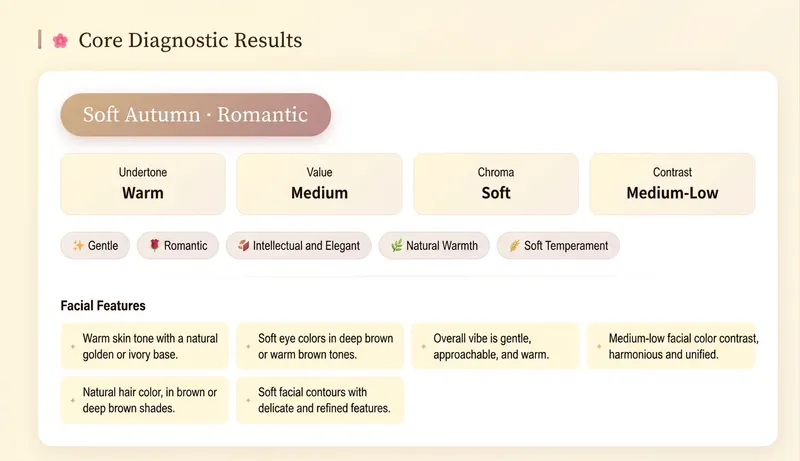 Image
ImageAI Color Stylist V2.0
Avoid pitfalls with lipstick, hair color, and clothing colors—stop buying in confusion. Generate personalized color schemes to build long-term, reusable color rules. 🎨 AI Color Stylist Pro – Professional Color Consultation ✨ Comparable to ¥4,000 in-person consultations, now only 199 Credits! 🎉 Limited-time early bird pricing! Tiered prices: • 11th–100th: 199 Credits✨ (current price) • 101st–200th: 299 Credits • 201st and up: 399 Credits ⏰ Price increases automatically with user count—buy early and enjoy! ━━━━━━━━━━━━━━━━━━━━ 📊 14 Professional Analysis Modules ✅ Precise seasonal color type positioning (Warm Spring/Bright Spring/Soft Spring, Light Summer/Cool Summer/Soft Summer, Warm Autumn/Soft Autumn/Deep Autumn, Cool Winter/Deep Winter/Bright Winter) ✅ Complete color swatch display (20–30 core colors with HEX codes) ✅ Makeup color schemes (foundation, brows, eyeshadow, blush, lipstick with specific brand shades) ✅ Hair style and color advice (dye shades, hairstyles, bangs recommendations) ✅ Outfit coordination (color formulas, item recommendations, neckline test) ✅ Detailed accessory analysis (metallic tones, gemstones, earrings, necklaces, bags, glasses) ✅ Shopping list (specific brands, shades, price ranges) ✅ 3 complete outfit examples ━━━━━━━━━━━━━━━━━━━━ 🌟 Delivery Format Beautiful interactive web report: • Visual display of all colors • Gradients + card layout • Responsive design, perfect on mobile and desktop • Shareable, savable, printable ━━━━━━━━━━━━━━━━━━━━ 👥 Who It's For • You want to enhance your personal image • You don’t know how to choose clothing colors • You want to find your best makeup and hair color • You’re preparing for seasonal shopping and need pro advice • You want to discover your seasonal color type ━━━━━━━━━━━━━━━━━━━━ 💡 How to Use 1. Upload a front-facing photo in natural light (or describe your features in text) 2. Answer a few simple multiple-choice questions 3. AI conducts professional analysis across 14 modules 4. Receive a beautiful web-based diagnostic report 5. Get a complete shopping list and styling recommendations ━━━━━━━━━━━━━━━━━━━━ ⏰ Limited time and quantity—first come, first served!
 Image
ImageAI Style Quick Diagnosis V3.0
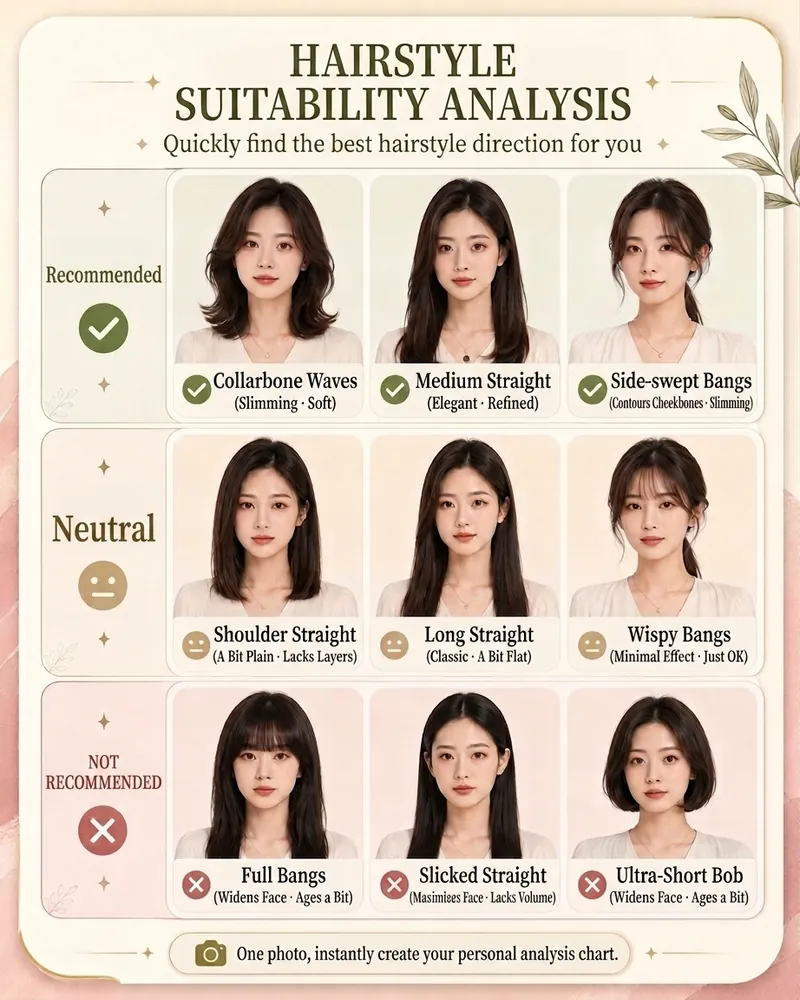
Save hundreds to thousands of dollars in trial and error costs by buying three fewer unsuitable outfits. Upload a photo to quickly identify the top 3 image issues to address first. Can't choose a hairstyle, don't know how to match colors, or worried about buying the wrong jewelry? Upload a photo to quickly generate your AI Style Quick Diagnosis Card Pro. The system will provide clear, intuitive analysis results across four modules: hairstyle, makeup, color, and jewelry, helping you quickly find a personal style that suits you better. No complex tests needed—just one photo for a visual reference, perfect for everyday beauty improvement, self-enhancement, and image management.
 Image
ImageReality Blend Artist Pro
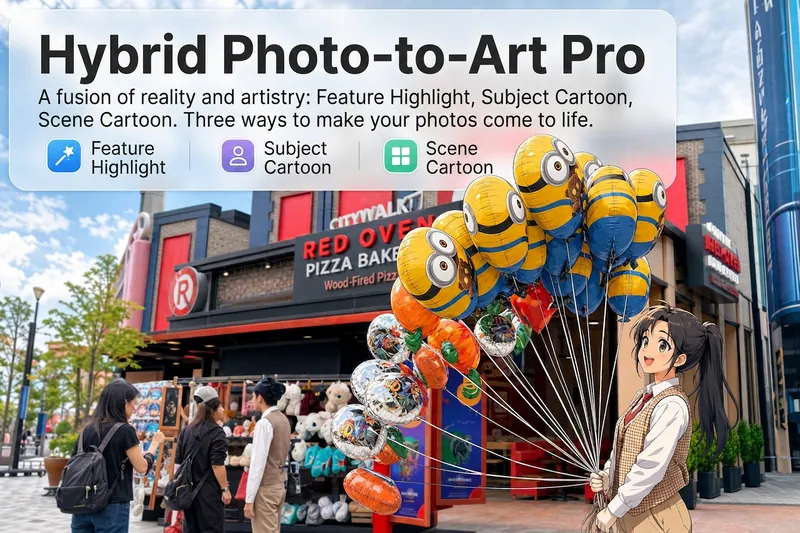
Upload a photo, and AI first reads it like a visual analyst across five dimensions: what the subject is, how it is composed, its color palette, where the visual focus lies, and what emotion it conveys. It then tells you where a hand-drawn treatment would have the most impact and how to make it look best. Four real-and-drawn blend modes, four ways to play: 🔹 Local Accents — Keep the overall image realistic while AI selects 2–3 local areas to replace with a hand-drawn style. Patterns on a sign, the coffee cup in someone’s hand, or a few flowers peeking out from a flower bed—just enough to give the photo a sense of life. Choose from 4 hand-drawn styles: pencil sketch / watercolor wash / sticker doodle / clay relief. 🔹 Subject Anime — Turn a person, animal, or object into an anime-style subject while keeping the background’s realistic photographic texture. Choose from 5 anime styles: action manga / American superhero comics / Ghibli-style / Korean webtoon / Chinese ink wash. It feels like an anime character has stepped into the real world. 🔹 Environment Anime — Reverse the approach: keep the subject realistic while transforming the surrounding environment into an anime style. The contrast of being in a real world surrounded by a 2D universe is instantly amplified. 🔹 Selective Color Light Trails — Convert the image to black-and-white grayscale while keeping selected objects in their original, highly saturated colors. Clean white detail outlines surround the colored objects, extending into flowing, curling, psychedelic agate-like color trails that naturally follow the scene’s direction. Retro collage × surreal art turns a single photo into a movie poster in an instant. Each mode × 2 blending methods: Gradient Feathering (a natural transition between real and illustrated, like ink spreading through paper) / Hand-Drawn Border (a white outline, like a sticker placed on the image). No blind image generation—you're in control at every step. AI analyzes first → recommends an approach → you confirm → then it generates, helping avoid wasted results. For portrait photos, faces and facial features are automatically avoided and are not replaced with hand-drawn elements. The number of local areas is limited to 2–3, with professional constraints on their position and size—the result is a finishing touch, not a collage. 4 modes · 16 styles · 2 blending methods = 32 real-and-drawn combinations. The same photo can take on completely different moods.
Information
- Version
- v3
- Last updated
- Runtime credits
- Usage-based
- Models
- Auto
