
Post-Meeting Decision Video
Turn meeting notes into 45–75s decision clips
Post-Meeting Decision Video
Turn meeting notes into 45–75s decision clips
Showcase
Description
In complex B2B sales, you've won over the attendees, but they struggle to explain your value to executives and finance teams who missed the meeting. Send me your meeting notes, proposal, or product screenshots, and specify who should see it. I won't fabricate an AI ad; instead, I'll create a **Fact Ledger** and, once you confirm it, strictly follow the 3-10-15 narrative framework to produce a **45–75 second client-specific decision video** (with motion graphics, professional voiceover, and clear next steps). Designed for independent consultants, agencies, and B2B sellers, it lets your proposal be safely and accurately forwarded within your client's organization.
Related Skills
View all
B2B Collaboration Feasibility
Input a client name, output a deal feasibility report ready for decision meetings. Process: Company profiling research → Value chain breakdown (including in-house/outsourcing assessment) → Scenario matching matrix → Hard constraint veto → Six-dimension weighted scoring (1-10) → Decision chain and 30/60/90-day action plan → Verification checklist. Produces both YouMind document and web report. Three key differences from ordinary client analysis: ① Will say 'no'. Things your solution cannot do are recorded in the 'Solution Profile', and boundary-crossing scenarios are directly vetoed, without masking through rhetoric. ② First determine whether the process is in-house or outsourced. No matter how painful the client's problem is, if that process has already been outsourced, the buyer is their supplier; the client entity has changed, and it must be assessed separately. ③ Check if value metrics can align. You talk about defect rate, the client talks about government assessment scores; proposals without a 'conversion rate' between the two languages will be rejected during financial review. Our capabilities are injected once via the 'Solution Profile' and reused long-term, applicable to any industry and any B2B solution (hardware/software/service/integration). Built-in value chain decomposition for seven types of industries: discrete manufacturing, retail chain, software/internet, B2B services & finance, energy & infrastructure, healthcare/education/government, and project-based integration, along with a mixed-ownership decision chain template. Every key piece of information is required to be labeled as fact/inference/unknown to avoid using inference as fact. Trigger words: client assessment, cooperation feasibility, client analysis, deal assessment, worth pursuing, can we take it, client screening.
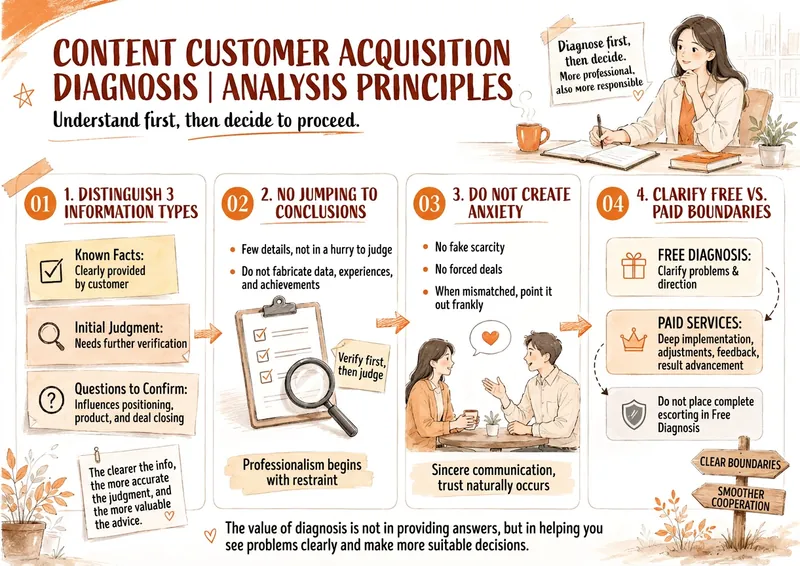
High-Ticket Sales Diagnostic
Have you encountered these situations? You've posted a lot of content, but clients don't take action after reading; You've spent half an hour on a free diagnostic, only to get a "I'll think about it"; You can clearly see the client's problem, but don't know how to ask questions, give solutions, or naturally move toward payment; You've talked a lot about your high-ticket product, but the other person still doesn't see the value. Tongtong's 30-Minute High-Ticket Content Lead Generation Diagnostic is designed specifically for those who want to generate leads through self-media, especially those selling high-ticket products. It turns an ordinary conversation into a professional diagnostic that is valuable, well-defined, and moves the sale forward. You only need to input the potential client's introduction, product, account, articles, and current issues. It will follow: Vision → Positioning → Product → Content → Platform Traffic → Private Domain Sales → Delivery Evidence to complete a systematic analysis and directly generate: ✦ The client's top 3 current sales blockers ✦ A minute-by-minute 30-minute diagnostic process with full scripts ✦ Coaching-style questions, follow-up questions, and mirroring ✦ Client differentiated advantages and high-ticket value extraction ✦ Content planning for lead generation, trust building, and closing ✦ Account types: WeChat Official Account, Xiaohongshu, Short Video, Private Domain division ✦ Methods to naturally transition from free diagnostic to paid coaching ✦ Common objection responses and post-meeting follow-up copy ✦ Judgment on whether the client is really suitable to purchase coaching Don't turn your free diagnostic into a useless Q&A session. Let the client see their problem clearly within 30 minutes, feel your expertise, and understand why they need a more complete paid solution.
 Video
VideoFood & Drink Ad Maker
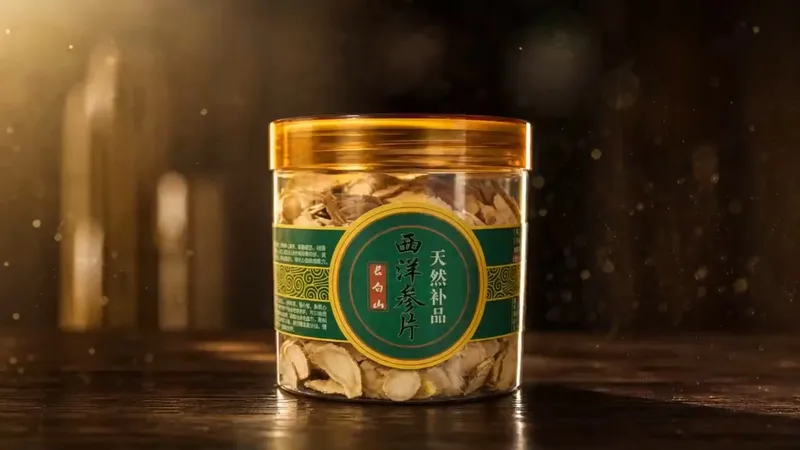
Ways to monetize the Skill: 1. Pay per generation: charge for each completed video, such as $4.99–$29.99 per video; 2. Subscription: offer e-commerce operators and high-volume sellers unlimited monthly or annual generations, priced at a fraction of the cost of one professional shoot; 3. Tiered pricing by duration or quality: use a free or low-cost 15-second basic version to attract users, then charge extra for 30-second or sound-effect versions. Best for: 1. E-commerce and food and drink brands without a production team or ad budget that want polished product promos; 2. Small and midsize food manufacturers and white-label factories that need a product video for product pages or social posts; 3. E-commerce operations and agency teams that need to produce ad assets for clients in bulk while reducing outsourced production costs; 4. Short-form commerce creators and group-buying organizers who want a visually focused asset for snack and drink products to improve conversions; 5. New consumer brands launching products that cannot wait for a professional team’s schedule and want to build momentum with an AI-generated video first. Upload any food or drink packaging image, and AI will automatically identify the product type and generate a cinematic, seven-scene ad storyboard—from the product reveal to the hero visual freeze—in one click. YouMind automatically handles the entire process, from image generation to image-to-video creation and final video assembly. You don’t need to understand camera-movement terminology or write prompts, and you don’t need to switch between tools. All you need is one product photo and one sentence. The default duration is 15 seconds, but you can set any length. From potato chips and milk tea to chocolate and craft beer, anything edible or drinkable can be turned into a polished, big-brand-style ad with one click.
Information
- Version
- v2
- Last updated
- Runtime credits
- Usage-based
- Models
- Auto
