
Scene Storyboard to Prompts
Consistent shots, ready-to-use prompts
Scene Storyboard to Prompts
Consistent shots, ready-to-use prompts
Showcase
Description
Storyboard to Prompts — Consistency-Locked Shot Prompts. Russian title: Scene Storyboard to Prompts with Image Consistency. Enter a scene, its beats, or a finished shot list, and the Skill will return a storyboard and prompts. It builds a model sheet for characters and props—consistent descriptions that can be inserted verbatim into every shot; separates each prompt into a locked core and a variable section; establishes a shared vocabulary for shot size, camera movement, lighting, and color palette; writes one negative prompt for the entire scene; and keeps a regeneration log so the main character doesn’t “drift.” The output is a shot-and-prompt table ready for use in Seedance, Veo, or Kling, plus an end-to-end continuity check using a screen-direction map. The Skill answers two questions for every scene: what stays word-for-word in the prompt, and what changes from shot to shot. It does not restage the scene or invent its drama—it takes decisions that have already been made and makes them reproducible in a generator. The main problem it solves is the “drifting” character: the face, hairstyle, clothing, and props change between clips, the characters’ screen directions get mixed up, objects are replaced with similar ones, and the video falls apart into a collection of beautiful images. The Skill is a direct continuation of “Mise-en-Scène and Blocking”: the first answers “how should the scene be staged?” while this one answers “how can you get shots where the character and props stay the same?” It is suited to AI directors and creators, indie animators, marketers, and agencies assembling cohesive videos in Seedance, Veo, Kling, and similar tools. The output format is a shot table with prompts and a screen-direction map, ready to use immediately. Tags: storyboard, video prompts, character consistency, image consistency, props and continuity, model sheet, negative prompt, Seedance, Veo, Kling. English title: Storyboard to Prompts — Consistency-Locked Shot Prompts.
Best for
For AI directors, animation creators, marketing teams, and agencies creating cohesive video scenes.
How to use this Skill
Provide your input
Provide the scene, its beats, or a ready-made shot list, along with details about the characters, props, location, lighting, and format.
Run the Skill
The service converts approved material into a shot-by-shot storyboard, separating consistent image elements from changeable shot parameters.
Review your result
You’ll receive a shot table with prompts and a continuity map to preserve character appearances, props, and screen directions.
Related Skills
View allScene Dialogue & Subtext
English: Dialogue & Subtext — Scene to Dialogue Score. Russian title: Dialogue and Scene Subtext — from dialogue to a sound score. Enter a scene with dialogue, and the Skill will return a working dialogue sound score broken down by shot. It analyzes what the characters say literally and what they really mean; gathers what remains unspoken; decides for each line what should be said in words, moved into action, or given to a pause; finds moments where silence is stronger than words; distributes the text across shots, including voiceover and a silent response; establishes intonation through on-screen behavior rather than voice generation; marks where an object sound or everyday noise replaces a line; and decides where music is unnecessary and why. The output is a shot-by-shot table: dialogue, pause, silence, everyday sound, what is heard, and what is not voiced. The Skill answers two questions for every scene: what the characters are really saying and how to distribute it across shots so that meaning is carried by more than words. It works with a scene containing dialogue or the ready-made shot list from the first two Skills, focusing on the dramaturgy of sound. Its core principle: voiceover alone is not a method; the Skill delivers directorial decisions—what stays silent, what sounds, and where pauses and silence belong—rather than a speech-generation button. The third Skill in the line continues “Scene Mise-en-Scène and Blocking” and “Storyboard a Scene into Prompts with Image Consistency”: the first stages the scene, the second maintains the image from shot to shot, and the third analyzes what the characters are really saying and what remains unspoken. It does not repeat the first Skill’s sound layer: that one provides the technical map of “what is heard,” while this one addresses the meaning and subtext of the dialogue—“what it means.” The number and order of shots come from the shot list and do not change. Suitable for AI directors and creators using Seedance, Veo, and Kling, as well as indie animators, screenwriters, and marketers. The output format is a shot-by-shot dialogue score, ready to use immediately. Tags: dialogue and subtext, sound score, pause and silence, voiceover, silent response, object sound, intonation through behavior. English title: Dialogue & Subtext — Scene to Dialogue Score.
Mise-en-Scène & Blocking
Mise-en-Scène & Blocking — Scene to Shot List (English title). Enter a scene, and the Skill will return a staging solution and translate it into prompts. It breaks the scene into action beats, places characters in space, determines who wants what in the frame, derives blocking movements from changes in the characters’ relationships, selects shot size and angle to match the meaning of the moment, maintains the eyeline and 180-degree axis, decides whether the camera should move and why, reads lighting and time of day as carriers of meaning, plans the scene’s sound layer, and produces a shot-by-shot shot list with a sound column and ready-to-use prompts for your generation model. The Skill answers two questions for every scene: what to stage on set and what to write in the prompt so the generator reproduces exactly that. It is not about “what kinds of shots exist,” but about a specific scene. A separate section addresses the main challenge in AI video—character inconsistency and a “clip-like” feel—with a fixed reference look, consistent wording, shot order, seed, and a list of things to avoid. It is suitable for AI directors and creators making videos in Seedance, Veo, Kling, and similar tools, as well as indie animators, marketers, and agencies. The output format is a shot table and prompt list, ready to use immediately. Tags: mise-en-scène, blocking, shot list and storyboard, AI video, scene direction, eyeline and axes, video prompts, cinematic shots. English title: Mise-en-Scène & Blocking — Scene to Shot List.
 Image
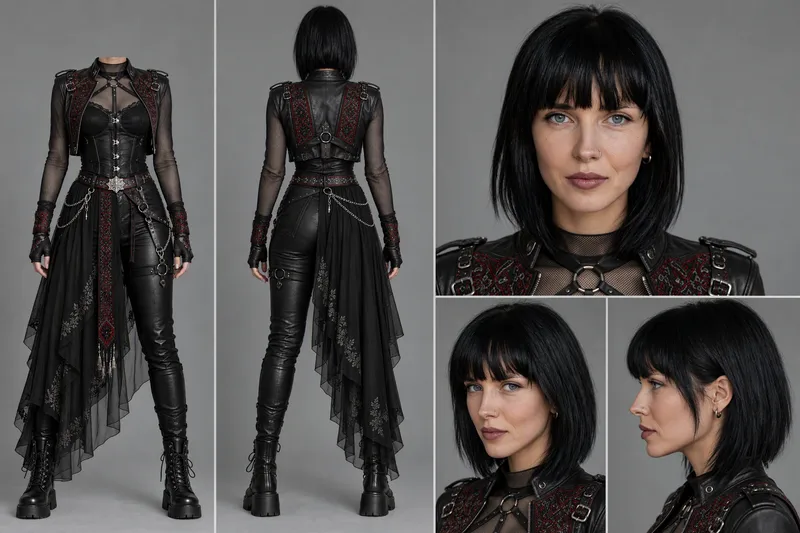
ImageCharacter Sheet
Creates a professional character reference sheet based on a character face reference. The skill first clarifies the purpose of the sheet (for video: 3 frames including front full-body without head, back full-body, and close-up portrait; for images/photos: 5 frames including two full-body shots and three portraits at front, three-quarters, and profile views), asks you to attach 1 to 3 face photos, asks whether the outfit needs to be changed (keep original / replace via outfit reference / describe in words), and requests an outfit reference if needed. It then compiles a prompt using strict templates and generates a sheet on a neutral gray background via GPT Image 2.5, preserving the original character's appearance, style, proportions, and materials.
Information
- Version
- v2
- Last updated
- Runtime credits
- Usage-based
- Models
- Auto
- Use cases
- Writing & contentVideo & audio
- What you get
- DocumentPrompt
