Content to Word
Content to Word
Showcase
Description
Organize multi-source content such as web pages, images, and documents into an editable-first Word document, recognizing the main text, retaining illustrations, and noting content that cannot be reliably converted.
Related Skills
View all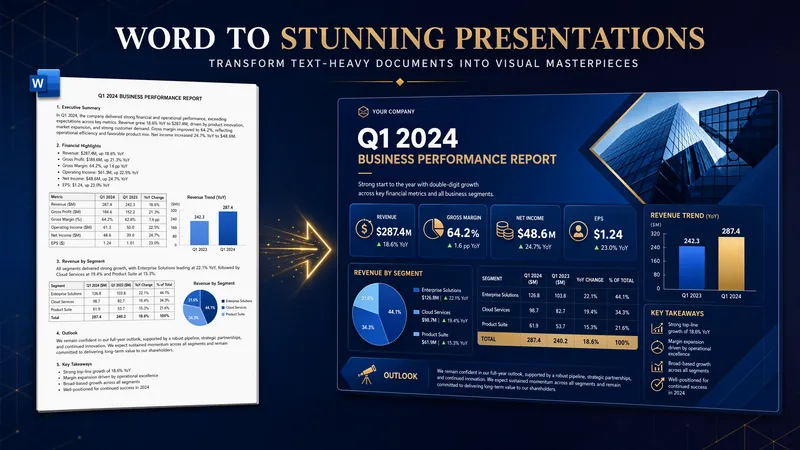
Convert Word Documents to PPT
Faithfully converts Word documents into client-ready, reading-oriented PPTs. Using semantic density segmentation, it intelligently paginates while strictly preserving the original content and order (zero alteration). Users can freely combine 16 visual styles with 6 generation models, and select image/text assets with true embedding of original images. Title provenance locks onto original titles, and a three-tier content fidelity audit (full entity coverage, full argument retention, paragraph fidelity ≥95%) works with a four-dimensional self-check (Tao, Method, Technique, Tool) and a page-by-page intelligent audit loop to ensure the final deliverable is well-illustrated, consistent in style, and leaves out no content.
 Research
Multi-Source Mind Map 2.0
Turn complex documents, web pages, or long text into clearly structured visual mind maps with one click. Whether it's academic papers, course materials, or technical documents, this tool intelligently extracts core topics and multi-level knowledge points, helping you quickly clarify the logical structure. Through in-depth content analysis of the input source, it automatically identifies section structure and key details, generating a well-organized knowledge system. This tool supports generating mind maps in multiple styles, including professional educational tree diagrams (PlantUML format) and intuitive center-radial diagrams (Mermaid format). You can directly get SVG images viewable in a browser, along with the corresponding source code files. This means you can quickly preview the results and also import the source code into XMind, FreeMind, or a Markdown editor for further editing and in-depth processing. Simply upload a PDF, Word, or text file, or provide a web link, to transform a large amount of information into a visual knowledge map. It's ideal for study notes, structured paper reading, and brainstorming presentations, making knowledge organization and sharing more efficient and professional.
English Slides to Bilingual
Convert an English PPT or PDF into a clear, editable English-Chinese bilingual document for course materials, meeting presentations, training materials, project proposals, and archiving. The original information and structure are preserved as much as possible, making titles, key points, steps, and data easier to read, search, and reuse. During conversion, unordered lists, ordered lists, and tables are organized appropriately based on the content. English text and its Chinese translation are arranged by paragraph and hierarchy, avoiding the separation of an entire English text from an entire Chinese translation while also avoiding the reading burden of alternating every line. English and Chinese titles are presented side by side to help readers quickly compare the original and translated text. For specialized content such as legal materials, the Chinese translation retains key English terms for proofreading, learning, and future professional use. Whether you need to preserve presentation content, create bilingual reading materials, or further edit course materials into a formal document, you will get a clearly structured and complete text result.
Information
- Version
- v2
- Last updated
- Runtime credits
- Usage-based
- Models
- Auto
