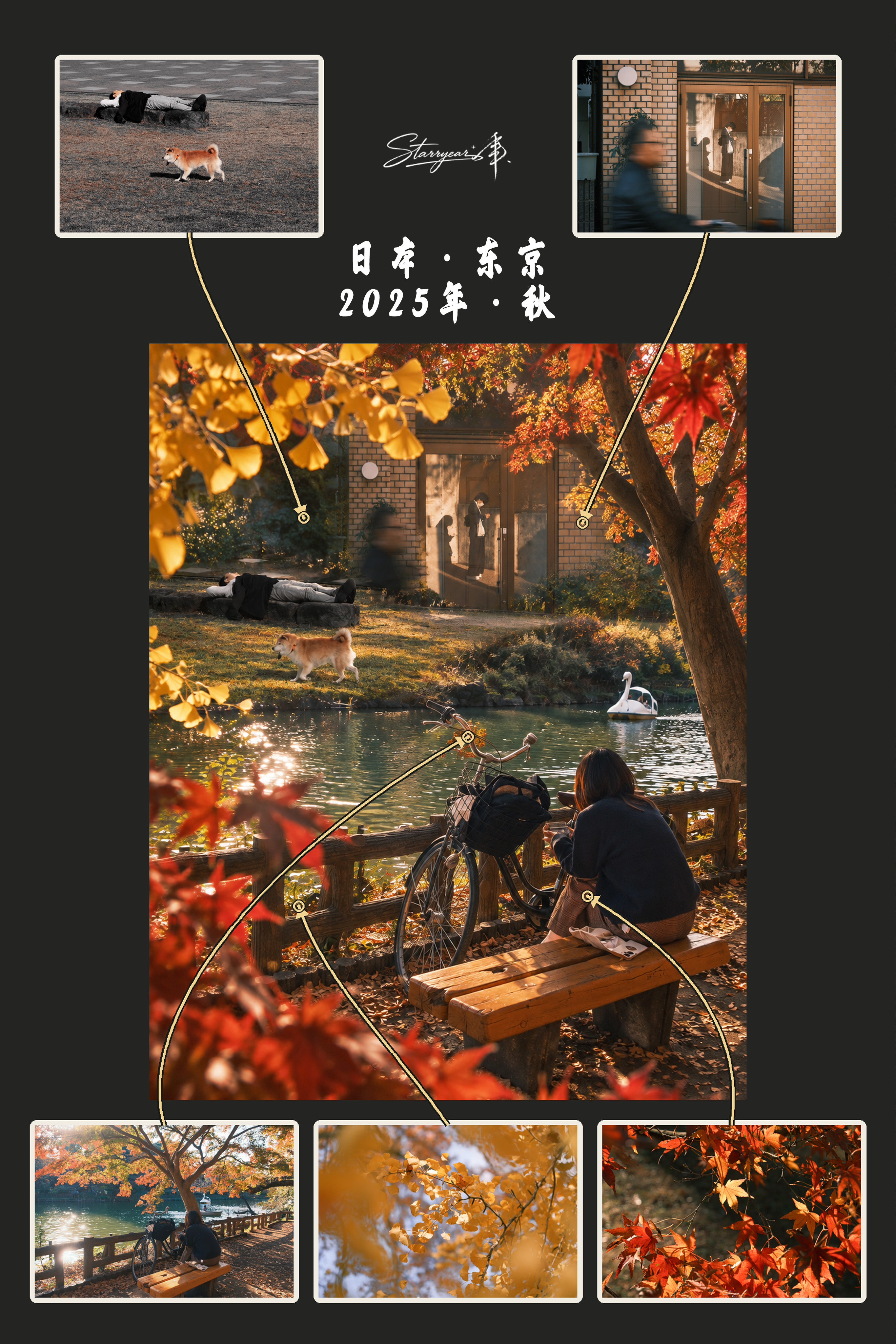
S.020 Starryear Photo Story
Turn five photos into a realistic story scene
S.020 Starryear Photo Story
Turn five photos into a realistic story scene
Showcase
Description
Combine exactly five photos into one continuous, realistic vertical story scene and deliver two finished images: an undecorated standalone main scene, plus a display collage with five numbered thumbnails, fine-line arrows, and space for copy. Ideal for travel records, family memories, character stories, or five-photo composites with multi-scene narratives—not ordinary photo grids or contact sheets. The main scene uses a 2:3 vertical 4K composition and fully preserves recognizable people, animals, objects, buildings, environmental structures, and important details from all five source photos. It does not arbitrarily add, remove, duplicate, or replace source content, while aiming to retain the original photos’ realistic colors, lighting, and spatial logic. The five photos are organized into one scene that can be read as a whole, rather than as four disconnected panels. The display collage uses thumbnails directly from the original photos, with clear connecting lines pointing to the corresponding content in the main scene. If you provide text, the display will reproduce it as written, without adding a title, date, byline, or watermark. If the five photos cannot be combined without omitting or adding content, the conflict will be clearly explained instead of being filled in through guesswork.
Recommended by
淡苍
Why we love this skill
Featured for its disciplined five-photo integration, faithful preservation of source elements, and delivery of both a realistic story scene and a guided presentation collage.
Best for
Ideal for five-photo composites featuring travel memories, family moments, character stories, or multi-scene narratives.
How to use this Skill
Provide your input
Provide exactly five photos. If you want copy included in the display, provide the original text as well.
Run the Skill
Combine the five photos into a continuous, realistic vertical story scene, then create a display collage with numbered thumbnails, connecting lines, and space for copy.
Review your result
Receive two finished images: an undecorated standalone main scene and a five-photo display collage.
Related Skills
View all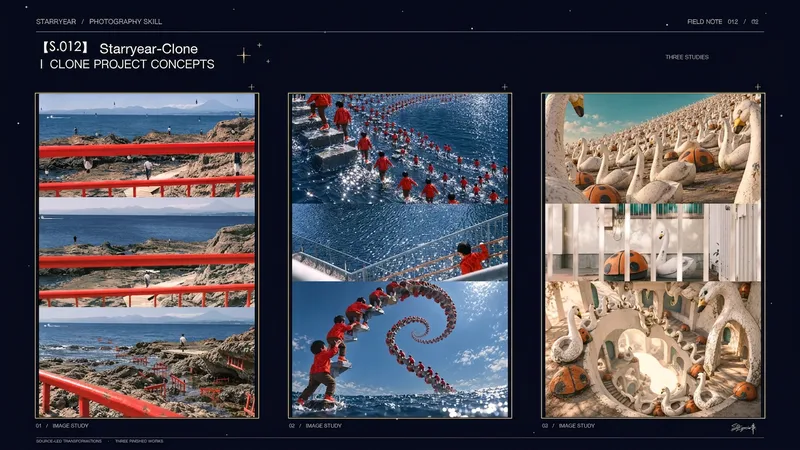 Image
Image[S.012] Year Clone · Photo
Turn one photo into a borderless vertical triptych: the center preserves an unaltered crop of the original image as clear evidence of the scene, while the top and bottom each clone and invert a different subject from the photo. The result is a surreal image rooted in the original environment. The top panel can focus on a primary subject such as a person or animal, while the bottom panel works well with boats, buildings, railings, landmarks, or other clearly structured objects. Each generated area retains one recognizable subject at a clear scale, while allowing smaller inverted forms to blend into the foreground, background, water, rocks, roads, or building edges. The original scene’s lighting, perspective, occlusion, materials, and depth of field are maintained. Ideal for photographic collages with separately duplicated and inverted people and objects, source-photo-driven surreal triptychs, and visual experiments that preserve features such as landmarks, mountains, and skylines. The final output is a single vertical 2:3 image with no text, border, watermark, or decorative title.
 Image
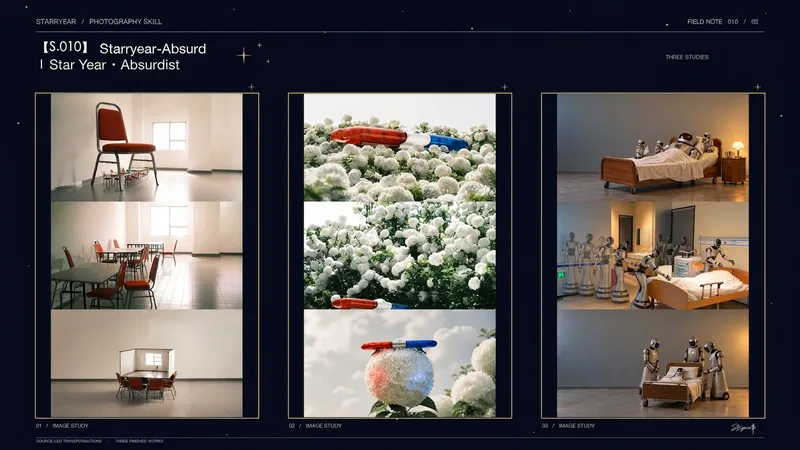
ImageS.010 · Starryear Absurdist
Turn one photo into a vertical absurd triptych that uses the original image as visual evidence: the top panel presents a scale-shifted absurd scene, the middle preserves the original photo with a horizontal crop, and the bottom forms a return or causal loop from the same absurd relationship. The final image combines three equal-width landscape 16:9 panels vertically with no gaps, creating an exact 16:27 composition without borders, text, or watermarks. The generated top and bottom panels develop new relationships only from the people, animals, objects, actions, quantities, colors, and lighting in the photo. They preserve important identifying features and recognizable outlines, using a spacious, restrained real-world or puppet-theater aesthetic. The middle panel uses only the original photo pixels, with orientation correction, proportional scaling, and conservative cropping where necessary. It is not redrawn, retouched, or filled in, ensuring that it remains a reliable record of the original image. Ideal for vertical absurd triptychs with the original image in the middle, photo-based derivative art, and surreal posters with visual narratives. It is not intended for ordinary filters, unrelated fantasy scenes, dense collages, or layouts that redraw the middle evidence photo.
 Image
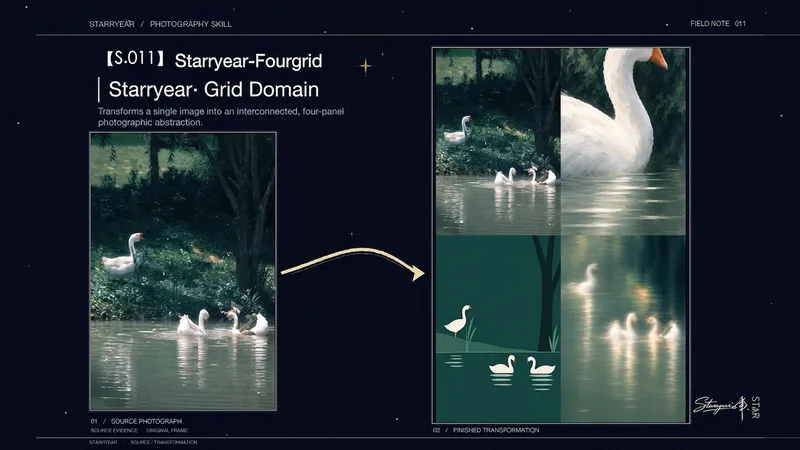
ImageS.011 YearGrid Starryear
Distill one photo into a complete 2:3 portrait four-panel abstract poster. While preserving evidence from the original photo, it explores different visual distances and emotional tones within the same scene. The finished piece follows the viewing order of “original evidence, enlarged abstraction, minimalist structure, and dreamlike afterimage”: key contours, spatial relationships, and color cues from the photo remain recognizable, while textures, light, reflections, or materials are reorganized into abstract expressions. This Skill is suited to four-photo layouts, four-panel grid posters, editorial-style visual work, and artistic reinterpretations based on a single photo. The three transformed panels share the original photo’s color relationships and visual DNA while clearly distinguishing enlarged details, sparse structures, and optical illusions—avoiding four duplicated filter treatments or an unrelated collage. The imagery emphasizes restrained textures, clear functional sections, and an overall balance that remains effective at thumbnail size. It works with photos of people, animals, architecture, nature, objects, and subjects with distinctive lighting or material qualities. The final output is a single, consistently proportioned portrait four-panel image ready for use, with no extra versions, borders, or unrelated decoration.
Information
- Version
- v5
- Last updated
- Runtime credits
- Usage-based
- Models
- Auto
- Use cases
- Images & designLifestyle & entertainment
- What you get
- Image
- Visual styles
- Photorealistic
