
Mood Prompt & Quote Cards
Create prompts, quotes, and layouts for mood cards
Mood Prompt & Quote Cards
Create prompts, quotes, and layouts for mood cards
Showcase
Description
Turn a sentence or your current emotion into a comforting illustrated graphic plan with a handmade feel: an image-generation prompt, a healing quote, and a layout for sharing on Moments. Triggers: pair this sentence with an image / I want a comforting illustration / make an emotion card / graphic for Moments / comforting image-generation prompt / draw this emotion / pair a sentence with an image / Moments graphic maker / daily emotion card
Best for
For anyone who wants to turn a current emotion or quote into a warm social graphic.
How to use this Skill
Provide your input
Provide a quote, emotion, or scene description. You can also add the intended use and preferred color palette.
Run the Skill
Turn the emotion into Chinese and English prompts for image-generation tools, paired with a healing quote and social-platform layout suggestions.
Review your result
Get an emotion card plan with an image-generation prompt, a short quote, and layout suggestions for platforms such as Moments.
Related Skills
View all Image
ImageOil Pastel Mood Collage
Posting emotional content and missing a warm image to go with it? Write a sentence or a mood, and you'll get a healing oil pastel illustration featuring hand-drawn characters, scattered everyday objects, and a handwritten quote. It's perfect for any post.

Jimeng Healing Portrait Prompt
Describe the image you want in one sentence, and it will automatically generate professional prompts that can be directly pasted into Jimeng. ✦ Who is it for For you who want to create healing-style character portraits with Jimeng but don't know how to write prompts. ✦ How to use Simply tell the Skill your idea, for example: · "A Japanese girl under cherry blossoms, a bit melancholic" · "Grandma reading by the window, afternoon sunlight, warm and healing" · "Randomly generate a healing-style male avatar for me" The more detailed your description, the more accurate the output. If your description is incomplete, the Skill will actively ask for missing information and provide reference options, helping you lock in the exact image you want step by step. ✦ Output Structured Jimeng prompts covering 7 dimensions: subject, style, scene, lighting, color, composition, and atmosphere. Just copy and paste into the Jimeng text-to-image input box.
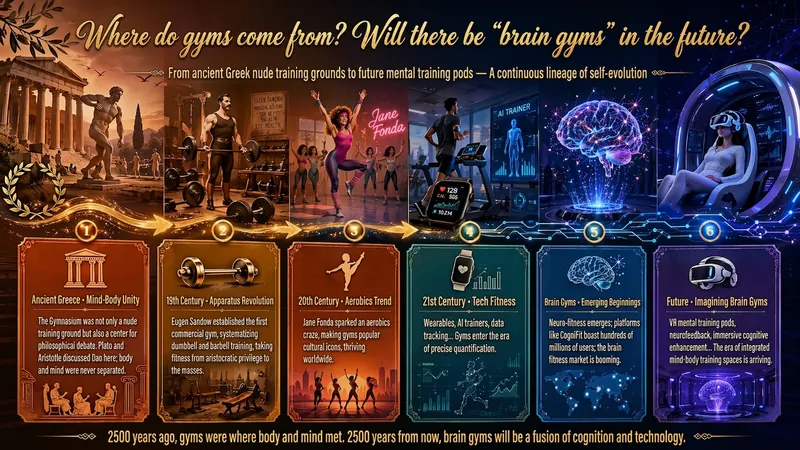
Idea to Infographic
A single image, a single sentence is all it takes. Have you ever had this experience—you have a great idea and want to turn it into an infographic like the ones big accounts post, but: - Open an AI image tool, rewrite prompts over and over, and the result either has terrible layout or completely mismatched style. - Tried several prompt templates, each requiring three or four adjustments, and half an hour later you're still not done. - Want styles like financial literacy, Chinese classic, science, tech... each time you have to research colors and layouts from scratch. Now you don't have to. 「Idea to Infographic」automates all of this: You say "make an emotion management infographic," and it decides whether to use a warm Chinese style or a healing scientific style, searches and organizes core knowledge points, breaks them into 6-8 module cards, assembles the optimal prompt, and quality-checks—if it fails, it automatically redoes; if it passes, it hands it right to you. Four killer capabilities, all built-in: 🧠 **Style Engine** — Not a rigid four-choice. If your topic matches financial literacy, it automatically goes with deep blue gold; if it matches Chinese classics, it uses rice paper and ink; if it matches technology, it uses cyan neon. For topics outside these four? It automatically synthesizes a new style. Coffee encyclopedia → food warm tones; exercise and fitness → vibrant orange gray. No style it can't handle. 🔍 **Content Brain** — You give a word, it searches the web to fill out content; you give a paragraph, it extracts the core; you give nothing but a topic, it organizes everything clearly. All three input methods are supported—the simpler, the more effortless. 📐 **Layout Adviser** — Progressive ladders, side-by-side comparisons, causal chains, overarching-subcategory radiation... Five logical patterns automatically matched. Not just stuffing text into an image, but actually designing an infographic. ✅ **Self-Inspection** — After generating, it automatically checks layout, text density, image-to-text ratio, and style match. If there's an issue, it adjusts and regenerates, up to two times. You don't need to know how to write prompts; you just need to know how to speak. **Who is this Skill for?** - Social media creators who need to produce images daily but don't want to learn design. - Knowledge commerce creators who want to visualize course content but lack a designer. - Corporate trainers who need professional infographics but lack budget for outsourcing. 🔍 - Anyone who wants to turn an idea into a great image. In a word: You have the idea, it has the image. All the hassle in between, it handles for you.
Information
- Version
- v4
- Last updated
- Runtime credits
- Usage-based
- Models
- Auto
- Use cases
- Writing & contentImages & design
- What you get
- Social postPrompt
- Visual styles
- Hand-drawnWatercolor
