
Web Page Creator & Delivery
Create production-ready responsive web pages
Web Page Creator & Delivery
Create production-ready responsive web pages
Showcase
Description
Turn your ideas into ready-to-use, deliverable web pages without needing to code first. Just describe what you have in mind. Key Features: • From Idea to Web Page: Helps organize your requirements to build tool pages, data dashboards, personal profiles, promotional H5 pages, and more. • Clean Delivery by Default: No unsolicited third-party signatures, promotional links, fixed brand icons, or visitor counters added; these are only included per your request, respecting necessary attribution. • Privacy and Offline Focus: Minimizes internet dependencies as needed and explains data storage locations, external services, and their limitations. • Flexible Communication: Builds directly when requirements are clear, and asks targeted questions only when critical ambiguities arise. • Honest Delivery: Clearly outlines network dependencies, delivery formats, and testing scope without passing off static demos as backend systems or fabricating test results. html-website-builder, HTML website creation and development. Triggered when users say "help me make a website", "build an html website", "create a web page", "build an XX website", or "make an H5 page". Suitable for: tool sites, data display pages, personal profiles, event pages, mini-program H5 versions, and single-page applications. Not suitable for: complex backend systems, database-driven full-stack apps, or framework projects like WordPress, React, or Vue (unless explicitly requested).
Best for
Ideal for users who need to create tool pages, data dashboards, personal portfolios, event H5s, or other lightweight web pages.
How to use this Skill
Provide your input
Provide the website purpose, core features, content, visual style, device adaptability, data sources, or offline requirements.
Run the Skill
After you share your requirements, the assistant organizes key details and builds a responsive web page, confirming any critical missing information upfront.
Review your result
Receive a ready-to-use HTML web page or source code, complete with usage instructions, external dependencies, test scope, and known limitations.
Related Skills
View all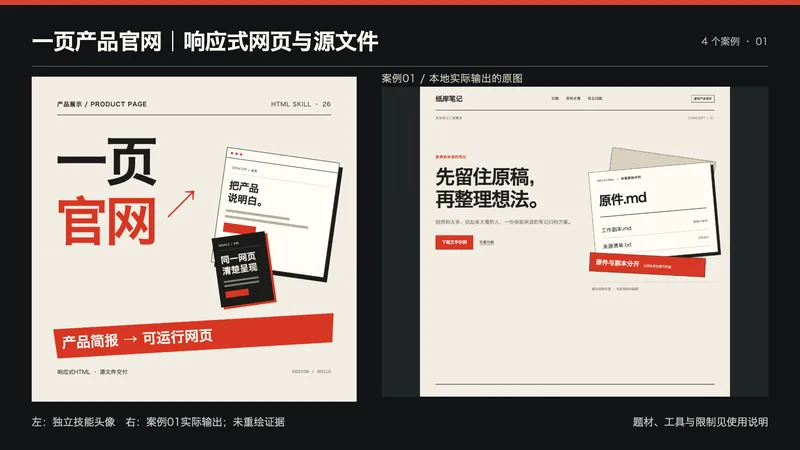 Webpage
一页产品官网|响应式网页与源文件
适合需要介绍产品、课程或服务,但还没有清楚展示页的创作者。 提供:产品功能、受众、完成状态、价格与行动入口(如有)、视觉参考和授权素材。缺少客户数、好评、价格时不会编造。 处理:梳理事实与页面目标,设计首屏、功能和使用说明,编写响应式HTML/CSS/JavaScript,实际打开检查手机与桌面、链接及必要交互。没有后台时不展示伪发送或支付成功。 交付:可运行的一页网站源文件、使用与部署说明、内容核对及测试结果。默认单文件HTML,无CDN或远程字体。具备文件工具时给可下载文件;否则给完整代码并说明未保存,不用截图冒充代码。 使用:发送简报,核对页面内容,打开HTML检查并替换自己的真实入口;公开部署、域名、后台、支付和账号功能需另行配置与授权,本技能不自动开通。 依赖:文字/代码模型(推荐GPT)、文件能力与浏览器预览。核心不需要图片API;本地四案例用真实Chrome分别验证1600×1200桌面、1200×1200方形视窗与390×844手机,无横向溢出,FAQ键盘展开、锚点、示例TXT下载内容通过。四张展示直接来自四个实际网页的方形首屏视窗,完整HTML与长页另留档;按笔记归档、会议状态、课程步骤与设计配色区分视觉,页面题材明确虚构,没有真实客户或销量。头像为独立原创HTML文字与图形封面,不是案例运行证据,不冒称生图API输出。 未追加YouMind运行测试、未验证持久模型绑定。静态官网不等于完整SaaS或真实服务上线,不保证转化、SEO排名、流量或任意平台直接预览;199积分不包含托管、域名、后台、模型运行或第三方服务费用。 展示说明:首张为独立技能头像与案例01实际输出的并排排版,用于横向缩略展示;不是新增案例,也未让生图模型重绘证据。其余三张对应案例02—04。
 Webpage
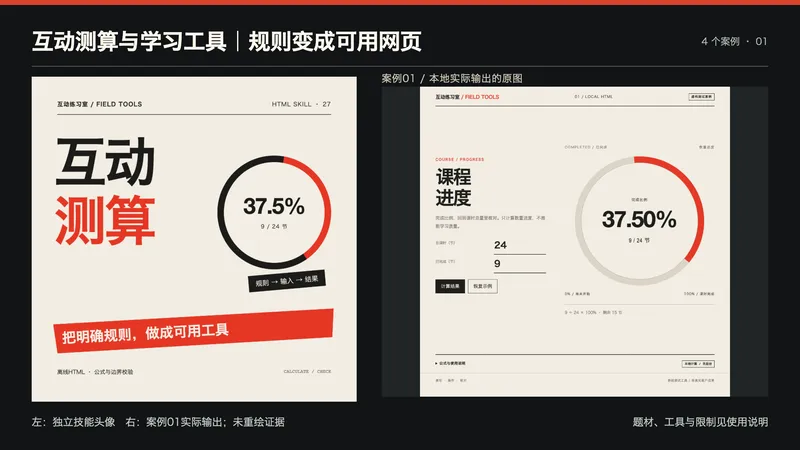
互动测算与学习工具|规则变成可用网页
适合需要课程进度、时间预算、单位换算或材料自测小工具的创作者。 提供:工具用途、明确公式或题目答案、输入单位和合法范围、输出精度与视觉参考。规则不明确时先核对,不假设专业预测模型。 处理:拆分计算或题目状态与页面,生成响应式HTML/CSS/JavaScript,核对公式、空值和边界,并在桌面与手机浏览器测试实际按钮、输入、重置与结果。 交付:可离线打开的HTML源文件、公式与规则说明、有效/无效输入样例、运行记录及待核事项。打开文件后输入自己的数据即可操作,默认无后台、不上传数据、不保存历史。需要文件能力才能保存交付,不以截图冒充源码。 本地四真实运行案例为:课程9/24=37.50%及剩余15节;5小时减4次×45分钟=结余120分钟,超额也能显示;128.5厘米=1.285米并做反向换算;四题词汇自测逐题反馈、锁定重复提交、计分与重开。题材与数据明确虚构。四张展示直接来自实际运行网页的1200×1200方形截图,分别为数据驱动的进度圆环、预算条、长度换算单和首题正确提交后的练习反馈;图形随已校验的输入变化,非法输入会清除旧结果与图形。头像为独立原创文字与图形排版,未声称生图模型出图。 依赖:可用文字/代码模型(推荐GPT)、文件工具和JavaScript浏览器。简单单文件核心不需Node、图片API、账户或密钥;复杂应用需要另外明确构建环境与第三方许可。精度和范围取决于当次规则,不用于医疗、投资或法律诊断,不预测收益或学习效果。 本地已测1600×1200桌面、1200×1200方形和390×844手机,含极大结果完整显示,未追加YouMind耗积分测试、未验证平台文件工具与固定模型绑定,不保证任意平台直接运行。199积分不包含平台模型调用、部署或额外服务费用。 展示说明:首张为独立技能头像与案例01实际输出的并排排版,用于横向缩略展示;不是新增案例,也未让生图模型重绘证据。其余三张对应案例02—04。
 Webpage
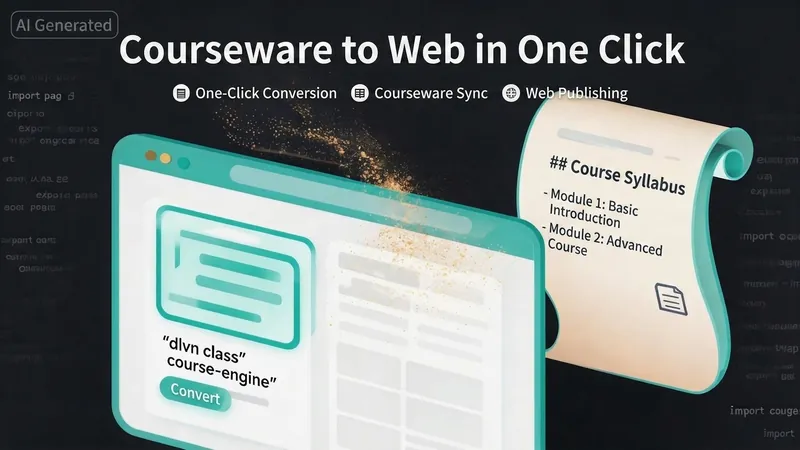
One-Click Courseware to Web
Turn your courseware into a viewable website. Whether you have a Markdown note, a PDF paper, a PPT slides, or a plain text script, or even a public account link, One-Click Courseware to Web can automatically convert it into a clear, beautifully designed online course display webpage. You don't need to write a single line of code—just provide the content. Two display styles: - Course training content → generates a scrolling long page, like flipping through a book. - Paper/report content → generates a PPT-style page-turning website, like browsing slides one by one. Responsive design adapts to mobile and desktop. What you need to do: Just one step: provide your courseware content. Supported formats: .md Markdown files, .pdf PDF documents, .pptx PPT presentations, .txt plain text. You can also paste course content directly in the conversation. Example commands: "Turn these lecture notes into a webpage" "Make this PDF paper into a PPT-style website" "Here is my courseware content, generate an online display page" What you get: A directly accessible online course display website, with the display mode automatically determined. Your content automatically selects the effect: - Course outlines, training handouts, textbooks → scrolling long pages, modules naturally connected, scroll to browse. - Academic papers, research reports → PPT-style slide flipping, each page focuses on one point. - Speeches, meeting reports → PPT-style page-by-page display, supports keyboard/click navigation. If you explicitly request "scrolling" or "PPT", your request is respected. Content extraction capability: For information-dense papers and long texts, the skill automatically performs: - Structure decomposition: splits continuous discourse into independent chapters/slides. - Information condensation: condenses three paragraphs into three key points, each within 20 characters. - Thesis-first: each page gives the conclusion first, then supporting arguments. - Framework visualization: models and classification systems are presented with charts instead of plain text. - Data highlighting: key numbers and metrics are displayed on separate pages prominently. Subsequent modifications: After the website is generated, you can request adjustments at any time: "Update the content of module three" "Change the color scheme to warm tones" "Add a course roadmap" "Change this module to a timeline layout" Modifications only affect the corresponding part; you don't need to regenerate the entire website. What it does not do: This skill currently focuses on course content display and does not include the following LMS (Learning Management System) features: - User login/registration - Learning progress tracking - File download - Online quizzes/practice If you need these features, they are separate extensions.
Information
- Version
- v13
- Last updated
- Runtime credits
- Usage-based
- Models
- Auto
- Use cases
- Web creation
- What you get
- Webpage
