PowerPoint Processor
PowerPoint Processor
Showcase
Description
Create, read, edit, or merge PowerPoint presentations based on user tasks. It supports template processing, flexible theme design, and delivery quality checks.
Best for
Individuals, teams, and content creators who need to build, organize, modify, or merge PowerPoint presentations.
How to use this Skill
Provide your input
Provide presentation files, templates, or text materials, and state your goal to create, read, edit, merge, or fill templates. You can also specify the audience, page count, style, and delivery format.
Run the Skill
Process the presentation content and structure based on your task, organize page narratives, layouts, and visual presentations, and check readability, page order, and file availability when possible.
Review your result
Receive deliverable presentation files, or page-by-page text, chart data, and speaker notes. Any content that cannot be retained or checked will be clearly explained.
Related Skills
View all
pptx.max
Easily create, edit, and manage your PowerPoint presentations, whether from scratch or based on an existing template. This skill is designed for handling various PPTX file needs, helping you efficiently produce professional and engaging slides. You can use this skill to parse existing PPTX files, extract text content, or make modifications to presentations. It supports structural adjustments to slides, such as deleting, copying, or reordering, and intelligently selects diverse layouts based on your content to avoid monotony. From multi-column designs to text-image combinations to full-bleed images, ensuring your presentations are visually rich and engaging. When you need to build a presentation from scratch, this skill helps you design outstanding slides. It guides you to choose a color scheme that matches the theme, emphasizes the importance of visual elements, and offers multiple layout options such as dual columns, icon grids, or data displays. Whether it's text, shapes, images, or backgrounds, you get fine-grained control to ensure the final presentation is both professional and impactful. After completing the presentation, this skill performs a rigorous quality check. It helps you review content, find omissions or errors, and scrutinize visuals to ensure no overlapping elements, text overflow, or insufficient contrast. Through iterative validation and correction, it ensures your final presentation is flawless.
 Slides
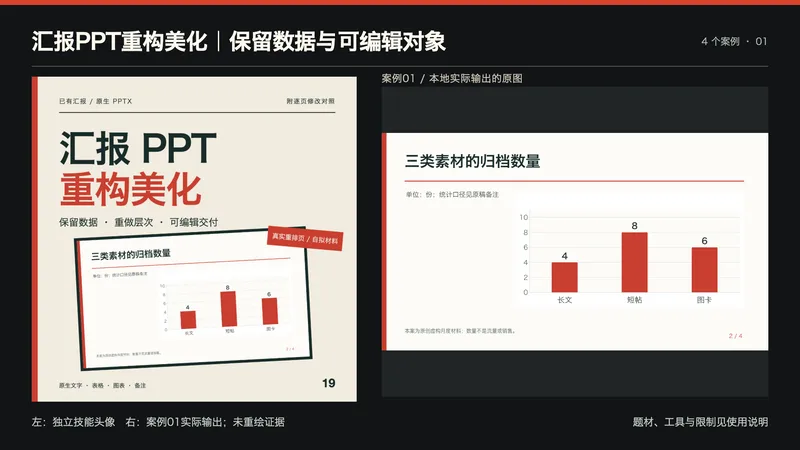
汇报PPT重构美化|保留数据与可编辑对象
适合月度汇报、项目复盘、年度总结与方案提案。提供已有PPTX、汇报对象、需要保留的品牌/尺寸/字体、允许修改范围和视觉参考;先看完整原稿再重排页面。 流程:提取文字、表格、原生图表和备注清单,逐页说明问题与改法;在副本中调整信息层次、对齐、字号、图表表格样式与页面节奏,保留数据口径和未知项;输出后重新读取、渲染并逐页检查。输入是PPTX;图片/PDF还原属于其他任务。 交付:可编辑PPTX、逐页修改对照、事实/数据/备注核对表、完整页预览和使用说明。不会把正文、表格和图表烘焙成整页图;未经授权不改数据、删页或把计划写成完成。专用编辑探针另存,正式汇报与测试副本明确区分。 包内Python3标准库清单脚本只负责OOXML事实取证,不是完整编辑器;工作簿保留助手仅在源与候选图表数据/公式唯一匹配时保留源工作簿原字节,不能修复任意PPT。核心重排仍需要真实PPTX原生编辑和渲染工具。使用可用文字模型(建议GPT)组织修改;精确型号以环境为准,不绑定图像模型。YouMind是否具备本地工具需按实际能力核验,不能仅因导入Skill就保证能运行编辑器。 四个本地真实执行案例都是本次新建的虚构原稿:月度内容、资料整理项目、年度归档、工时提案。每份4页,共16页,原生文字/表格/图表/备注完整保留;编辑测试实际修改标题、表格单元格和图表首项数值,另存并重开核对。源数据与原有工作簿保留检查覆盖这些案例,不等于任意复杂PPT零损失保证。 四展示为最终PPTX重新导入后渲染的代表页,未重绘证据;完整原稿、逐页前后图与16页正式稿本地保留。头像为原创文字排版结合真实案例页,未冒称生图API或客户业绩。 本地用Artifact Tool完成原生编辑与重开渲染;未在PowerPoint、Keynote或Google Slides应用内打开验证,字体缺失可能改变换行。复杂动画、宏、SmartArt/OLE、外链公式、图片文字及特殊模板须单独检查,工具丢失必需对象时应停止并说明。未消耗YouMind积分测试,未确认平台模型绑定;199积分不含模型或第三方工具费。不承诺审核、任意应用兼容、销量、融资、效率或收益提升。 展示说明:首张为独立技能头像与案例01实际输出的并排排版,用于横向缩略展示;不是新增案例,也未让生图模型重绘证据。其余三张对应案例02—04。
 Slides
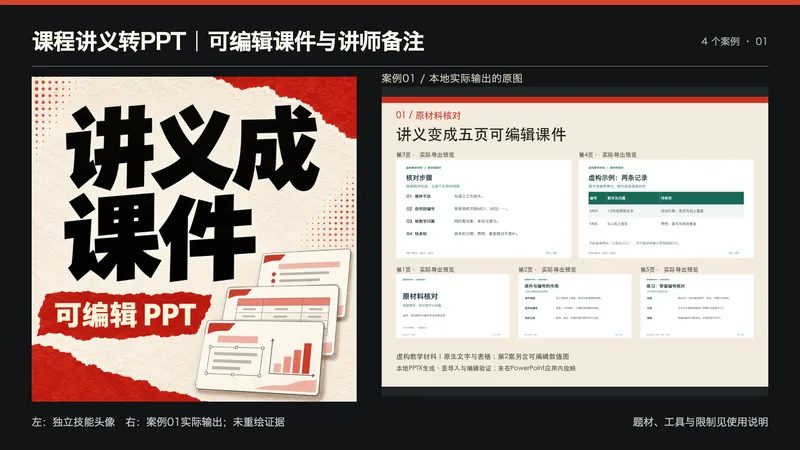
课程讲义转PPT|可编辑课件与讲师备注
适合有课程讲义、培训笔记,需要整理授课演示的讲师与创作者。 提供:讲义、学员基础、学习目标、时长、总页数和视觉参考;没有数值时不会编造统计图,新增练习注明教学设计。 处理:材料编号与事实核对、教学页序、每页内容和讲师备注、原生对象排版、PPTX导出和检查。文字保留为文本框,表格为原生单元,数值图使用可编辑图表;插画只作辅助,不用整页截图冒充课件。 交付:真正可编辑PPTX、讲师备注与使用说明;环境支持时附全页预览。没有PPTX导出能力会明确未完成,不以纯大纲或图片代替。 使用:发送讲义并说明要讲给谁、总页数与时长;核对材料映射与练习,再下载PPTX在授课软件中确认字体、备注和放映。 依赖:文字模型(推荐GPT)和支持原生对象及PPTX导出的工具;本地四案例用Codex的Artifact Tool运行环境制作,并验证文字/表格可单独编辑,第二案例还验证图表数据与嵌入工作簿。该本地运行库不会随技能包分发;YouMind需要其自身可用的可编辑幻灯片导出能力,未追加平台运行测试或验证模型持久绑定。不保证任意环境直接具备该工具。 四张展示图来自四份本地真实PPTX的全页渲染,每份5页、虚构教学材料;未在PowerPoint应用内放映,跨应用和接收方字体兼容需要再确认。不承诺学习效果或收益,199积分售价不含Office订阅、平台模型费或其他服务。 展示说明:首张为独立技能头像与案例01实际输出的并排排版,用于横向缩略展示;不是新增案例,也未让生图模型重绘证据。其余三张对应案例02—04。
Information
- Version
- v2
- Last updated
- Runtime credits
- Usage-based
- Models
- Auto
- Use cases
- Images & designPresentations & reporting
- What you get
- DocumentSlides
