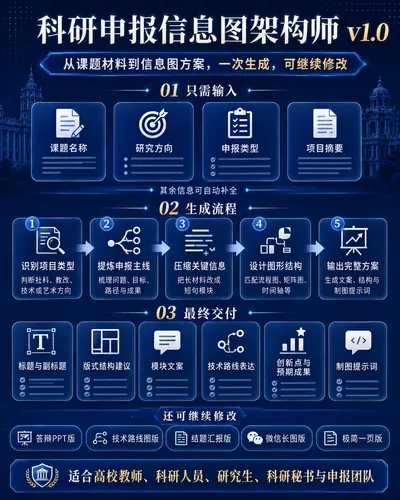
Grant Infographic Architect v1
Input project details, get infographic text.
Grant Infographic Architect v1
Input project details, get infographic text.
Showcase
Description
Turn complex research grant application content into a clear, professional, and compelling infographic. It helps you: 1. Automatically extract key points for visualization From project title, research background, research questions, objectives, content, technical approach, and expected outcomes, extract the key information best suited for visualization. 2. Automatically design the infographic structure Based on the project type, generate an infographic framework of "Problem – Goal – Path – Results – Value" to avoid content clutter and logical confusion. 3. Automatically generate in-graphic text Output titles, subtitles, module headings, short copy, process nodes, result tags, chart descriptions, etc., ready to hand off to designers or use in PPT creation. 4. Automatically match visual expressions Suggest suitable graphic forms for each module, such as flowcharts, path diagrams, matrices, timelines, pyramids, four-quadrant charts, result trees, result maps, etc. Suitable for: University faculty, researchers, graduate students, project leaders, research secretaries, project application teams, and academic PPT creators. How to use: Simply enter the project title, research topic, or paste a portion of application materials. You don't need to organize the format beforehand; the system will automatically identify key information and generate a research grant infographic plan. If the materials are incomplete, it will generate a usable version first and ask 1–3 key questions as needed.
Related Skills
View all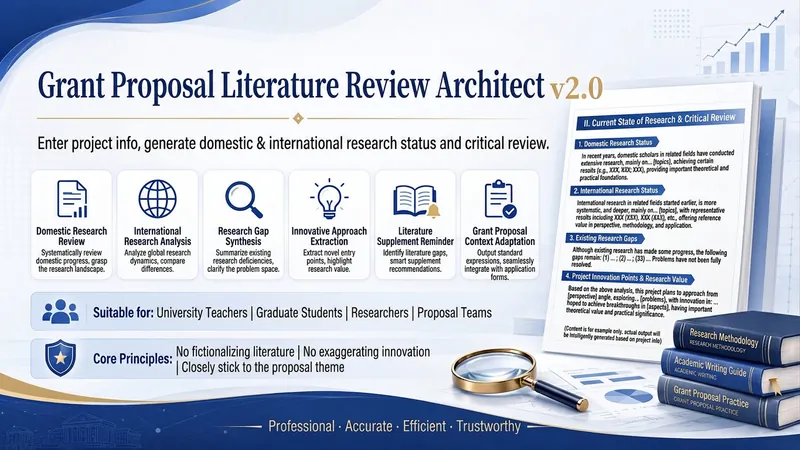
Proposal Review Architect v2.0
Enter your research topic information to generate a proposal-ready review of domestic and international research status and critical commentary. It can help you: 1. Automatically break down topic keywords Based on the topic title, research field, and research content, extract core concepts, research subjects, methodological approaches, and application scenarios. 2. Automatically structure review dimensions Organize the research status into 3–4 domestic research dimensions and 2–3 international research dimensions, avoiding simple literature lists and weak logic. 3. Automatically generate critical review text Following the common proposal structure of “domestic research status—international research status—critical review,” generate 900–1,200-character prose. 4. Automatically identify research gaps Summarize limitations in research perspectives, interdisciplinary integration, model development, and practical validation, then naturally lead into the topic’s innovative entry points. Suitable for: University faculty, doctoral students, master’s students, researchers, project leaders, applicants for teaching reform projects, applicants for education planning projects, and teams applying for social science and humanities projects. How to use: Enter a topic title or research direction directly, or paste part of your proposal materials. If you have references, paste them as well; I will prioritize the sources you provide. If you do not have references, I will generate “replaceable citation placeholders” and “search keywords” to avoid fabricating specific sources.
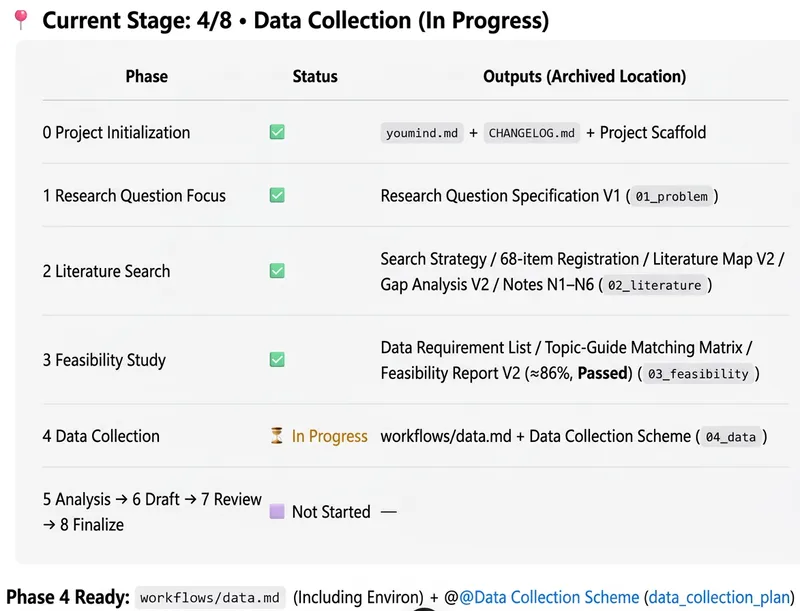
Research Proposal Assistant
Designed for university faculty and researchers, this assistant turns an initial research idea into an executable, fundable project plan. It covers national- and provincial-level humanities and social sciences projects, teaching reform projects, and other research project types. Provide the project type and application guidelines or template, research direction, existing成果, and personal and institutional information. The assistant helps clarify the topic, focus the research question, and build a complete foundation for the proposal around the research problem, application requirements, and review logic. As the project develops, the assistant can support academic searches, literature reviews, research gap analysis, feasibility assessments for data and methods, comparable project matching, and research design adjustments. It helps ensure that literature, data, and funding information are authentic and verifiable, while incorporating AI, contemporary relevance, and methodological innovation into the topic and innovation points. Once the research plan is mature, it can draft an initial proposal based on the application guidelines or blank template you provide, simulate different reviewer perspectives, and suggest revisions through to the final draft. The project retains stage outputs, version records, and the basis for changes. It can ultimately organize a proposal, technical roadmap, research framework diagram, innovation logic diagram, progress Gantt chart, and other research visuals. For tasks requiring an external environment, such as full-text PDF analysis, code execution, web scraping, or large-scale data processing, the assistant clearly identifies handoff tasks and supports filling in results and continuing the work, helping move the project from preparation through a properly formatted final proposal.
 Image
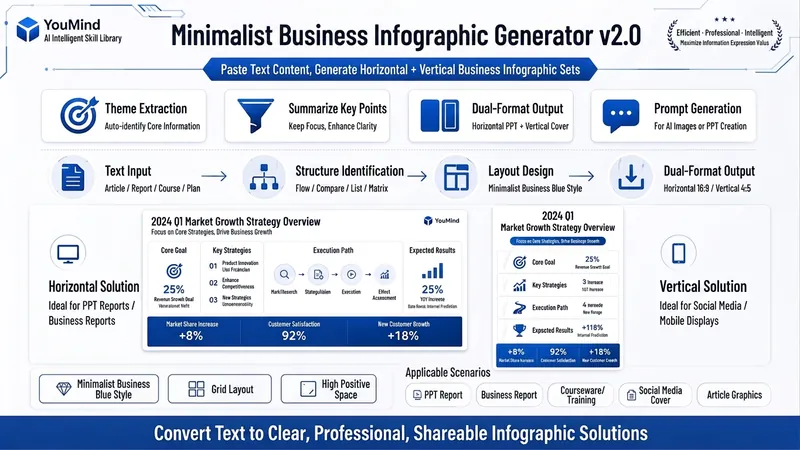
ImageBiz Infographic Generator v2.0
Transforms complex text into clear, professional, presentation-ready business minimalist infographics. It can help you: 1. Automatically extract core information Extract topics, keywords, logical relationships, and key points from user-provided text, materials, course content, meeting minutes, or reports. 2. Automatically design infographic structure Match business expression formats such as flowcharts, comparison charts, hierarchical charts, matrix charts, checklist charts, and path charts based on content type. 3. Automatically generate dual-format solutions Output two sets of infographic designs: landscape and portrait. Landscape is suitable for PPT, presentations, and web display; portrait is suitable for Xiaohongshu, WeChat Moments, public account covers, and vertical screen display. 4. Automatically generate diagram prompts Output complete diagram prompts ready for use with AI drawing tools, designers, or PPT tools. Suitable for: Professionals, knowledge bloggers, trainers, course creators, consultants, operations staff, PPT designers, business report creators. How to use: Directly paste a piece of text, materials, course content, meeting minutes, or report summary. You don't need to organize the structure first; I will automatically extract the core content and generate both landscape and portrait business minimalist infographic solutions.
Information
- Version
- v3
- Last updated
- Runtime credits
- Usage-based
- Models
- Auto
