Sales/growth/budget report
Sales/growth/budget report
Showcase
Description
Perfect for data-driven presentations. Generate dynamic presentations with elegant Aurora gradients and Glassmorphism effects, ensuring your data always looks compelling and clear.
Recommended by
nene@YouMind
Why we love this skill
This report generator transforms raw data into visually captivating and strategic presentations. Thanks to innovative design elements like Glassmorphism and Aurora gradients, it makes complex numbers accessible and engaging. Ideal for growth forecasts, budgets, or marketing performance analyses, it enables effective communication of crucial financial information.
Instructions
Based on selected content to generate slides. Ask user how many pages they want before start creating.
1. Visual Philosophy & Mood
Philosophy: “Organic Integration.” It breaks away from the rigid boxes of traditional corporate decks, using fluid "blob" shapes to represent agility and continuous growth. This softness effectively counteracts the potential "coldness" of hard data, making complex marketing or growth logic feel more accessible.
Mood: Modern, transparent, and forward-thinking. It strikes a perfect balance between "professional trust" and "innovative energy"—ideal for carrying high-growth forecasts or large-scale budget proposals.
2. Color System & Materiality
Palette: "Aurora Gradients."
Bright Coral (#FF6B81): Used to highlight sales spikes, conversion peaks, or core growth KPIs.
Sky Blue (#48C6EF): Represents the baseline, stable budget foundations, or technological trust.
Deep Navy Violet (#2D326F): Used for typography to ensure maximum readability for financial figures.
Materiality: “Glassmorphism.” The use of frosted, semi-transparent overlays creates a sense of depth, allowing data layers to "float" above the background. This prevents complex charts from feeling cluttered or heavy.
3. Layout Logic & Grid
Asymmetric Balance: Leverages significant negative space and shifted centers of gravity to create balance. This provides the necessary "visual breathing room" required when comparing multi-dimensional datasets.
Modular Encapsulation (Card UI): Content is housed in rounded, semi-transparent containers. This "dashboard-style" logic is perfect for displaying parallel KPIs, budget breakdowns, or multi-channel ROI while maintaining granular clarity.
4. Typography Personality
Font Choice: Geometric Sans-serifs (eg, Montserrat, Poppins, Gilmer).
Characteristics: Heavyweight titles are reserved for bold financial numbers to convey authority and certainty. Small body text with generous line spacing ensures that even dense sales terms or growth footnotes remain easy to scan during a presentation.
5. Graphic Elements & Language
Fluid Vector Shapes: Large, smooth S-curves or cloud-like gradients subliminally suggest market momentum and unstoppable growth trends.
Dynamic Spheres: Scattered gradient orbs act as visual anchors, strategically placed to draw the eye toward critical data inflection points within a chart.
Streamlined Data Visualization: Simplified lines and dot-markers turn complex growth curves into abstract trends, forcing the audience to focus on the "big picture" rather than minor data noise.
6. Visual Hierarchy & Depth
Hierarchy:
Top Layer: North Star Metrics (Total Sales, ROI, Growth %).
Middle Layer: Data explanation cards and supporting infographics.
Base Layer: Soft brand-ambient gradients.
Sense of Depth: By using opacity overlaps instead of harsh drop shadows, the deck remains lightweight and efficient, even when packed with budget tables and pie charts.
7. Scenarios & Industry Alignment
Core Scenarios: Specifically engineered for data-heavy environments. It excels at marketing performance reviews, annual budget allocations, sales forecasting, and user growth funnels. It transforms heavy data into a compelling brand narrative.
Target Audience: From the perspective of an AI Company CMO, this style is most effective for convincing stakeholders who demand both rational data results and emotional brand momentum
Related Skills
View all Slides
Performance review
Vibrant, human-centric narratives. Craft compelling presentations with bold visuals and clear insights, perfect for high-growth tech and creative industries.
 Webpage
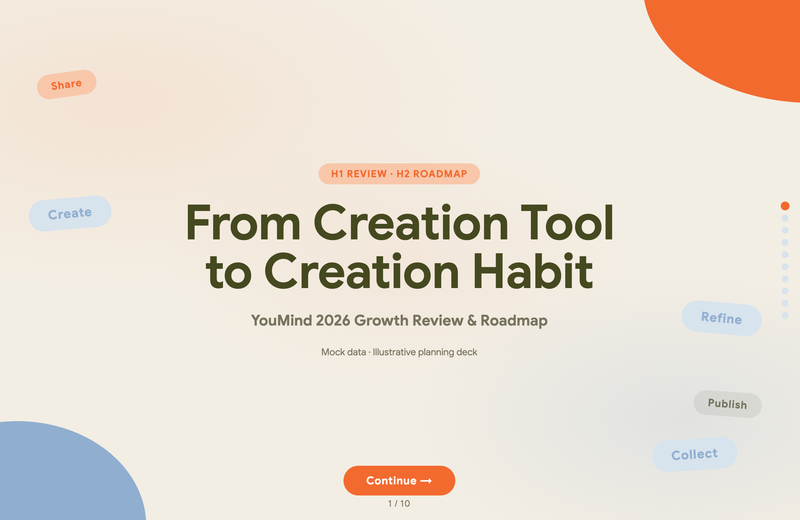
Warm Tones Project Report (HTML Deck)
Transform your data and strategy into high-end, browser-ready presentations with the Warm Modular Clarity system. This skill generates self-contained HTML reports designed for product growth reviews, business strategy, and technical insights. Each deck features a sophisticated olive and warm-neutral palette, providing a professional yet approachable aesthetic that emphasizes decision-oriented storytelling over generic bullet points.
 Slides
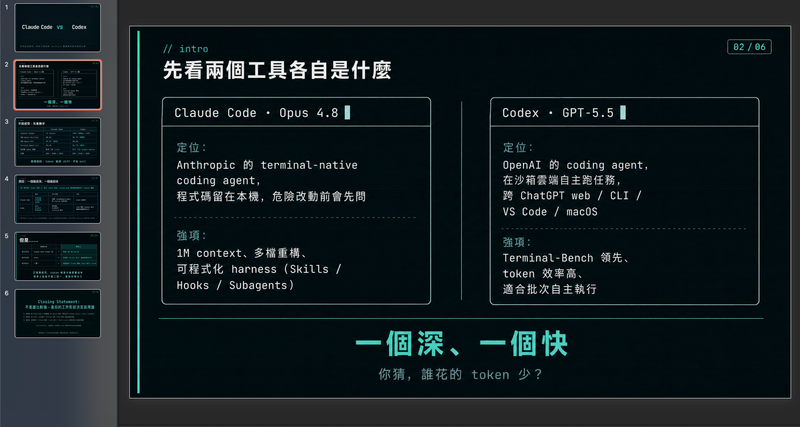
Modern cool blue-green engineer-style briefing
Craft professional, data-driven presentation blueprints with a sophisticated engineer's aesthetic. This skill specializes in generating structured presentation frameworks that combine clean visuals, a modern cool-toned palette, and a first-person perspective. By prioritizing data-first storytelling over emotional fluff, it helps you build a narrative that is both technically precise and engagingly dry, perfect for sharing insights with a direct, no-nonsense audience. Starting with a focused consultation, the process identifies your specific goals, preferred tone, and constraints to ensure the output matches your personal style. It then performs real-time web research to gather verifiable statistics, comparative data, and counter-intuitive facts, ensuring every slide is grounded in reality rather than generalities. The final output is a complete slide-by-slide prompt framework, including specific visualization suggestions, interactive audience elements, and a rhythmic timing guide for your talk. Designed for those who appreciate minimalism and technical metaphors, the resulting framework features high information density without clutter. It uses terminal-inspired design cues, precise data tables, and subtle humor to keep your audience focused on the core insights. Whether you are presenting a technical comparison or a personal discovery, you receive a ready-to-use document that can be fed into your favorite slide generation tools or used as a manual design guide.
Information
- Version
- v1
- Last updated
- Runtime credits
- Usage-based
- Models
- Auto
