ตัวสร้างสไลด์ AI ทรงผม
คำอธิบาย
เหตุผลที่เราแนะนำทักษะนี้
ทักษะนี้สามารถเปลี่ยนแนวคิดทรงผม AI ของคุณให้เป็นงานนำเสนอระดับพรีเมียมได้ทันที ด้วยดีไซน์สไตล์นิตยสารแฟชั่น ทำให้ข้อเสนอของคุณโดดเด่นทางสายตา ดูเป็นมืออาชีพและน่าสนใจ
สร้าง Slides สำหรับสาธิตเทคโนโลยีการสร้างทรงผมด้วย AI โดยเฉพาะ โดยจะสร้างสไลด์สไตล์นิตยสารแฟชั่นที่มีเนื้อหาครบถ้วน รวมถึงการแนะนำผลิตภัณฑ์ การวิเคราะห์ปัญหา วิธีแก้ไข เปรียบเทียบกรณีศึกษา ข้อได้เปรียบทางเทคนิค ฯลฯ เหมาะสำหรับการนำเสนอในอุตสาหกรรมทำผมและเทคโนโลยีความงาม
ทักษะที่เกี่ยวข้อง
ดูทั้งหมด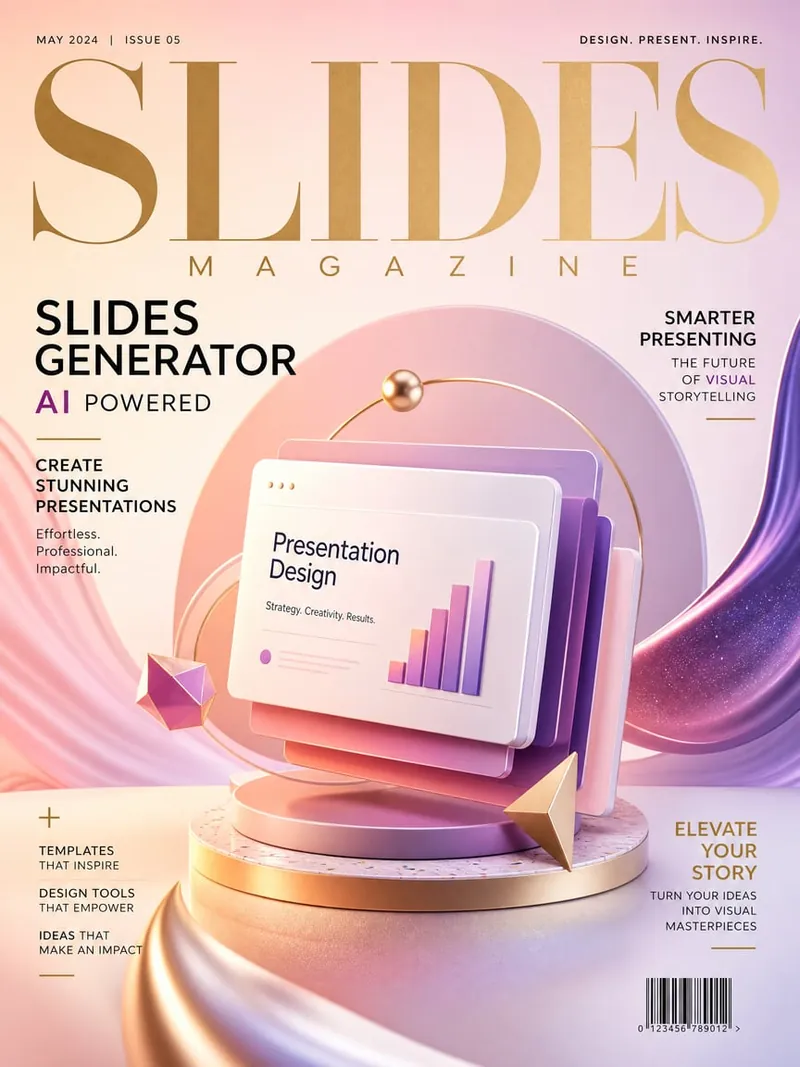 สไลด์
สไลด์ตัวสร้างสไลด์สไตล์นิตยสารแฟชั่น
เครื่องสร้างสไลด์สไตล์นิตยสารแฟชั่นที่ใช้งานได้ทั่วไป สามารถใช้กับหัวข้อใดก็ได้ ใช้ภาษาภาพของนิตยสารแฟชั่นระดับสูง (สไตล์ Vogue/ELLE) รวมถึงการจัดวางที่สง่างาม สีสันที่ประณีต และความรู้สึกเหมือนภาพถ่ายมืออาชีพ เหมาะสำหรับการเปิดตัวผลิตภัณฑ์ การนำเสนอแบรนด์ การเสนอไอเดียสร้างสรรค์ และสถานการณ์อื่นๆ ที่ต้องการการนำเสนอด้วยภาพระดับสูง
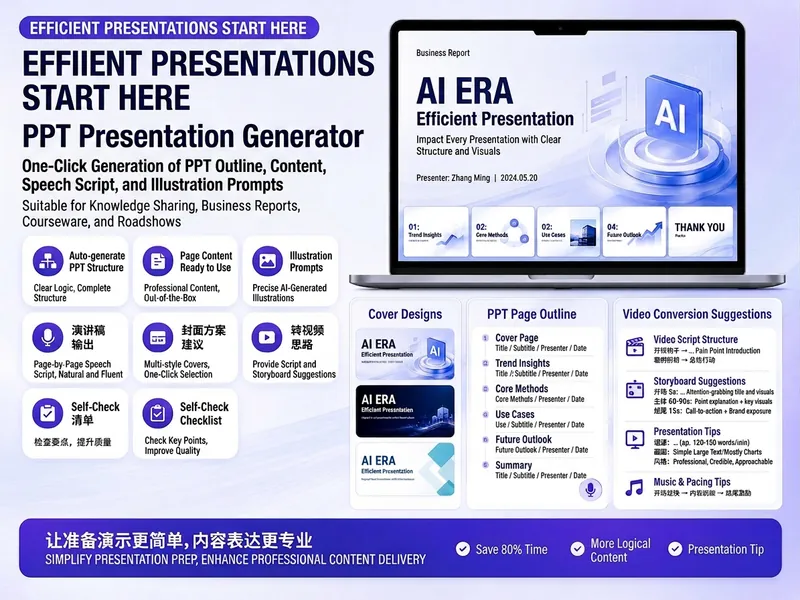
ตัวสร้างสไลด์ PPT ยอดฮิต
สร้างพรีเซนเทชัน PPT ที่น่าสนใจได้อย่างง่ายดาย ไม่ว่าคุณจะแชร์ความรู้ รายงานธุรกิจ สอนหนังสือ นำเสนอสินค้า หรือพิตช์ไอเดีย คุณจะได้แผนที่มีโครงสร้างสมบูรณ์และเนื้อหาครบถ้วน เพียงป้อนหัวข้อ วัตถุประสงค์ ผู้ชม ระยะเวลา จำนวนหน้า หรือสไตล์ที่ต้องการ ก็จะได้รับแผนเนื้อหา PPT ที่ปรับแต่งให้คุณ ทักษะนี้จะให้แผนพรีเซนเทชัน PPT โดยละเอียด รวมถึงชื่อสไลด์ ธีมหนึ่งประโยค การวิเคราะห์ผู้ชม โครงสร้างหน้า หัวข้อแต่ละหน้า เนื้อหา และประเด็นการพูด นอกจากนี้ยังให้คำแนะนำภาพและคีย์เวิร์ดสำหรับสร้างภาพ รวมถึงคีย์เวิร์ดสำหรับออกแบบปก เพื่อช่วยให้คุณสร้างสไลด์ที่ดูเป็นหนึ่งเดียวและน่าสนใจ หากคุณต้องการแปลง PPT เป็นวิดีโอสั้น ทักษะนี้ยังให้คำแนะนำมืออาชีพเกี่ยวกับจังหวะ คำบรรยาย เสียงพากย์ การเคลื่อนกล้อง และปก ช่วยให้เนื้อหาของคุณเผยแพร่บนหลายแพลตฟอร์ม ไม่ต้องกังวลกับโครงร่างที่คลุมเครือ เนื้อหาในแต่ละหน้าสามารถคัดลอกและใช้ได้ทันที เพื่อให้การนำเสนอของคุณมีทั้งความลึกและประสิทธิภาพ

PPT เนื้อหา V2.0
เนื้อหา PPT คำอธิบาย: ความสามารถในการสร้างเนื้อหา PPT ระดับมืออาชีพ ครอบคลุม 6 สถานการณ์หลัก: การรายงานธุรกิจ/การเปิดตัวผลิตภัณฑ์/การฝึกอบรมการสอน/การนำเสนอระดมทุน/สรุปประจำปี/การเริ่มโครงการ ประกอบด้วย 5 ขั้นตอนการสร้าง (เป้าหมาย→โครงสร้าง→ประโยคเด่น→สตอรี่บอร์ด→การจัดหน้า), 6 แม่แบบสถานการณ์การนำเสนอ, 10 โครงสร้าง PPT (ปัญหา-แนวทาง/เปรียบเทียบ/ไทม์ไลน์/ตัวเลข-ข้อมูลเชิงลึก/พีระมิด/ผังงาน ฯลฯ), การสกัดประโยคเด่น, การเลือกแผนภูมิ, คำแนะนำเกี่ยวกับสีและการจัดหน้า, คู่มือหลีกเลี่ยงข้อผิดพลาด เหมาะสำหรับ: (1) PPT การรายงานธุรกิจ, (2) PPT การเปิดตัวผลิตภัณฑ์, (3) PPT การฝึกอบรมการสอน, (4) PPT การระดมทุน คำค้นหา: PPT, สไลด์, งานนำเสนอ, deck, รายงานธุรกิจ, เปิดตัวผลิตภัณฑ์, ระดมทุน, สรุปประจำปี, ประโยคเด่น, สตอรี่บอร์ด
ตัวสร้างสไลด์ AI ทรงผม
คำอธิบาย
เหตุผลที่เราแนะนำทักษะนี้
ทักษะนี้สามารถเปลี่ยนแนวคิดทรงผม AI ของคุณให้เป็นงานนำเสนอระดับพรีเมียมได้ทันที ด้วยดีไซน์สไตล์นิตยสารแฟชั่น ทำให้ข้อเสนอของคุณโดดเด่นทางสายตา ดูเป็นมืออาชีพและน่าสนใจ
สร้าง Slides สำหรับสาธิตเทคโนโลยีการสร้างทรงผมด้วย AI โดยเฉพาะ โดยจะสร้างสไลด์สไตล์นิตยสารแฟชั่นที่มีเนื้อหาครบถ้วน รวมถึงการแนะนำผลิตภัณฑ์ การวิเคราะห์ปัญหา วิธีแก้ไข เปรียบเทียบกรณีศึกษา ข้อได้เปรียบทางเทคนิค ฯลฯ เหมาะสำหรับการนำเสนอในอุตสาหกรรมทำผมและเทคโนโลยีความงาม
ทักษะที่เกี่ยวข้อง
ดูทั้งหมดสไลด์ตัวสร้างสไลด์สไตล์นิตยสารแฟชั่น
เครื่องสร้างสไลด์สไตล์นิตยสารแฟชั่นที่ใช้งานได้ทั่วไป สามารถใช้กับหัวข้อใดก็ได้ ใช้ภาษาภาพของนิตยสารแฟชั่นระดับสูง (สไตล์ Vogue/ELLE) รวมถึงการจัดวางที่สง่างาม สีสันที่ประณีต และความรู้สึกเหมือนภาพถ่ายมืออาชีพ เหมาะสำหรับการเปิดตัวผลิตภัณฑ์ การนำเสนอแบรนด์ การเสนอไอเดียสร้างสรรค์ และสถานการณ์อื่นๆ ที่ต้องการการนำเสนอด้วยภาพระดับสูง
ตัวสร้างสไลด์ PPT ยอดฮิต
สร้างพรีเซนเทชัน PPT ที่น่าสนใจได้อย่างง่ายดาย ไม่ว่าคุณจะแชร์ความรู้ รายงานธุรกิจ สอนหนังสือ นำเสนอสินค้า หรือพิตช์ไอเดีย คุณจะได้แผนที่มีโครงสร้างสมบูรณ์และเนื้อหาครบถ้วน เพียงป้อนหัวข้อ วัตถุประสงค์ ผู้ชม ระยะเวลา จำนวนหน้า หรือสไตล์ที่ต้องการ ก็จะได้รับแผนเนื้อหา PPT ที่ปรับแต่งให้คุณ ทักษะนี้จะให้แผนพรีเซนเทชัน PPT โดยละเอียด รวมถึงชื่อสไลด์ ธีมหนึ่งประโยค การวิเคราะห์ผู้ชม โครงสร้างหน้า หัวข้อแต่ละหน้า เนื้อหา และประเด็นการพูด นอกจากนี้ยังให้คำแนะนำภาพและคีย์เวิร์ดสำหรับสร้างภาพ รวมถึงคีย์เวิร์ดสำหรับออกแบบปก เพื่อช่วยให้คุณสร้างสไลด์ที่ดูเป็นหนึ่งเดียวและน่าสนใจ หากคุณต้องการแปลง PPT เป็นวิดีโอสั้น ทักษะนี้ยังให้คำแนะนำมืออาชีพเกี่ยวกับจังหวะ คำบรรยาย เสียงพากย์ การเคลื่อนกล้อง และปก ช่วยให้เนื้อหาของคุณเผยแพร่บนหลายแพลตฟอร์ม ไม่ต้องกังวลกับโครงร่างที่คลุมเครือ เนื้อหาในแต่ละหน้าสามารถคัดลอกและใช้ได้ทันที เพื่อให้การนำเสนอของคุณมีทั้งความลึกและประสิทธิภาพ
PPT เนื้อหา V2.0
เนื้อหา PPT คำอธิบาย: ความสามารถในการสร้างเนื้อหา PPT ระดับมืออาชีพ ครอบคลุม 6 สถานการณ์หลัก: การรายงานธุรกิจ/การเปิดตัวผลิตภัณฑ์/การฝึกอบรมการสอน/การนำเสนอระดมทุน/สรุปประจำปี/การเริ่มโครงการ ประกอบด้วย 5 ขั้นตอนการสร้าง (เป้าหมาย→โครงสร้าง→ประโยคเด่น→สตอรี่บอร์ด→การจัดหน้า), 6 แม่แบบสถานการณ์การนำเสนอ, 10 โครงสร้าง PPT (ปัญหา-แนวทาง/เปรียบเทียบ/ไทม์ไลน์/ตัวเลข-ข้อมูลเชิงลึก/พีระมิด/ผังงาน ฯลฯ), การสกัดประโยคเด่น, การเลือกแผนภูมิ, คำแนะนำเกี่ยวกับสีและการจัดหน้า, คู่มือหลีกเลี่ยงข้อผิดพลาด เหมาะสำหรับ: (1) PPT การรายงานธุรกิจ, (2) PPT การเปิดตัวผลิตภัณฑ์, (3) PPT การฝึกอบรมการสอน, (4) PPT การระดมทุน คำค้นหา: PPT, สไลด์, งานนำเสนอ, deck, รายงานธุรกิจ, เปิดตัวผลิตภัณฑ์, ระดมทุน, สรุปประจำปี, ประโยคเด่น, สตอรี่บอร์ด
ค้นหาทักษะโปรดถัดไปของคุณ
สำรวจทักษะ AI ที่คัดสรรเพิ่มเติมสำหรับการวิจัย การสร้างสรรค์ และงานประจำวัน