AI Travel Portrait Director
Create photorealistic travel portraits from any reference
AI Travel Portrait Director
Create photorealistic travel portraits from any reference
Showcase
Description
Turn a single character reference into a complete AI travel-photo workflow. AI Travel Portrait Director acts as a virtual travel photographer, destination researcher, and scene director. It preserves the character’s recognizable identity while helping you create believable, destination-specific travel portraits that feel like real photography—not a person pasted onto a tourist background. The skill can: - Analyze a reference image and set identity/style controls - Research current destinations, seasonal hotspots, and photogenic locations - Adapt instantly when you already know the exact destination - Create 10 distinct photo concepts with varied poses, actions, lighting, camera angles, and outfits - Build detailed production-ready image-to-image prompts in English - Preserve facial identity across styling and location changes - Check realism, perspective, lighting, anatomy, scale, and environmental consistency - Generate selected images when supported and explicitly approved You stay in control at each important step: choose the destination, select the concepts you like, review the prompts, and decide whether to generate images. Ideal for personal travel portraits, AI influencers, virtual models, social media creators, and character-based visual projects.
Recommended by
淡苍
Why we love this skill
An editor’s pick for turning one reference image into a coherent, photorealistic travel series. Its identity-lock workflow, destination-aware scene direction, varied shot planning, production-ready prompts, and targeted quality review distinguish it from generic portrait generators.
Related Skills
View all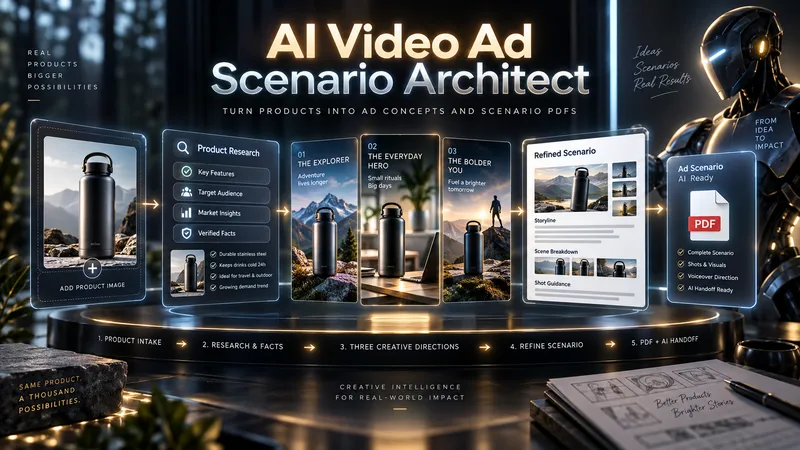
AI Video Ad Scenario Architect
Upload a product image or provide a product/model name. AI Video Ad Scenario Architect researches the product, identifies verified features, and turns them into creative advertising opportunities. The Skill first builds the Product Creative DNA, then uses the Creative Diversity Engine to generate 3 genuinely different ad directions. You can choose one, combine ideas, or introduce your own concept. If you want more control, Collaborative Mode lets you refine the selected direction together with the AI. For identifiable products already on the market, the Skill researches the web, prioritizes official sources, resolves conflicting information, and prevents unsupported technical claims from entering the script. When you upload a product image, Product Identity Lock preserves key visual details such as color, silhouette, logo placement, and distinctive product features for later production stages. After your chosen direction is approved, it is developed into a complete video ad scenario with scene timing, dialogue, visual direction, product visibility, sound design, payoff, and an optional CTA. The final deliverable is a structured PDF. It is not just a readable script: it also includes Verified Sources, Product Identity Lock, Production Context, and a Universal AI Continuation Prompt. You can give the PDF to another capable AI assistant and continue with image generation, image-to-image, image-to-video, voice, sound, and editing planning. You can also pass the same PDF into an optional AI Video Ad Production Workflow for a more advanced production pipeline.
create-avatar
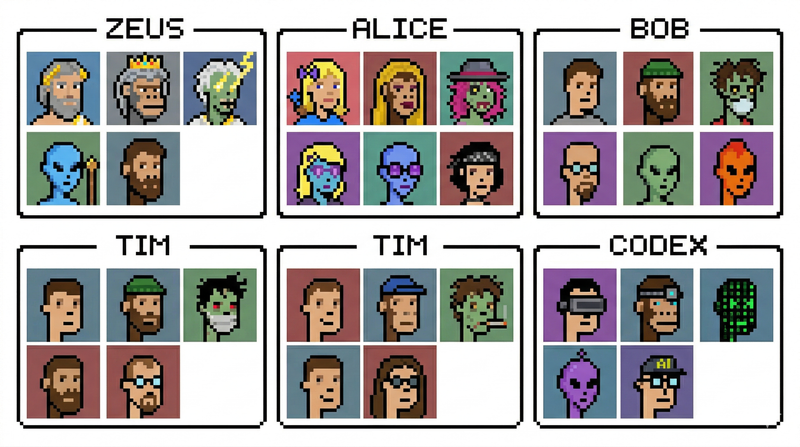
create-avatar generates a single 16:9 avatar contact sheet with exactly six named sections arranged in a 3×2 layout. Each section has a thin black border, a centered name tab, and a 3×2 grid of six portraits inside, for 36 portraits total. The skill is designed for quickly creating polished character boards, team avatar sheets, fictional profile collections, collectible-card layouts, or creative identity explorations. The user controls three main inputs: exactly six names, the visual style, and any special characters to include. The default style is photorealistic studio portraiture with a clean retro collectible-card aesthetic, but the style can be changed to pixel art, anime, cyberpunk, clay render, 3D toy, oil painting, noir photography, or other visual directions. The layout is intentionally fixed so the output remains consistent and reusable. Names always appear in order from left to right across the top row, then left to right across the bottom row. Each portrait uses a distinct solid-color background and the full sheet emphasizes character variety: different ages, ethnicities, skin tones, hairstyles, hats, glasses, facial expressions, tattoos, jewelry, and imaginative characters such as aliens, zombies, AI/robots, pandas, or monkeys. Use this skill when you want a clean, organized, highly visual avatar grid rather than a single portrait or a loose collage.
 Image
ImageNaive Doodle Avatar
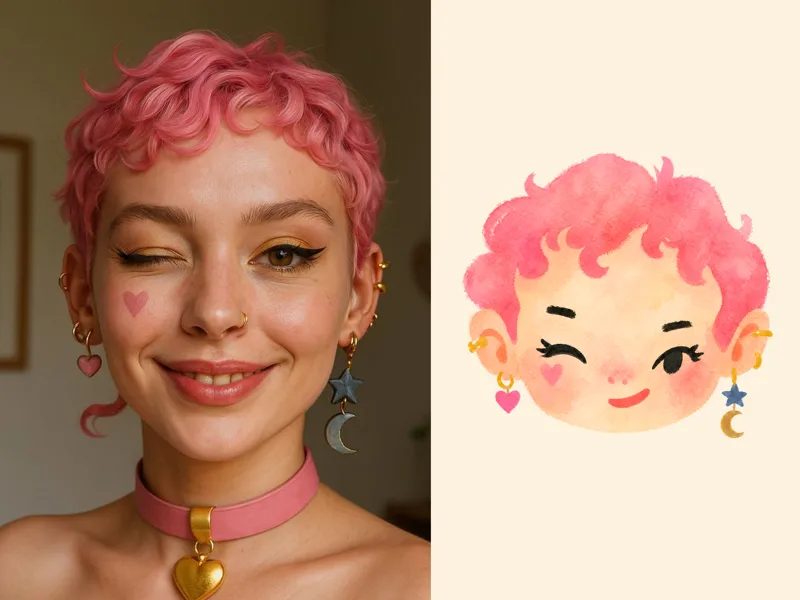
Turn a portrait, appearance description, or creative character idea into a distinctive naive doodle fashion-chibi avatar with a childlike yet cool editorial feel. The style emphasizes bold graphic hair shapes, rough marker or dry-brush edges, restrained watercolor-like color, and a clean white or warm-white background. Real photos guide recognizable cues such as hairstyle silhouette, face shape, expression, and attached accessories while remaining clearly transformed into an illustrated avatar rather than a realistic likeness. You can also start with a set of fresh fictional avatars when you want random inspiration instead of a photo-based transformation. The result stays flat, expressive, and fashion-forward, avoiding photographic skin, 3D rendering, heavy shading, detailed anatomy, distracting backgrounds, text, and watermarks.
Information
- Version
- v7
- Last updated
- Runtime credits
- Usage-based
- Models
- Auto
