Mood Pixels | xiaoxiaodong P249
By xiaoxiaodong
Mood Pixels | xiaoxiaodong P249
By xiaoxiaodong
Showcase
Description
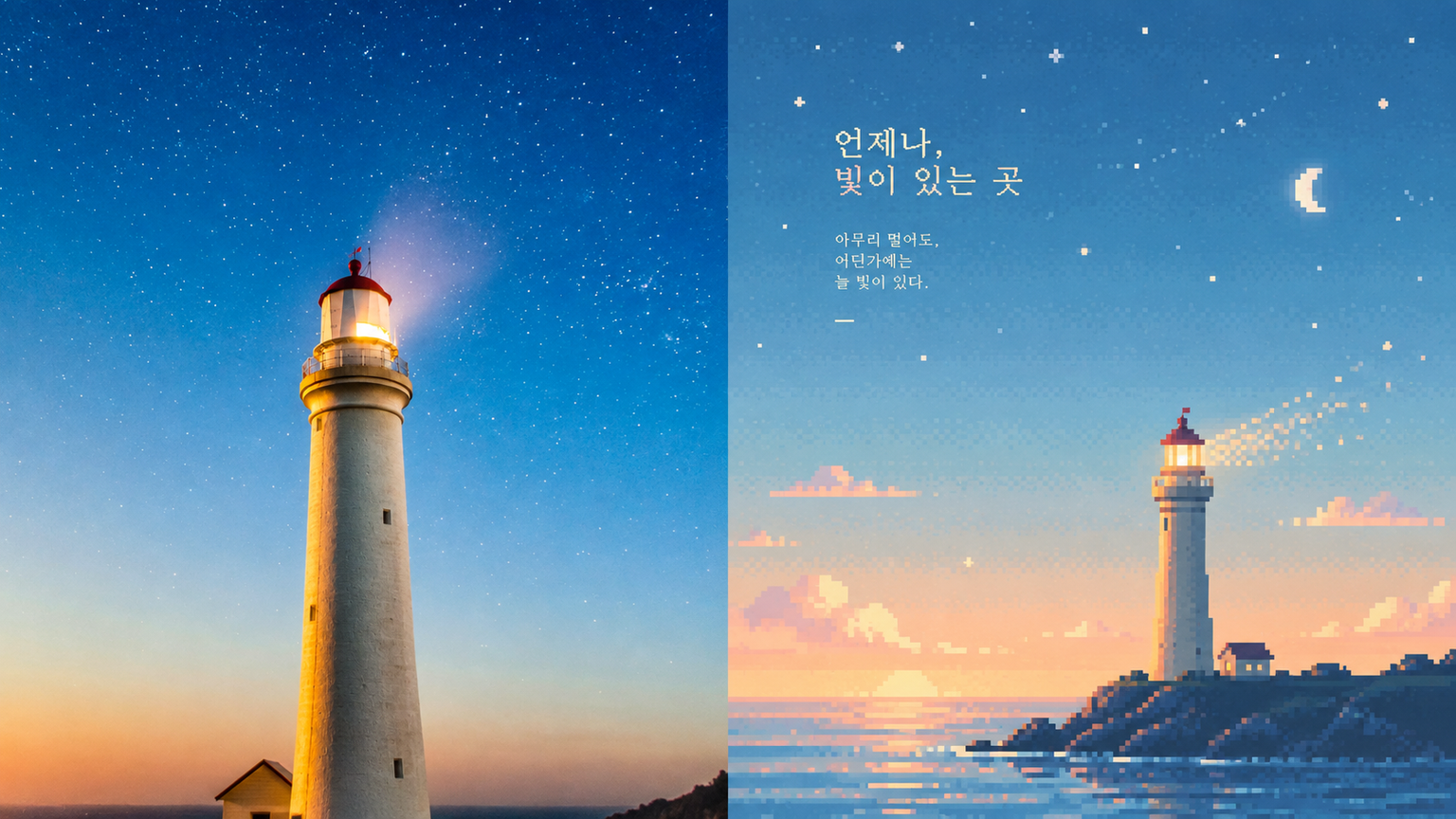
Suited to turning ordinary scenes into a quiet moment in a retro game world. The upper half is the original photo; the lower half reduces information while preserving its spirit and silhouette. The subject may be off-center, farther away, or cropped. The sky, mist, water, or blank space carries the mood. Colors from the original image shift to misty blue, pale cyan, mint green, creamy yellow, warm beige, and soft pink. Clear and warm—not gray, dirty, or highly saturated. Avoid ordinary pixel filters and fully packed scenes.
Recommended by
Dancang
Why we love this skill
Transforms photos into composed retro pixel art, placing a small subject in expansive sky, mist, or water with soft colors, sparse dithering, and subtle grain for a sense of memory.
Related Skills
View all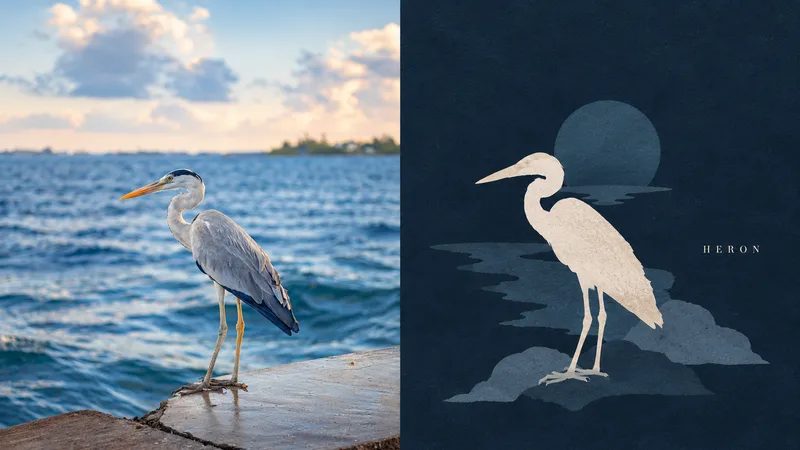 Image
Dark Silhouette by xiaoxiaodong
Ideal for turning a main subject and a few nearby items into a dark-background silhouette still life. The top half shows the original photo; the bottom half converts them into front-facing or profile flat silhouettes with no outlines and almost no internal details, staggered in height and overlapping in a cluster like quiet objects on a tabletop. The background color deepens the darkest tone of the photo, and the silhouettes are rendered as low-saturation pink-gray blocks with only one accent brightened to near warm white as if illuminated. The entire surface features fine, dry-gouache-like textures. The silhouette group leans slightly to one side, leaving empty space on the other side featuring a slender serif uppercase word. Avoid photos requiring perspective, 3D lighting, or clear facial features, as well as entire streets, full rooms, bright backgrounds, pure black backgrounds, gradients, outlines, and high-saturation colors.
 Image
Floating Pixel Art by xiaoxiaodong
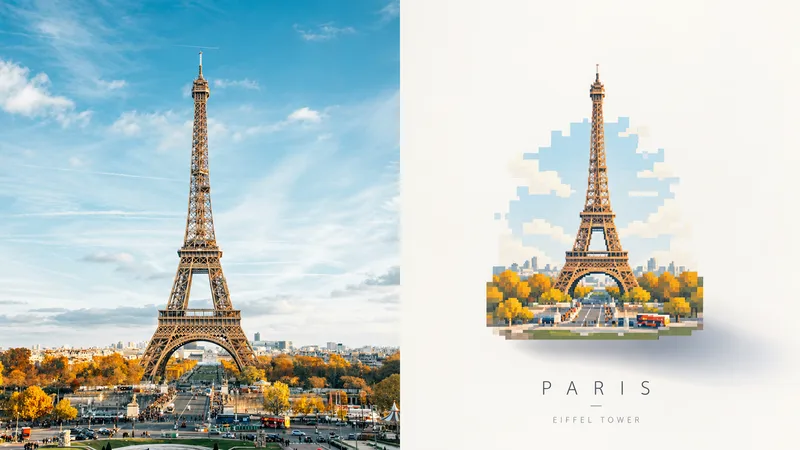
Perfect for turning photo subjects into a floating, pastel pixel art piece. The top half shows the original photo; the bottom half redraws the subject as a self-contained small art piece centered in a large expanse of light negative space, with a soft shadow offset from the piece at the bottom right that fades into the distance. The artwork uses uniform pixel grids, breaks curves into horizontal and vertical steps, merges details into grouped rectangles, and features no black outlines. Colors are sampled from the photo into four to six high-lightness pastel shades, with a small amount of muted dark tones and a single highlight, resulting in clean and flat color blocks. A thin, light sans-serif caption may appear outside the artwork. Avoid photos that require clear facial recognition or fine textures, scenes intended to fill the entire frame, or cartoon styles, smooth curves, plastic textures, and old paper textures.
 Image
GPT2 x Mint Pixel Cuisine
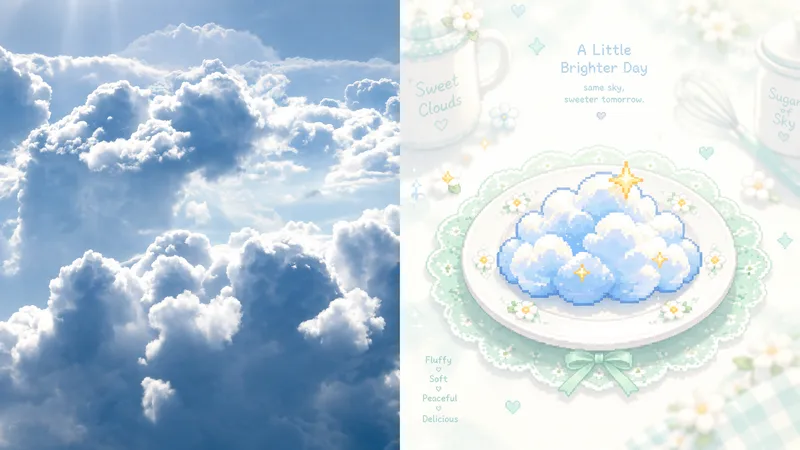
Ideal for turning photos into light, sweet, quiet pixel art cards: culinary nostalgia, independent stationery, and exhibition vignettes. The upper half preserves the recognizable original image; the lower half reduces the subject to a single central pixel symbol on a pale ceramic plate. A soft white halo, mint-green lace, and tiny floral dots surround it. Cookware in the distance should nearly fade into white. Only the center has clear blocky pixel edges; everything else is mist, bloom, and an almost overexposed pale background. Use mint green, ivory, and cream as the base, with bright orange, coral, golden yellow, or pink appearing only as accents at the center. Avoid dark backgrounds, strong outlines, complex details, and gray, dirty-looking filters.
Information
- Version
- v3
- Last updated
- Runtime credits
- Usage-based
- Models
- Auto
