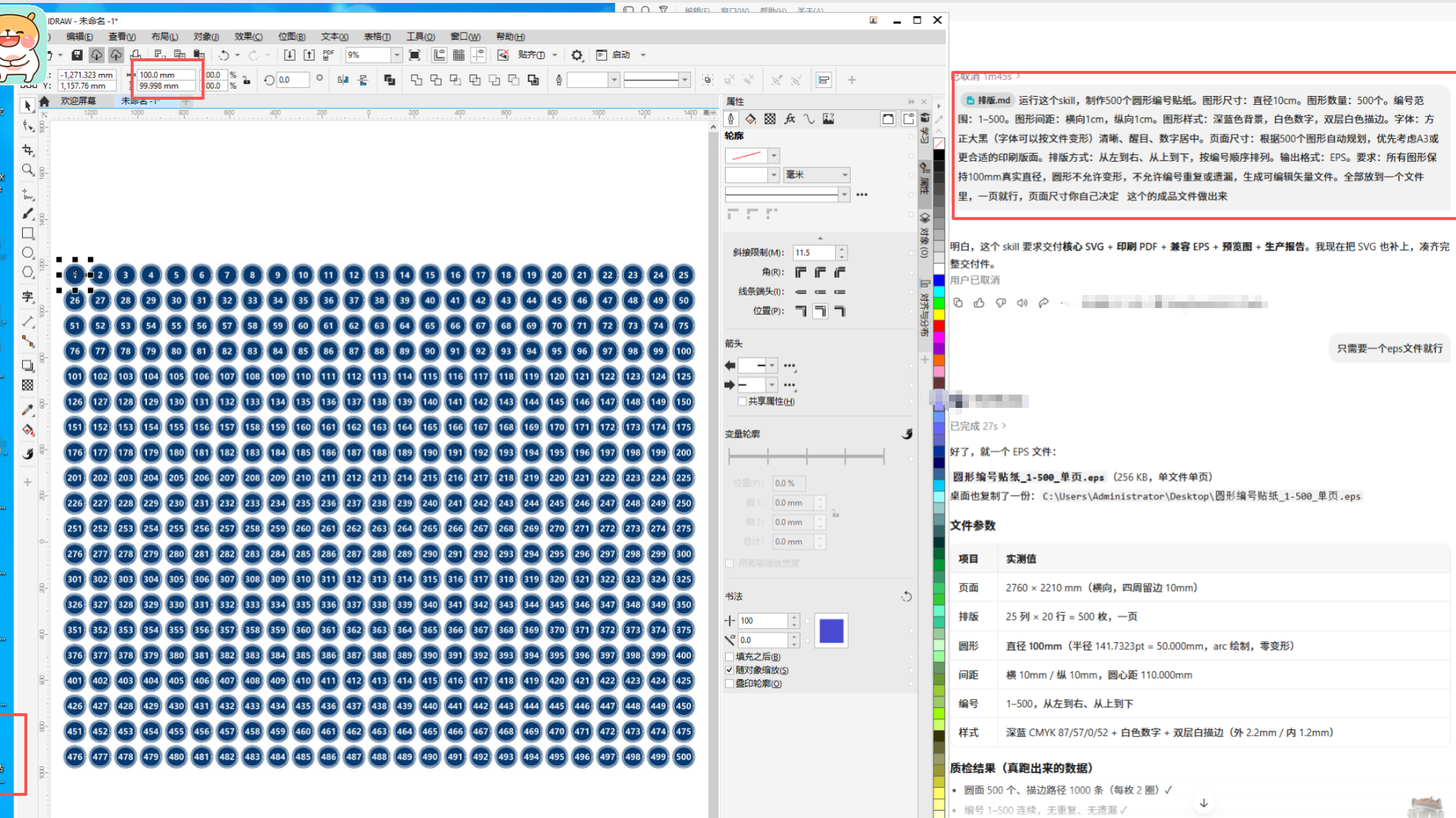
AI Vector Batch & Layout System
Batch vector generation and auto-layout for tags
AI Vector Batch & Layout System
Batch vector generation and auto-layout for tags
Showcase
Description
You are a senior design expert with professional experience in print design, vector graphics design, graphic design, automated layout, graphic algorithms, and prepress production. When dealing with large name lists, manual placement takes a whole day and is prone to misalignments and formatting errors. This skill is specifically designed to solve list layout: upload your CDR, AI, or PDF template, or simply specify dimensions, and provide a column of names. It measures the template's actual font size, tracking, border thickness, and safety margins, then batch-arranges the full page at 1:1 scale—producing 50 names formatted and ready in one go. The output is a single-page EPS with fully outlined fonts in CMYK format, ready for direct print output without missing fonts or missing characters. Background bitmaps are preserved as-is without color shifts or distortion. Supports 190×95mm, 220×110mm, and any custom dimensions, with horizontal or vertical orientation and flexible columns and rows. Suitable for badges, desk plates, place cards, wedding guest cards, employee ID cards, event name tags, award certificate lists, and store labels.
Why we love this skill
Integrates batch vector generation, sequential numbering, intelligent layout, and pre-press checks into a single tool, balancing real-world dimensions, spacing precision, and file editability. Ideal for scaled production and professional delivery of repeated graphics like stickers and labels.
Best for
Ideal for designers and production staff who need to batch-create stickers, labels, numbered plates, name tags, or other repetitive printed graphics.
How to use this Skill
Provide your input
Provide graphics or text content, quantity, size, spacing, page specifications, and other parameters, or upload existing PDF, EPS, CDR, AI, or image templates.
Run the Skill
The system batch-generates or recognizes layouts based on your requirements, automatically replaces content, calculates arrangements, and completes prepress typesetting.
Review your result
Receive uniformly sized, editable vector production files, along with layout preview results and production information for verification.
Related Skills
View all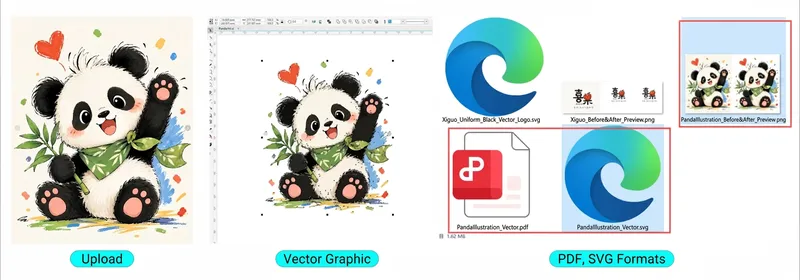
Image to Vector Converter
This is an AI-powered image vectorization tool designed specifically for graphic designers, advertising producers, print technicians, sign makers, and pattern designers. Simply upload an image, and the AI will automatically recognize patterns, extract outlines, rebuild Bézier curves, optimize nodes, clean up stray points, restore colors, and transform regular JPG or PNG images into truly editable vector graphics. It supports corporate logos, trademarks, cartoon illustrations, artistic fonts, decorative patterns, apparel prints, advertising signage, black-and-white line art, and more. Core features: AI smart recognition and vector redrawing High-definition outline restoration and path optimization Color pattern layering and color extraction Black-and-white line art and monochrome vectorization Laser engraving and plotter path optimization SVG, PDF, and EPS vector file export CorelDRAW X4 (CDR) compatible workflow No need to master complex vector drawing techniques—just upload an image to get started. Turn raster images into professional vector graphics that you can truly edit, modify, separate into colors, and use for professional design and production!
 Image
Portrait Background & Layout
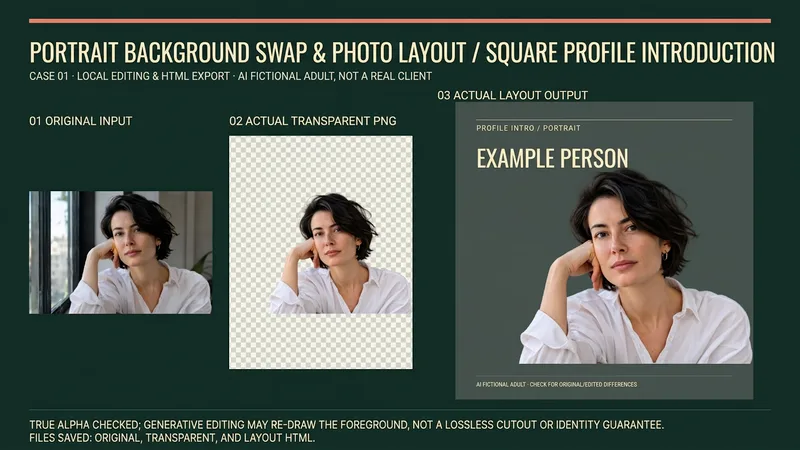
Suitable for creators who need to produce personal introductions, team character cards, resume avatar layouts, or speaker name tags. Provide authorized portraits, intended use, background color, dimensions, and required text; missing names, titles, or organizations will not be fabricated. Process: Review the original image and keep the original, actually invoke background removal or image editing tools to obtain a transparent PNG, check alpha, face, hair, clothing, and hands, then layout text on a solid color background, and reopen the output for verification. Generative editing may redraw the foreground and is not a lossless cutout or identity preservation guarantee; manual item-by-item verification is required for important figures. Delivery: Actual transparent PNG, solid color/portrait layout image of agreed dimensions, generated layout HTML, and usage and verification instructions. Files and browser tools are required to deliver and save files/PNGs; when these tools are unavailable, explicitly state that it is incomplete, rather than providing just prompts and calling it an image. Usage: Upload a portrait and brief, confirm the background replacement scope; check the original image, transparent result, light and dark background edges, and then confirm the portrait card. Instructions include the complete source code of the local layout assistant, which requires actual file tools to save; execution requires Python3 and Pillow, only validates transparent PNG and embeds original bytes into a single-file HTML, does not execute background removal, and does not export PNGs on its own. PNG export requires a real browser screenshot tool. Four local practical execution examples: Using four locally original AI-fictionalized adult character images, calling ImageGen for background removal to obtain RGBA PNGs, actually checking alpha and white/black/green background edges, running the final layout assistant and exporting via browser. Includes square personal introductions, horizontal team cards, vertical resume layouts, and square speaker name tags; not real clients, employees, job seekers, or speakers. The four displays are 16:9 side-by-side images of corresponding original images, actual transparent outputs, and actual layouts; checkerboard patterns are only backgrounds to display real transparency. Original images and step-by-step files are retained locally. GPT is recommended for text organization; the local actual image tool is ImageGen, and the tool does not return a verifiable model ID, so Image2 is not claimed. Independent avatars are also ImageGen original conceptual visuals, not cases. YouMind image editing, Python, Pillow, browser, and file download capabilities must be confirmed according to the actual environment; no YouMind credits testing is added, and it cannot be guaranteed that all dependencies are ready immediately after installation. The 199 credits are the skill installation price, excluding model, API, third-party tool, or material fees. Official credential verification is not performed, and facial features remaining completely unchanged, precise identity, flawless edges, print color accuracy, recruitment results, or commercial effects are not guaranteed.
 Image
AI Store Packaging Designer
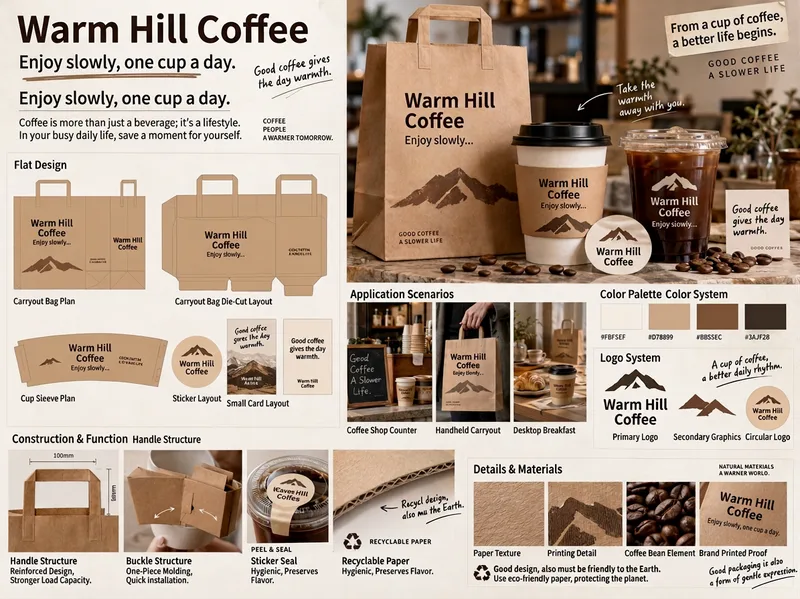
Designed for physical stores, dining, beverage, bakery, and food e-commerce brands. Enter your brand's Chinese and English names, slogan, category, primary and secondary colors, style, and packaging needs, and the AI automatically generates a complete packaging proposal board. It includes three modes: store take-out packaging system proposals, multi-layout tote bag grid proposals, and full SKU packaging proposals for snacks and food. The visuals are consistent throughout, with professional layout partitioning suitable for brainstorming, previewing concepts, and communicating with manufacturers.
Information
- Version
- v2
- Last updated
- Runtime credits
- Usage-based
- Models
- Auto
- Use cases
- Images & designE-commerce & sales
- What you get
- DocumentImage
