Deep Reliable Bio/Med Research
Deep Reliable Bio/Med Research
Description
Use case: Perform a round of biomedical scientific literature search and provide users with detailed and reliable output. 1. After the user initiates a search, the system breaks down the question and keywords. 2. Use public, reproducible data sources to search for literature. 3. Deduplicate, stratify, grade evidence, and sort the search results. 4. Use clickable in-text citations in the response. 5. List complete literature information item by item at the end, and annotate IF using publicly verifiable routes; if it cannot be verified with high confidence, it must be marked as 'Pending Verification' or 'Not Detected'.
Recommended by
Nico@YouMind
Why we love this skill
This skill is a reliable guide for biomedical research, ensuring highly accurate and verifiable scientific information through structured queries, multi-stage literature screening, and rigorous IF verification.
Showcase
1 / 2
Instructions
The core of this process is: first, use multiple queries to perform a reproducible initial screening in PubMed/NCBI E-utilities, then use PMID for deduplication and abstract evidence grading; only a small number of key documents enter the PMC/BioC full-text review; in-text citations must be clickable; complete bibliographic information must be listed at the end of the article; IF can only be conservatively checked through publicly accessible sources, and cannot be assumed to have JCR or local databases, cannot be guessed, and low-confidence matches cannot be treated as definitive results.
1. Preprocessing after a user initiates a search
1.1 First, analyze the user's question.
After receiving a user's question, the natural language question is first broken down into structured elements.
Must be identified:
• Research subjects: genes, proteins, drugs, channels, cell types, tissues, diseases, and models.
• Biological systems: humans, mice, rats, zebrafish, organoids, retina, brain regions, cell lines, etc.
• Relationship types: expression, regulation, function, mechanism, phenotype, death, survival, treatment, toxicity, development, degeneration, etc.
• Evidence requirements: Whether direct evidence, mechanistic evidence, full-text evidence, charts, dosage parameters, and experimental methods are required.
• Time range: unlimited time, the last 5 years, the last 1 year, the latest developments, and classic literature.
• Output types: short answer, representative literature, review summary, experimental design suggestions, evidence table, mechanism diagram.
Example:
User issue:
"Please help me find literature related to retinal organoid death."
Structured decomposition (example):
• Core models: retinal organoid, retina organoid, hPSC-derived retinal organoid, optic cup organoid.
• Phenotype: cell death, apoptosis, degeneration, survival loss, stress, necrosis.
• Related cells: photoreceptor, cone, rod, retinal ganglion cell, Müller glia.
• Potential mechanisms: oxidative stress, ER stress, mitochondrial dysfunction, hypoxia, inflammation, ferroptosis, necroptosis.
• Evidence objectives: Prioritize original studies that directly observe cell death/apoptosis/degeneration in human or animal retinal organoids; then look for literature on indirect mechanisms.
1.2 Keyword Segmentation Principles (Example)
Don't just write one search query. Prepare at least three categories of terms for each concept.
Category 1: Precise words.
• retinal organoid
• retina organoid
• human retinal organoid
• hPSC-derived retinal organoid
• iPSC-derived retinal organoid
The second category: synonyms and hypernyms.
• optic cup organoid
• 3D retinal culture
• stem cell-derived retina
• retinal differentiation
• retinal tissue model
The third category: mechanism and phenotypic terms.
• apoptosis
• cell death
• degeneration
• survival
• stress
• oxidative stress
• ER stress
• mitochondrial dysfunction
• hypoxia
• necroptosis
• ferroptosis
If the user specifies the cell type, add:
• photoreceptor
• cone
• rod
• retinal ganglion cell
• Müller glia
• bipolar cell
• amacrine cell
If the user specifies the species or origin, add:
• human
• mouse
• rat
• zebrafish
• hESC
• iPSC
• pluripotent stem cell
1.3 Generating hierarchical search queries
Generate at least 3–6 queries. Each query corresponds to a search objective.
First layer: Direct evidence retrieval.
Used to find literature that directly matches the target model and target phenotype.
```text
("retinal organoid" OR "retina organoid" OR "human retinal organoid") AND (apoptosis OR "cell death" OR degeneration)
```
Second layer: Extended model retrieval.
Used to capture literature where the author did not use the precise term "retinal organoid" but it is actually relevant.
```text
("optic cup organoid" OR "3D retinal culture" OR "stem cell-derived retina") AND (survival OR apoptosis OR stress)
```
The third layer: mechanism-specific search.
Used to verify specific pathways or mechanisms.
```text
("retinal organoid" OR "retina organoid") AND ("oxidative stress" OR "ER stress" OR hypoxia OR mitochondria)
```
Fourth layer: Cell type specific search.
```text
("retinal organoid" OR "retina organoid") AND (photoreceptor OR cone OR rod OR "retinal ganglion cell") AND (death OR apoptosis OR degeneration)
```
Fifth layer: Disease model retrieval.
```text
("retinal organoid" OR "retina organoid") AND (disease OR degeneration OR dystrophy OR retinitis OR glaucoma)
```
Sixth layer: Review/background search.
```text
("retinal organoid" OR "retina organoid") AND (review OR protocol OR model)
```
2. What methods and websites were used for the search?
2.1 Preferred: PubMed / NCBI E-utilities
PubMed is the preferred tool for searching biomedical literature. Do not default to scraping PubMed pages. Use the NCBI E-utilities API instead.
2.1.1 ESearch: Retrieving PMID using a query
interface:
```text
https://eutils.ncbi.nlm.nih.gov/entrez/eutils/esearch.fcgi
```
parameter:
```text
db=pubmed
term=
retmode=json
retmax=20
sort=relevance
```
You can also sort by time:
```text
sort=pub+date
```
Example:
```text
https://eutils.ncbi.nlm.nih.gov/entrez/eutils/esearch.fcgi?db=pubmed&term=(%22retinal%20organoid%22%20OR%20%22retina%20organoid%22)%20AND%20(apoptosis%20OR%20%22cell%20death%22)&retmode=json&retmax=20&sort=relevance
```
Read from the return:
```text
esearchresult.idlist
```
This is the PMID list.
2.1.2 ESummary: Obtaining Literature Metadata
interface:
```text
https://eutils.ncbi.nlm.nih.gov/entrez/eutils/esummary.fcgi
```
parameter:
```text
db=pubmed
id=PMID1,PMID2,PMID3
retmode=json
```
Extracted fields:
• PMID
• title
• fulljournalname
• source/journal abbreviation
• pubdate
• authors
• DOI and PMCID in articleids
• volume, issue, pages
2.1.3 EFetch: Retrieving Summary and XML Details
interface:
```text
https://eutils.ncbi.nlm.nih.gov/entrez/eutils/efetch.fcgi
```
parameter:
```text
db=pubmed
id=PMID1,PMID2
retmode=xml
rettype=abstract
```
Extracted fields:
• ArticleTitle
• AbstractText
• Journal Title
• ISOAbbreviation
• ISSN / eISSN
• PubDate
• DOI
• PMCID
• MeSH terms
2.1.4 Batch Retrieval Strategy
Recommended process:
1. Call ESearch for each query.
2. For each query, select the first 5–20 results.
3. Merge all PMIDs.
4. Use PMID to remove duplicates.
5. Use ESummary / EFetch to retrieve metadata and abstract data in batches.
6. In the initial screening stage, only read the metadata and abstract; do not start by reading the full text.
────────────────
2.2 Second Phase: Full Review of PMC/BioC Documents
The full text will only be included in the following cases:
• Users request to read the full text carefully.
• The abstract is insufficient to determine the mechanism.
• Requires charts, experimental methods, concentrations, dosages, IC50, EC50, Kd, and Ki.
• A small number of key PMIDs have been identified and require review on a case-by-case basis.
2.2.1 PMID to PMCID
interface:
```text
https://www.ncbi.nlm.nih.gov/pmc/utils/idconv/v1.0/?ids=
```
If PMCID is returned, it means that PMC may have open full text.
2.2.2 Prioritize BioC JSON
interface:
```text
https://www.ncbi.nlm.nih.gov/research/bionlp/RESTful/pmcoa.cgi/BioC_json/
```
Advantages: Highly structured, suitable for extracting main text paragraphs.
2.2.3 Try PMC XML when BioC is unavailable
interface:
```text
https://www.ncbi.nlm.nih.gov/pmc/articles/
```
Skip when extracting the main text:
• references
• bibliography
• Acknowledgments
• author contributions
• competing interests
Full text review must include a stop criterion:
• Each document is scanned only once.
• By default, only paragraphs related to the question are extracted.
• If the target field is not matched, mark it as "No direct evidence found".
• Avoid repeatedly scraping keywords.
────────────────
2.3 bioRxiv / medRxiv
Used to supplement the latest preprints.
You can use the official API:
```text
https://api.biorxiv.org/details/biorxiv/YYYY-MM-DD/YYYY-MM-DD
https://api.biorxiv.org/details/medrxiv/YYYY-MM-DD/YYYY-MM-DD
```
You can also use a regular search as a supplement:
```text
site:biorxiv.org retinal organoid apoptosis
site:medrxiv.org retina organoid degeneration
```
Preprints must be labeled:
```text
This is a preprint and has not been peer-reviewed.
```
────────────────
2.4 Crossref/OpenAlex/Unpaywall
Used to complete DOI, open full-text address, and publication information.
Crossref:
```text
https://api.crossref.org/works?query.title=<title>
```
OpenAlex:
```text
https://api.openalex.org/works?search=<title or topic>
```
Unpaywall:
```text
https://api.unpaywall.org/v2/
```
use:
• DOI completion.
• OA PDF link search.
• Journal name verification.
• Publication year verification.
────────────────
2.5 Publisher Page
Access the publisher's page only when API information is insufficient.
Access rules:
• Each publisher URL will only be tried once.
• If you encounter CAPTCHAs, login barriers, Cloudflare, Access Denied, or institutional access barriers, stop immediately.
• Avoid repeatedly refreshing, changing the path within the same site, or waiting in a loop.
• Use PubMed, PMC, Crossref, OpenAlex, Unpaywall, and DOI metadata as fallback.
3. How to organize information after retrieval
3.1 Establish a unified record structure
Each document is compiled into a unified record.
Fields:
```text
pmid
doi
pmcid
title
authors
journal
journal_abbrev
issn
eissn
year
abstract
query_source
evidence_level
evidence_tags
paper_type
URL
```
3.2 Deduplication
Priority:
1. PMID deduplication.
2. Use DOI to remove duplicates if PMID is unavailable.
3. If there is no DOI, use lower(title) + year + first_author to remove duplicates.
Retain the query_source that was hit the first time, and record which queries hit the document.
3.3 Evidence Classification
It is necessary to distinguish:
Direct evidence:
The target species, tissue, cell type, model, and treatment conditions are directly matched.
Indirect evidence:
Adjacent systems, similar models, and similar mechanisms are supported, but they are not direct systems for user problems.
No direct evidence found:
Only background, speculation, reviews, or adjacent models can be found; there are no direct experimental results.
3.4 Document Type Labeling
At least the following should be noted:
• original research
• review
• protocol
• preprint
• dataset/resource
• clinical study
• method paper
3.5 Sorting Rules
Recommended sorting:
1. Original research with direct evidence.
2. Research on key mechanisms.
3. Latest important research.
4. Classic foundational studies.
5. High-quality review.
6. Indirect evidence.
Do not sort by IF alone. IF is a journal-level indicator and does not equate to the quality of an individual article.
4. How to organize quotations in a reply
4.1 Text Citation Format
All text citations must be clickable.
Format:
```markdown
[[1. **Journal**, Year]](https://pubmed.ncbi.nlm.nih.gov/PMID/)
```
Example:
```markdown
Previous studies have observed developmental stage-related photoreceptor stress and degeneration in human retinal organoids [[1. **Cell Stem Cell**, 2019]](https://pubmed.ncbi.nlm.nih.gov/xxxxxxx/).
```
Do not write it as:
```text
[1]
(PMID: xxxxx)
See reference 1
```
4.2 Recommended Answer Structure
First paragraph: Direct conclusion.
```text
Conclusion: There have been relevant reports, but the direct evidence mainly focuses on...; direct evidence regarding... is still lacking.
```
Second paragraph: Evidence classification.
```text
Direct evidence:
- Reference A: ...
Indirect evidence:
- Reference B: ...
No direct evidence found:
- Not found in this round...
```
Third paragraph: Mechanism summary.
Group by topic, for example:
• apoptosis/caspase pathway
• oxidative stress
• mitochondrial dysfunction
• ER stress
• hypoxia/metabolic stress
• inflammation
• developmental mismatch
Fourth paragraph: Research gap.
Clearly state which issues lack direct evidence.
Fifth paragraph: Inspiration from the experiment.
If the user needs experimental design, provide the marker, assay, time point, and control.
5. Complete list of references at the end of the article
If a specific reference is cited in the text, a complete list must be attached at the end of the article.
Format:
```markdown
## Complete List of Reference Information
1. Smith J et al., **Journal Name** (2021), [PMID: 12345678](https://pubmed.ncbi.nlm.nih.gov/12345678/). *{IF=X,Qn}*
2. Wang X et al., **Journal Name** (2022), [DOI: 10.xxxx/xxxxx](https://doi.org/10.xxxx/xxxxx). *{IF=To be verified}*
```
Author format:
• 1–3 authors: List all.
• More than 3 authors: First author et al.
The PMID / DOI / URL must be clickable.
6. IF Verification and Labeling
6.1 First, let's explain the practical limitations of IF checks.
Normally, the official Journal Impact Factor comes from Clarivate Journal Citation Reports (JCR). However, any external agent typically does not have a Clarivate/JCR account or a local JCR table, so do not verify it through this path.
```
6.2 Practical methods for using IF skill
Main route:
1. If the input is PMID, first use NCBI E-utilities to obtain PubMed metadata.
- Retrieve FullJournalName. - Retrieve Source/ISO abbreviation. - Retrieve ISSN/eISSN. - Retrieve auxiliary fields such as title, year, and DOI.
2. Use the publicly available iikx/iscience mobile JSON interface to query journals.
Search API:
```text
https://m.iikx.com/api/restfull/?m=sci&c=index&a=info&keyword=
```
Details API:
```text
https://m.iikx.com/api/restfull/?m=sci/index/detail&id=
```
3. Perform a conservative match on the search results.
- Prioritizes exact normalized journal title matches. - Second, prioritizes exact abbreviation matches. - Exercises great caution with short and broad terms. - Does not accept obvious substring mismatches, such as mismatching "Nature" as "Nature Reviews" series. - Returns ambiguous/not_found results if the match is unstable, rather than guessing.
4. If PubMed provides an abbreviation, try expanding it to the full name or alternative title using NLM Catalog.
The NLM Catalog search interface remains NCBI E-utilities:
```text
https://eutils.ncbi.nlm.nih.gov/entrez/eutils/esearch.fcgi?db=nlmcatalog&term=[Title Abbreviation]&retmode=xml&retmax=1
```
Then use ESummary to get the Title / TitleAlternate.
5. Read from the iikx detail results:
- Impact factor. - IF year. - JCR quartile. - CAS/CAS quartile, if applicable. - Source URL. - Match confidence.
6. Do not include the IF year in the main text when annotating; use compact annotations.
The final annotation should only state:
```text
*{IF=X,Qn}*
```
If it fails:
```text
*{IF=Pending Verification}*
```
or:
```text
*{IF=Not detected}*
```
6.3 Specific Steps
Perform the following procedure for each document.
Step 1: Prepare the journal search name.
Prioritize retrieving from PubMed metadata:
```text
FullJournalName
ISOAbbreviation / Source
ISSN
eISSN
```
If only a DOI is available, first use Crossref or OpenAlex to obtain the journal name.
Crossref:
```text
https://api.crossref.org/works/
```
OpenAlex:
```text
https://api.openalex.org/works/https://doi.org/
```
Step 2: Standardize journal names.
Standardization rules:
• All lowercase.
• HTML unescape.
• Replace & with and.
• Remove punctuation.
• Combine multiple spaces.
• When making comparisons, you can also use the compact form, which removes all spaces.
Example pseudocode:
Python
import re, html
def norm(s):
s = html.unescape(s or '').lower()
s = re.sub(r'&', ' and ', s)
s = re.sub(r'[^a-z0-9]+', ' ', s)
return re.sub(r'\s+', ' ', s).strip()
def compact(s):
return norm(s).replace(' ', '')
```
Step 3: Query the iikx search interface.
```text
https://m.iikx.com/api/restfull/?m=sci&c=index&a=info&keyword=
```
It is recommended to set a User-Agent, for example:
```text
Mozilla/5.0
```
If no exact match is found on the first page, you can flip through a limited number of pages, for example, up to 8 pages.
Page turning parameters are usually:
```text
page=2
page=3
```
Step 4: Select candidates from the search results.
Candidate fields typically include:
```text
id
classid
title
smalltitle
IF or IF2024
zky2020
URL
```
Matching rules:
• If compact(query) == compact(candidate.title), accept.
• If norm(query) == norm(candidate.title), accept.
• If compact(query) == compact(candidate.smalltitle), accept.
• If norm(query) == norm(candidate.smalltitle), accept.
• Do not accept a substring unless the query is long enough and unambiguous.
• Be especially cautious with short words such as Nature, Science, Cell, Brain, Vision, and Retina.
Step 5: If no match is found, use the NLM Catalog extended abbreviation.
For example, in PubMed, the Source is:
```text
Free Radic Biol Med
```
You can check:
```text
https://eutils.ncbi.nlm.nih.gov/entrez/eutils/esearch.fcgi?db=nlmcatalog&term=Free%20Radic%20Biol%20Med%5BTitle%20Abbreviation%5D&retmode=xml&retmax=1
```
After obtaining the NLM Catalog ID, use it as follows:
```text
https://eutils.ncbi.nlm.nih.gov/entrez/eutils/esummary.fcgi?db=nlmcatalog&id=
```
Read:
```text
Title
TitleAlternate
```
Then use these full names to search for iikx.
Step 6: Check the iikx details interface.
If the search results contain:
```text
id=
classid=
```
Call:
```text
https://m.iikx.com/api/restfull/?m=sci/index/detail&id=
```
Read from detail:
```text
IF2024, IF2023, IF2022 ...
IF
zky2020 or other JCR quartile fields
jcr22 / jcr12 or partition field
issn
eissn
title
smalltitle
category
```
Step 7: Select the latest IF statement.
Search the returned fields for all instances of the form:
```text
IF20xx
```
For example:
```text
IF2024
IF2023
IF2022
```
Choose the year with the largest significant digit.
If IF20xx is not present, attempt to read:
```text
IF
if_value
```
If no valid value is found, it is marked as not detected.
Step 8: Output confidence level and label.
If exact title/abbreviation matches, and detail returns a valid IF:
```text
*{IF=X,Qn}*
```
If the match is uncertain:
```text
*{IF=Pending Verification}*
```
If the public API returns no results:
```text
*{IF=Not detected}*
```
6.4 IF Annotation Format
Fixed format:
```text
*{IF=X,Qn}*
```
Example:
```markdown
Smith J et al., **Neuron** (2020), [PMID: 12345678](https://pubmed.ncbi.nlm.nih.gov/12345678/). *{IF=15.0, Q1}*
```
Notice:
• The JCR year is not written inside the IF annotation.
• Do not write "2024 JCR IF".
• Do not write "JCR 2024".
• Only the year of publication is retained.
• If the IF is 0.0, null, has an unstable source, or an unstable match, the number will not be displayed.
6.5 Standard handling for IF check failures
Don't guess.
Do not use the journal name to fill in the numbers.
Do not use large models to memorize and fill in IF statements.
Only three states are allowed upon failure:
```text
*{IF=Pending Verification}*
```
Used for:
• Search results are vague.
There are several similar journals.
• Only the abbreviation was found, but the full name could not be confirmed.
• The IF returned by publicly available sources is questionable.
```text
*{IF=Not detected}*
```
Used for:
• The public interface returned no results.
• The journal is not covered by SCI/JCR.
• The new issue does not yet have an IF.
```text
*{IF=Not publicly verifiable}*
```
Used for:
• The user requires an official JCR, but the current Agent does not have Clarivate/JCR permissions.
7. Final self-checklist
Must be checked before shipment:
• Should the user's core questions be answered first?
• Whether to distinguish between direct evidence, indirect evidence, and no direct evidence found.
• Are all text citations clickable?
• Is there a complete list of references at the end of the article?
• Does every document include an IF (Input/Output) label or a label indicating pending verification/not detected?
• Whether the PMID/DOI/URL is clickable.
• Does it avoid substituting overall tissue results for conclusions about specific cell types?
• Does it avoid substituting activation/phosphorylation for an increase in total expression?
• Whether to indicate a preprint.
• Does it specify the search boundaries?
• IF whether it was not based on memory or guesswork.
8. Reproducible pseudocode
Python
queries = build_queries(user_question)
all_pmids = []
for query in queries:
pmids = ncbi_esearch(query, retmax=20, sort='relevance')
all_pmids.extend(pmids)
pmids = deduplicate_keep_order(all_pmids)
metadata = ncbi_esummary(pmids)
abstracts = ncbi_efetch_abstract(pmids)
records = merge_metadata_and_abstracts(metadata, abstracts)
records = tag_evidence(records, user_question)
records = rank_records(records)
selected = select_top_records(records)
if need_fulltext:
for record in selected_key_records:
pmcid = idconv_pmid_to_pmcid(record.pmid)
if pmcid:
record.fulltext = fetch_bioc_or_pmc_xml(pmcid)
For record in selected:
journal_query = record.full_journal_name or record.journal_abbrev
if_result = lookup_if_public_iikx(journal_query)
if_result.confident:
record.if_annotation = f'*{IF={if_result.if_value},{if_result.quartile}}*'
elif if_result.ambiguous:
record.if_annotation = '*{IF=Pending Verification}*'
else:
record.if_annotation = '*{IF=Not Detected}*'
answer = compose_answer(
conclusion
evidence_groups,
clickable_body_citations,
full_reference_list_with_if
)
```
9. Recommended final delivery template
```markdown
in conclusion:
...
Level of evidence:
Direct evidence:
- ……[[1. **Journal**, Year]](https://pubmed.ncbi.nlm.nih.gov/PMID/)
Indirect evidence:
- …[[2. **Journal**, Year]](https://pubmed.ncbi.nlm.nih.gov/PMID/)
No direct evidence found:
- ……
Mechanism summary:
1. ……
2. ……
Search boundaries:
This round of searches primarily involved PubMed, PMC, BioC, and bioRxiv; initial screening was based on metadata and abstracts, with only key documents undergoing full-text verification. IF annotations were based on publicly accessible sources; documents that could not be matched with high confidence were marked as pending verification or not detected.
Complete list of literature information:
1. Smith J et al., **Journal Name** (2021), [PMID: 12345678](https://pubmed.ncbi.nlm.nih.gov/12345678/). *{IF=X,Q1}*
2. Wang X et al., **Journal Name** (2022), [DOI: 10.xxxx/xxxxx](https://doi.org/10.xxxx/xxxxx). *{IF=To be verified}*
```
Related Skills
View all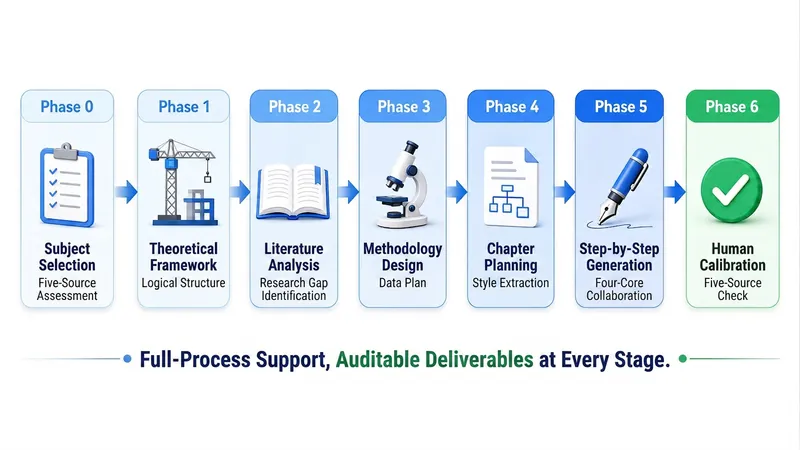
Proposal Readiness Checker
Before you spend dozens of hours writing your thesis, take ten minutes to run a structured checkup. This skill does only one thing: It diagnoses, not writes. It tells you whether your topic can hold up, whether your materials are sufficient, what's missing, where to fill the gaps, and in what order. Then it gives you an actionable missing-material checklist and search queries. It will not write your introduction, literature review, methods, or discussion. Four steps: 1. Discipline diagnosis: Classify your work into 1A Humanities/Arts, 1B Social Sciences, 2A Science/Engineering, or 2B Agriculture/Medicine/Life Sciences, and load the corresponding regulatory red lines; 2B triggers a mandatory ethics review block. 2. Topic checkup: Examine the topic from three dimensions—momentum, shape, and wording—to judge whether the research unit can be operationalized, whether the research question can be answered, and whether the topic has been done to death. 3. Material checkup: Register your existing literature into an M1/M2… material library, verify each entry against the four elements (author/year/title/verifiable locator), and compute the true coverage rate. 4. Gap list and search queries: Specify how many papers of what type are missing and which piece of evidence is lacking, and provide search queries ready to paste into databases (including Boolean keyword combinations, time ranges, and screening criteria). When to use it (trigger phrases): "Help me check my proposal" "Can this topic work?" "Do I have enough literature?" "My proposal was sent back" "I want to confirm before starting to write" — for graduate students who have just set a direction but haven't started writing; for those whose proposal was rejected but don't know why; for those with a pile of literature but unsure if it's enough to begin; for those wanting to confirm whether the topic is worth the investment before committing fully. Deliverables: A Proposal Checkup Report document + a Five-Source Readiness Scorecard (each level has behavioral criteria, not vague scoring) + a prioritized list of missing materials + search queries + an archive code. The archive code is compatible with the Academic Paper Full-Process Writing System v4.0; after the checkup, paste it there to continue writing without re-stating your discipline, topic, or journal. What this skill explicitly does not do: It does not write the main text, generate reference lists, or fabricate authors, years, volumes, issues, pages, or DOIs. Any literature found via online search is flagged with ⚠️ "needs verification" and must be verified by you before use. This skill does not promise any acceptance or passing outcome.
 Research
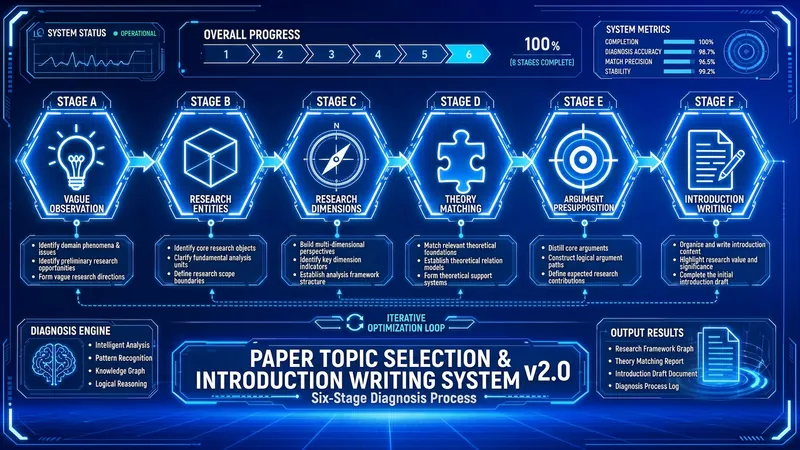
Thesis Topic & Intro v3.2
Read in 10 seconds: turn a vague observation into a defensible topic, then into an introduction that can pass review. Throughout, it uses only the real materials you provide — no fabricated references. Trigger words: thesis topic, topic selection, introduction, research gap, academic writing, thesis proposal, topic selection before literature review. Applies to: journal papers / dissertations / conference papers / course papers, across all disciplines — humanities and social sciences, STEM, agriculture, medicine, and life sciences. Up and running in 3 minutes: lock in your discipline and starting point → shape the topic layer by layer → strict evidence-chain gate → module-by-module introduction → ratchet finalization. [Division of labor with other skills] The health check comes first, writing comes after, and polishing comes last. This skill handles the middle stretch: topic shaping + introduction draft. It does not write the full paper (that's the Academic Paper Full-Process Writing System v4.x), and it does not polish language sentence by sentence (that's the Academic Paper Three-Track Polishing System v8.x). [Six gates] 1. Discipline placement: classify into one of four categories — 1A humanities/arts, 1B social sciences, 2A STEM, 2B agriculture/medicine/life sciences — and load the corresponding red-line norms; for category 2B, ethics review status is always checked. 2. Stage positioning: are you at a vague observation, have a unit but no angle, have an object but no theory, lack a method, lack a viewpoint, or only lack an introduction? Start from the corresponding gate instead of starting over from scratch. 3. Topic shaping: research unit → dimension compass → theoretical perspective → research method → research viewpoint, locked layer by layer; before locking each layer, first judge whether the previous layer holds. 4. Strict evidence-chain gate: before the introduction, your references are registered into an M1/M2… material library, each entry verified on four elements — author/year/title/locator; if fewer than 3 references are registered in the conversation, the system refuses to generate the research-gap statement — not a downgrade, a refusal. 5. Module-by-module generation: the introduction is produced in five inverted-pyramid modules, and each module must be annotated with citation numbers [Mn]; no source, no sentence. 6. Ratchet finalization: only versions that have passed receive credit; qualifying modules are locked and no longer changed; scores only go up, never down. [Deliverables] A '[Topic Keyword] · Topic & Introduction' document + a sentence-level traceable citation mapping table + a ⚠️ to-verify checklist + an AFP archive code. The archive code works across four systems — the proposal health-checker, the v4.x full-process system, and the three-track polishing system — so switching skills doesn't require re-stating your discipline, topic, journal, or material library. [Explicitly not done] It does not fabricate authors, years, volumes, issues, page numbers, or DOIs; any bibliographic records retrieved online are marked ⚠️ to-verify and can only be written into the reference list after you verify them; it makes no promises of acceptance or passing review. Authorship and responsibility are yours — please verify every citation and data point.
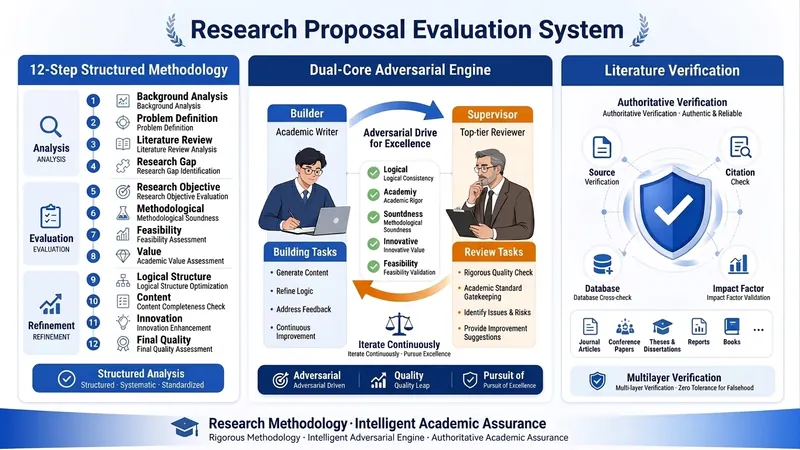
Grant Proposal Review PRO V2.0
🎯 Core Functionality Overview This is an intelligent review and optimization system specially designed for national social science, education ministry, and provincial grant applications. It simulates the thinking mode of a senior review expert with 15 years of experience, ensuring academic rigor and competitiveness through three core mechanisms. 🔧 Three Core Mechanisms 1️⃣ 12-Step Structured Methodology Covers the full lifecycle of grant proposal review: Phase 1-3: Basic Diagnosis - In-depth analysis of announcement (funding priorities, review criteria, application requirements) - Cross-disciplinary type judgment (precise identification of 8 types) - Research GAP five-dimension identification (theory/methodology/empirical/policy/technology) Phase 4-7: Core Element Review - Research question TMAQ model analysis (theory/methodology/approach/question four dimensions) - Research objective SMART principle test - Research content framework completeness assessment - Research approach type matching (6 types) Phase 8-10: Deep Quality Enhancement - Precise extraction of key difficulties (distinguish criteria + breakthrough paths) - Innovation point seven-dimension mining - Feasibility seven-dimension argumentation Phase 11-12: Overall Optimization - Nine-dimension quality check (academic rigor, innovativeness, feasibility, etc.) - Comprehensive optimization suggestions and final report 2️⃣ Dual-Core Adversarial Mechanism (Builder vs Supervisor) Working Principle: - Builder (academic writer): Generates optimization plans based on user materials - Supervisor (top journal reviewer): Challenges Builder's plans with the strictest standards - Adversarial iteration: 3 rounds of confrontation to ensure plans are robust Application Scenarios: - Innovation point mining: Builder proposes innovation points → Supervisor questions novelty → iterative optimization - Feasibility argumentation: Builder designs plan → Supervisor challenges feasibility → supplementary argumentation - Literature citation: Builder cites literature → Supervisor verifies authenticity → ensure academic standards 3️⃣ Literature Authenticity Verification Mechanism Two working modes: Mode A: Placeholder Mode (Default) - Use markers like [Literature Placeholder-001] in place of specific references - Output a Literature Requirement List specifying search requirements for each placeholder - User searches and fills in real references Mode B: Real-Time Verification Mode - Call Google Scholar to verify literature authenticity in real time - Generate Literature Verification Report (authenticity/relevance/authority scores) - Ensure every citation is traceable Preventing AI Hallucination: - Prohibits fabricating authors, journals, DOIs - All references must be verified or marked as placeholders - Guarantees academic integrity bottom line 💡 Core Value and Applicable Scenarios ✅ Key Pain Points Addressed 1. Academic sloppiness: AI-generated content often includes fake references, logical gaps 2. Insufficient innovation: Difficulty uncovering true academic innovation points 3. Weak feasibility: Research plans lack systematic argumentation 4. Cross-disciplinary difficulty: Interdisciplinary topics often fall between two stools 🎓 Target Users - University faculty (social sciences, education, humanities) - Researchers (applying for national and provincial grants) - Academic teams (needing systematic review processes) 📋 Typical Workflow 1. Input: Upload announcement + proposal draft 2. Review: System executes 12-step structured analysis 3. Adversarial: Dual-core mechanism iteratively optimizes key sections 4. Verification: Literature authenticity check 5. Output: Complete review report + optimization suggestions + literature list 🔍 Differences from Traditional Review | Dimension | Traditional Human Review | Expert Review System | |-----------|------------------------|----------------------| | Review depth | Depends on personal experience | 12-step structured + 9D QC | | Academic rigor | Hard to fully audit | Literature verification + dual-core adversarial | | Innovation mining | Subjective judgment | 7-dimension systematic analysis | | Feasibility argumentation | Experience-driven | 7-dimension item-by-item argumentation | | Consistency | Varies by individual | Standardized process | | Efficiency | Days to weeks | 1-2 hours for initial review | The core advantage of this system is: it makes the tacit knowledge of a 15-year senior review expert explicit, structured, and replicable, enabling every user to receive top-level expert review services.
Information
- Last updated
- Runtime credits
- Usage-based
- Models
- Claude Sonnet 4.5
- Capabilities
- Web research