Diagram Presentation Generator
Turn text, docs, or Slides into visual presentations
Diagram Presentation Generator
Turn text, docs, or Slides into visual presentations
Showcase
Description
Transform text, documents, or existing Slides files into a ready-to-deliver presentation that retains original facts, data, and core conclusions while reorganizing slide structures based on content and context. Choose from key diagrams, arrow diagrams, iceberg diagrams, comparison diagrams, fishbone diagrams, or flowcharts to present your main content through clear visual relationships for key elements, directions, symptoms and underlying factors, current states versus goals, categorized issues, or action stages. During generation, the Skill adjusts colors, fonts, and visual styles based on your theme, audience, industry, and brand requirements, ensuring consistent covers, tables of contents, content pages, and endings without rigid template repetition, while keeping text, units, timelines, and logic accurate and clear. It will not fabricate numbers, causal relationships, sequences, or conclusions lacking source support, and will clearly point out missing information if a file cannot be read or key details are insufficient. You will receive a complete Slides file or accessible link rather than just a text outline, along with explanations of the chosen diagram type, important material gaps, and actual editability. It is ideal for project reporting, proposal explanations, business summaries, workflow planning, and information visualization.
Recommended by
Dancang
Why we love this skill
Transforms text, documents, or old Slides into truly ready-to-deliver presentations, reconstructing information across six diagram types while strictly avoiding unverified facts for clear, visual, and logical expression.
Best for
Users who need to organize project reports, proposals, business summaries, or workflows into visual diagram presentations.
How to use this Skill
Provide your input
Provide text, documents, or an existing Slides file, and specify a topic, audience, purpose, page count, and one of the six diagram types.
Run the Skill
Extracts and reorganizes your material into a presentation featuring the selected diagram, while verifying facts, data, and logic.
Review your result
Receive a complete Slides file or access link, along with details on the diagram used, material gaps, and editability.
Related Skills
View all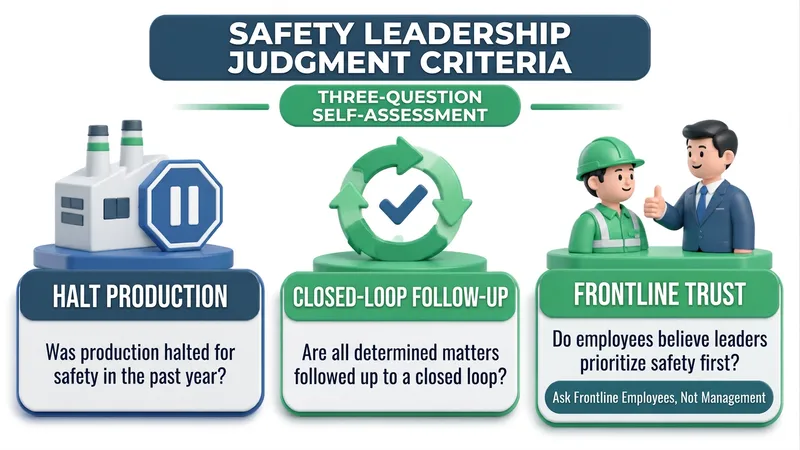
Text to Transparent 3D Infographic
Transform a single sentence, paragraph, or abstract concept into a clear, easy-to-read 3D infographic with a transparent background, perfect for presentations, lectures, study notes, article illustrations, and technical notes. It extracts key points from the original text, uses concise labels and descriptions to present the content, preserves the original meaning and essential information without adding outside conclusions, and maintains a consistent language throughout. Depending on the relationships between points—such as parallel, progressive, circular, hierarchical, comparative, divergent, or chronological—it automatically matches 3D layouts like card grids, process arrows, circular structures, pyramids, comparison panels, radial hubs, or timelines, pairing text nodes with visual structures. It uses a unified 3D style, lighting, and materials, controls the color count, and ensures that text stays flat on the front and clearly readable. The output supports common aspect ratios such as 16:9, 4:3, 1:1, and 3:2, and provides a transparent PNG image. After generation, it also explains the graphic structure, 3D visual style, lighting and materials, color scheme, text list, content coverage, and retained scope, making it easy to verify that the information is complete. Main titles are not added by default; if a title is needed, please provide the title text, font, and size.
 Slides
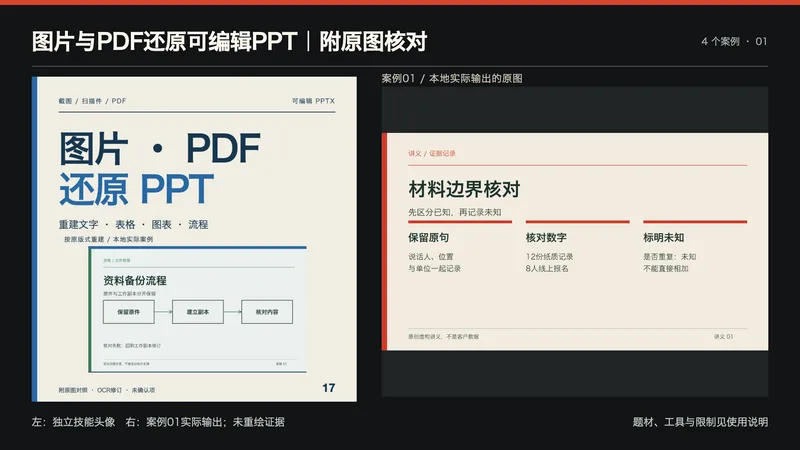
图片与PDF还原可编辑PPT|附原图核对
适合需要把已有讲义截图、流程页、数据图或扫描PDF变成可编辑演示的人。提供PNG/JPG/PDF、页面顺序和范围、必须保留的尺寸/字体/品牌、清晰原件及授权;此技能用于既有视觉页还原。 流程:保存源文件与页序,读取PDF文字层并实际OCR,逐页看图纠正行列顺序、漏字、小数点与数量单位;建立对象清单后按原比例和层次,用原生文本框、表格、图表、形状和连接线重建,再导出PPTX重新读取/渲染并比对。不会整页贴图再叠字冒充可编辑。 交付:可编辑PPTX、逐页预览、源页到PPT页映射、OCR复核/对象清单、原图对照、无法确认项与使用说明。照片和复杂纹理仍是图像资产,摆放可编辑不等于像素内容可编辑;遮挡文字不能恢复,不猜人名。清晰数据标签可重建原生图表;只有柱高/曲线时不虚构精确数据,需补充原始数据或说明只能保留图像。没有原备注时仅附重建说明,不假称恢复原讲稿。 工具:可用文字模型(建议GPT)及实际PPTX原生写入/渲染工具。包内Python源页助手需Pillow,PDF另外需pypdf、pypdfium2;可选Swift OCR需macOS Vision/Swift,其他系统需可用OCR并重新验证。助手不包含PPT编辑器。本地案例用Artifact Tool重建;目标平台缺少工具时应报告缺口,不能仅因导入Skill就保证运行。 四个本地真实执行案例为本次自拟合成输入:PNG讲义、原生PDF流程、JPEG小数数据图、两页扫描PDF,共5页。实际做OCR和逐页看图;修订跨列顺序、PDF兼容字形与标题漏字,保留12.5/8.0/5.5的显示精度、数量单位、两条向右连接及遮挡未知项。最终PPT全部为原生对象,案例没有照片或整页位图背景。四个编辑副本实际修改代表文字/形状/连接节点/表格/图表并重开核对;这些是合成自测,不是盲测、客户效果或OCR准确率证明。 四展示是最终PPTX重开渲染的代表页,完整5页与源图对照本地保存;头像为原创文字排版结合真实案例页,未冒称生图API。原生引擎的字距、图表内边距、表格边距和连接线画法可与原图有差异,不保证像素级一致;未在PowerPoint、Keynote或Google Slides应用内验证兼容性。 文字模型精确ID、YouMind模型绑定与平台运行尚未验证;未消耗YouMind积分测试。199积分不含模型、云端OCR或第三方工具费用。不承诺任意图片100%还原、恢复遮挡内容、任意系统无依赖或业务收益。 展示说明:首张为独立技能头像与案例01实际输出的并排排版,用于横向缩略展示;不是新增案例,也未让生图模型重绘证据。其余三张对应案例02—04。
 Slides
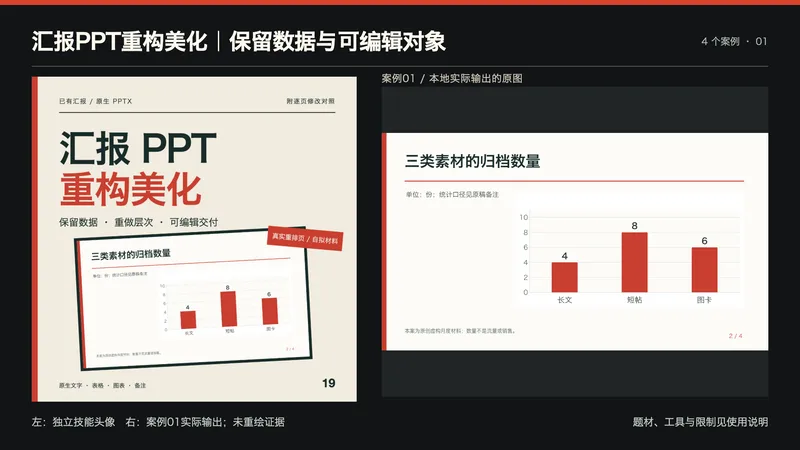
汇报PPT重构美化|保留数据与可编辑对象
适合月度汇报、项目复盘、年度总结与方案提案。提供已有PPTX、汇报对象、需要保留的品牌/尺寸/字体、允许修改范围和视觉参考;先看完整原稿再重排页面。 流程:提取文字、表格、原生图表和备注清单,逐页说明问题与改法;在副本中调整信息层次、对齐、字号、图表表格样式与页面节奏,保留数据口径和未知项;输出后重新读取、渲染并逐页检查。输入是PPTX;图片/PDF还原属于其他任务。 交付:可编辑PPTX、逐页修改对照、事实/数据/备注核对表、完整页预览和使用说明。不会把正文、表格和图表烘焙成整页图;未经授权不改数据、删页或把计划写成完成。专用编辑探针另存,正式汇报与测试副本明确区分。 包内Python3标准库清单脚本只负责OOXML事实取证,不是完整编辑器;工作簿保留助手仅在源与候选图表数据/公式唯一匹配时保留源工作簿原字节,不能修复任意PPT。核心重排仍需要真实PPTX原生编辑和渲染工具。使用可用文字模型(建议GPT)组织修改;精确型号以环境为准,不绑定图像模型。YouMind是否具备本地工具需按实际能力核验,不能仅因导入Skill就保证能运行编辑器。 四个本地真实执行案例都是本次新建的虚构原稿:月度内容、资料整理项目、年度归档、工时提案。每份4页,共16页,原生文字/表格/图表/备注完整保留;编辑测试实际修改标题、表格单元格和图表首项数值,另存并重开核对。源数据与原有工作簿保留检查覆盖这些案例,不等于任意复杂PPT零损失保证。 四展示为最终PPTX重新导入后渲染的代表页,未重绘证据;完整原稿、逐页前后图与16页正式稿本地保留。头像为原创文字排版结合真实案例页,未冒称生图API或客户业绩。 本地用Artifact Tool完成原生编辑与重开渲染;未在PowerPoint、Keynote或Google Slides应用内打开验证,字体缺失可能改变换行。复杂动画、宏、SmartArt/OLE、外链公式、图片文字及特殊模板须单独检查,工具丢失必需对象时应停止并说明。未消耗YouMind积分测试,未确认平台模型绑定;199积分不含模型或第三方工具费。不承诺审核、任意应用兼容、销量、融资、效率或收益提升。 展示说明:首张为独立技能头像与案例01实际输出的并排排版,用于横向缩略展示;不是新增案例,也未让生图模型重绘证据。其余三张对应案例02—04。
Information
- Version
- v2
- Last updated
- Runtime credits
- Usage-based
- Models
- Auto
- Use cases
- Images & designPresentations & reportingBusiness & strategy
- What you get
- Slides
