Healing Avatar Generator
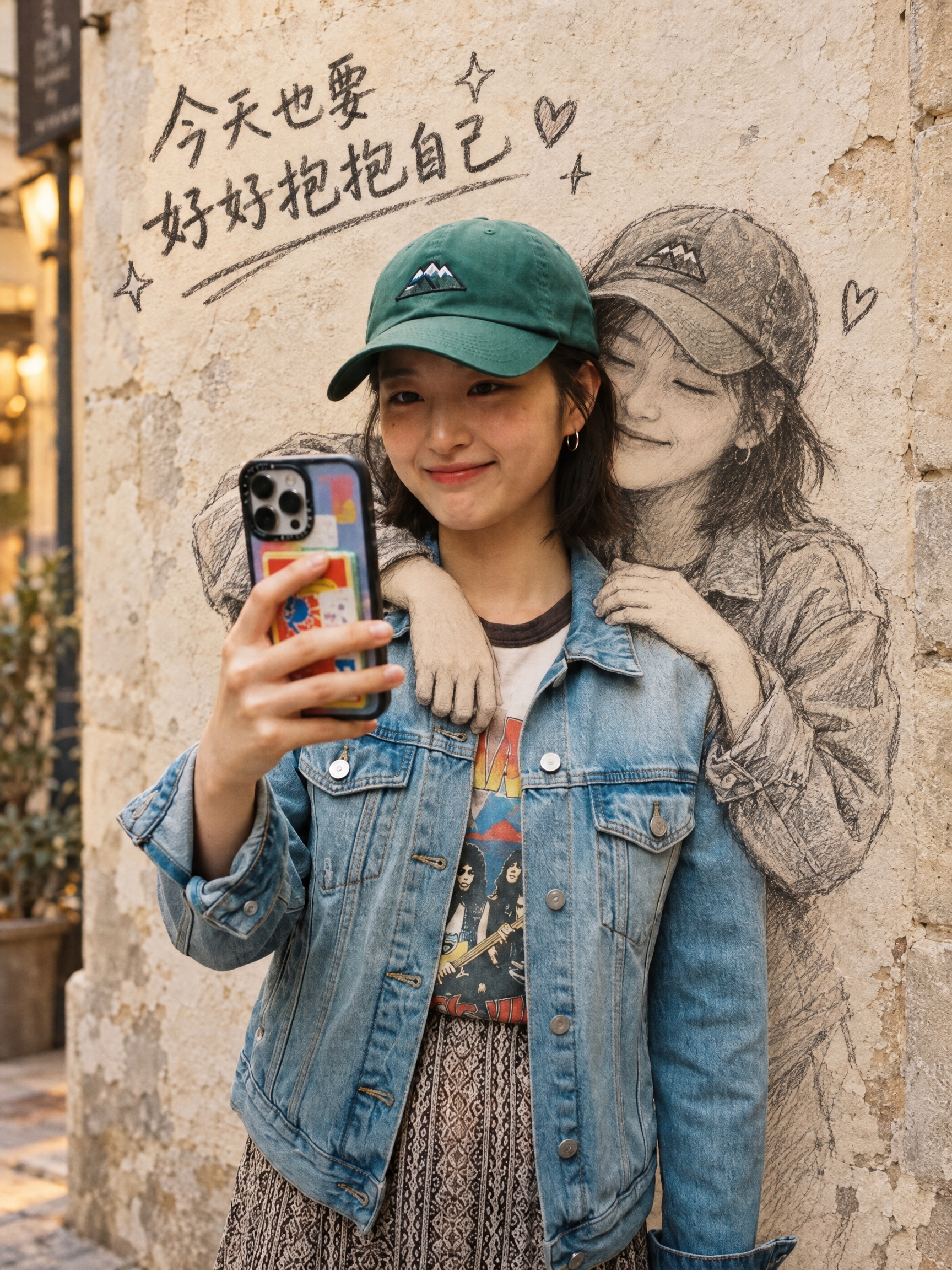
Turn portraits into comforting wall sketch embrace art
Healing Avatar Generator
Turn portraits into comforting wall sketch embrace art
Showcase
Description
Upload a portrait photo and generate a viral "my sketched self hugs me" wall-art portrait with a native-language handwritten caption, 8 wall styles, 6 sketch styles, default 3:4. Upload one portrait photo and get a viral "my sketched self hugs me" wall-art portrait with a native-language handwritten caption, 8 wall styles, 6 sketch styles, default 3:4. Wall styles (8): exposed concrete, weathered street cement, white plastered wall, light brick wall, dark chalkboard wall, pastel macaron wall, graffiti street wall, warm sunset yellow wall. Sketch styles (6): pencil, charcoal, pen and ink, watercolor pencil, chalk doodle, comic lines. Default aspect ratio is 3:4, adjustable to 1:1, 4:5, 2:3, 9:16, 16:9.
Recommended by
Dancang
Why we love this skill
Transforms a real portrait into a wall sketch of "yourself hugging yourself," cleverly combining identity preservation, hand-drawn texture, and natural handwriting. It goes beyond a simple filter to turn self-love and healing into a storytelling visual.
Best for
Individuals and content creators looking to transform portrait photos into warm, self-love-themed creative portraits.
How to use this Skill
Provide your input
Upload a portrait photo of yourself or someone with permission, and optionally specify the wall style, sketch style, aspect ratio, language, and wall caption.
Run the Skill
After you submit the photo, the tool blends the real person with a hand-drawn sketch avatar on the wall in an embracing composition, adding your chosen caption to the blank wall space.
Review your result
Receive a comforting, creative portrait featuring a natural interaction between the real person and the wall sketch, creating a warm, self-love wall art effect.
Related Skills
View all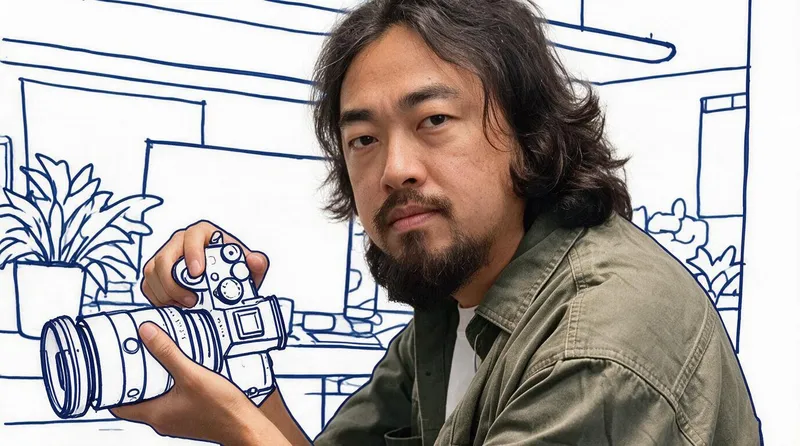 Image
Real-Person Doodle Portrait
Blend your real-person photo into a room or scene drawn with bold hand-drawn lines, creating a creative portrait that places a real person alongside a doodle environment. The person retains realistic photographic texture, facial features, clothing, and lighting, while the environment uses monochrome marker sketches to outline furniture, walls, and spatial contours. The result creates a striking visual effect of a “real person floating in a line-art world,” making it suitable for profile pictures, social cards, and stylized portrait artwork. You can upload a headshot, half-body photo, or full-body photo, then describe the living room, bedroom, study, café, studio, balcony, or other scene you want, along with the person’s clothing, pose, and expression. If you only have a headshot, the image can complete the body and place it in the specified space. If the original photo already includes a real environment, you can also keep the person unchanged while converting the background furniture, floor, walls, or street scene into a simple doodle line drawing, while maintaining the original composition. Deep ocean blue, burgundy, charcoal black, and other line-art colors are supported, with suitable aspect ratios matched to indoor portraits, open outdoor scenes, sports, or spacious environments. The setting will not be filled with excessive detail. Instead, it selects a few key objects and preserves negative space, making the contrast between the real person and the hand-drawn room clearer and more thoughtfully designed.
 Image
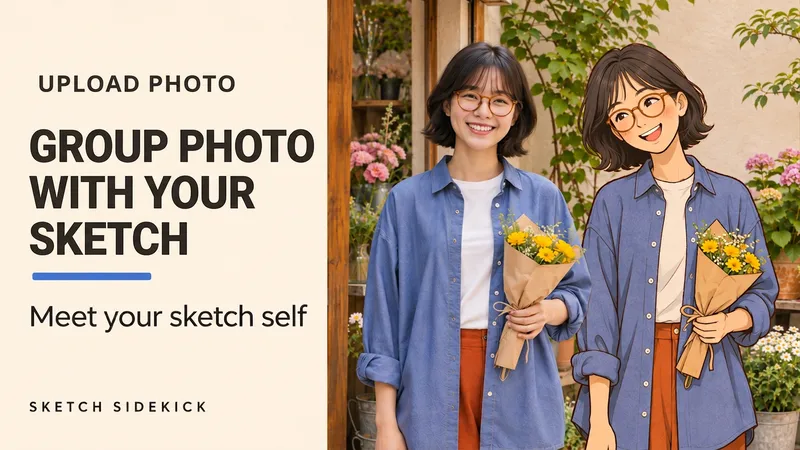
Sketch Sidekick
Upload one photo to create a portrait of you beside your matching, life-size 2D hand-drawn double. You can also choose a standalone hand-drawn portrait. Like meeting another drawn version of yourself in a flower shop, bookstore, or studio. The real person retains photographic quality, while the hand-drawn double echoes your hairstyle, glasses, outfit, and accessories, standing with you in the same frame. What you can do: • Side-by-Side Photo: Real person plus life-size hand-drawn double, perfect for travel, outfit posts, and everyday memories. • Custom Poses: Standing shoulder to shoulder smiling, reading a book together, or interacting based on the visible posture in the photo. • Standalone Illustration: Keeps only the single-person 2D illustration, featuring clean lines paired with soft color blocks. By default, it generates a text-free 4:5 image keeping the framing of the original photo. You can adjust the pose, background, and aspect ratio. Supports Chinese and English. Upload a photo and simply say: "Let me take a photo with my hand-drawn self, keep my glasses and blue shirt, no text." Meet your sketch self. Upload one photo to create a portrait of you beside your matching, life-size 2D hand-drawn double. Keep the person and setting photographic while the illustrated self echoes your hair, glasses, outfit and accessories with fine ink outlines, matte colors and a little pencil texture. Create a friendly side-by-side portrait, choose a pose or scene, or switch to a standalone illustration with one drawn person. Made for outfit diaries, travel memories and everyday moments. One text-free 4:5 image by default, framed to match your source photo. Customize the action, setting and aspect ratio. Start in Chinese or English. Try: "Use my photo. Let me pose beside my hand-drawn double. Keep my hair and clothes. No text." 更多玩法 / More ways to start "让手绘版的我坐在旁边,一起看书,保留原照取景。" "只要单人纯手绘版,保留我的发型和穿搭,不加字。" "Seat my sketch double beside me with a book. Keep the source crop." "Make a standalone illustration of me. Keep my hair and outfit. No text."
 Image
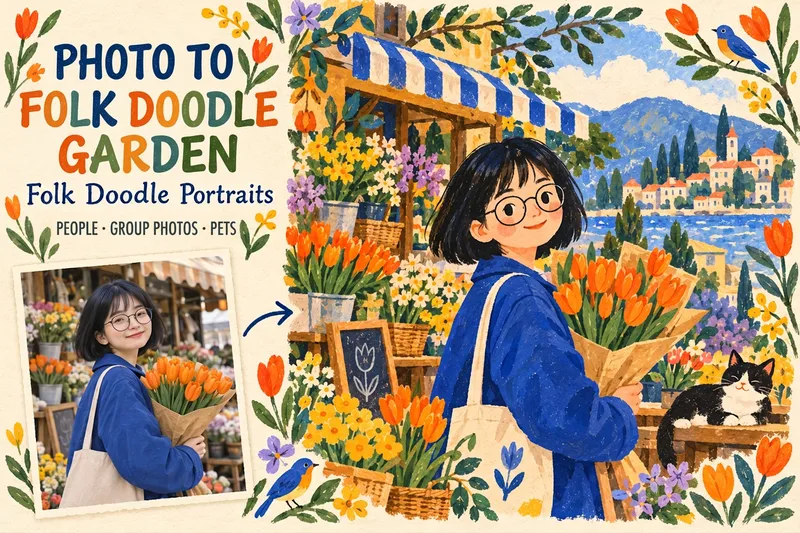
Folk Doodle Portraits
Upload portraits, group photos, pets, or everyday snapshots to transform the entire image into a vibrant folk doodle illustration. You can adjust the color palette, floral decorations, background, and aspect ratio. It preserves hairstyles, glasses, clothing, pet markings, and interactive poses, using flat color blocks, hand-drawn edges, and paper grain to turn ordinary moments into a warm storybook illustration. Perfect for avatars, family keepsakes, pet portraits, travel imagery, and holiday cards. By default, it generates a text-free 4:5 image, and square or landscape formats can also be specified. Upload a photo to get started, for example: "Turn this group photo into a painted garden style, keep the poses, use blue and orange colors, and keep the doodles minimal." Turn a portrait, group, pet or everyday photo into a joyful full-scene folk illustration. Customize the palette, botanical doodles, background and framing. Keep the distinctive hair, glasses, outfits, pet markings and shared gestures, then reimagine the whole scene with flat gouache shapes, handmade edges and tactile paper grain. Great for avatars, family keepsakes, pet portraits, travel illustrations and greeting cards. One text-free 4:5 image by default; square and landscape formats are available. Upload a photo and say: "Turn this into a folk gouache illustration. Keep the poses, use coral and cobalt, and add a few botanical doodles." Chinese and English supported.
Information
- Version
- v3
- Last updated
- Runtime credits
- Usage-based
- Models
- Auto
- Use cases
- Images & design
- What you get
- Image
- Visual styles
- Hand-drawnPhotorealistic
