
One-Click H5 Workspace
Mobile check-ins, QR codes, and H5 pages
Description
A full-workflow generator for single-file HTML tracking workspaces. Use this Skill when users ask to create an “XX workspace,” logging app, check-in app, tracker, or diary app—such as a mindfulness log, sleep check-in, fitness tracker, or 21-day habit builder—and want it to work on mobile with data saved locally. It covers the complete workflow, from requirements confirmation and single-file HTML development to minimalist magazine-style design, localStorage persistence, PWA deployment, QR code generation, and H5 deployment through a WeChat Official Account. Trigger words: workspace, check-in, daily log, tracker, single-file app, H5 app.
Related Skills
View all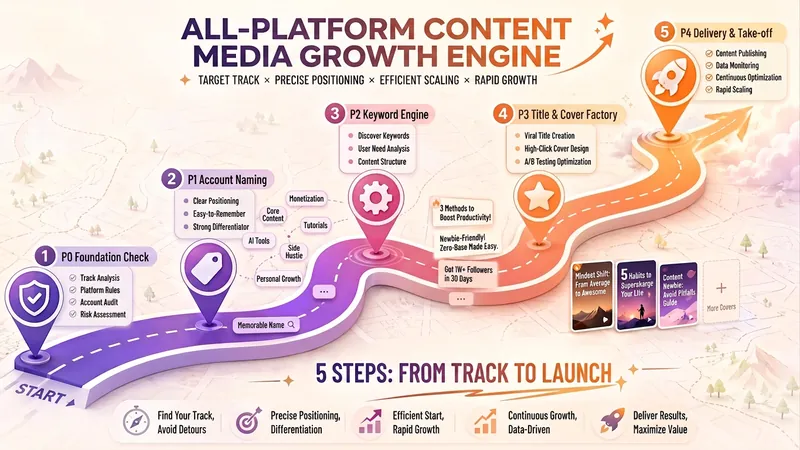
Account Launch Assistant v2.3
📝 Skill Overview In one sentence: input your niche and platform, get a complete account launch plan in 5 steps—account name, keywords, viral titles, covers, and posting calendar—no thinking required. 🎯 Core Capabilities · Niche Panorama Matching — covers 70+ niches across 7 major categories (money-making, wellness, fashion, workplace, etc.), with custom options · Keyword × Trend Engine — combines underlying desire words, current trends, and collective memory keywords to generate high-click title prototypes · Title Combination Factory — 6-element formula (identity/audience/time/method/endorsement/result) + platform word-count adaptation + good/bad comparison samples, producing 10+ titles at once · Cover Strategy + AI Mockups — 6 cover types with image prompt templates, plus an A/B testing schedule (stable values on weekdays, test new types on weekends) · Platform Knowledge Base — automatically adapts title length and cover specs for Douyin, Xiaohongshu, Bilibili, WeChat Official Account, WeChat Channels, and Kuaishou · Full Plan Delivery — cross-phase consistency check + 7-day posting calendar + launch checklist + review template 🛡️ Structural Upgrade (v2.3) · Global state register + quality control core + rollback — zero variable loss, no release without passing, rollback anytime · Three-core roles — main engine × platform adaptation expert × quality control officer · Compliance filtering — auto-rewrites medical efficacy/absolute claims/financial promises, reducing throttling risk · Global anti-hallucination — no fabricated search results, no invented trends, uncertain items flagged as 'pending verification' How to use? Just say 'niche + platform', e.g., 'wellness, Douyin' → the engine walks you through naming → keywords → titles → covers → plan delivery. For quick titles, say 'quick mode' and finish within 3 rounds; say 'try another batch', 'back to P2', or 'review' to adjust anytime. Trigger words: launch account / quick mode / title factory / try another batch / back to P{N} / review
 Research
Language Dictation Generator
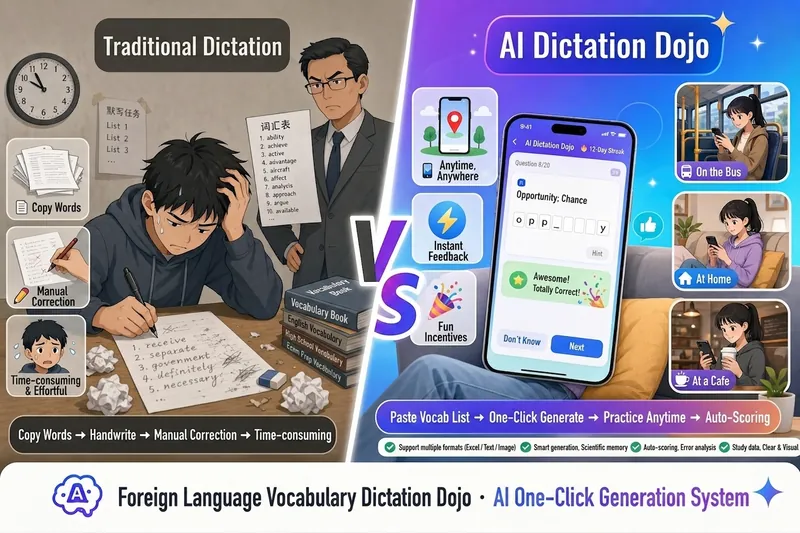
Paste your vocabulary list, then generate an H5 practice webpage for keyboard dictation with one click, ready to send to students. ✍️ Real keyboard dictation — not multiple-choice; students must manually spell to truly test memory 🔥 Combo incentive system — consecutive correct answers trigger sound effects and animations, keeping learning going 💡 Two-level spelling hints — first shows the initial letter, then the full word; step-by-step without discouragement 📚 Automatic error collection — wrong answers or hinted words go into a review bank for targeted practice 📊 Learning reports — cumulative practice count, level scores, and total accuracy at a glance 🏆 Percentage score chart — generates a name-included scorecard upon completion, ready to screenshot and share in group chats 📋 One-click score copy — students copy text to share, teachers easily collect results without downloading files 🎨 14 visual themes — deep-sea aurora, cherry blossom Japanese style, egg-bunny party... fresh experiences every time Supports multiple languages · Smart leveled stages · Perfect mobile adaptation · Zero coding, zero barrier
 Webpage
One-Click Courseware to Web
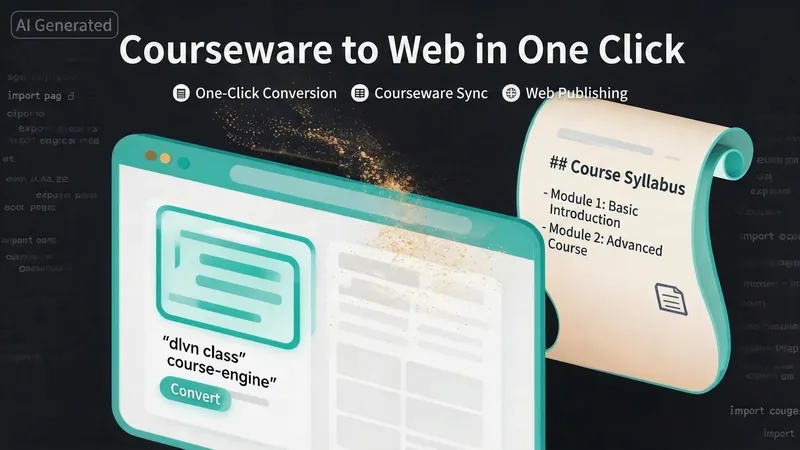
Turn your courseware into a viewable website. Whether you have a Markdown note, a PDF paper, a PPT slides, or a plain text script, or even a public account link, One-Click Courseware to Web can automatically convert it into a clear, beautifully designed online course display webpage. You don't need to write a single line of code—just provide the content. Two display styles: - Course training content → generates a scrolling long page, like flipping through a book. - Paper/report content → generates a PPT-style page-turning website, like browsing slides one by one. Responsive design adapts to mobile and desktop. What you need to do: Just one step: provide your courseware content. Supported formats: .md Markdown files, .pdf PDF documents, .pptx PPT presentations, .txt plain text. You can also paste course content directly in the conversation. Example commands: "Turn these lecture notes into a webpage" "Make this PDF paper into a PPT-style website" "Here is my courseware content, generate an online display page" What you get: A directly accessible online course display website, with the display mode automatically determined. Your content automatically selects the effect: - Course outlines, training handouts, textbooks → scrolling long pages, modules naturally connected, scroll to browse. - Academic papers, research reports → PPT-style slide flipping, each page focuses on one point. - Speeches, meeting reports → PPT-style page-by-page display, supports keyboard/click navigation. If you explicitly request "scrolling" or "PPT", your request is respected. Content extraction capability: For information-dense papers and long texts, the skill automatically performs: - Structure decomposition: splits continuous discourse into independent chapters/slides. - Information condensation: condenses three paragraphs into three key points, each within 20 characters. - Thesis-first: each page gives the conclusion first, then supporting arguments. - Framework visualization: models and classification systems are presented with charts instead of plain text. - Data highlighting: key numbers and metrics are displayed on separate pages prominently. Subsequent modifications: After the website is generated, you can request adjustments at any time: "Update the content of module three" "Change the color scheme to warm tones" "Add a course roadmap" "Change this module to a timeline layout" Modifications only affect the corresponding part; you don't need to regenerate the entire website. What it does not do: This skill currently focuses on course content display and does not include the following LMS (Learning Management System) features: - User login/registration - Learning progress tracking - File download - Online quizzes/practice If you need these features, they are separate extensions.
One-Click H5 Workspace
Mobile check-ins, QR codes, and H5 pages
Description
A full-workflow generator for single-file HTML tracking workspaces. Use this Skill when users ask to create an “XX workspace,” logging app, check-in app, tracker, or diary app—such as a mindfulness log, sleep check-in, fitness tracker, or 21-day habit builder—and want it to work on mobile with data saved locally. It covers the complete workflow, from requirements confirmation and single-file HTML development to minimalist magazine-style design, localStorage persistence, PWA deployment, QR code generation, and H5 deployment through a WeChat Official Account. Trigger words: workspace, check-in, daily log, tracker, single-file app, H5 app.
Related Skills
View allAccount Launch Assistant v2.3
📝 Skill Overview In one sentence: input your niche and platform, get a complete account launch plan in 5 steps—account name, keywords, viral titles, covers, and posting calendar—no thinking required. 🎯 Core Capabilities · Niche Panorama Matching — covers 70+ niches across 7 major categories (money-making, wellness, fashion, workplace, etc.), with custom options · Keyword × Trend Engine — combines underlying desire words, current trends, and collective memory keywords to generate high-click title prototypes · Title Combination Factory — 6-element formula (identity/audience/time/method/endorsement/result) + platform word-count adaptation + good/bad comparison samples, producing 10+ titles at once · Cover Strategy + AI Mockups — 6 cover types with image prompt templates, plus an A/B testing schedule (stable values on weekdays, test new types on weekends) · Platform Knowledge Base — automatically adapts title length and cover specs for Douyin, Xiaohongshu, Bilibili, WeChat Official Account, WeChat Channels, and Kuaishou · Full Plan Delivery — cross-phase consistency check + 7-day posting calendar + launch checklist + review template 🛡️ Structural Upgrade (v2.3) · Global state register + quality control core + rollback — zero variable loss, no release without passing, rollback anytime · Three-core roles — main engine × platform adaptation expert × quality control officer · Compliance filtering — auto-rewrites medical efficacy/absolute claims/financial promises, reducing throttling risk · Global anti-hallucination — no fabricated search results, no invented trends, uncertain items flagged as 'pending verification' How to use? Just say 'niche + platform', e.g., 'wellness, Douyin' → the engine walks you through naming → keywords → titles → covers → plan delivery. For quick titles, say 'quick mode' and finish within 3 rounds; say 'try another batch', 'back to P2', or 'review' to adjust anytime. Trigger words: launch account / quick mode / title factory / try another batch / back to P{N} / review
ResearchLanguage Dictation Generator
Paste your vocabulary list, then generate an H5 practice webpage for keyboard dictation with one click, ready to send to students. ✍️ Real keyboard dictation — not multiple-choice; students must manually spell to truly test memory 🔥 Combo incentive system — consecutive correct answers trigger sound effects and animations, keeping learning going 💡 Two-level spelling hints — first shows the initial letter, then the full word; step-by-step without discouragement 📚 Automatic error collection — wrong answers or hinted words go into a review bank for targeted practice 📊 Learning reports — cumulative practice count, level scores, and total accuracy at a glance 🏆 Percentage score chart — generates a name-included scorecard upon completion, ready to screenshot and share in group chats 📋 One-click score copy — students copy text to share, teachers easily collect results without downloading files 🎨 14 visual themes — deep-sea aurora, cherry blossom Japanese style, egg-bunny party... fresh experiences every time Supports multiple languages · Smart leveled stages · Perfect mobile adaptation · Zero coding, zero barrier
WebpageOne-Click Courseware to Web
Turn your courseware into a viewable website. Whether you have a Markdown note, a PDF paper, a PPT slides, or a plain text script, or even a public account link, One-Click Courseware to Web can automatically convert it into a clear, beautifully designed online course display webpage. You don't need to write a single line of code—just provide the content. Two display styles: - Course training content → generates a scrolling long page, like flipping through a book. - Paper/report content → generates a PPT-style page-turning website, like browsing slides one by one. Responsive design adapts to mobile and desktop. What you need to do: Just one step: provide your courseware content. Supported formats: .md Markdown files, .pdf PDF documents, .pptx PPT presentations, .txt plain text. You can also paste course content directly in the conversation. Example commands: "Turn these lecture notes into a webpage" "Make this PDF paper into a PPT-style website" "Here is my courseware content, generate an online display page" What you get: A directly accessible online course display website, with the display mode automatically determined. Your content automatically selects the effect: - Course outlines, training handouts, textbooks → scrolling long pages, modules naturally connected, scroll to browse. - Academic papers, research reports → PPT-style slide flipping, each page focuses on one point. - Speeches, meeting reports → PPT-style page-by-page display, supports keyboard/click navigation. If you explicitly request "scrolling" or "PPT", your request is respected. Content extraction capability: For information-dense papers and long texts, the skill automatically performs: - Structure decomposition: splits continuous discourse into independent chapters/slides. - Information condensation: condenses three paragraphs into three key points, each within 20 characters. - Thesis-first: each page gives the conclusion first, then supporting arguments. - Framework visualization: models and classification systems are presented with charts instead of plain text. - Data highlighting: key numbers and metrics are displayed on separate pages prominently. Subsequent modifications: After the website is generated, you can request adjustments at any time: "Update the content of module three" "Change the color scheme to warm tones" "Add a course roadmap" "Change this module to a timeline layout" Modifications only affect the corresponding part; you don't need to regenerate the entire website. What it does not do: This skill currently focuses on course content display and does not include the following LMS (Learning Management System) features: - User login/registration - Learning progress tracking - File download - Online quizzes/practice If you need these features, they are separate extensions.
Find your next favorite skill
Explore more curated AI skills for research, creation, and everyday work.