
B&W Portrait Stamp
Turn your photos into bold-line avatars
B&W Portrait Stamp
Turn your photos into bold-line avatars
Showcase
Description
Portray yourself in a clean, distinctive style. Upload a portrait photo to transform key features like your hairstyle, face shape, glasses, and facial hair into bold black outlines, black-and-white blocks, and expressive facial details. By default, it preserves the original orientation and natural expression, generating a text-free, 1:1 head avatar with a solid background. Want to switch up your mood? You can also say "playful wink," "calm expression," or "make a set of expressions." Keep the same hairstyle, frames, and facial contour while generating natural, playful, and calm versions. You can also customize the background, aspect ratio, and count, or create a transparent background when supported by the tool. Ideal for social avatars, personal branding, community member portraits, and digital sticker visuals. After generation, the result is compared against the original photo to check hairstyle, glasses, facial hair, stray lines, and framing margins, with targeted corrections made for any clear issues. Examples: "Make a black-and-white avatar from this photo, keeping the round glasses and short curly hair with a closed-mouth smile." "Keep the white hair and mustache, make a calm expression, and remove the glasses." Delivered as a digital image, defaulting to a raster PNG or the tool's actual output format, without editable vector source files. Cartoonization simplifies details, and likeness depends on the photo and model capabilities. Requires an environment that supports image generation or editing with character reference. 2000 credits is the Skill installation price; actual generation usage is subject to platform rules. Displayed as a newly created AI-generated fictional character and avatar conversion example. Full end-to-end portrait conversion runs inside YouMind have not yet been fully tested.
Recommended by
Dancang
Why we love this skill
Featured for avoiding generic cartoon faces and instead accurately preserving hairstyles, face shapes, expressions, and real accessories, using bold lines and monochrome shapes to create an instantly recognizable avatar.
Best for
Great for users who need social media avatars, personal brand imagery, community member portraits, or digital sticker visuals.
How to use this Skill
Provide your input
Upload a clear portrait photo and describe your requirements for hairstyle, glasses, facial hair, expression, background, or aspect ratio. For group photos, specify which person to process.
Run the Skill
Distills the face shape, hairstyle, and visible accessories from the photo into bold black outlines, black-and-white blocks, and clean facial features, retaining the original orientation and natural expression by default.
Review your result
Generates a text-free, 1:1, solid-background black-and-white cartoon avatar, or creates different expressions and multiple avatars as requested.
Related Skills
View all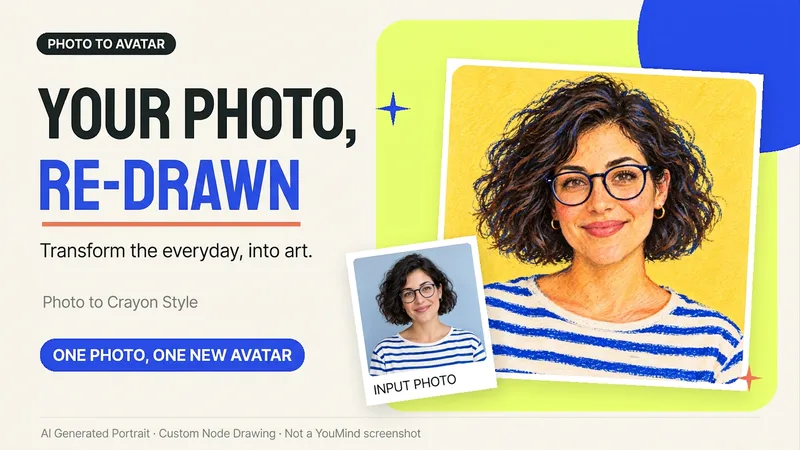 Image
ImagePhoto to Hand-Drawn Avatar
Want a hand-drawn avatar while keeping your hairstyle, glasses, and distinctive expression? Upload a clear photo of one person, then choose a warm crayon or cool marker style to create a square avatar for WeChat, social accounts, and personal homepages. You can also start without choosing a style; warm crayon is used by default. You can get: ① One hand-drawn avatar: clean background, head-and-shoulders composition, and no text by default. ② Preserved features: focuses on the hairstyle, glasses, face shape, and noticeable accessories to reduce a generic look. ③ Avatar-friendly composition: designed for circular cropping and recognizability at small sizes; when supported by the tool, the thumbnail and circular preview are checked. ④ Targeted edits: when changing the background, expression, or accessories, the previously approved version is prioritized for continuity. Photo conversion is supported, as is creating fictional avatars from text descriptions. Delivery is one image by default; a full sticker pack is not generated automatically. The final image and edits depend on the image tools and usage limits available on the current platform, and exact consistency of personal features is not guaranteed. If an image cannot be generated, this will be stated clearly and a copyable conversion prompt will be provided; the prompt will not be presented as a finished avatar. Usage is calculated according to the platform's rules at the time.
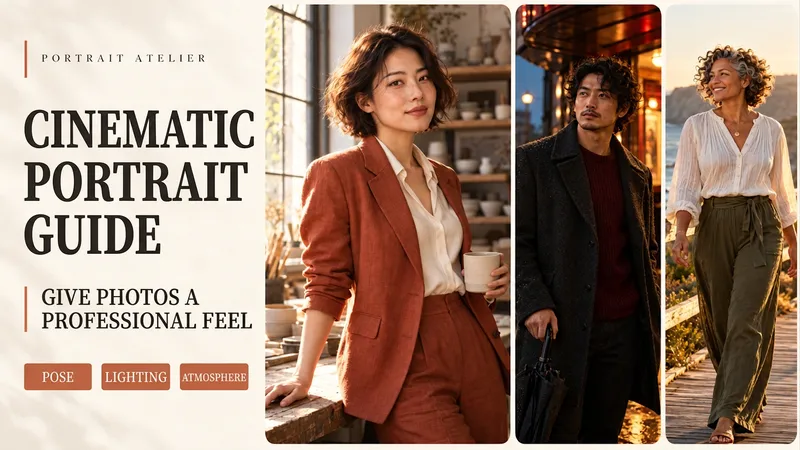 Image
ImagePortrait Director
The same portrait can tell a completely different story with new lighting and a natural pose. Upload a portrait photo or describe a fictional character to create cinematic avatars, personal portraits, and magazine-style images. This Skill combines the subject's visible features to arrange poses, lighting, framing, clothing, and environments, ensuring natural hand gestures, grounded body posture, and realistic light sources. Three original scenes are ready to use: • Warm Pottery Window: Terracotta and warm wood tones, medium shot by a studio window. • Rainy Night Set: Warm light in a cinema porch, cool wet streets, and a story-driven gaze. • Golden Coastal Breeze: Sunset backlighting, sea breeze, and a relaxed full-body travel portrait. Professional headshots, solid-color studio backgrounds, black-and-white portraits, and custom themes are also supported. Uploaded photos retain original clothing and accessories by default; to change outfits, backgrounds, or poses, just specify your request. By default, it generates one 3:4 vertical text-free image per run. You can change aspect ratios, create series, or request Chinese, English, or bilingual prompts. Multiple images are generated separately. After generation, check character recognition, hands, feet, anchoring points, and lighting. Try saying: "Use this photo for the rainy night set, keep the hairstyle, and change to a dark coat." or "Create a mature woman with short curly hair walking naturally by the sea at sunset." Showcase materials are newly created fictional AI character samples, not real-person before-and-after comparisons. Requires an environment supporting image generation or reference image editing capabilities. Similarity depends on the photo and model capabilities. 3000 credits is the Skill installation price; actual generation usage is subject to platform rules. Full generation on YouMind has not been fully tested yet.
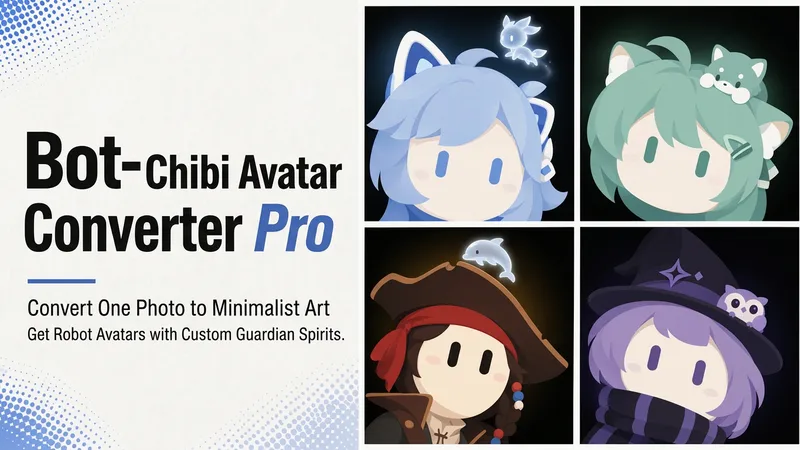 Image
ImageBot Q-Style Avatar Pro
Upload a photo, a character image, or simply describe it in one sentence, and turn it into a minimalist 2D “robot avatar” with a consistent style—no mouth or nose, large vertical oval eyes, a charcoal-black background, and soft theme-colored backlighting. You can also add a dedicated guardian that stays by its side. [What it can do] - Handles four input types: real-person photos, character or original IP art, pet photos, and text-only descriptions can all be transformed. - One style, a cohesive set: all avatars share the same minimalist robot visual language, creating a highly recognizable avatar wall without making everyone look alike. - Natural, realistic skin tones: skin color is captured from the original image for a clean, natural result—not a stark white mask. For real-person photos, the person’s actual skin tone is used. - Optional exclusive “Guardian” overlay: if the character has a signature pet, one is added automatically. You can also request one yourself and choose between a “glowing spirit” or a “physical cute companion.” - Switchable backgrounds: the main avatar uses a charcoal-black background with theme-colored backlighting. For displays or covers, you can also switch to a full theme-pattern background. - Delivered as a set: in addition to the main avatar, you can add guardian stickers, dual-form comparison versions, and sticker packs. [What you’ll receive] One 1:1 minimalist robot avatar, with guardian stickers, dual-form comparison versions, and sticker packs available as add-ons for a complete set. [Who it’s for] - Individuals who want a highly recognizable avatar that doesn’t look like everyone else; - Social media creators and managers who need a consistent avatar wall or visual identity; - Bloggers and brands that want to humanize and develop their original IP, pets, or brand mascots into a series. [Note] This Skill is a general-purpose style engine. You provide the source materials in the conversation; it does not include or replicate any specific artwork or trademarked character. Make sure you have the rights to use any photos or images you provide. The finished work is AI-generated content.
Information
- Version
- v2
- Last updated
- Runtime credits
- Usage-based
- Models
- Auto
- Use cases
- Images & design
- What you get
- Image
- Visual styles
- CartoonFlatBlack and white
