Recursive Image Generation
Split images to sub-images, generate stepwise
Recursive Image Generation
Split images to sub-images, generate stepwise
Showcase
Description
With the 'Recursive Image Generation' skill, you can easily handle complex image creation, breaking down scenes that are difficult to generate in one go into controllable and reusable sub-image elements. Whether you need to create illustrations with a 'picture-in-picture' effect, multi-column layout academic posters, or social media cards with clear typography, this skill helps you achieve them efficiently. It uses a unique two-stage approach: first, your complex concepts are broken down into independent elements such as charts, photo frames, screens, characters, or stickers, each generated and refined individually; then, these approved sub-images are used as input to intelligently synthesize the final complete image. This method ensures a visual, iterative creative process and maximizes the reusability of materials. A rich library of Harness templates is built in, covering common scenarios such as academic posters, WeChat public account covers, Xiaohongshu (Little Red Book) image posts, comics, infographics, product visuals, and more. These templates not only provide structured guidance for material generation but also optimize composition strategies for different platform display needs, ensuring the final result meets your expectations. You will get professional-grade visual content where each image is carefully designed, consistent in style, and with clear text.
Related Skills
View all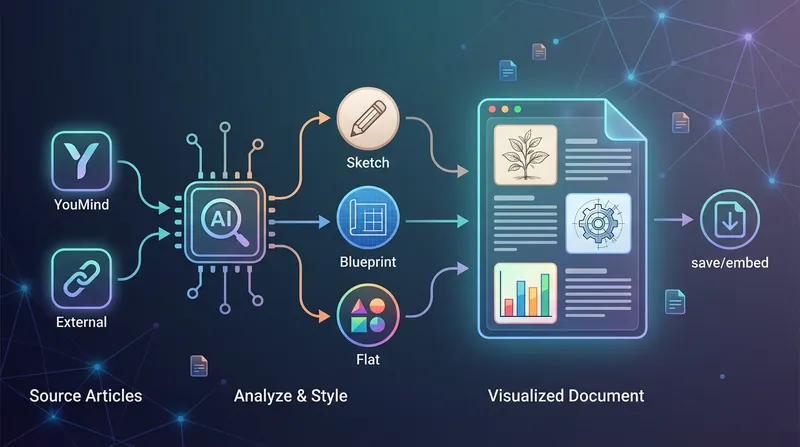 Image
ImageBatch Article Illustration 2.0
This is an intelligent visual enhancement tool designed for content creators. It deeply understands the flow of your text and automatically creates high-quality supporting illustrations for key paragraphs of your articles. Whether your content resides in a personal knowledge base or you need to process externally imported long-form articles, it accurately identifies core concepts, turning abstract text into concrete visual language and significantly improving the reading experience and shareability of your content. The tool offers three distinct visual styles to suit different creation scenarios: a fresh and lively minimalist hand-drawn style fits essays and popular science; a rigorous and professional architectural blueprint style is the ideal choice for technical documents and research reports; and a modern flat illustration style perfectly matches the aesthetic needs of social media accounts and knowledge notes. For long-form content, it also intelligently suggests illustration layouts to ensure a reasonable visual distribution with key points highlighted. During generation, you can flexibly choose how images are produced. You can have the generated illustrations seamlessly embedded directly into the original document paragraphs for automated layout, or you can opt to receive a standalone image resource package for manual distribution. This end-to-end collaboration, from content analysis to visual generation, makes your writing more impactful and complex ideas instantly clear.
 Image
ImageSemi-Flat Illustration Maker
Have you ever faced challenges like these when expressing ideas visually? Your brand needs a sense of sophistication, but purely flat illustrations feel too thin, lacking warmth and texture? You want to convey product details through a realistic style, but worry the image will become too complex and distract from the content itself? Abstract concepts, emotional stories, or complex ideas never quite look right—either too obvious or too obscure? You search through asset libraries but can’t find visuals that are both modern and elegant, while accurately capturing the core meaning? What we want is a visual language that feels just right—designed yet authentic, simple and powerful yet refined and engaging. Now, all you need to do is enter a piece of text. It will generate a semi-flat realistic illustration that gives your brand, content, or concept a distinctive visual appeal. What is it? An intelligent generation tool that transforms written content into modern, semi-flat realistic illustrations. It thoughtfully combines the clean outlines of flat illustration with the soft lighting and sense of volume found in realistic styles, finding an elegant balance between “too simple” and “too complex.” How does it work? Three simple steps Enter your text—whether it’s a brand story, an emotional monologue, a product description, or an abstract philosophical concept. It captures the core meaning with precision; (Optional) Adjust your composition or color preferences—you can set the direction for the image or let it interpret your input freely; Generate—a carefully composed illustration with sophisticated colors and finely rendered texture appears instantly. No drawing experience is required. You provide what to say; it takes care of how to show it. What makes its visual language distinctive? Outlines, but not flat—It preserves the fresh, modern outlines of flat illustration while using soft shadows and subtle volume to make objects feel dimensional rather than thin; Realistic, but not photorealistic—It avoids excessive photo-level detail, retaining only the warmth created by light, shadow, and materials, so the image feels believable while leaving room for imagination; Clean, but not empty—A pure white background keeps the visual focus on the subject, ensuring the image stays clean, restrained, and centered on the message you want to convey. Every piece strikes a subtle balance between design appeal and storytelling power. Where can it be used? Visualizing brand stories—Modern illustrations tailored to your brand’s character, conveying restrained yet richly textured visual symbols; Illustrating in-depth content—Make articles, reports, or columns less dry by letting images resonate with the words; Product explanations / concept presentations—Transform complex features or abstract ideas into an intuitive, elegant visual language; Decorative art / cover design—Clean, sophisticated imagery that naturally suits books, albums, or interior decoration. What you receive is more than just an image You’ll receive a clean illustration with no text to distract from the image, along with a visual style analysis. It briefly explains why the composition, lighting, and color palette were chosen to reflect your text, helping you better understand the design logic behind the image and making it easier to explain the creative direction to your team.
 Image
ImageInfographic Maker
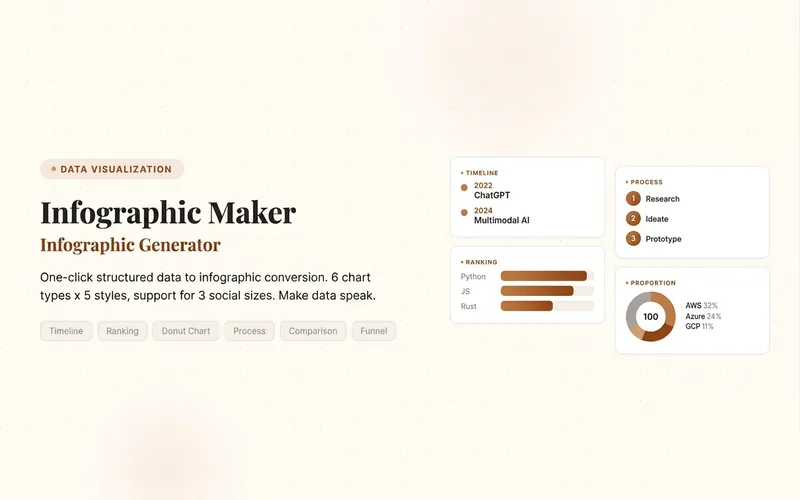
Easily turn any article, table, link, or casual note into a professional infographic, making your data and insights stand out. Whether it's a single poster or a multi-page carousel, this tool intelligently identifies content structure and automatically extracts key information—no manual formatting required. Choose from six chart types: timeline, flowchart, ranking, proportion, comparison, or funnel, and pair them with visual styles like Business Blue, Creative Color, Dark Tech, Elegant Warm, Minimalist Black & White, or Xiaohongshu-exclusive styles. We specially support Chinese content and brand colors to ensure visuals are both professional and aligned with your brand identity. Whether for annual reports, social media (e.g., Xiaohongshu, Instagram, X), or study notes, this tool generates high-resolution PNG images in multiple sizes, helping your information spread in the most appealing way. Say goodbye to tedious design work—create stunning infographics with one click, letting data speak and stories come alive. Companion tools: For final drafts to be published on WeChat Official Accounts, look for '公众号排版器'; for data tables needing publication-grade formatting, look for 'TableCraft'; for quote card sets, look for '知识卡片生成工坊'.
Information
- Version
- v3
- Last updated
- Runtime credits
- Usage-based
- Models
- Auto
