Resume & Photo Polish
Organize materials into a polished resume
Resume & Photo Polish
Organize materials into a polished resume
Showcase
Description
Turn scattered text, PDFs, Word files, image resumes, web content, PPTs, or mixed materials into an authentic, clear, professional resume for job applications. The skill first identifies the material types, then extracts and organizes personal information, education, work and internship experience, projects, skills, certifications, honors, and more. When key information is missing, it asks focused questions as needed; anything that cannot be confirmed is clearly marked “To be added.” No facts are altered or fabricated. For an included ID photo, it first evaluates the background, lighting, composition, pose, clarity, and imperfections, then offers options such as light retouching, a standard ID photo, or advanced retouching. It processes the photo after you confirm the background color and dimensions. Retouching preserves your identifying features and aims for a natural, credible result—no face swapping or exaggerated beautification. If you do not have a photo, you can skip the photo step. You will receive a Markdown content version and a web resume optimized for mobile, easy to print, or export as a PDF. The resume can also be tailored to the target role by adjusting information priorities, language, length, and phrasing, while considering both ATS parsing and visual presentation. Delivery also explains the completed wording improvements, all information still to be added, and the photo-processing status, helping you quickly review the content and continue making adjustments.
Related Skills
View all
Resume Coach
Organize your background into a truthful, clear, and targeted resume. It supports resume review and rewriting, job description breakdown, streamlined maintenance, and career direction and skill exploration aligned with AI development. It is suitable for campus recruiting, experienced hiring, career transitions, and returning to the workforce. You can provide your current resume, target role, or a summary of your experience. We prioritize the information you provide to extract personal contributions, verifiable results, and role-relevant skills. When information is lacking, we confirm items one by one without fabricating experiences or numbers. You can also adjust the layout for actual application scenarios, checking keywords, readability, and items to verify. When employment trends, job requirements, or salaries are involved, we will check information with dates and sources where possible, explain sample sizes and uncertainties, and make no guarantees of hiring. Your consent will be obtained before long-term storage of your career profile, and contact details can be added by you in the final resume. Continuous progress in your career!
 Webpage
Online Resume Builder
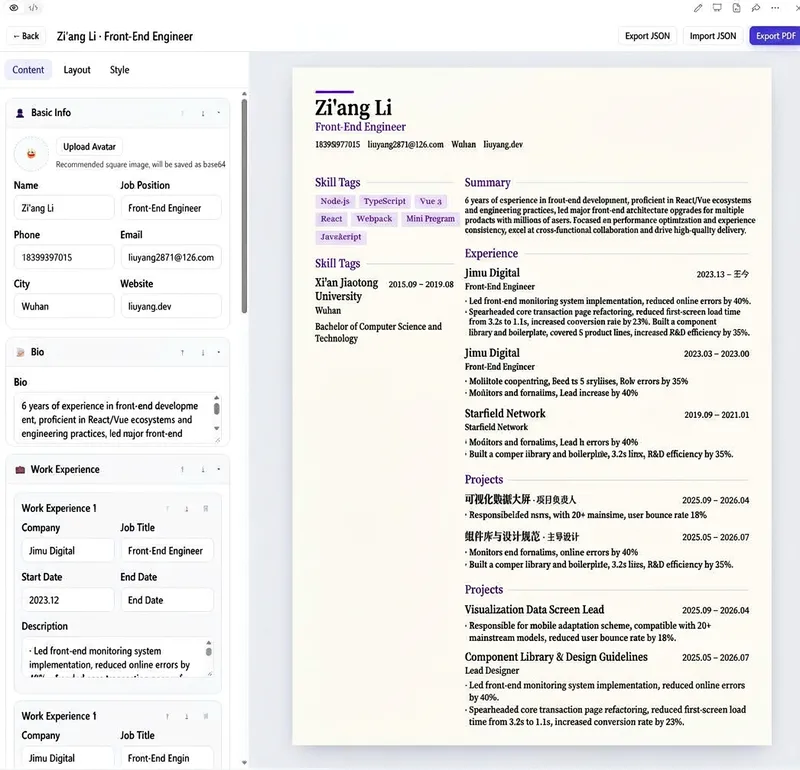
Create and use a complete online resume builder in your browser—from creating a new resume and entering your experience to adjusting the layout and colors, previewing changes in real time, and exporting the result. It helps job seekers quickly create professional resumes. It is ideal for individuals who need multiple resumes for different roles and want to repeatedly refine both their content and visual presentation. It can also serve as a front-end single-page tool that requires no backend deployment. Manage multiple resumes and edit your basic information, personal summary, work experience, education, projects, skills, and custom sections. Organize content by dragging items or changing their order. The tool offers multiple layouts, including single-column, two-column, and timeline styles. You can customize the font, font size, line height, spacing, paper background, and colors, while the right panel provides a real-time preview of all changes in A4 proportions. Resume data is saved in your browser, so you can continue editing after refreshing the page. You can also copy, rename, and delete resumes, randomly generate sample resumes, and import or export JSON data. When finished, export a PDF suitable for printing or job applications. The tool also works on narrow-screen devices and runs without a backend or external network resources.
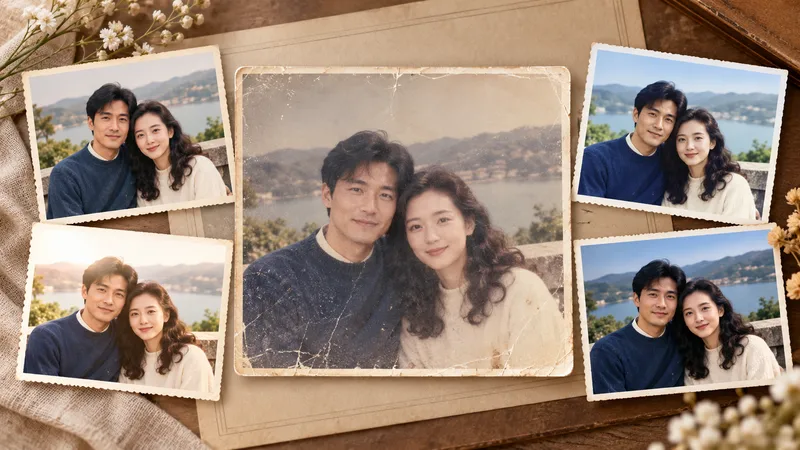
Photo Restoration and Cinematic Enhancement
Transform ordinary, out-of-focus, poorly exposed, faded, or damaged photos into clearer, more textured results ready for sharing and printing. Whether working with portraits, travel landscapes, architecture, interiors, food, products, museum exhibits, old photos, black-and-white images, or scans, it handles light, shadow, color, detail, noise, scratches, and visual depth based on the subject's characteristics while preserving personal identity, object details, architectural structures, text, logos, and historical marks. In addition to faithful and natural restoration, it re-evaluates cropping, aspect ratio, subject size, negative space, perspective, and visual flow to make the image look professionally shot and edited rather than simply brightened or filtered. Landscapes can be enhanced for sky, atmosphere, depth, and cinematic feel; portraits focus on natural skin tones, eyes, hair, and subject separation; architecture maintains realistic lines and textures; exhibits and documents prioritize accurate colors, textures, inscriptions, and details. Old photos undergo dust removal, repair, tonal recovery, and careful colorization, with prudent handling of any inferred reconstruction. Four clearly labeled results are provided by default: natural programmatic restoration, stylized programmatic enhancement, natural AI restoration, and a more impactful AI enhancement, making it easy to compare fidelity and visual presentation. The AI versions also include the optimization prompts used, making it easy to adjust the style or continue creating later.
Information
- Version
- v3
- Last updated
- Runtime credits
- Usage-based
- Models
- Auto
