
Scope & Add-On Quote Helper
Check scope and draft add-on quotes
Scope & Add-On Quote Helper
Check scope and draft add-on quotes
Showcase
Description
When a client says, “Could you add one more page?” or “Can you make one more change?”—what's included in the original quote, and what should be billed separately? This Skill helps freelance web professionals organize clients’ additional requests. Provide the accepted scope description, the client’s exact words this time, and your own rates and time estimates to get: ① Item-by-item scope comparison: Quotes the original text and distinguishes items within the original scope, well-supported add-ons, and items requiring confirmation. ② Open-question checklist: Identifies missing information that could affect fees, revision rounds, and delivery dates. ③ Add-on estimate draft: Lists hours and rates, keeps estimates as ranges, and notes items that have not yet been priced. ④ Customer reply draft: Clearly explains included items, proposed add-ons, fees, and scheduling conditions. It checks the remaining revision rounds and distinguishes defect fixes from new features. When the agreement is unclear, it marks the item for confirmation rather than guessing market rates or promising an unknown delivery date. Best for: independent website builders, small web studios, and project leads responsible for scope and pricing discussions. The output is copyable text and tables. Review it yourself before sending. Examples and rates shown are fictional teaching data. Amounts are based on the information provided by the user; this Skill does not provide legal rulings, send messages on your behalf, or guarantee payment.
Recommended by
淡苍
Why we love this skill
Designed for independent web developers and small studios, it rigorously separates original scope, valid add-ons, and items requiring confirmation while supporting pricing, scheduling, and client replies.
Best for
Independent website builders, small web studios, and project leads handling scope confirmation and pricing discussions.
How to use this Skill
Provide your input
Paste the accepted original agreement, the customer's exact words, and any available rates, time estimates, and scheduling information.
Run the Skill
Organize the customer's added requests, check each against the original scope, revision rounds, and open questions, then estimate add-ons using your pricing details.
Review your result
Generate a scope comparison, open-question checklist, add-on quote draft, and copyable customer reply draft, showing amounts, currency, and scheduling conditions.
Related Skills
View all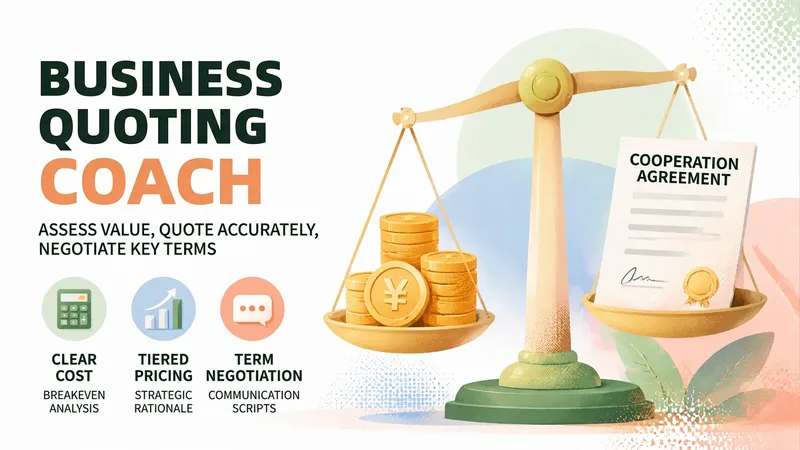
Brand Deal Pricing Coach
The hardest part of taking a brand deal isn't finding one—it's knowing what the deal is worth. You spend three days negotiating, then the client says, “That’s the entire budget.” You don’t know whether it’s a firm limit or a negotiation tactic. Quote too high and you may lose the deal; quote too low and you may finish the work after staying up late, only to realize you lost money. This skill brings in the knowledgeable friend who knows the business. Share the basic details of the deal—who the client is, the format, how many deliverables and revision rounds are required, and what price they offered. It will first ask for key missing information, then provide a Brand Deal Pricing Evaluation Report: ✨ Core capabilities 1. Break-even price calculation: Time costs + hard costs + taxes and commissions + revision and payment-term risks, so you can first determine “below what price am I losing money?” 2. Three pricing tiers: Floor price / target price / ideal price, with the reasoning behind each tier and the amount tied to every add-on and discount item 3. Contract checklist: Payment, advance payment, revision limits, licensing scope and duration, exclusivity period, and the right to publish the work as a case study—beginners often lose out more on terms than on price 4. Negotiation scripts: For the initial quote, “the budget is limited,” “let’s test the results first,” exclusivity requests, requests for free trial work, and more. Each scenario includes a ready-to-copy version with tone and risks noted 5. One-page quote letter: Once you reach an agreement, generate a quote letter you can send directly to the client with one click 6. Pricing archive: Remember your past deal prices and minimum hourly rate, becoming more accurate the more you use it 🛡️ Three firm principles · No invented market figures: All amounts come only from the anchors and cost calculations you provide. Estimated ranges are clearly marked as “not the market average” · No sugarcoating: If the price is below your costs, it will tell you directly, “Taking this deal means losing money,” and calculate where the loss comes from · No deciding for you: It provides analysis and supporting reasons; the decision remains yours 📱 Who it’s for Bloggers, creators, and up creators handling brand partnerships, platform deals, or sponsored content; public-account writers; Xiaohongshu and Douyin creators; as well as designers, writers, and podcast hosts taking on projects. 💡 How to use it Simply describe your deal. You can also use /报价 /还价 /条款 /出函 /复盘 /档案 for precise access. Getting one quote right can mean a difference of hundreds or even thousands.
 Research
Automated Quote Comparison
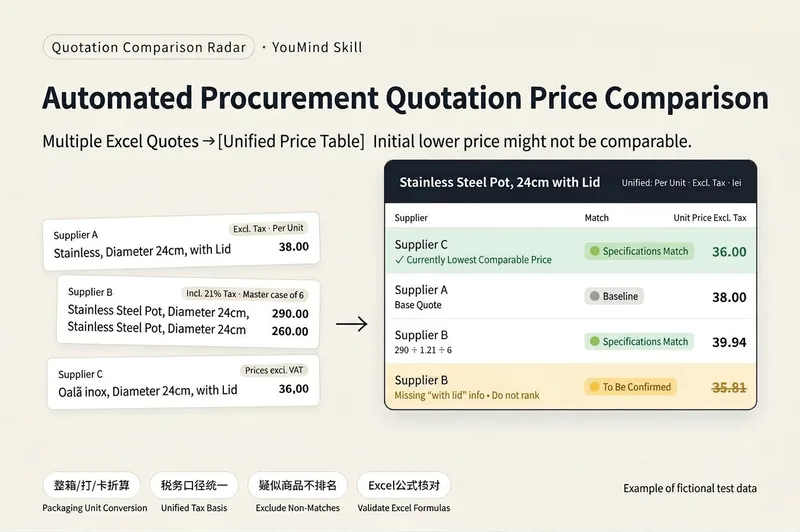
# Automated Quote Comparison | Quote Comparison Radar **Compare multiple supplier quotes in one table: only matching specifications are ranked, suspected matches require confirmation, and unit prices are calculated with Excel formulas.** ## Still comparing supplier quotes manually? If you run a wholesale business, stock a store, or handle purchasing, you may often encounter these issues: - Supplier A quotes by the case, supplier B by the dozen, and supplier C by the individual item. - Some prices include tax while others do not, making direct comparisons error-prone. - The same product may have different names and may mix Chinese, foreign-language text, and different decimal formats. - Products that look identical may differ in capacity, dimensions, material, or model. - Quote sheets may contain dozens or even hundreds of rows. Organizing them manually takes time and makes it easy to miss lines. **Quote Comparison Radar organizes multiple supplier Excel quotes into one standardized comparison table that you can check row by row.** The focus is not just on comparing prices, but first determining whether the product specifications are comparable. ## Core features **① Three-level product specification matching** 🟢 Matching specifications: Key specifications meet the requirements and can be included in the price comparison. 🟡 Needs confirmation: Key information is missing or the specifications require further confirmation. The item is temporarily excluded from the lowest-price ranking. 🔴 Conflicting specifications: Key attributes such as dimensions, capacity, or material are clearly different. The item is excluded from the lowest-price ranking for that product. This prevents a lower-priced product with different specifications from being treated as the best quote. **② Automatic packaging quantity conversion** Supports cases, dozens, cards, and multi-level packaging, such as “20 packs × 10 pieces.” Automatically organizes package quantities and pricing units while distinguishing product specifications from minimum order quantities, so quotes for different quantities are not compared directly. **③ Standardized tax-inclusive and tax-exclusive prices** When tax information is clearly provided in the quote, tax-inclusive prices are converted to tax-exclusive prices for a consistent comparison basis. Foreign-currency quotes are marked separately. Exchange rates are not converted automatically, and these quotes are not included in the lowest-price ranking. **④ Tiered pricing support** Tiered prices for different purchase quantities are listed separately. By default, only the starting quantity tier is used for comparison. **⑤ Excel formula calculations for row-by-row checking** Unit prices in the output are calculated with Excel formulas rather than estimated directly by AI. Each row retains the source file and original product number, making it easier to verify product descriptions, package quantities, tax rates, and prices. **⑥ Missing-row prevention and batch processing for large files** At the beginning, the Skill reports the number of rows identified in each file. After output is complete, it performs an item-by-item check and attempts to restore any missing rows. When there are more than 40 rows, the output is automatically split into batches. Reply “Continue” to get the next batch; row numbers remain continuous. **⑦ Supplementary confirmation for suspected products** For example, reply: “B-04 is transparent.” The Skill updates the corresponding entry based on the additional information, so you do not need to reorganize all quotes from scratch. ## How to use **Step 1: Upload at least two supplier Excel quote sheets.** Files are sorted by filename, and the first file becomes the reference supplier. To specify the reference supplier, add `1_` to the beginning of its filename. **Step 2: Wait for product matching and the comparison table.** If the quote contains more than 40 rows, reply “Continue” as prompted until the entire output is complete. **Step 3: Copy the results to Excel.** Paste each batch into Excel cell A1 in order so Excel can calculate the formula results. **Step 4: Filter for the lowest quotes.** Filter for 「参与排名=是」, group by product, and sort 「未税单价」 from low to high to find the currently lowest comparable quote for each group. **Step 5: Manually verify and confirm suspected products.** Add specification information for 🟡 entries, then ask the Skill to update the corresponding rows. ## Internal test results The final version was tested using self-created fictional quote data: - 4 suppliers and 156 quote rows in total. - The test included case packaging, tax-inclusive quotes, multiple worksheets, Romanian product names, comma decimals, euro quotes, tiered pricing, and entries without prices. - The final version output all 156 rows. - 0 incorrectly matched items entered the lowest-price ranking. - The lowest-price conclusions for all 50 product groups were correct. - After the output was pasted into Excel, no formula errors occurred during testing. These are **test results using fictional internal data**. They are not a real customer case and do not indicate that all real quote sheets will achieve the same accuracy. ## Limitations and notes - Currently supports only Excel quote sheets, not PDFs, images, or WeChat text. - Compares product unit prices only; shipping costs, minimum order quantities, and payment terms are not included in the price comparison. - 🟢 means the provided key specifications match. It does not guarantee the same brand, model, or completely identical product. - Foreign-currency quotes are not automatically converted using exchange rates. - If Excel uses commas as decimal separators, such as `12,50`, mention this when uploading. - Entries missing required tax rates, pricing units, or packaging information must be confirmed before they can be used for a valid comparison. - The Skill does not directly provide a final purchasing decision. You need to filter, sort, and verify the lowest quotes in Excel. - Before purchasing, manually verify key product specifications and supplier quotes. ## Price and credit usage **Launch price: 1,980 credits.** In an internal test with quotes from 4 suppliers and approximately 150 rows, the run used about 224 credits. Actual credit usage depends on the number of files, number of product rows, batch output, and the number of follow-up confirmations. 224 credits is not a fixed fee. ## Who is it for? - Retail store owners who frequently purchase from multiple suppliers - Wholesalers and small trading companies - People responsible for product purchasing and supplier quote requests - Business operators who need to organize multiple Excel quote sheets **Confirm that specifications are comparable before comparing prices.** A price that looks cheaper may not be directly comparable.

Research Review Assistant
An expert assistant for university-level research project reviews. Provide the materials for N projects in a given category. Each project includes three types of files: a proposal, a form-check summary or interim review form, and supporting evidence. File names may be scrambled, mismatched, or changed, and files may be DOCX, XLSX, PDF, or image files. Supporting evidence may be bundled into one file or provided as multiple separate files. This Skill then completes the following steps: ① Content-anchor alignment—extracts the project or center name, principal investigator, affiliated school, and project period from within the documents; matches the three-part file set for each project; and flags items requiring review when file names do not match their contents. ② Evidence normalization—whether bundled or separate, breaks materials into “atomic evidence items” and creates a coded ledger for each item with one of four status labels: complete, needs verification, missing, or questionable. This avoids judging the strength of the evidence by file count. ③ Three-dimensional item-by-item audit—evaluates each piece of evidence for relevance, authenticity, and completeness, then reconciles it against the commitments in the proposal and the self-reported results in the interim review form. ④ Dual-track scoring and comparative ranking—uses the five weighted criteria in Appendix 2 as the reporting standard and the five dimensions of the interim review as a reference standard. The two systems remain independent and are not combined, and all projects are ranked and grouped into tiers. ⑤ Delivers a structured review draft with “score + review comments” that can be pasted directly into the official form, and can generate an interactive scoring webpage when needed. Huali’s current standards are used by default. Users can confirm or revise the criteria, weights, and reference materials before work begins, or upload replacements. There are two confirmation checkpoints: first for alignment and the evidence ledger, then for scoring and ranking. When materials cannot be identified, the user is prompted to confirm. For project completion reviews, two additional hard requirements apply: first, the correspondence between the proposal’s expected outcomes and the documented evidence must be verified. If the evidence does not include an expected outcome listed in the proposal, the project automatically fails. Second, template issues are distinguished between using the completely wrong template, which results in failure, and partial formatting inconsistencies, which result in only a small deduction.
Information
- Version
- v2
- Last updated
- Runtime credits
- Usage-based
- Models
- Auto
- Use cases
- Writing & contentBusiness & strategy
- What you get
- ReportDocument
