PMBOK 8 R&D PM Assistant
One-stop project docs for PMBOK 8 & standards
PMBOK 8 R&D PM Assistant
One-stop project docs for PMBOK 8 & standards
Showcase
Description
One-stop software development project management document generation assistant. Built on the PMBOK 8 framework, covering the full lifecycle from project initiation to closure, supporting both predictive (waterfall) and agile methodologies, with 127 standard project document templates built-in, enabling one-click generation of professional project management documents. Core capabilities: • Smart document generation — Project charter, requirements specification, WBS, risk register, test plan, deployment plan, and 127 other document types, automatically categorized by PMBOK 8 performance domains. • Dual methodology — Predictive and agile terminology automatically isolated, with bridging terms added for cross-methodology references, ensuring professional consistency. • Three standard systems — Integrated with China's CSPM (GB/T 41831/41246), e-government (国办发57号/等保/密评), and Hong Kong DPO standard systems, with automatic keyword detection and adaptation. • Trilingual output — Simplified Chinese, Traditional Chinese (Hong Kong usage), and English, supporting parallel multi-language generation. • Flexible configuration — Three orthogonal dimensions: proficiency (beginner/expert), richness (simple/standard/professional), and output language. • Project folder — Automatically creates PMBOK 8 focus area folder structure, documents auto-sorted, maintaining a project document master index. • Smart sensing — Paste meeting minutes, emails, logs, automatically identify project events and link to corresponding documents. • Template learning — Upload your templates, the Skill learns the structure and generates documents in your format. Applicable scenarios: Software development project managers, PMOs, technical leads, agile coaches, and teams needing standardized project management documents. Whether you use PMBOK, CSPM, or DPO systems, quickly generate compliant project documents.
Related Skills
View all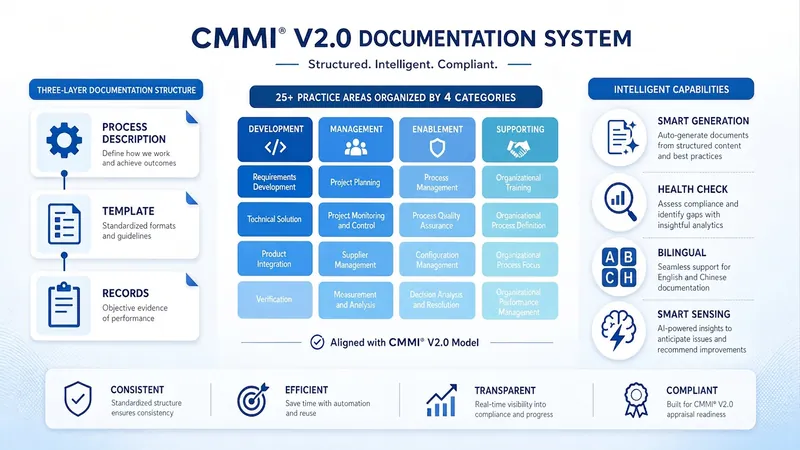
CMMI V2.0 Document Assistant
One-stop CMMI V2.0 document system builder. Covers all models (DEV/Services/People/Supplier/Security) ML2-ML5, with practice areas (PA) as the main axis. Each PA generates three-level documents: process description, template, and record. Supports bilingual output in Chinese and English. Core capabilities: - Intelligent document generation — 25+ PA × three-level documents, automatically categorized according to CMMI's four category domains (Execution, Management, Support, Improvement), with built-in complete structure definitions - Four intents — Template generation, material to document, intelligent update, and system health check. Automatically recognizes user intent and confirms before execution - System health check — Cross-PA coverage calculation, gap grading analysis, phased action plan, and assessment readiness evaluation - Bilingual output — Simplified Chinese and English freely combinable; CMMI standard abbreviations remain in English - Status tracking — Maintain project context status matrix, gap register, and document system general catalog - Project folder — Automatically create folder structure by CMMI category domains; documents are automatically placed - Intelligent awareness — Paste meeting minutes, logs, or emails; automatically recognizes 10 types of project events and associates corresponding PA documents - Version verification — Automatically detects and corrects CMMI version misnomers (e.g., V3→V2.0) - Agile adaptation — Supports CMMI practice adaptation in agile development environments Applicable scenarios: CMMI assessment preparation teams, EPG/process improvement groups, QA managers, project managers, and organizations that need to build a CMMI compliant document system. Whether the goal is ML2 entry-level or ML5 optimization-level, this assistant can quickly generate a process document system that meets CMMI V2.0 standards.
Research Proposal Assistant
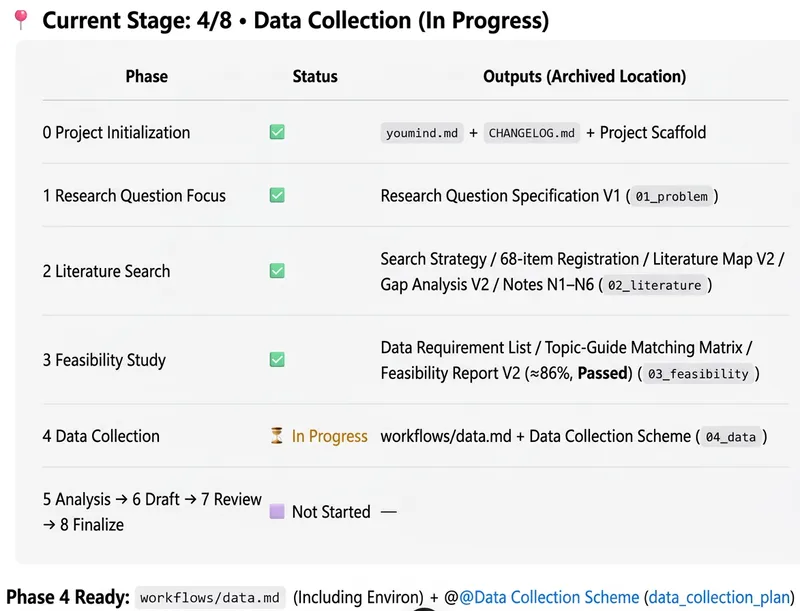
Designed for university faculty and researchers, this assistant turns an initial research idea into an executable, fundable project plan. It covers national- and provincial-level humanities and social sciences projects, teaching reform projects, and other research project types. Provide the project type and application guidelines or template, research direction, existing成果, and personal and institutional information. The assistant helps clarify the topic, focus the research question, and build a complete foundation for the proposal around the research problem, application requirements, and review logic. As the project develops, the assistant can support academic searches, literature reviews, research gap analysis, feasibility assessments for data and methods, comparable project matching, and research design adjustments. It helps ensure that literature, data, and funding information are authentic and verifiable, while incorporating AI, contemporary relevance, and methodological innovation into the topic and innovation points. Once the research plan is mature, it can draft an initial proposal based on the application guidelines or blank template you provide, simulate different reviewer perspectives, and suggest revisions through to the final draft. The project retains stage outputs, version records, and the basis for changes. It can ultimately organize a proposal, technical roadmap, research framework diagram, innovation logic diagram, progress Gantt chart, and other research visuals. For tasks requiring an external environment, such as full-text PDF analysis, code execution, web scraping, or large-scale data processing, the assistant clearly identifies handoff tasks and supports filling in results and continuing the work, helping move the project from preparation through a properly formatted final proposal.
Research Review Assistant
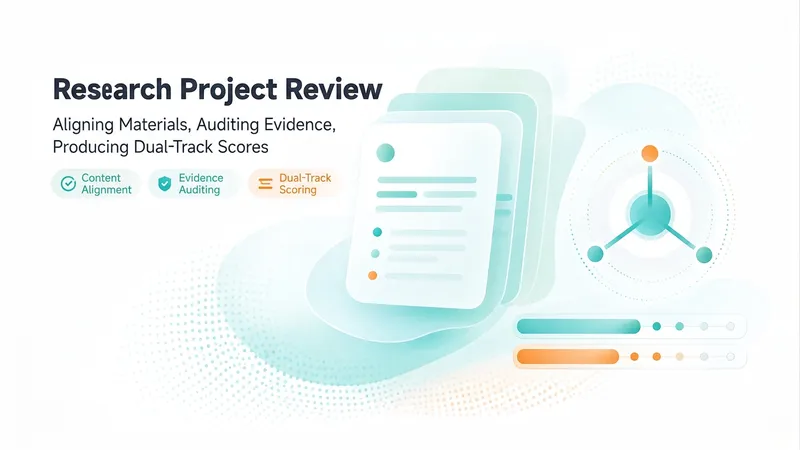
An expert assistant for university-level research project reviews. Provide the materials for N projects in a given category. Each project includes three types of files: a proposal, a form-check summary or interim review form, and supporting evidence. File names may be scrambled, mismatched, or changed, and files may be DOCX, XLSX, PDF, or image files. Supporting evidence may be bundled into one file or provided as multiple separate files. This Skill then completes the following steps: ① Content-anchor alignment—extracts the project or center name, principal investigator, affiliated school, and project period from within the documents; matches the three-part file set for each project; and flags items requiring review when file names do not match their contents. ② Evidence normalization—whether bundled or separate, breaks materials into “atomic evidence items” and creates a coded ledger for each item with one of four status labels: complete, needs verification, missing, or questionable. This avoids judging the strength of the evidence by file count. ③ Three-dimensional item-by-item audit—evaluates each piece of evidence for relevance, authenticity, and completeness, then reconciles it against the commitments in the proposal and the self-reported results in the interim review form. ④ Dual-track scoring and comparative ranking—uses the five weighted criteria in Appendix 2 as the reporting standard and the five dimensions of the interim review as a reference standard. The two systems remain independent and are not combined, and all projects are ranked and grouped into tiers. ⑤ Delivers a structured review draft with “score + review comments” that can be pasted directly into the official form, and can generate an interactive scoring webpage when needed. Huali’s current standards are used by default. Users can confirm or revise the criteria, weights, and reference materials before work begins, or upload replacements. There are two confirmation checkpoints: first for alignment and the evidence ledger, then for scoring and ranking. When materials cannot be identified, the user is prompted to confirm. For project completion reviews, two additional hard requirements apply: first, the correspondence between the proposal’s expected outcomes and the documented evidence must be verified. If the evidence does not include an expected outcome listed in the proposal, the project automatically fails. Second, template issues are distinguished between using the completely wrong template, which results in failure, and partial formatting inconsistencies, which result in only a small deduction.
Information
- Version
- v22
- Last updated
- Runtime credits
- Usage-based
- Models
- Auto
