
Deep Logic, Essential Slides
Turn a script into a presentation you can own
Deep Logic, Essential Slides
Turn a script into a presentation you can own
Showcase

演示-医美海报风格PPT制作
碳水脸是假的,但这样吃确实能变好看

演示-AI课程逐字稿生成PPT
大仙 AI 系列课 1:把 Codex / Claude Code 和飞书连起来
每页 1–2 句提示,配合画面即可开讲;数据口径已在页内标注。
-
封面 — 开场点题:《关于深化主流媒体系统性变革的意见》正式印发,改革进入新阶段;用“改革有阵痛,但不改革就是长痛”定调。
-
核心主张 — 先给总论点:这不是一家单位的自我调整,而是一场结构性重塑;再亮三条主线,说明接下来按“困境→破局→立身”展开。
-
第一章过渡 — 交代本部分三步:先破一个误读、再看三重结构、最后看治理滞后。
-
一个流行的误读 — 指出把系统性变革等同于“媒体内部整改”是惯性认知,正是内卷、变形、低效之源;引出“系统性问题”。
-
三重结构迭代 — 逐根讲三根支柱(传播、发展、社会),强调三者叠加系统性稀释了媒体优势。
-
优势是如何被稀释的 — 每根支柱展开一层:门槛降低/分发转移/议题前置;资源高度分散;大众裂解为圈层。收口:这是结构位移,不是局部失守。
-
治理逻辑,滞后于时代 — 讲“既要、又要、还要”的层层加码,与“只布置答卷、不搭答题条件”的错位。
-
现实承压 — 用 5.6%(电视)、11.6%(广播)刊例花费下滑与行业总收入 14878.02 亿元的结构分化,落到一线那句“一睁眼就想着咋挣钱养人”。口径:CTR 媒介智讯、国家广播电视总局统计公报。
-
从浅表改动,到系统性支撑 — 批评“增减版面、调整频道、开关栏目”式浅表改革;转折:变革需要系统性支撑,要放进治理体系。
-
第二章过渡 — 转向外部:树立“治理工程、系统工程”理念,搭建协同支撑体系。
-
媒体变革,是一场治理工程 — 媒体是治理体系的功能平台;协同不是包办,而是补齐短板、创造条件。
-
五条支撑 — 一次过五张卡片:经营保障、数据资源、主责主业、评价标准、舆论环境。
-
让媒体活得下去、转得起来 — 展开经营保障与数据资源;小结“先生存,再转型”。
-
让媒体干得专业、说得响亮 — 展开主责主业、评价标准、舆论环境;落点“专业的人干专业的事、让媒体敢发声”。
-
第三章过渡 — 平衡:强调外部支撑不等于坐等政策,所有外部条件最终要转化为内部能力。
-
外部支撑,不等于坐等政策 — 亮出四组“多一些、少一些”,强调这是向内修炼。
-
多与少 — 逐条讲具体所指:内容为本、真正触网、实效检验、相信年轻人。
-
内外联动,双向赋能 — 收尾:外部补短板 + 内部深修炼,双向赋能;让主流媒体守住主阵地、扛起新使命、展现新作为。
<EMPTY_PARAGRAPH>
媒体系统性变革,不只是媒体的事 · 演讲者备注
演示-医美海报风格PPT制作
碳水脸是假的,但这样吃确实能变好看
演示-AI课程逐字稿生成PPT
大仙 AI 系列课 1:把 Codex / Claude Code 和飞书连起来
每页 1–2 句提示,配合画面即可开讲;数据口径已在页内标注。
-
封面 — 开场点题:《关于深化主流媒体系统性变革的意见》正式印发,改革进入新阶段;用“改革有阵痛,但不改革就是长痛”定调。
-
核心主张 — 先给总论点:这不是一家单位的自我调整,而是一场结构性重塑;再亮三条主线,说明接下来按“困境→破局→立身”展开。
-
第一章过渡 — 交代本部分三步:先破一个误读、再看三重结构、最后看治理滞后。
-
一个流行的误读 — 指出把系统性变革等同于“媒体内部整改”是惯性认知,正是内卷、变形、低效之源;引出“系统性问题”。
-
三重结构迭代 — 逐根讲三根支柱(传播、发展、社会),强调三者叠加系统性稀释了媒体优势。
-
优势是如何被稀释的 — 每根支柱展开一层:门槛降低/分发转移/议题前置;资源高度分散;大众裂解为圈层。收口:这是结构位移,不是局部失守。
-
治理逻辑,滞后于时代 — 讲“既要、又要、还要”的层层加码,与“只布置答卷、不搭答题条件”的错位。
-
现实承压 — 用 5.6%(电视)、11.6%(广播)刊例花费下滑与行业总收入 14878.02 亿元的结构分化,落到一线那句“一睁眼就想着咋挣钱养人”。口径:CTR 媒介智讯、国家广播电视总局统计公报。
-
从浅表改动,到系统性支撑 — 批评“增减版面、调整频道、开关栏目”式浅表改革;转折:变革需要系统性支撑,要放进治理体系。
-
第二章过渡 — 转向外部:树立“治理工程、系统工程”理念,搭建协同支撑体系。
-
媒体变革,是一场治理工程 — 媒体是治理体系的功能平台;协同不是包办,而是补齐短板、创造条件。
-
五条支撑 — 一次过五张卡片:经营保障、数据资源、主责主业、评价标准、舆论环境。
-
让媒体活得下去、转得起来 — 展开经营保障与数据资源;小结“先生存,再转型”。
-
让媒体干得专业、说得响亮 — 展开主责主业、评价标准、舆论环境;落点“专业的人干专业的事、让媒体敢发声”。
-
第三章过渡 — 平衡:强调外部支撑不等于坐等政策,所有外部条件最终要转化为内部能力。
-
外部支撑,不等于坐等政策 — 亮出四组“多一些、少一些”,强调这是向内修炼。
-
多与少 — 逐条讲具体所指:内容为本、真正触网、实效检验、相信年轻人。
-
内外联动,双向赋能 — 收尾:外部补短板 + 内部深修炼,双向赋能;让主流媒体守住主阵地、扛起新使命、展现新作为。
<EMPTY_PARAGRAPH>
媒体系统性变革,不只是媒体的事 · 演讲者备注
Description
Provide a transcript, speech, or article and get a polished, logically complete PPTX—from structure and logic refinement to source research and fact-checking, copy distillation, visual design, and native image generation, all in one workflow. Automatic mode is also supported for generating the full deck in one click. Every page includes its conclusion and sources, making it self-contained and easy to read—or a backup prompt sheet that works without the original script. A 15-slide deck costs less than 300 credits.
Best for
For anyone who needs to quickly turn a script into a complete professional presentation for self-reading or presenting.
How to use this Skill
Provide your input
Provide a transcript, speech, or article. You may include reference materials and specify the presentation’s purpose, audience, setting, and duration.
Run the Skill
The Skill organizes the content, distills the copy for each page, verifies claims that require sources, and designs an editable presentation.
Review your result
Receive a clear, self-contained, editable PPTX ready to present, complete with speaker notes and source information.
Related Skills
View all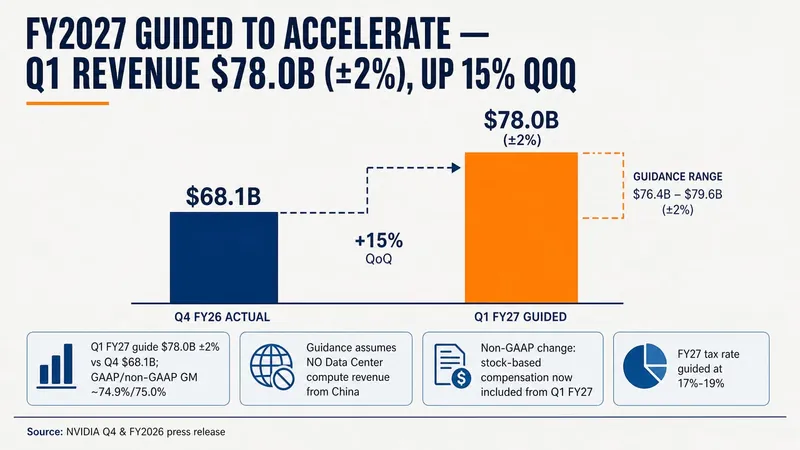 Slides
Consulting-Style Slides
This Skill helps you create high-quality business Slides to the professional standards of top-tier consulting firms. It strictly follows the Pyramid Principle and applies the core ideas of leading with conclusions, progressing logically, and using data to turn scattered business insights into structured, coherent presentations. Whether you are developing a strategy, proposing a project, or conducting a business analysis, it helps you quickly build a framework based on the MECE principle, ensuring that points are mutually exclusive and collectively exhaustive. During content development, this Skill automatically distills insightful slide titles and recommends the most suitable visualizations based on your data, such as waterfall charts, funnel charts, and stacked bar charts. It provides structured design guidance and can also generate a professional Slides file with title slides, content slides, comparison slides, and chart placeholders. The generated document uses a classic dark blue and orange business color palette, with clean, professional layouts and clear visual hierarchy, helping your presentation demonstrate a high level of professionalism in both design and content.
 Slides
Pixel Game PPT Designer Pro
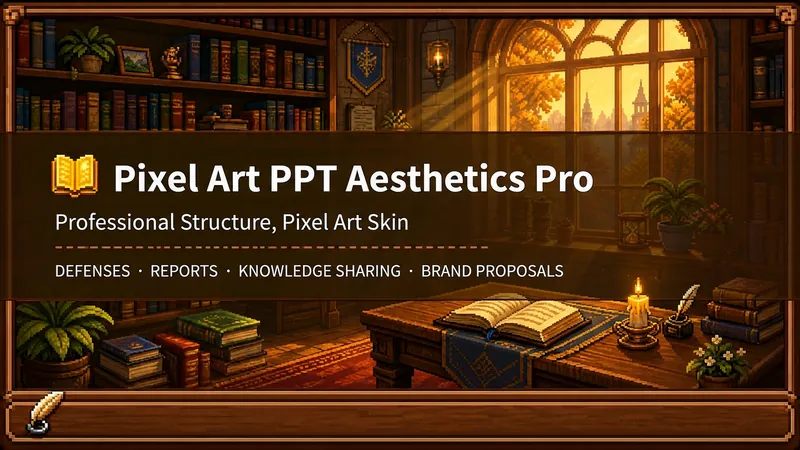
Who says professional PPTs have to be white backgrounds, black text, blue-gray colors, and cookie-cutter templates? If you love games, adore pixel art, and happen to need a thesis defense, report, knowledge sharing session, or brand proposal—then you have to try this. Pixel Game PPT Aesthetic Designer Pro does one simple thing: the skeleton is professional, the skin is pixel. It doesn't just make a "pixel-style creative PPT"; it makes a serious PPT that's fit for any professional occasion—only this one wears a 16-bit pixel game aesthetic coat. Core design philosophy: Separate skeleton and skin. Information architecture, visual flow, and page templates stick to professional norms; colors, borders, icons, and decorations adhere to universal pixel game aesthetics. Text is never pixelated, ensuring readability within 0.8 seconds. Pixel elements only appear in backgrounds, borders, icons, and decorative accents. No game-specific symbols are used—only cross-game universal symbols like candles, books, coins, stars, hearts, and crystals—so any pixel fan can use it. 🎮 How to use? Two modes, choose as needed: ① Direct Generation (2 steps): Enter topic/materials → AI confirms framework → Full output. Ideal for everyday scenarios with tight deadlines and moderate text requirements. ② Fine Mode (3 steps, saves credits): Enter topic/materials → AI confirms framework → Confirm text per slide → Full output. Finalize text per slide before generating images—avoids wasting credits on regenerating due to text errors. Use this for important occasions to control content and save credits. 🏰 Four professional scenarios with adaptive immersion depth: Academic Defense — Light immersion mainly, medium immersion on cover, deep immersion anchor points on data pages. Judges get it at a glance, and key pages make an impression. Work Reports — Light immersion plus medium immersion on metrics pages; risk pages stay non-pixelated. Bosses see professionalism, colleagues remember the style. Knowledge Sharing — Medium immersion mainly plus deep immersion on synthesis recipes. Replace boring flowcharts with "synthesis recipes" so knowledge sticks like game items. Brand Proposals — Adapts to brand temperature: cool brands get restrained pixel use, warm brands embrace the scene. 🎨 What you'll get: ① A complete pixel-style professional PPT (YouMind Slides format, editable online—text, layout, page order—change anytime. Edit within YouMind, then export locally as images.) ② A three-layer pixel wood border system (#5C3A1E outer ring + #8B5E3C inner ring + #F5E6D3 fill, unified visual language across the deck) ③ Exclusive synthesis recipe infographic (ingredient grid → synthesis circle → result grid, replacing traditional flowcharts with a visual anchor that RPG players instantly understand) ④ Adaptive immersion rhythm across four scenarios (not every page crammed with pixels—heavy where needed, light where not) ⑤ Dual-mode design (direct generation for daily use, fine mode for important occasions—finalize text first, then generate images to save credits) 399 credits. Give your professional content a 16-bit armor. Anyone who loves pixel art knows its worth.
Lesson Prep Script V1.0
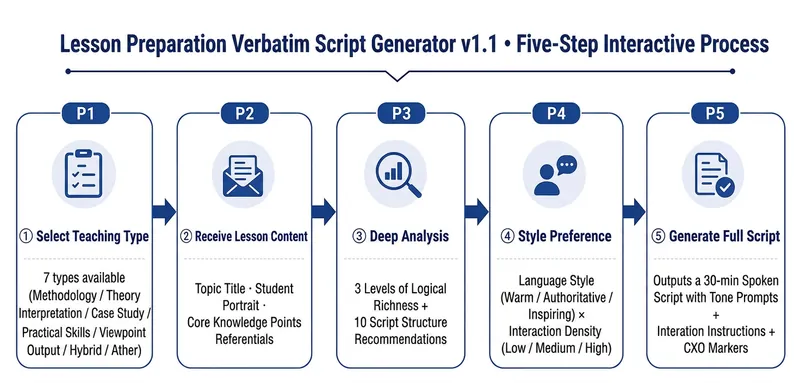
Helps instructors/knowledge IPs directly turn lesson preparation topics into a ready-to-use 30-minute spoken-word script—just pick it up and read, not secondary prompts. What it solves Traditional lesson preparation requires instructors to go through "ideation → break into modules → write script → mark pacing → design interactions", which is time-consuming and easy to miss details. This Skill compresses this process into a 5-step interaction. Instructors only need to provide the topic and key knowledge points, and the rest is automated. Core capabilities ① Five-step structured interaction: Select lesson type → Receive preparation content → Deep analysis with option presentation → Ask for style preference → Directly generate a complete spoken-word script. Each step waits for user confirmation before proceeding. ② CXO three-dimensional teaching verification: Each module is annotated with teaching dimensions — C (Content/Knowledge), X (Experience/Practice), O (Objective/Output), ensuring full coverage throughout. ③ Spoken-word script template: Each segment follows the framework of Hook → Key Point → Structure → Call to Action. The structure supports four modes: reason, method, situation/reaction, and chronological order. ④ Complete output includes: 7 modules totaling approximately 7,900 words of spoken text + tone cues (【Pause 2 seconds】【Emphasis】) + audience interaction instructions + CXO paragraph annotations + full statistics. ⑤ Seven-dimensional quality check: Word count deviation / Spoken style / Template completeness / CXO coverage / Logical coherence / Pacing / Reusability — each dimension is checked, and if any fails, it is corrected and regenerated.
Information
- Version
- v10
- Last updated
- Runtime credits
- Usage-based
- Models
- Auto
- Use cases
- Images & designPresentations & reporting
- What you get
- Slides
