
Search Engine
Search, fact-check, and debug across sources
Search Engine
Search, fact-check, and debug across sources
Showcase
Description
Turn natural-language questions into traceable public web search results for research, fact-checking, finding public-account articles, troubleshooting program errors, and searching for papers, technical documentation, and open-source projects. For topics requiring current information or evidence from multiple sources, it combines Chinese and international search results across different types of public sources, helping reduce omissions and bias from relying on a single search engine. In addition to summarizing relevant pages, it organizes titles, sources, links, and available publication dates, merges duplicate results, and distinguishes independent evidence from different organizations or websites. For key claims, the results present supporting and opposing information, disagreements between sources, and a credibility assessment based on the amount and quality of the evidence. This helps you see which points are supported by cross-checking and which remain isolated claims or cannot be confirmed. You can enter search terms or a claim to verify directly, and add a field, time range, region, language preference, or specific websites. The final output includes a structured search summary, source list, cross-checking results, and items requiring verification. Content that cannot be accessed, requires login, or has scraping restrictions is clearly marked; speculation is never used in place of real sources.
Best for
Users who need public research, fact-checking, technical troubleshooting, or papers and open-source projects.
How to use this Skill
Provide your input
Enter a natural-language query or claim to verify. You can add a field, time range, region, language preference, and websites to include or exclude.
Run the Skill
Search across multiple public sources, organize and deduplicate results, compare independent evidence, and note sources, disagreements, accessibility, and verification confidence.
Review your result
Receive a structured search summary, source list, cross-checking results, and items requiring verification. Inaccessible or unsupported content is clearly marked.
Related Skills
View all
Fact Check
Hand any opinion, conclusion, data point, or proposal to an AI fact-checker: online source tracing, five-level credibility ratings, and reasoning-chain analysis—followed by a fact-check report you can share directly. 【What it does】Paste any claim, and the skill completes three checks automatically: 🔍 Break it down—separates the claim into “verifiable facts / inferred conclusions / value judgments,” keeping positions distinct from facts 🌐 Trace sources online—verifies sources, samples, statistical definitions, dates, and full context point by point, with cross-checking across multiple channels 🧩 Check the reasoning chain—identifies hidden assumptions, correlation-versus-causation errors, omitted alternative explanations, and the conditions under which the conclusion holds or fails 【Why choose it】 ✅ Five-level credibility ratings: Confirmed / Generally sound but should be narrowed / Contested / Insufficient evidence / Clearly false, with source links for every item ✅ Four-part report: Reliable facts and corrections / The most critical flaws in the reasoning chain / The strongest revised version / How much you can trust it ✅ No made-up answers: When a claim cannot be verified, it is honestly marked “Insufficient evidence” instead of being passed off as “possibly true” ✅ Report-ready output: Share it directly with readers, clients, or your community 【Who it’s for】Independent media and content creators, investors and analysts, students and researchers, and anyone who needs to quickly decide whether a statement can be trusted. 【How to use it】Paste the claim you want checked—anything from one sentence to a paragraph. For example, enter “People with Hashimoto’s thyroiditis often have low energy” to get a source-backed, tiered fact-check report. ⚠️ For medical, legal, investment, and other professional questions, use this for information verification only and rely on qualified professionals for advice.
SEO+GEO Visibility Engine
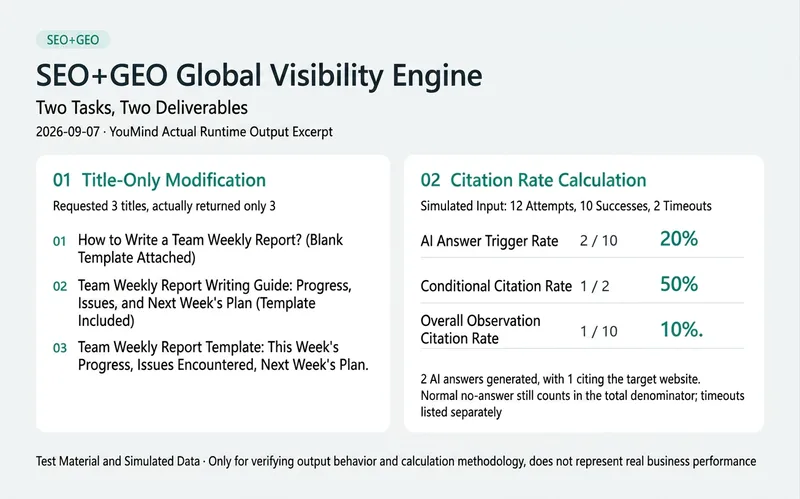
Optimize the search performance and AI citation readiness of your articles, product pages, and landing pages. Quickly identify the issues most worth fixing, or get ready-to-use titles, rewrites, content briefs, technical fix lists, or performance retest plans. Four modes route tasks appropriately: send only a link or body copy for a quick diagnosis by default; request writing to get usable text first; use a full audit to break findings down by target engine and page; or use a performance retest with clearly defined data sources, numerators, denominators, and comparison conditions. Simple tasks do not require a full-length report. Supports platform-specific checks for Google AI Overviews / AI Mode, Bing / Copilot, ChatGPT Search, Perplexity, and Claude. Search, training, and user-triggered visits are assessed separately. For Chinese platforms, checks are adapted to actually available sources and direct observations rather than applying rules from other engines. v8 standardizes scoring and evidence criteria, limits the scope of local blocks, distinguishes answer trigger rate, conditional citation rate, and overall citation rate, and updates Google site-level AI control checks. Use it for your own websites, articles on third-party platforms, and unpublished drafts. Recommendations distinguish what you can change from items that require platform-side validation. Each key finding includes evidence or clearly stated limitations. Scores are provided when needed; data, authors, or citations are never fabricated, and rankings, indexing, or AI citations are not guaranteed. Actual run example (2026-09-07; test material, not business results) Title mode: Given test copy for “How to write a team weekly report” with a request to return only 3 titles, the actual output was: 1. How to Write a Team Weekly Report: Blank Template Included 2. Team Weekly Report Writing Guide: Progress, Issues, and Next Week’s Plan (Template Included) 3. Team Weekly Report Template: This Week’s Progress, Issues, and Next Week’s Plan Calculation mode: Simulated 12 attempts, with 10 successes and 2 timeouts; 2 successful runs generated AI answers, and 1 cited the target website. Actual output: AI answer trigger rate 2/10 = 20%, conditional citation rate 1/2 = 50%, and overall observed citation rate 1/10 = 10%. Normal no-answer cases remain in the overall denominator, while timeouts are listed separately. These figures validate the calculation criteria only and do not represent actual citation performance.
 Video
VideoSpark | Video Asset Finder
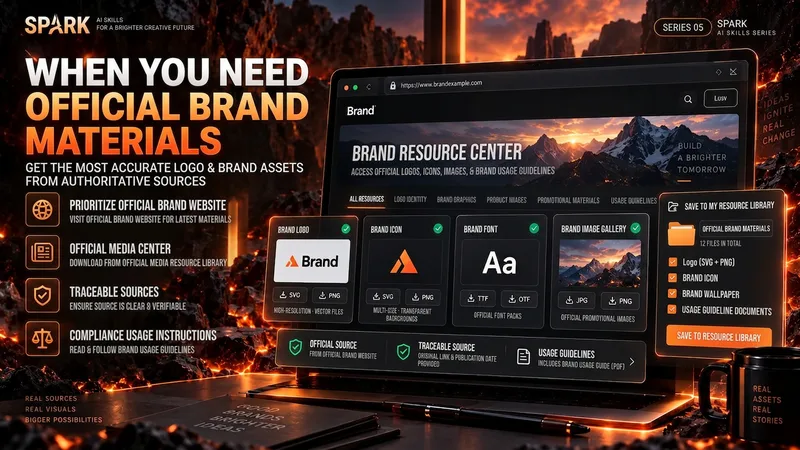
One of the most time-consuming parts of making a video isn’t knowing that you need visuals—it’s finding assets that are actually right for the job. A brand Logo may exist on its official website, an older CDN, Wikimedia, Pinterest, and countless reposted pages. A search for a “warehouse photo” may return product images shot against backdrops, 3D renders, and completely irrelevant stock images. If you only look at the first few search results, it’s easy to bring the wrong version, a secondhand source, or questionable licensing into your final video. “Spark | Video Asset Finder” breaks asset collection into four modes: Query Discovery / Single Page Pull / Site Pull / Transcript → Asset Pull You can simply say, “Find OpenAI’s current official Logo,” provide a brand page for it to extract assets from, or submit a full video transcript or script. It will first determine which parts truly need real visual assets, then search for and verify them one by one. It does not treat search hits as evidence of usable assets, and it will not pretend a file was “downloaded successfully” when it could not be saved. Brand assets are sourced from official channels whenever possible. For non-brand visuals, it checks whether the image really depicts the target scene. Third-party reposts are used only as leads; for important sources and licensing, it tries to trace back to the original rights holder or a trusted licensing platform. The final deliverable is not a pile of scattered images, but a production-ready asset Manifest. Each item records the asset request, source page, image or file reference, version, license, save status, and why it was selected. Failed items and remaining gaps are preserved as well. Best for creators making YouTube videos, educational content, product introductions, technology and business content, documentaries and interviews, tutorials, reviews, and other videos that need real Logos, product images, people, places, scenes, or B-roll. How to use it Method A | Find official assets for a brand (Query Discovery) Give it: a brand, product, person, or place, plus the visual assets you actually need. Example: Find OpenAI’s current official Logo and the 3 most useful official brand visuals. Prioritize official sources; save them directly when possible, and clearly explain when saving isn’t possible. It will: prioritize official brand pages → verify each item → remove duplicates → save or reference assets → create a Manifest. Method B | Turn a video script into an asset list (Transcript → Asset Pull) Give it: a transcript, complete script, or storyboard text. Example: Here is my script for a video about global logistics. First determine which parts truly need a Logo, real warehouse footage, or port and container visuals, then find authentic, usable assets. Don’t add items just to fill the list. It will first break the script into visual requirements, then search for brand assets and real-world footage separately. Method C | Extract precisely from one official page (Single Page Pull) Give it: a specific webpage URL plus quantity or usage requirements. Example: Extract the 4 visual assets best suited for video production, using only this official brand page and its directly linked official files. Do not expand the search to third-party websites. Ideal for brand guidelines, product pages, press releases, media centers, and other clearly first-party pages. Method D | Find related assets within one website (Site Pull) Give it: an official website and the target assets. Example: On this company’s website only, find authentic photos and product visuals related to “automated warehouses.” Prioritize original images; do not collect navigation icons or decorative elements. Useful when a website has extensive content and the target assets are spread across news, product pages, customer stories, or a media center. Best inputs: Clear asset targets (brand, product, scene, person, or place) A complete transcript, script, or storyboard A specific official page URL A specified official website or domain The intended use (opening, corner Logo, B-roll, product introduction, customer story, etc.) Limits such as quantity, resolution, format, and licensing preferences If you care about requirements such as “must be official,” “must be a real photo,” “must be commercially usable,” or “search this domain only,” state them directly. The Skill will treat them as filtering requirements rather than after-the-fact notes.
Information
- Version
- v3
- Last updated
- Runtime credits
- Usage-based
- Models
- Auto
- Use cases
- Research & analysisLearning & educationSoftware development
- What you get
- ReportData
