Scarf Stylist
Smart style detection for custom winter scarfs
Scarf Stylist
Smart style detection for custom winter scarfs
Showcase
Description
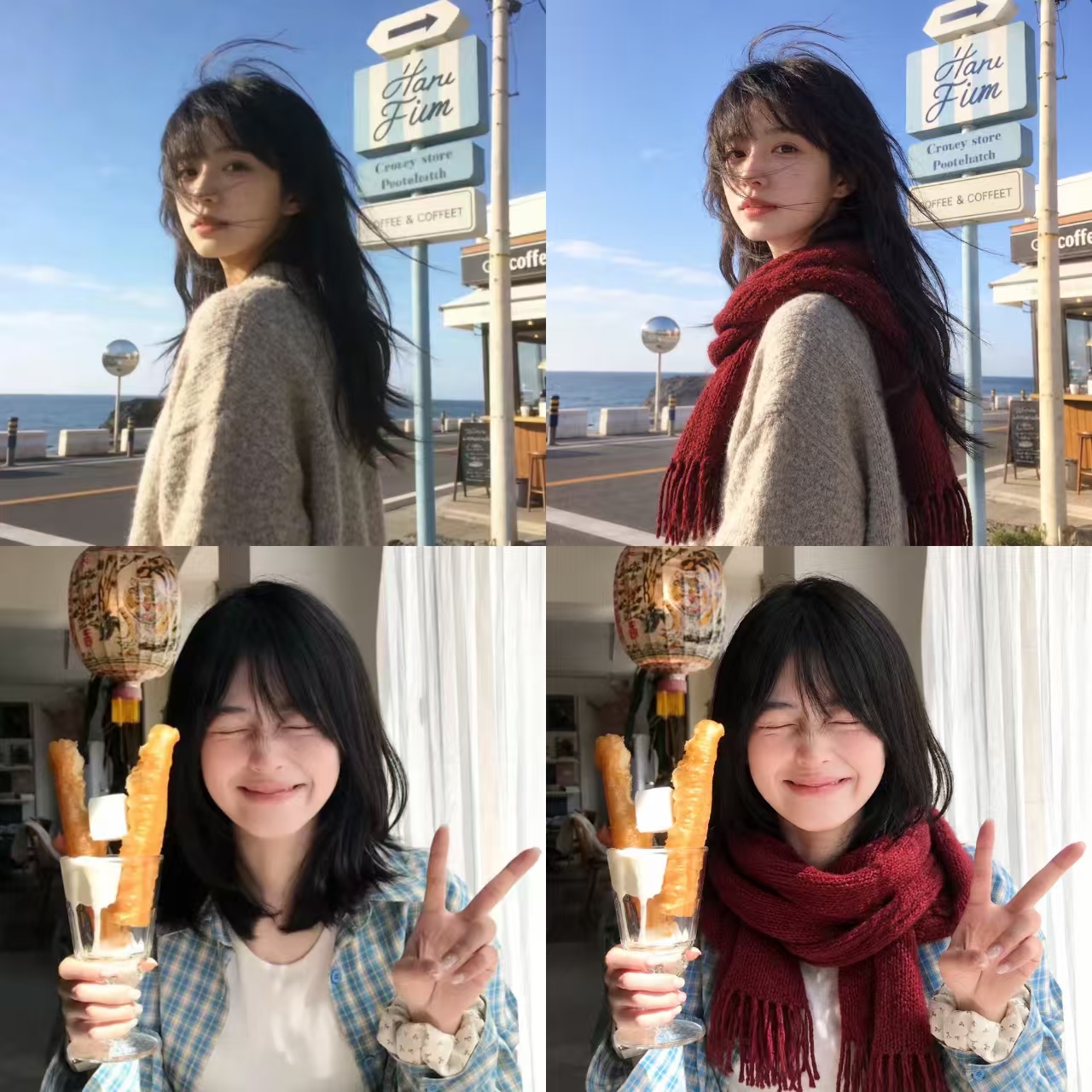
🧣 **Add a touch of winter scarf magic to your avatar!** Experience the viral winter scarf avatar trend with your very own custom version! No complicated photo editing or styling required. Just upload a photo, and the AI becomes your personal scarf stylist to design a unique winter scarf for the subject. ✨ **Core Features** **1. Smart Style Recognition** Automatically detects photography, anime, manga, illustration, chibi, 3D, and other styles to keep the scarf visually cohesive with the original image. **2. Custom Color Matching** Say goodbye to one-size-fits-all red scarfs! The AI automatically selects the best scarf color based on the subject's hair, clothing, background, and overall mood. You can also specify your favorite color. **3. Smart Scarf Design** Knit, cashmere, wool, plaid... Custom-designed to match the subject's temperament, giving every avatar its own unique character. **4. Natural Draping** Based on head angle, shoulder position, and body posture, the AI creates natural wrapping, drooping, and draping effects to avoid floating, clipping, or stiff splicing. **5. Original Image Protection** Preserves facial features, expressions, hairstyles, clothing, backgrounds, and lighting as much as possible, while strictly maintaining the original aspect ratio without arbitrary cropping or composition changes. 🎨 **Who is this for?** - Anyone wanting to add a winter vibe to their social media avatars - Fans of anime and manga avatars - People looking to add scarfs to couple or friend avatars - Lovers of personalized avatars and AI image creation - Content creators wanting unique winter avatars 📌 **How to Use** 1. Upload one or more avatar photos. 2. Tell the AI your preferred scarf color, or let it choose automatically. 3. Wait for the AI to design the scarf and generate the image. 4. Get your finished avatar with a custom scarf! ❤️ **No complicated steps—give your avatar a one-of-a-kind winter look!** One photo, one custom scarf, and your winter vibe is unlocked.
Recommended by
Dancang
Why we love this skill
Like a true stylist who understands characters and visuals: automatically detects photo or illustration styles, colors, and poses to design unique color palettes, materials, and draping styles, while strictly preserving features, clothing, background, and composition.
Best for
Ideal for adding a personalized winter scarf to social media, couple, or friend avatars, and for content creators making AI profile images.
How to use this Skill
Provide your input
Upload one or more profile photos and optionally specify a scarf color.
Run the Skill
The AI detects the art style, pose, and colors to design a naturally fitting scarf while preserving the original subject, background, and composition.
Review your result
Receive finished profile pictures with a custom winter scarf added to each original photo.
Related Skills
View all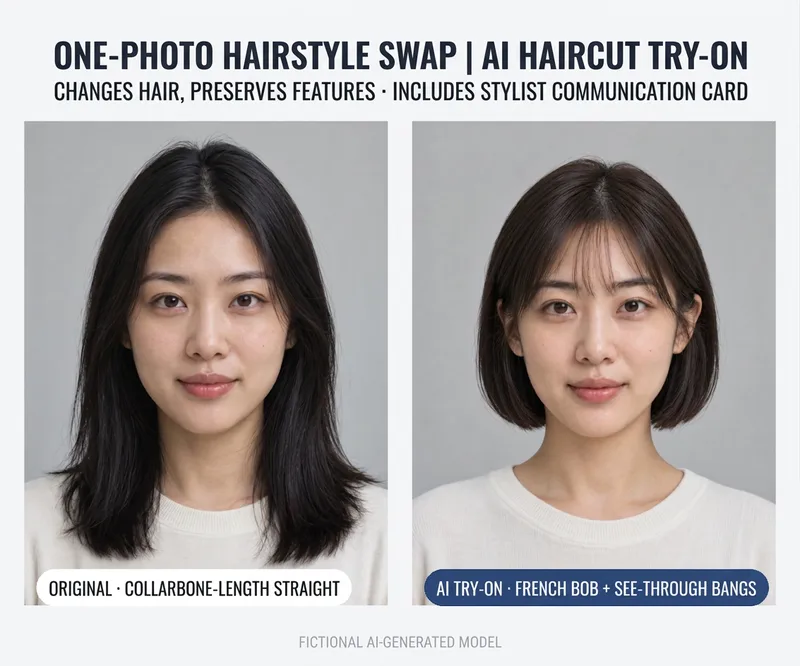 Image
AI Hairstyle Try-On
# AI Hairstyle Try-On **See what you look like with a new hairstyle before you cut!** Want short hair but worried it won't suit you? Thinking about bangs or a new hair color, but not sure of the final result? Never quite know how to describe the hairstyle you want at the salon? Upload a frontal photo, and the AI will recommend 3 hairstyles of different styles. Once you pick your favorite, it generates a try-on preview image along with a communication card you can show your hairstylist. **Suitable for both men and women—take the guesswork out of changing your hair.** ## What You Get **① 3 Personalized Hairstyle Recommendations** Based on your visible facial contours, current hairstyle, and preferences, the AI recommends 3 hairstyles with varying degrees of change: - ✂️ Minor Change: Optimize your existing hairstyle - ✨ Moderate Change: Adjust length, bangs, or layers - 🌟 Major Change: Try a noticeably different look or hair color Each recommendation includes details on length, bangs, layers, color, and daily maintenance difficulty. **② AI Hairstyle Preview Image** After choosing your preferred hairstyle, generate a test cut preview. Focuses primarily on hair adjustments while retaining your original facial features, face shape, clothing, and background to help you easily judge the visual effect of the new style. Check recognition and hair changes after generation, using runtime settings to correct noticeable issues if needed. **③ Professional Hairstylist Communication Card** It gives you more than just an image; it tells you how to talk to your hairstylist: - Length and layers for the back, sides, and top - Shape of the bangs and cutting requirements - Clipper length recommendations for short men's cuts - Hair color notes and whether to consult ahead about bleaching conditions - Daily maintenance methods and questions to confirm in person Includes a ready-to-use description you can read directly to your stylist. **④ Multilingual Salon Communication** Getting a haircut abroad and not sure how to express yourself? Request English or other language versions of the communication card to help you explain the desired look to your stylist. ## When Is This Useful? - Want short hair, but worried it won't work out - Want to try curtain bangs, layered cuts, or different hair colors - Men looking for a fresher, sharper short haircut - Preparing for an interview, date, photoshoot, or important event - Wanting reference images and communication notes ready before heading to the salon ## How to Use 1. Upload a clear frontal photo. 2. Tell the AI what hairstyle direction you want to try, or leave it unspecified. 3. Review the 3 hairstyle recommendations. 4. Select your favorite and generate a try-on preview. 5. Bring the preview and communication card to your hairstylist to confirm the actual cut. ## Tips - Photos with hair naturally down, a clear front view, and even lighting usually yield better results. - Limited to adult photos; please upload your own or authorized photos. - AI previews are visual approximations and do not guarantee an exact replica in real life. - Actual results depend on hair texture, hair volume, hairline, cutting technique, and daily styling. - Minor details or hair deviations may occur with AI; confirm major changes with a professional hairstylist. - Image generation and extra corrections may consume credits; check platform details for actual usage. --- **One photo, three hairstyle inspirations, one stylist communication card. Try before you cut!**
 Image
AI Professional Headshot
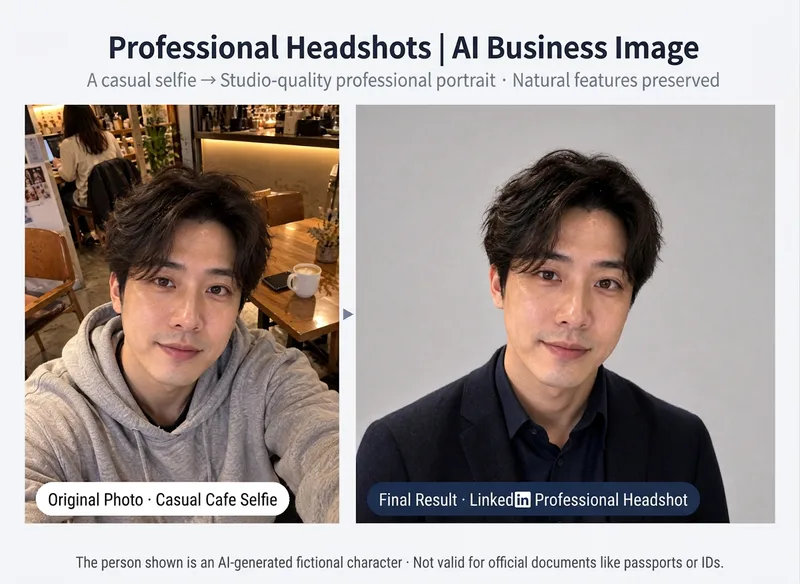
# AI Professional Headshot **Turn casual selfies into professional, polished business headshots!** No suitable resume photo? Using a random selfie for LinkedIn? Want a professional headshot without booking a photo studio? Simply upload an everyday photo, and AI will design the attire, background, and studio lighting based on your professional use case, generating a headshot tailored for the workplace. **The focus is on elevating your professional presentation, not changing who you are.** ## What You Get **① Tailored Professional Image Concept** Recommended styles based on your purpose and industry: - 💼 Resumes & Job Hunting: Natural, neat, and professional - 🌐 LinkedIn & Business Networking: Polished, trustworthy, and approachable - 🏢 Corporate Websites & Team Intros: Uniform, formal, and high-quality - 🎤 Speakers & Presenters: Poised, natural, and charismatic - ✨ Entrepreneurs & Freelancers: Formal or business casual based on industry **② A Professional Business Headshot** Transforms everyday photos into studio-quality styles: - Swaps in appropriate business attire - Adjusts to a clean, professional background - Optimizes lighting and overall composition - Selects a 1:1 avatar or 3:4 portrait ratio based on use case **③ Preserves Your True Features** Focuses on keeping your facial features, face shape, skin tone, hairstyle, and natural expression from the original photo. No default slimming, eye enlargement, or heavy skin smoothing; freckles, moles, and other personal traits are preserved. Headscarves, religious attire, or traditional garments are respected and kept according to your requirements. **④ Result Verification** Checks person recognition, clothing necklines, shoulders, and image edges after generation. If noticeable discrepancies are found, adjustments will be attempted according to the Skill's actual settings. Minor generation details may still vary. **⑤ Headshot Usage Tips** Provides applicable scenarios, cropping methods, and usage suggestions for different platforms. ## Who Is This For? - Job seekers preparing resumes - Professionals looking to update their LinkedIn photo - Entrepreneurs needing team photos for their website - Freelancers, consultants, and speakers - Anyone wanting to boost the professionalism of their workplace avatar ## How to Use 1. Upload a clear front-facing or slight-profile photo; phone selfies work too. 2. Select your use case, industry, and preferred business style. 3. Review the professional image concept recommended by AI. 4. Confirm to generate your professional headshot. 5. Use or crop the photo according to platform requirements. ## Tips - Photos with even lighting, clear facial features, and no obstructions generally yield better results. - For adults only; please upload photos of yourself or ones you have authorization to use. - AI-generated images are for professional presentation, not official photographic records. - Not suitable for passports, ID cards, visas, or other official identity document requirements. - Character details, clothing edges, and lighting may still contain generation errors. - Image generation and extra adjustments may consume credits; actual charges are subject to YouMind usage logs. --- **One everyday photo, one professional upgrade. Make your first workplace impression stand out.**
 Image
Anime Character to Real Life
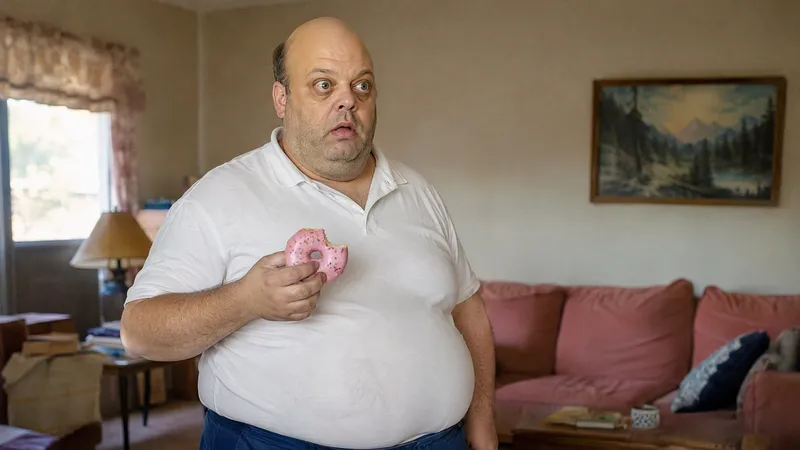
Bring your favorite anime characters to life as if they actually exist in the real world! This is an AI image generation skill designed specifically for anime, manga, and cartoon characters. Upload a character image to transform 2D characters into realistic portraits featuring real skin, natural hair, authentic clothing textures, and cinematic photography quality. Core Features: • High-Fidelity Character Recognition: Analyzes signature hairstyles, facial features, face shapes, eyes, clothing, and accessories to preserve character recognition. • Realistic Human Texture: Renders natural skin textures, subtle blemishes, realistic lighting and shadows, and photographic depth of field. • True to Original Design: Preserves classic color schemes, clothing silhouettes, and key features. • Cinematic Snapshot Style: Creates natural-looking photos as if captured in real life. • Multi-Aspect Ratio Support: Set ratios such as 3:4, 9:16, 1:1, and 16:9 as needed. • Multi-Model Support: Adjusts prompts and generation strategies based on currently available YouMind image generation models. Use Cases: Anime character live-action transformation, cartoon character realism, AI creative avatars, character concept design, short video visual assets, and social media content creation. How to Use: Upload an image or enter a character name, describe the features and visual style you want to retain, and get started.
Information
- Version
- v4
- Last updated
- Runtime credits
- Usage-based
- Models
- Auto
- Use cases
- Images & designLifestyle & entertainment
- What you get
- Image
- Visual styles
- 3DCartoonAnime
