3D剪纸科普图
指令
## 使用方法
上传文章或输入主题关键词,自动生成 3D 剪纸风格的教育科普图。
## 指令格式
```plaintext
@3D剪纸科普图 [主题] [类型]
```
**类型选项:**
- `流程型` - 展示步骤流程(默认)
- `对比型` - 天平对比结构
- `分类型` - 网格分类展示
## 示例用法
- `@3D 剪纸科普图 咖啡冲泡 流程型`
- `@3D 剪纸科普图 茶叶发酵 对比型`
- `@3D 剪纸科普图 巧克力制作`
---
## 核心提示词模板
### 基础框架
```plaintext
Educational infographic in 3D paper cut art style with beige/cream background.
Title: "[主标题]"
Subtitle: "[副标题说明]"
Content sections:
- Top section: [顶部内容] with icons in paper cut style
- Middle section: [中间核心内容]
- Bottom section: [底部补充信息]
All elements in layered 3D paper cut art style with soft shadows, warm color palette (beige, brown, cream, soft pastels), educational and handcrafted aesthetic.
```
### 模板 1 - 流程型
```plaintext
Educational infographic in 3D paper cut art style. Title "[主题]" at top. Step-by-step process shown with numbered paper cut elements: 1) [步骤1], 2) [步骤2], 3) [步骤3]. Each step has icon and description. Arrows connecting steps. Beige background, dimensional paper layers, handcrafted aesthetic.
```
### 模板 2 - 对比型(天平结构)
```plaintext
Educational infographic in 3D paper cut art style. Title "[主题名称]" at top. Central vintage balance scale showing comparison between [A] and [B]. Top section with 3-4 icons (thermometer, clock, [相关图标]) with text labels. Bottom section with key points and circular badges. Beige background, layered paper effect, soft shadows, warm tones.
```
### 模板 3 - 分类型
```plaintext
Educational infographic in 3D paper cut art style. Title "[主题]" at top. Multiple categories arranged in grid: [类别1], [类别2], [类别3], each with icon and key information. Bottom summary section. Warm color palette, layered paper craft, soft shadows, cream background.
```
---
## 关键风格要素
**必备关键词:**
- `3D paper cut art style`
- `layered paper craft technique`
- `beige/cream background`
- `soft shadows between layers`
- `dimensional depth`
- `handcrafted aesthetic`
- `warm color palette`
**常用图标元素:**
- 温度计:`thermometer icon in layered paper`
- 时钟:`clock icon with paper layers`
- 天平:`vintage balance scale made in paper art`
- 容器:`container in paper craft style`
- 标签:`banner / label with text`
- 圆形徽章:`circular badge / emblem in paper cut`
---
## 主题替换指南
| 要素 | 示例替换 |
| --- | --- |
| **主题** | 咖啡冲泡、茶叶发酵、巧克力制作、面包烘焙 |
| **核心概念** | pH 值 → 温度、时间、比例 |
| **图标** | 温度计 → 咖啡杯、茶壶、烤箱 |
| **数值** | 4.1-4.3 → 92°C-96°C |
| **对比项** | 酸度/强度 → 苦味/甜度 |
---
## 生成建议
1. **保持结构清晰**:标题 → 核心内容 → 补充说明
2. **图标要具体**:明确说明每个图标代表什么
3. **文字要完整**:把需要显示的中文文字直接写在提示词里
4. **强调风格**:始终包含“3D paper cut art style”和“layered”关键词
5. **色调统一**:使用温暖色系(米色、棕色、奶油色、柔和粉彩)
---
## 常见主题预设
### 咖啡冲泡
- 步骤:研磨 → 称量 → 冲泡 → 萃取
- 温度:92-96°C
- 时间:2-4 分钟
- 比例:1:15-1:17
### 茶叶发酵
- 类型:绿茶(不发酵)→ 乌龙茶(半发酵)→ 红茶(全发酵)
- 温度:80-100°C
- 时间:3-5 分钟
### 面包烘焙
- 步骤:混合 → 揉面 → 发酵 → 整形 → 烘烤
- 温度:180-220°C
- 时间:20-40 分钟
---
## 技术参数
- **画幅比例**:16:9(横版科普图)
- **生成模型**:Nano Banana Pro
- **质量设置**:medium(标准质量)
- **风格一致性**:高(通过固定模板保证)
描述
推荐自
nene@YouMind
为什么我们推荐这个技能
这款技能能将复杂的知识转化为精美的3D剪纸科普图,让学习变得生动有趣。无论是展示流程、进行对比还是分类说明,它都能以独特的艺术风格呈现,尤其适合教育、科普内容创作。其温暖的色调和手工艺质感,为用户带来沉浸式的视觉体验。
为文章或主题关键词,自动生成 3D 剪纸风格的教育科普图。
相关技能
查看全部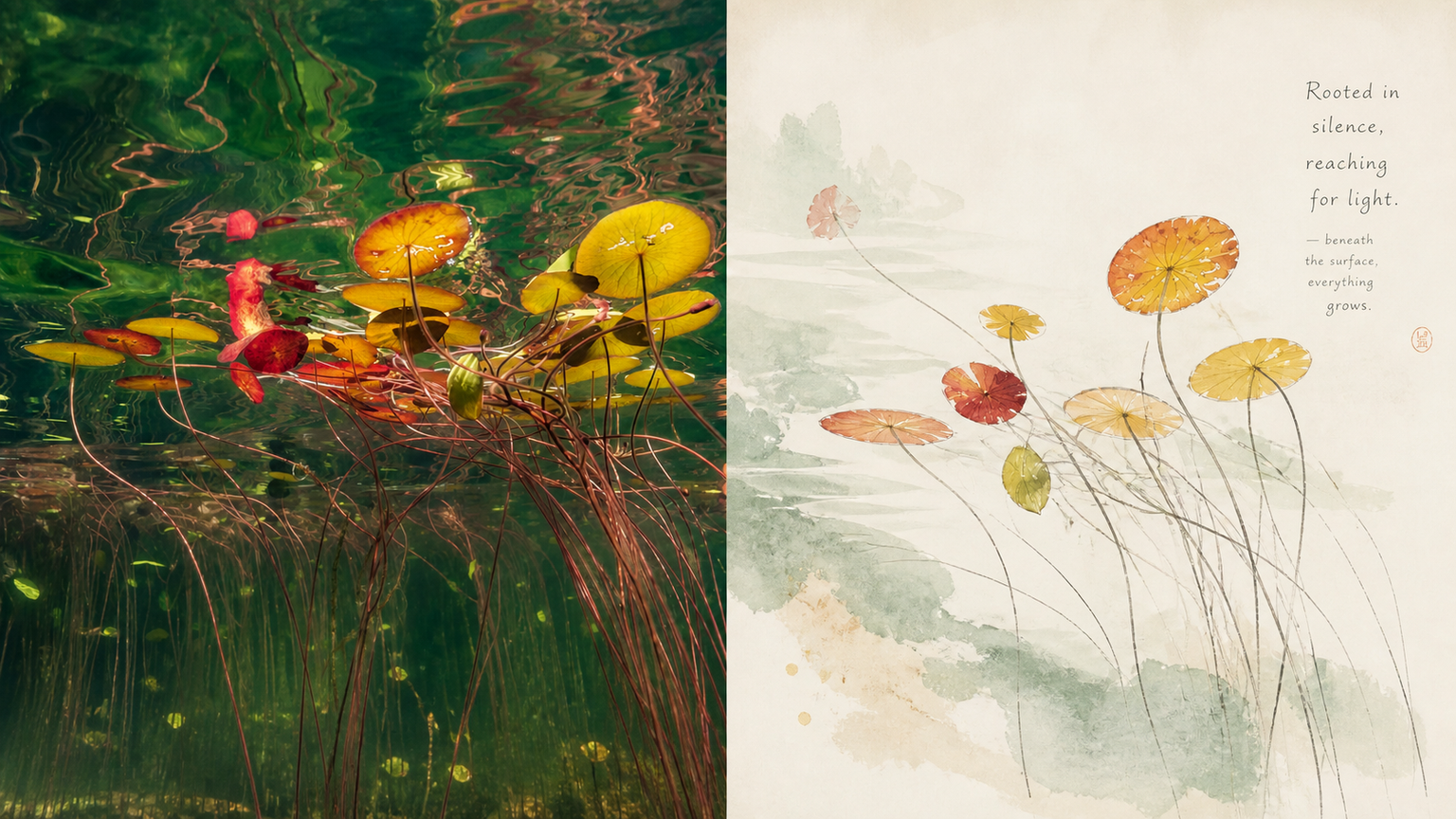 图片
图片小小东 x 写意 x 淡彩 x P068
一听到“中国风/水墨”,就会暴力塞满浓墨重彩、枯山水、印章和仙鹤等堆砌符号,既俗气又毫无现代出版物的呼吸感。 如果你想给照片做东方美学重构,但又极度反感那种像旅游纪念品一样的浓墨大红大绿,可以试试这套**“当代东方写意册页”**的解法。 它的底层逻辑只有六个字:意到笔不到、留白。
 图片
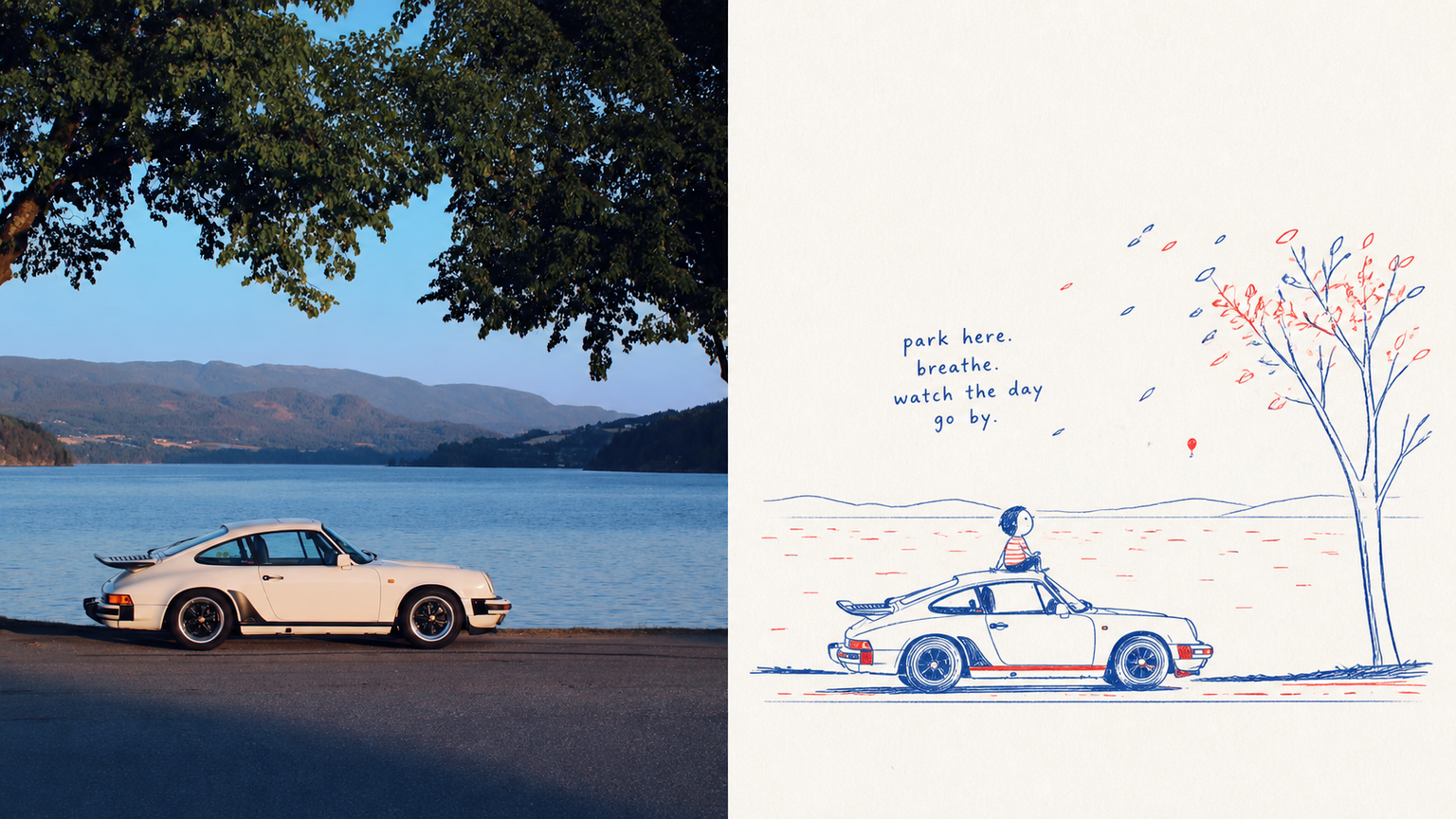
图片小小东 x 手绘 x 童真 x P067
这套提示词把这种“草稿纸上的灵气”拿捏得死死的: ⚬ 极其纯粹的红蓝双色墨水:全图抛弃所有杂色,只用带着圆珠笔或蜡笔质感的复古蓝与番茄朱红。线条纤细、带轻微手抖与反复描画的痕迹,两色不平均分配,仅在关键轮廓和局部小色块里自然穿插。 ⚬ 只画一个视觉重心:坚决不抄原图背景,只提取最核心的动作和神态,甚至允许比例带一点点天真的夸张感,一眼能联想到原片,却多了十足的幽默感。 ⚬ 接近白色的干净纸底:大面积纯净留白,没有脏旧发黄的滤镜,只保留极轻微的纸纤维质感,让画面像刚画完一样透气。 ⚬ 带基线错位的手写短句:文字不再是死板的海报标题,而是像小孩子随手记下的一句感叹、拟声词或口语短句,笔画不齐地悬在留白处,与红蓝箭头或小符号自然呼应。 上半张是严肃的现实光影,下半张是一本充满呼吸感的私人观察笔记。
 图片
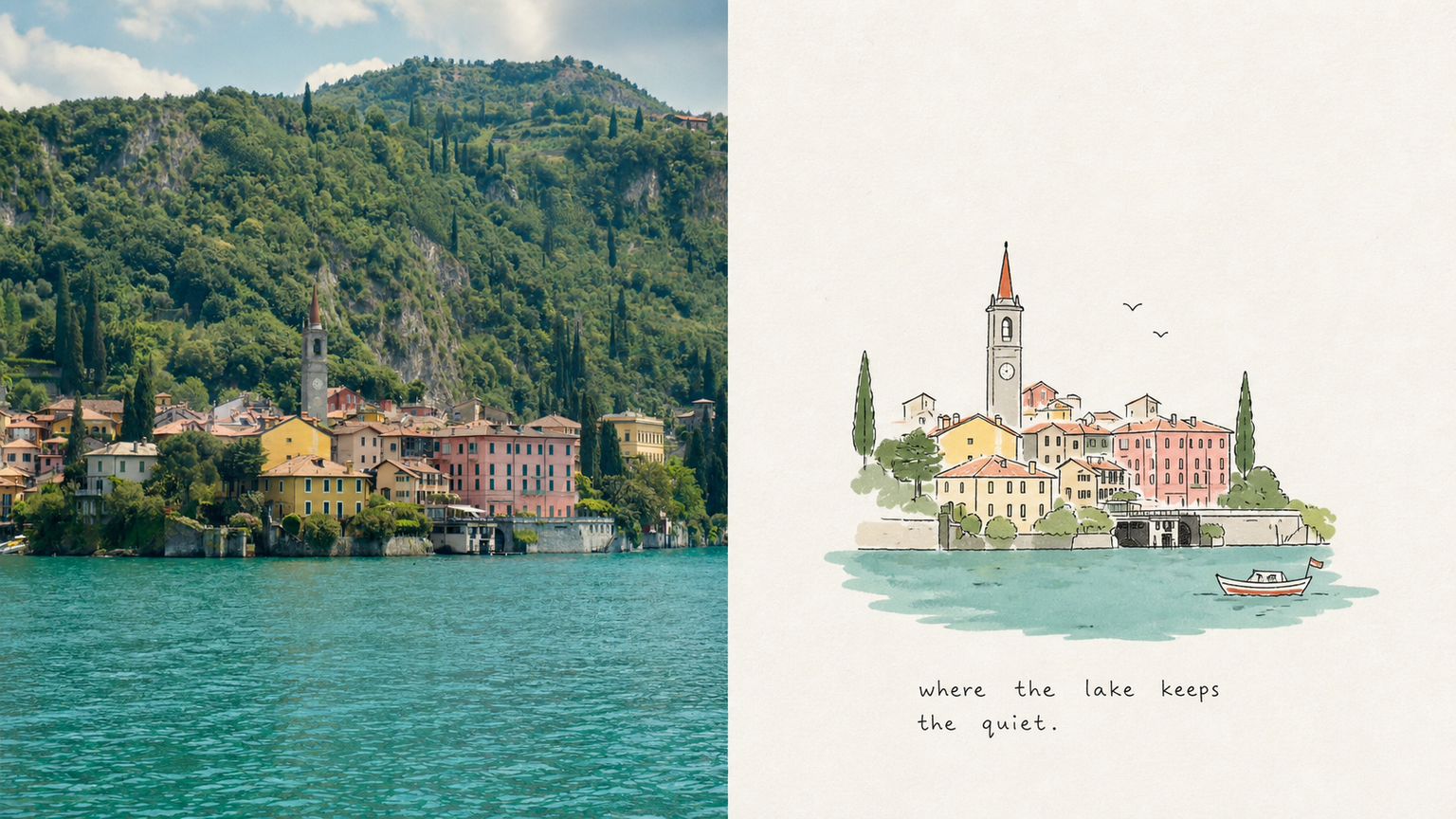
图片小小东 x 童真 x 色彩 x P066
如果你想把日常拍下的一幕(比如路边晒太阳的猫、公园里并排坐着的老人、桌上一杯喝了一半的水),变成带有童年滤镜却又极其高级的绘本内页,这套词可以说是直击靶心。 它最迷人的地方,在于兼顾了**“孩子般的天真”与“艺术总监级的版式克制”**: ⚬ 笨拙却极具灵性的线条:用纤细、微抖、带有停顿与断笔的手绘黑线去抓主体,不画繁琐杂物,复杂的建筑或人物被概括成可爱的纯粹形体。 ⚬ 低饱和平涂色块:从原片里抓出 3 到 6 种最耐看的颜色,调和成清透柔和的平涂色块,再用一两处明亮的原色作为视觉跳点,轻盈干净,绝不上脏旧滤镜。 ⚬ 会呼吸的大面积留白:极浅的纸纹底色上,主体可偏心、缩小或局部裁切,周围留出充足的空间,让画面像经过精心编辑的随笔,而不是涂满整张纸的儿童作业。 ⚬ 随手写下的手写体小字:抛弃死板的商业印刷字,生成一段带轻微书写误差的稚拙手写短句,顺着动作或留白自然排布,像画完画随手记下的心情旁白。
3D剪纸科普图
指令
## 使用方法
上传文章或输入主题关键词,自动生成 3D 剪纸风格的教育科普图。
## 指令格式
```plaintext
@3D剪纸科普图 [主题] [类型]
```
**类型选项:**
- `流程型` - 展示步骤流程(默认)
- `对比型` - 天平对比结构
- `分类型` - 网格分类展示
## 示例用法
- `@3D 剪纸科普图 咖啡冲泡 流程型`
- `@3D 剪纸科普图 茶叶发酵 对比型`
- `@3D 剪纸科普图 巧克力制作`
---
## 核心提示词模板
### 基础框架
```plaintext
Educational infographic in 3D paper cut art style with beige/cream background.
Title: "[主标题]"
Subtitle: "[副标题说明]"
Content sections:
- Top section: [顶部内容] with icons in paper cut style
- Middle section: [中间核心内容]
- Bottom section: [底部补充信息]
All elements in layered 3D paper cut art style with soft shadows, warm color palette (beige, brown, cream, soft pastels), educational and handcrafted aesthetic.
```
### 模板 1 - 流程型
```plaintext
Educational infographic in 3D paper cut art style. Title "[主题]" at top. Step-by-step process shown with numbered paper cut elements: 1) [步骤1], 2) [步骤2], 3) [步骤3]. Each step has icon and description. Arrows connecting steps. Beige background, dimensional paper layers, handcrafted aesthetic.
```
### 模板 2 - 对比型(天平结构)
```plaintext
Educational infographic in 3D paper cut art style. Title "[主题名称]" at top. Central vintage balance scale showing comparison between [A] and [B]. Top section with 3-4 icons (thermometer, clock, [相关图标]) with text labels. Bottom section with key points and circular badges. Beige background, layered paper effect, soft shadows, warm tones.
```
### 模板 3 - 分类型
```plaintext
Educational infographic in 3D paper cut art style. Title "[主题]" at top. Multiple categories arranged in grid: [类别1], [类别2], [类别3], each with icon and key information. Bottom summary section. Warm color palette, layered paper craft, soft shadows, cream background.
```
---
## 关键风格要素
**必备关键词:**
- `3D paper cut art style`
- `layered paper craft technique`
- `beige/cream background`
- `soft shadows between layers`
- `dimensional depth`
- `handcrafted aesthetic`
- `warm color palette`
**常用图标元素:**
- 温度计:`thermometer icon in layered paper`
- 时钟:`clock icon with paper layers`
- 天平:`vintage balance scale made in paper art`
- 容器:`container in paper craft style`
- 标签:`banner / label with text`
- 圆形徽章:`circular badge / emblem in paper cut`
---
## 主题替换指南
| 要素 | 示例替换 |
| --- | --- |
| **主题** | 咖啡冲泡、茶叶发酵、巧克力制作、面包烘焙 |
| **核心概念** | pH 值 → 温度、时间、比例 |
| **图标** | 温度计 → 咖啡杯、茶壶、烤箱 |
| **数值** | 4.1-4.3 → 92°C-96°C |
| **对比项** | 酸度/强度 → 苦味/甜度 |
---
## 生成建议
1. **保持结构清晰**:标题 → 核心内容 → 补充说明
2. **图标要具体**:明确说明每个图标代表什么
3. **文字要完整**:把需要显示的中文文字直接写在提示词里
4. **强调风格**:始终包含“3D paper cut art style”和“layered”关键词
5. **色调统一**:使用温暖色系(米色、棕色、奶油色、柔和粉彩)
---
## 常见主题预设
### 咖啡冲泡
- 步骤:研磨 → 称量 → 冲泡 → 萃取
- 温度:92-96°C
- 时间:2-4 分钟
- 比例:1:15-1:17
### 茶叶发酵
- 类型:绿茶(不发酵)→ 乌龙茶(半发酵)→ 红茶(全发酵)
- 温度:80-100°C
- 时间:3-5 分钟
### 面包烘焙
- 步骤:混合 → 揉面 → 发酵 → 整形 → 烘烤
- 温度:180-220°C
- 时间:20-40 分钟
---
## 技术参数
- **画幅比例**:16:9(横版科普图)
- **生成模型**:Nano Banana Pro
- **质量设置**:medium(标准质量)
- **风格一致性**:高(通过固定模板保证)
描述
推荐自
nene@YouMind
为什么我们推荐这个技能
这款技能能将复杂的知识转化为精美的3D剪纸科普图,让学习变得生动有趣。无论是展示流程、进行对比还是分类说明,它都能以独特的艺术风格呈现,尤其适合教育、科普内容创作。其温暖的色调和手工艺质感,为用户带来沉浸式的视觉体验。
为文章或主题关键词,自动生成 3D 剪纸风格的教育科普图。
相关技能
查看全部图片小小东 x 写意 x 淡彩 x P068
一听到“中国风/水墨”,就会暴力塞满浓墨重彩、枯山水、印章和仙鹤等堆砌符号,既俗气又毫无现代出版物的呼吸感。 如果你想给照片做东方美学重构,但又极度反感那种像旅游纪念品一样的浓墨大红大绿,可以试试这套**“当代东方写意册页”**的解法。 它的底层逻辑只有六个字:意到笔不到、留白。
图片小小东 x 手绘 x 童真 x P067
这套提示词把这种“草稿纸上的灵气”拿捏得死死的: ⚬ 极其纯粹的红蓝双色墨水:全图抛弃所有杂色,只用带着圆珠笔或蜡笔质感的复古蓝与番茄朱红。线条纤细、带轻微手抖与反复描画的痕迹,两色不平均分配,仅在关键轮廓和局部小色块里自然穿插。 ⚬ 只画一个视觉重心:坚决不抄原图背景,只提取最核心的动作和神态,甚至允许比例带一点点天真的夸张感,一眼能联想到原片,却多了十足的幽默感。 ⚬ 接近白色的干净纸底:大面积纯净留白,没有脏旧发黄的滤镜,只保留极轻微的纸纤维质感,让画面像刚画完一样透气。 ⚬ 带基线错位的手写短句:文字不再是死板的海报标题,而是像小孩子随手记下的一句感叹、拟声词或口语短句,笔画不齐地悬在留白处,与红蓝箭头或小符号自然呼应。 上半张是严肃的现实光影,下半张是一本充满呼吸感的私人观察笔记。
图片小小东 x 童真 x 色彩 x P066
如果你想把日常拍下的一幕(比如路边晒太阳的猫、公园里并排坐着的老人、桌上一杯喝了一半的水),变成带有童年滤镜却又极其高级的绘本内页,这套词可以说是直击靶心。 它最迷人的地方,在于兼顾了**“孩子般的天真”与“艺术总监级的版式克制”**: ⚬ 笨拙却极具灵性的线条:用纤细、微抖、带有停顿与断笔的手绘黑线去抓主体,不画繁琐杂物,复杂的建筑或人物被概括成可爱的纯粹形体。 ⚬ 低饱和平涂色块:从原片里抓出 3 到 6 种最耐看的颜色,调和成清透柔和的平涂色块,再用一两处明亮的原色作为视觉跳点,轻盈干净,绝不上脏旧滤镜。 ⚬ 会呼吸的大面积留白:极浅的纸纹底色上,主体可偏心、缩小或局部裁切,周围留出充足的空间,让画面像经过精心编辑的随笔,而不是涂满整张纸的儿童作业。 ⚬ 随手写下的手写体小字:抛弃死板的商业印刷字,生成一段带轻微书写误差的稚拙手写短句,顺着动作或留白自然排布,像画完画随手记下的心情旁白。
发现下一个适合你的技能
继续探索更多精选 AI 技能,用于研究、创作和日常工作。