What a single session costs, measured both ways
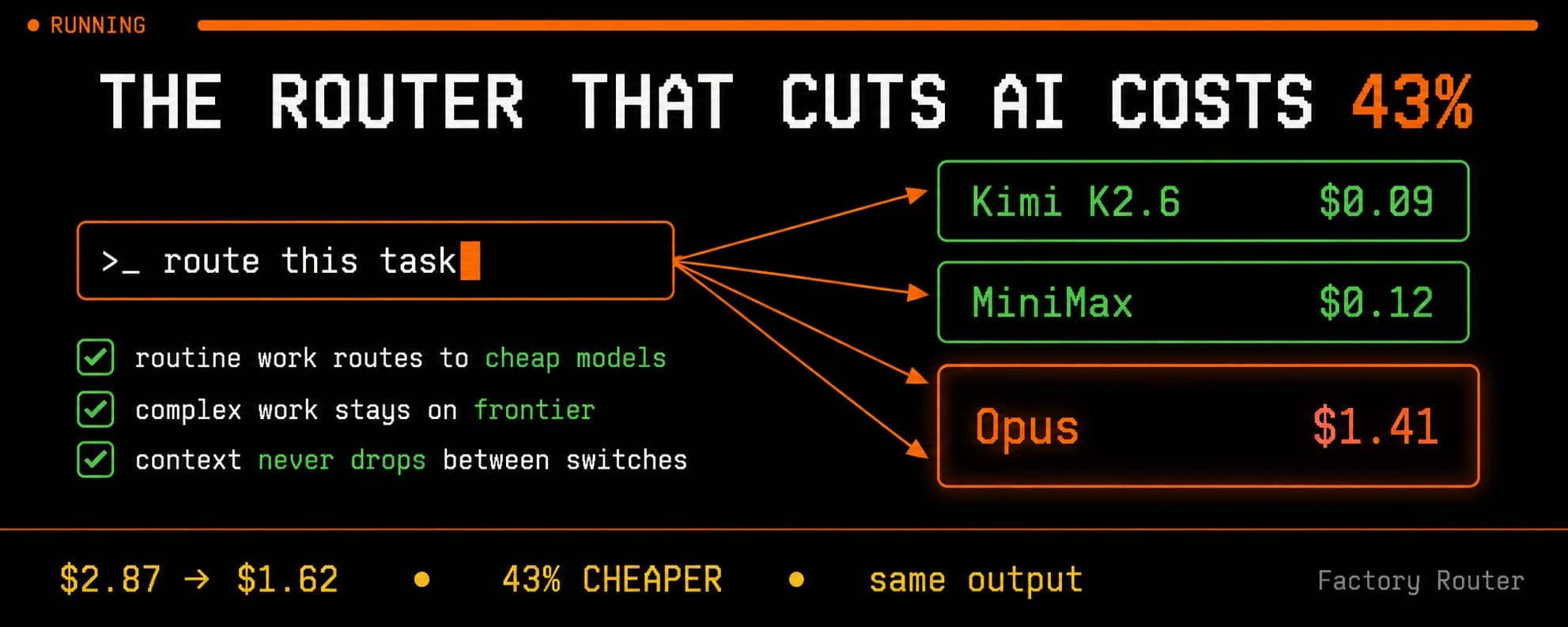
Take one Droid session with three tasks: resetting a password system, adding a copyright header, and refactoring the billing service. Run all three on a frontier Claude model like Opus and they come to $0.84, $0.62, and $1.41, a total of $2.87 for the session.
Route them by complexity instead. The first two are routine, so they drop to $0.09 and $0.12 on efficient models, while the refactor stays on the frontier model at $1.41. The session totals $1.62, the same output for 43% less, and the only variable that changed was which model handled which task.
Most engineering teams pick one model and leave it there. Not because it's optimal. Because switching mid-session means lost context, extra friction, a decision nobody wants to make 40 times a day. So they point everything at the most capable model they can afford and stop looking at the bill.
That default has a cost. The expensive model isn't the safe choice. It's just the expensive one. And the quality gap on routine work has closed fast enough that the math no longer holds up.
Factory Router sits inside their Droids platform and routes each task automatically: routine work to efficient models, complex work to frontier ones, full context carried across every switch. The session numbers above are from their launch benchmark. Factory doesn't sell models, which means they have no structural incentive to keep you on the expensive path. That's worth noting when you read the numbers.

The problem nobody measures
Every Droid session runs on a model, and most teams pick Opus and never revisit the choice. The cost of that default is invisible because it never shows up as a mistake. The work gets done, the output is good, and the bill is just quietly higher than it needed to be.
The single session above wastes about $1.25. That feels like nothing until you multiply it. At 10,000 sessions a month, the same default turns $16,400 of necessary spend into $28,700 of actual spend, which is $147,600 a year paid for routing routine work through a frontier model that was never required to do it.
Most teams find that 30 to 50 percent of their sessions are routine work running on their most expensive model. That gap is the whole opportunity, and what follows is fifteen rules across three sections for closing it.

→ Rule 1: Classify your task types before anything else:
1Look at your last 30 Droid tasks. Sort them into two groups:23Frontier-worthy: tasks involving system architecture, auth, payments, security,4cross-service dependencies, anything where being wrong costs time to debug or5reverts. Complex refactors over 100 lines of business logic.67Routine: doc updates, config changes, adding tests to existing functions,8small bug fixes with clear specs, copyright headers, README edits,9boilerplate generation, simple migrations.1011Count each group.1213Based on Factory's session-level data:14"reset my password" type tasks: Opus $0.84 vs routed $0.09. 89% cheaper.15"add copyright header" type tasks: Opus $0.62 vs routed $0.12. 81% cheaper.1617Multiply your routine task count by that difference.18That gap is your current model selection tax.
→ Rule 2: Measure the actual spend, not the assumption:
1Pull your last month of Droid session logs.23For each session:4- Task type (from Rule 1 classification)5- Model used6- Cost78Calculate:9- Total spend on routine tasks using frontier models10- What those tasks would cost on efficient models (apply 80-90% reduction)11- Monthly savings available from routing1213This is your baseline before enabling Factory Router.14Most teams find 30-50% of sessions are routine work running on frontier models.
→ Rule 3: Write task descriptions that signal complexity:
1The way you describe a task signals its complexity to any routing system.23Low-complexity signals (routes to efficient models):4- "Simple config update, no business logic: change timeout in config.yaml from 30 to 60"5- "Add missing JSDoc comments to the utility functions in /helpers"6- "Update the README to reflect the new deployment steps"78High-complexity signals (routes to frontier):9- "Refactor the auth middleware to support our new SSO integration across 3 services"10- "Debug the race condition in the payment processor that only appears under concurrent load"11- "Redesign the rate limiting system to handle per-tenant thresholds"1213Specific, context-rich task descriptions improve routing accuracy.14Vague descriptions get routed conservatively to frontier models.
→ Rule 4: Calculate your annual routing ROI:
1Formula for estimating Factory Router savings:23Monthly sessions: [N]4Average cost per session without routing: [Opus baseline in $]5Routine task percentage: [% from your Rule 1 audit]6Routine cost reduction: 80-90%78Monthly savings estimate:9N × baseline × routine% × 0.85 = monthly dollars recovered1011Annual: multiply by 12.1213For a team running 5,000 sessions/month at $2.87 average with 40% routine work:145,000 × $2.87 × 0.40 × 0.85 = $4,879/month = $58,548/year1516This is the minimum. Missions (long-running autonomous work) compound the savings further.
→ Rule 5: Document what frontier-only means for your codebase:
1Before enabling routing, define what must stay on frontier models for your codebase.23Write this once. Paste it as your routing guidance baseline:45"The following always require frontier models:6- Any changes touching [auth/payments/security layer]7- Cross-service refactors with more than [N] files8- Changes to CI/CD pipeline configuration9- Database schema migrations10- Anything flagged as [P0/critical] in our issue tracker1112Everything else is eligible for routing to efficient models."1314This becomes your routing policy document.15You update it as you learn what needs frontier treatment in your specific codebase.
team of 10 developers, 1,000 sessions/month, 40% routine: $13,776/year recovered team of 50 developers, 5,000 sessions/month, 40% routine: $58,548/year recovered enterprise (Nvidia, Adobe scale): six-figure annual savings
mistake to avoid: don't try to manually classify every task before enabling Router. The Router handles classification. Your job is to define the hard rules for what must stay on frontier, and let the system handle everything else.
0:28
→ Rule 6: Enable Factory Router in one step:
1In Factory CLI or Desktop App:231. Open the model picker42. Select "Factory Router"53. Done.67No configuration required to start. Router uses default routing logic immediately.89To verify it's active:10Run a simple task ("update a comment in this file").11Check the session log for model attribution.12You should see an efficient model handling it, not Opus.1314If you see Opus on a simple task, verify Router is selected and not a specific model override.
→ Rule 7: Set routing guidance for your codebase:
1Routing guidance is advisory. It helps the Router make better decisions2for your specific codebase. It does not force a model.34Paste this as your routing guidance starting point and edit for your stack:56"Auth, payments, and security changes: frontier models.7Database migrations and schema changes: frontier models.8API contract changes that affect external consumers: frontier models.910Documentation updates: efficient models.11Adding tests to existing functions: efficient models.12Config and environment variable changes: efficient models.13Boilerplate generation and scaffolding: efficient models.14Code comments and JSDoc: efficient models.15README and changelog updates: efficient models.1617Everything else: Router decides based on task context."
→ Rule 8: Configure routing guidance for enterprise governance:
1For teams running agents at scale, routing guidance becomes a governance document.23Standard template for regulated industries (banking, healthcare, enterprise SaaS):45"High-sensitivity routing rules:6- Anything touching [PII / financial data / auth] = frontier only7- Any external API changes = frontier only8- Production deployment scripts = frontier only9- Incident response tasks = frontier only1011Standard routing:12- Development, staging, and test environments = Router decides13- Internal tooling and automation = efficient models preferred14- Documentation, reporting, and communication = efficient models1516Override policy:17Any developer can request frontier on a task.18Router treats this as a hard override, not advisory.19Log all frontier overrides for monthly review."2021Save this as ROUTING_POLICY.md in your project root.22Reference it in your CLAUDE.md or equivalent context file.
→ Rule 9: Run Missions with routing enabled:
1Missions are Factory's long-running autonomous tasks.2Hours or days of work. No supervision required.34With Factory Router enabled, Missions benefit from the same routing logic.5Each step in a Mission gets routed appropriately.6Simple steps in a complex Mission run on efficient models.7The Mission pays frontier rates only when frontier reasoning is actually needed.89To configure:10Enable Factory Router before starting any Mission.11Add routing guidance that reflects the Mission's complexity profile:1213"This Mission involves [high-complexity core work] and [routine supporting tasks].14Core work (architectural decisions, security analysis): frontier.15Supporting work (documentation, config, boilerplate): efficient models.16Use the most efficient model available for any step17that doesn't require the reasoning specified above."1819Long Missions see proportionally larger savings because they accumulate more routine steps.
→ Rule 10: Set up provider failover policy:
1Factory Router routes across providers for reliability.2If one provider path degrades, sessions continue through a healthy provider.34For enterprise teams with uptime requirements:56"Reliability routing policy:7- Primary provider per model: [list your preferred providers]8- Failover trigger: any request failing or exceeding [N] second latency9- Failover behavior: same model, different provider if available.10 If same model unavailable, escalate to next frontier model.11- Dedicated TPM: confirm with Factory account team for your tier.12- Target: 99.9%+ request reliability.1314Log all failover events. Review weekly for provider health patterns."
Terminal-Bench 2: 99% of Opus pass rate at 20% lower cost Legacy-Bench: 96% of Opus pass rate at 25% lower cost 99.9%+ request reliability through provider routing
3 / 3 | THE SYSTEM: running Factory at the scale where savings compound
The cost savings story is interesting at the individual developer level. It becomes significant at team level. At enterprise scale, it's a budget line.
Nvidia. Adobe. EY. Palo Alto Networks. Adyen. These are Factory's enterprise customers.
A team running 5,000 sessions per month recovers $58,548 per year from routing alone, at 40% routine task rate. A team at 50,000 sessions recovers $585,480. The math scales linearly with volume. Enterprise token bills are not linear.
The deeper point is about architecture. Most AI agent platforms are built on a single-model assumption. One team, one model, one vendor. Factory's platform is model-agnostic by design: any LLM (Claude, GPT, Gemini, Llama, open source), any interface (CLI, Desktop, VS Code, Slack, GitHub, Linear, Jira, CI pipelines), any stage of the software lifecycle.
Router is one layer of that architecture. It is the cost control layer. The same Droid context that works in your terminal works in Slack. The same routing policy that applies to individual sessions applies to Missions running for days.
The final five rules build the full Factory system around Router.

→ Rule 11: Measure routing savings weekly:
1Set a weekly routine to track Router performance.23Check in Factory session logs:41. Total sessions this week52. Model distribution (what % went to each model)63. Cost with routing vs baseline (Opus on everything)74. Any sessions where Router escalated to frontier (quality signal)89Report format:10> sessions: [N]11> efficient model usage: [%]12> frontier model usage: [%]13> actual spend: $[amount]14> baseline (all Opus) would have been: $[calculated]15> weekly saving: $[amount]16> escalations to frontier: [N] (review for routing guidance improvements)1718If escalation rate is above 10%, review your routing guidance.19Too many escalations means routine tasks are being described as complex.
→ Rule 12: Agent Readiness assessment before full rollout:
1Before deploying Factory Router for your full team, run Factory's Agent Readiness assessment.23It evaluates 100+ signals across:4- Codebase health (test coverage, CI reliability, documentation)5- Workflow maturity (PR process, code review standards, deployment pipeline)6- Team readiness (familiarity with agentic tools, existing automation)78Use the output to prioritize which workflows to route first.910High-readiness workflows: deploy Router immediately, full routing enabled.11Medium-readiness workflows: deploy Router with conservative guidance, more frontier tasks.12Low-readiness workflows: build readiness before routing.13Agentic tools on unprepared codebases spend more time on frontier models correcting errors.1415Router savings are highest in high-readiness environments.
→ Rule 13: Build your model pool deliberately:
1Factory Router draws from a pool of frontier and efficient models.2The pool you configure affects the routing options available.34Recommended starting pool:56Frontier tier (complex work):7- Claude Opus (latest version)8- GPT-5.2 (if in your approved vendor list)910Efficient tier (routine work):11- Kimi K2.6 (best value per F1 point for code tasks)12- MiniMax M2.7 (lowest cost for simple tasks)1314Add models as you validate performance on your codebase.15Start with the two-tier structure.16Expand to three tiers (frontier / mid / efficient) once you have routing data.1718Document which models are approved for which compliance requirements.19If your enterprise restricts certain model providers, configure the pool accordingly.20US-hosted open-source models are available through Factory for environments requiring data residency.
→ Rule 14: Integrate routing into your CI pipeline:
1Factory works in CI pipelines. Routing applies there too.23Add Factory Router to your GitHub Actions workflow:45For pull request reviews:6"Route PR review tasks by file change scope.7- Security and auth file changes: frontier models8- Test files: efficient models9- Documentation changes: efficient models10- Mixed PRs: route section by section if possible, otherwise frontier for the full review"1112For automated QA:13"Route QA tasks by test complexity.14- Critical path end-to-end tests: frontier models15- Unit test generation: efficient models16- Regression test suites: efficient models"1718CI routing compounds savings because it runs on every commit.19The cost difference between Opus and Kimi K2.6 on test generation across 100 daily commits is material.
→ Rule 15: Set up monthly routing policy reviews:
1Routing guidance should evolve as your codebase and team grow.23Monthly review agenda (30 minutes):451. Cost report: actual vs baseline, savings trend62. Escalation analysis: which tasks escalated and why73. Routing guidance update: does current guidance still reflect codebase complexity?84. New model evaluation: any new models in the pool worth adding?95. Team feedback: are developers overriding Router frequently? Why?1011Questions that signal your routing guidance needs updating:12- Escalation rate above 15%: guidance is too aggressive toward efficient models13- Escalation rate below 2%: guidance may be too conservative, leaving savings on the table14- Developer override rate above 20%: Router is not matching developer expectations1516Update ROUTING_POLICY.md after every review.
without Factory Router: every session runs on frontier, regardless of task type with Factory Router: routine tasks on efficient models, complex tasks on frontier result: 20-43% cost reduction with 96-99% of frontier benchmark performance maintained
CONCLUSION
Here is where the math lands.
40-60% of engineering Droid sessions are routine tasks on most teams those sessions on Opus: $2.87 average per session those sessions with routing: $1.62 average at 10,000 sessions per month: $147,600 recovered per year
The benchmark numbers hold up: 99% of Opus pass rate on Terminal-Bench 2 at 20% lower cost. 96% on Legacy-Bench at 25% lower cost. Prompt cache stays intact across model switches, so quality doesn't drop when the router changes models mid-session. Provider failover keeps sessions running at 99.9%+ reliability.
Factory Router is in private research preview. You select it once in the model picker. No additional setup.
What I'm still trying to understand: how well advisory routing guidance works across different codebase types. Setting rules like "auth changes = frontier, doc tweaks = routine" sounds clean on paper. What happens when a task sits in the middle? That's the edge case worth watching as more teams start using this.
The 15 rules above are the setup system. Start with Rules 1 and 6.
p.s. the line most people will skim past: Factory doesn't sell models. they don't profit from your token bill. that structural difference is why a routing system like this exists in the first place. curious to see what happens as more models get added to the pool.
Bookmark this before it gets buried
If this was useful, share it with one person who needs it