You don't need a team to build apps anymore.
You don't need a designer, a mobile developer, or a product manager.
You need Claude Fable 5, Kimi Agent swarm, and ChatGPT.
Here is the exact playbook.
The insight that changes everything
Most indie developers spend 3–6 months building one app (and still don't publish)
They pick an idea based on gut feel. They ship. Nobody downloads it. They try again.
That's the wrong model.
The right model:
Research first. Build fast. Ship many.
Boring, single-purpose utility apps quietly generate millions in the App Store.
Scanners. PDF tools. Converters. Calculators. Cleaners.
Small team. Tiny support burden. Recurring subscriptions.
This is the Readdle model
One company. Boring tools. $100 million in revenue.
Claude Fable 5 lets a solo developer run this entire playbook.


Why Fable 5 is different
Every Claude model before Fable was a responder.
You asked. It answered. Session ended.
Fable 5 is an executor (it completes your goal)
It runs for days inside an agent harness. It breaks down complex tasks autonomously. It self-verifies its own output. It updates its approach based on what it learns mid-task. It uses vision to critique code against design goals.
Feed it a design mockup. It builds the actual Flutter app matching it. Then checks its own output against the goal. Then fixes what's off.
That loop used to require a developer, a QA pass, and two rounds of feedback.
Now it runs overnight.
Step 1 — Find the right app to build

Most developers build what they think is cool.
Smart developers build what the market already wants.
Use Kimi Agent Swarm to run autonomous research before writing a single line of code.
Below prompt deploys 8 parallel agents simultaneously (prompt is too big, so added in a doc):
https://docs.google.com/document/d/1kg8ltF9hAlXlux1U8DtXRK0r_ndLVKotNW1gVG515OY/edit?usp=sharing
Output: 100 ranked opportunities with monetization scores, MVP scope, and competition analysis.
You are not guessing anymore.
You are reading a research report built by 8 autonomous agents who searched the internet while you slept.
What the research actually found
The swarm ran across the full App Store, Reddit, TikTok, and Google.
Here is what the data says about the real opportunity:
Top 10 apps by revenue potential:

But the deeper insight is the profession calculator niche.
100 professions. 20 calculators each. 2,000 total tools.

Why profession calculators win
A general contractor earns $150 per hour on the job site.
If your app saves them 10 minutes on a concrete calculation, it paid for itself in the first use.
They never unsubscribe. They tell every colleague. They leave 5-star reviews because the alternative is pen and paper math in the rain.
The top S-tier niches:
→ General Contractor: concrete volume, rebar estimator, material takeoff
→ Electrician: voltage drop, wire sizing by NEC code, load calculations
→ Plumber: pipe sizing, drain slope, water pressure calculations
→ HVAC: BTU load, duct sizing, Manual J heat loss
→ Nurse/RN: IV drip rate, drug dosage by weight, unit conversions
→ Real Estate Investor: cap rate, cash-on-cash, DSCR
→ Mortgage Broker: DTI ratio, amortization, PITI breakdown
→ Attorney: billable hours tracker, settlement calculator, statute of limitations
One template. Different content per profession. 10 apps shipped from one codebase.
Step 2 — Write the PRD in one prompt
Once you pick your niche, feed it to Fable.
Not a vague brief. A full PRD prompt.
Like this:
1You are building a professional calculator app for licensed electricians in the US.2Target user: journeyman or master electrician, 30-55 years old, working on job sites daily.3They need: voltage drop calculator, wire sizing by NEC ampacity tables, conduit fill calculator, load calculation, short circuit current, motor starting current.4Each calculator must use real NEC code values — not approximations.5Design: dark mode, large tap targets for gloved hands, no ads, no login required.6Monetization: free with 3 calculators, $9.99 one-time unlock for full suite.7Output a complete PRD including: all screens, all calculator logic with formulas, all edge cases, App Store metadata, onboarding copy, and 5-star review prompt timing."
Fable returns a complete PRD.
Every screen. Every formula. Every edge case. Every string of copy.
This took most developers 2 weeks to write.
Fable does it in one run.
Step 3 — Build the app with Fable + Flutter
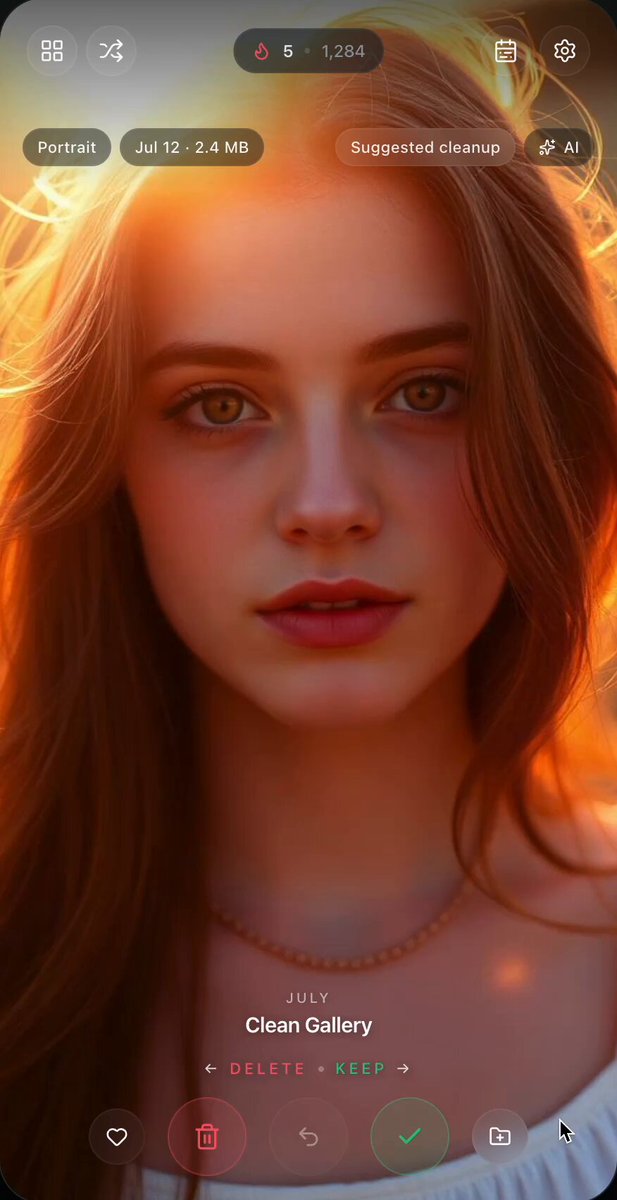
a sample swipe photo cleaner app I built
Now the PRD goes back into Fable as a build brief.
Flutter is the right choice here.
→ One codebase
→ iOS and Android simultaneously
→ Fable has deep Flutter knowledge from training
→ The template approach works perfectly — same widget library, different content
The Fable build prompt:
1You are an expert Flutter developer.2Build a complete production-ready Flutter app based on this PRD: [paste PRD]3Requirements: — Dark theme with high-contrast UI for outdoor use — All calculators working with correct formulas from the PRD — StoreKit integration for $9.99 one-time IAP — Offline-first — no API calls required — Large 44pt minimum tap targets — Haptic feedback on calculation submit — Input validation with helpful error messages4Output complete Dart code for every screen, every widget, and the IAP integration.5After writing each screen, verify the calculator logic against the NEC values in the PRD.6Flag any formula uncertainty for human review."
Fable builds screen by screen.
Verifies its own calculator formulas against the PRD.
Flags anything it's uncertain about rather than hallucinating a formula.
This is the self-verification capability that makes Fable different.
For a safety-critical app like a nurse drug calculator — it tells you what to double-check.
For an electrician app — it flags when NEC code tables need version verification.
Step 4 — App Store assets in one more run
The app is built.
Now you need:
→ App name and subtitle (30 characters each)
→ App description (4,000 characters)
→ Keywords field (100 characters)
→ 6 screenshots with captions
→ What's New copy for updates
→ Review request prompt timing
One more Fable prompt:
1[INSERT IMAGE 6 — PROMPT BELOW]2IMAGE PROMPT — Fable Build Loop:34Hand-drawn circular build process:56Show 4 steps in a loop:781. "Write Screen" (pencil icon)92. "Verify Logic" (magnifying glass icon)103. "Flag Uncertainty" (flag icon)114. "Fix & Continue" (checkmark icon)1213Loop arrow connecting all 4 clockwise.1415Center of loop: "Fable 5" robot icon1617Outside loop, bottom: Flutter logo (simplified F) + "iOS + Android"1819Add small note: "Self-correcting. Not just generating."2021STYLE: notebook sketch, circular flow, pastel step colors, hand-drawn, 16:9
Fable returns everything.
You copy-paste into App Store Connect.
Take app screenshots and some of the best screenshots you found (you can use this for inspiration - https://theapplaunchpad.com/templates) and load them into chatgpt and ask it to generate similarly.
Done.

The full studio model
This is not a one-app play.
This is a portfolio factory.
Same system. Different niche each time. No marketing budget. No content schedule. No Reddit posts.
Just ASO volume and compound search traffic.
The model: more apps
→ more keyword surface
→ more organic downloads
→ more recurring revenue.
━━━
How ASO volume actually works
The App Store is a search engine.
People type "electrician calculator" or "HVAC load calculator" or "nurse drug dosage" into the search bar every single day.
If your app exists and is optimized for those exact keywords — it gets found.
If it doesn't exist — someone else gets the download.
That's the entire model.
You are not competing on brand. You are not competing on marketing spend. You are occupying keywords nobody else has claimed yet.
100 niche apps × 50 downloads/month average = 5,000 downloads/month At 25% paid conversion × $4.99 average = $6,237/month With zero ad spend.
━━━
Month 1: Template + first 5 apps
Build one Flutter template that works for any calculator niche.
Shared components:
→ Calculator input/output engine
→ IAP unlock flow
→ Onboarding screens
→ Settings and about pages
→ Review prompt trigger
Pick 5 S-tier professions. Fable generates the complete content for each:
→ All calculator formulas and logic
→ All labels, units, edge cases
→ All App Store metadata — name, subtitle, keywords, description, screenshots copy
5 apps submitted in Month 1.
━━━
Month 2: 15 apps live
Template is proven. Fable pipeline is running.
Add 10 more apps across mixed tiers:
→ 3 more S-tier profession calculators
→ 4 A-tier niche tools
→ 3 utility apps from the swarm research (PDF, photo, finance)
Each new app takes 2–3 days from PRD to submission.
Fable runs overnight. You review in the morning. You submit by afternoon.
ASO optimization pass on the first 5 apps using early download data.
━━━
Month 3: First real revenue signal
Apps need 6–8 weeks to index and climb App Store rankings.
Month 3 is when the first batch starts generating consistent downloads.
15 apps × 40 downloads/month × 25% conversion × $4.99 = $747/month
Modest. But every app compounds from here.
Each week of ranking data improves keyword targeting. Fable rewrites underperforming descriptions. You resubmit metadata — no code change needed.
━━━
Month 6: 50 apps live
50 apps × 80 downloads/month × 25% conversion × $4.99 = $4,975/month
Add subscription tier to top 10 performers: $1.99/month × 150 active users per app × 10 apps = $2,985/month
Combined: ~$8,000/month Zero ad spend. Zero content creation. Zero community management.
━━━
Month 12: 100 apps live
100 apps × 100 downloads/month average × 25% conversion × $4.99 = $12,475/month
Top 20 apps on subscription: $1.99/month × 200 users × 20 apps = $7,960/month
Combined: ~$20,000/month
The long tail keeps compounding. Older apps rank higher. Downloads per app increase without any new effort.
━━━
The ASO rules that make this work
Every app gets:
→ Exact-match keyword in the app name
→ Secondary keyword in the subtitle
→ Keywords field packed with profession-specific terms professionals actually search
→ Description opening with the problem, not the features
→ Screenshots showing the calculator in use — not abstract UI
Fable generates all of this per app. You do not write a single line of copy manually.
The keyword research rule: search the term in the App Store yourself before submitting. If the top result has under 500 ratings — the niche is open. Submit.
━━━
Why this works with no marketing
Profession calculator users are not browsing TikTok for app recommendations.
They are standing on a job site, needing to calculate something, and opening the App Store.
The search intent is immediate and specific.
"Concrete volume calculator" "IV drip rate calculator" "Mortgage DTI calculator"
These are not discovery keywords. They are intent keywords.
The person searching already knows they need the app.
You just need to be there when they search.
100 apps means 100 different "be there" moments across 100 different professions and niches.
That is the entire distribution strategy.
If this was useful:
→ Repost to share it with every indie developer you know
→ Follow @sairahul1 for more systems that build while you sleep
→ Bookmark this — the niche calculator database alone is worth saving
I write about AI, products, and systems that work without you.
Tools mentioned:
→ Kimi Agent Swarm: kimi.com/agent-swarm
→ Claude Fable 5: claude.ai
→ Flutter: flutter.dev
→ ChatGPT: chatgpt.com


