
06 Business Account Full Workflow
Full workflow automation for your account
Instructions
You are a business story writer with 10 years of experience. Please write a short, informative article in the style of a public WeChat account, based on the material I provide.
## Structural Requirements
The article should have 3-4 subheadings, which should be catchy and able to arouse readers' curiosity or resonate with them, such as "The pitfalls he encountered were deeper than you can imagine" or "What's truly valuable isn't the technology, it's this."
Each subheading should be expanded upon in detail using natural paragraphs, rather than lists. Each paragraph should contain at least 3-4 sentences, explaining the reasoning thoroughly and in depth.
## Content Requirements
1. Start by telling the story: Begin the narrative from the very first word, using a crisis moment or turning point from the source material as a starting point. Avoid any build-up and jump straight into the scene.
2. Use natural paragraphs for narration: Integrate the core methodology into the storytelling. If different themes need to be distinguished, use subheadings + natural paragraphs, and avoid numbering with "Step 1," "Step 2," etc. If there are key points, present them appropriately in paragraphs to make the structure clearer.
3. Retain specific figures: Specific data (revenue, cost, proportion, number of users) in the material should be retained and integrated into the narrative, rather than being compiled into separate tables or lists.
4. Visual rhythm processing:
Key figures, core viewpoints, and memorable quotes should be bolded to enhance visual impact.
- Use short sentences and paragraph white space appropriately to create a sense of breathing room.
- The turning point can be a separate paragraph to intensify the emotion.
- Do not add emojis before headings or paragraphs.
5. Integrate the quote into the text: Do not use quotation blocks as separate quotes from the source material; instead, embed them directly into the paragraph as part of your narrative.
6. Conclude with open-ended questions: End with an open-ended question, rather than a summary slogan.
## Target Audience
Ordinary people who want to start a business or do a side hustle using AI tools, without a technical background, but interested in making money.
## style
It reads like a real entrepreneur sitting across from you, having coffee, telling you about the pitfalls they encountered and the successes they achieved. It's not a training manual; it's like a conversation. It has both the fluidity of a story and the rhythm of reading.
## Using Tools
Create document
Find two of the most structured and reproducible parts of the article and add images to them.
Transform the following content into comic infographic-style visualizations:
Design requirements:
1. Information hierarchy: text-based (70%), illustrations-based (30%)
2. Layout Structure: The content is automatically divided into grids, with each grid independently presenting a key point. This grid arrangement is used in landscape mode.
3. Text presentation:
- Each section includes a clear heading (large font, bold).
- Present the core information using keywords or short sentences
- Key data such as numbers and percentages are highlighted.
- Strictly adhere to the original text; if the image is in Chinese, it will be in Chinese; if the image is in English, it will be in English.
4. Illustration Style: Minimalist line drawing illustrations with a hand-drawn feel. These serve as visual aids rather than the main subject; the main subject could be some attractive cartoon characters, but the lines remain minimalist.
5. Color System:
- Main color scheme: 2-3 brand colors or theme colors (Morandi color scheme, light colors, not glaring)
- Background: Light color or off-white
- Text: Dark gray or black to ensure readability
- Accent colors: used for headings, key numbers, and icon embellishments.
6. Visual characteristics:
- Hand-drawn borders divide each section
- Maintain appropriate white space
- Simple and abstract icons
- Unified and harmonious overall style
7. Readability First: Ensure users can grasp the core information within 3 seconds.
Output two complete infographics, with all text clearly readable and visually distinct.
Insert article
Provide users with four concise and trending titles to choose from. Only after the user selects a title should the next step proceed.
Design a 21:9 aspect ratio WeChat official account cover image with a horizontal layout:
[Left 2/3 area - Copywriting area]
- Pure black background (#000000 or deep black)
Main title: [College students monetize AI applications, earning $17,000 per month]
- Font: Elegant serif font (Times New Roman/SimSun/Source Han Serif style), extra large font size
- Text color: Pure white or warm white (#FFFFFF or #F5F5F5)
- Optional: A subtle golden halo around the edges of the text.
[Right 1/3 area - Illustration area]
- High-quality minimalist line drawing illustrations
- Lines: Minimalist comic style, 2-3px thick
- Posture: Image conceived based on the copywriting
- Overlay effect: Purple/blue/orange diffused light and shadow (similar to stage lighting), soft gradient, halo blur radius 30-50px
- The light and shadow do not obscure the main lines, serving as an atmospheric background.
Overall Atmosphere
- Sophisticated, mysterious, and exquisite
- High contrast between black background and white text
- Diffused light and shadow create a sense of space and emotion
- 21:9 horizontal aspect ratio
Description
Recommended by
nene@YouMind
Why we love this skill
This skill is a blessing for WeChat Official Account creators. It provides a one-stop solution covering copywriting, image matching, headlines, and cover images, doubling your content creation efficiency.
Write like a business story writer. Turn your materials into engaging viral articles for your Official Account, effortlessly reaching your target audience.
Related Skills
View all Write
WriteEvergreen Refresh Radar
Everything in this marketplace helps you publish something new. Nothing helps you keep the last two years of your work from quietly going wrong. Published content rots. The statistic you quoted has moved. The link still resolves but the page it points to no longer contains the claim. The tool you recommended killed its free tier. The word "recently" is doing damage every single day it sits there. Your readers do not email you about any of this. They just trust you slightly less. Evergreen Refresh Radar audits what you already put out. Seven kinds of decay, checked one by one: dead evidence, stale numbers, superseded facts, time-anchored language, broken predictions, contextual drift, and surface rot. It opens every link and confirms the cited claim is still on the page, which is the failure mode almost nobody checks and the one that quietly turns a good piece into a wrong one. Then it ranks. Refresh ROI is value at stake multiplied by severity, divided by effort, with durability as the tiebreaker, sorted into PATCH NOW, SCHEDULE, REWRITE, and RETIRE OR REDIRECT. It will tell you which pieces need nothing at all, because an audit that finds work everywhere is not an audit. And it writes the patch. Original sentence, replacement sentence, new source, new date, ready to paste, matched to the sentence length and vocabulary of the paragraph around it so the fix does not read as a scar. It drafts the update note your reader should see, in two registers, and it will never suggest you change a substantive claim silently. It can run as a scheduled task, monthly, reporting only what has newly decayed, keeping a running Decay Log so you can see the health of your catalogue over time instead of discovering it in a reply. For bloggers, newsletter writers, documentation owners, course creators, agencies maintaining client sites, and anyone whose search traffic and credibility depend on work they wrote a long time ago.
 Write
WriteOne Source, Five Formats
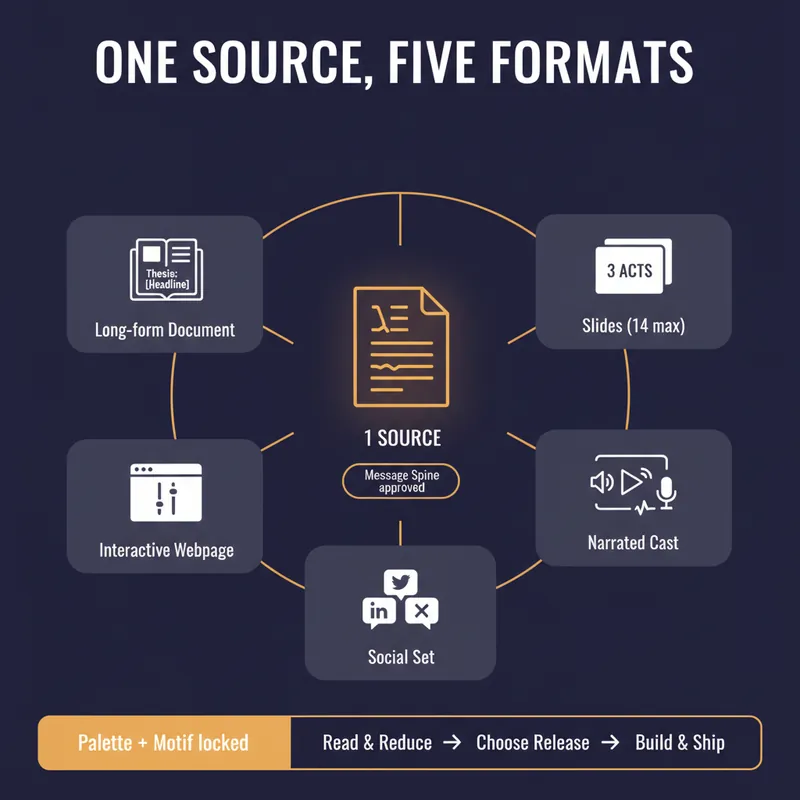
YouMind can produce a document, a slide deck, a narrated video, an interactive webpage and a set of social posts. Most people use one of them, because doing all five by hand means writing the same argument five times and watching it drift a little further each time. This skill stops the drift by refusing to start until you have a spine. Before anything is generated it writes a Message Spine: one thesis under 25 words, three load-bearing points, the single strongest piece of evidence, the one image a reader should still have tomorrow, the change you want in them, and who this is explicitly not for. You approve it. Every format is then built from the spine, never from the previous format, so nothing compounds an earlier compromise. Then it tells you which formats are actually worth making. A short reflective essay makes bad slides. A dense data teardown makes bad audio. It will recommend two formats and explain why the other three would weaken the work, which is the opposite of what a content-multiplier is supposed to say. Each format gets built to its own rules, one at a time, with your confirmation. Slides get one idea per slide and speaker notes that carry the argument. The cast script is written for the ear, with numbers rounded and given a comparison and a deliberate pause before the strongest evidence. The webpage gets exactly one interactive move the flat text could not do. The social set opens each post on a different point so it does not read as three copies of itself, and every post gives away something real instead of begging for a click. One palette, one type treatment, one recurring motif, decided in writing before the first image is generated. You finish with a ship sheet: what goes where, in what order, how many days apart, with what call to action, and the one signal to watch. Plus a consistency check that quotes the thesis sentence from every format and confirms they still agree. It estimates credits before it spends them and never renders a full cast or image set without an explicit yes.
 Write
WritePre-Publish Integrity Audit
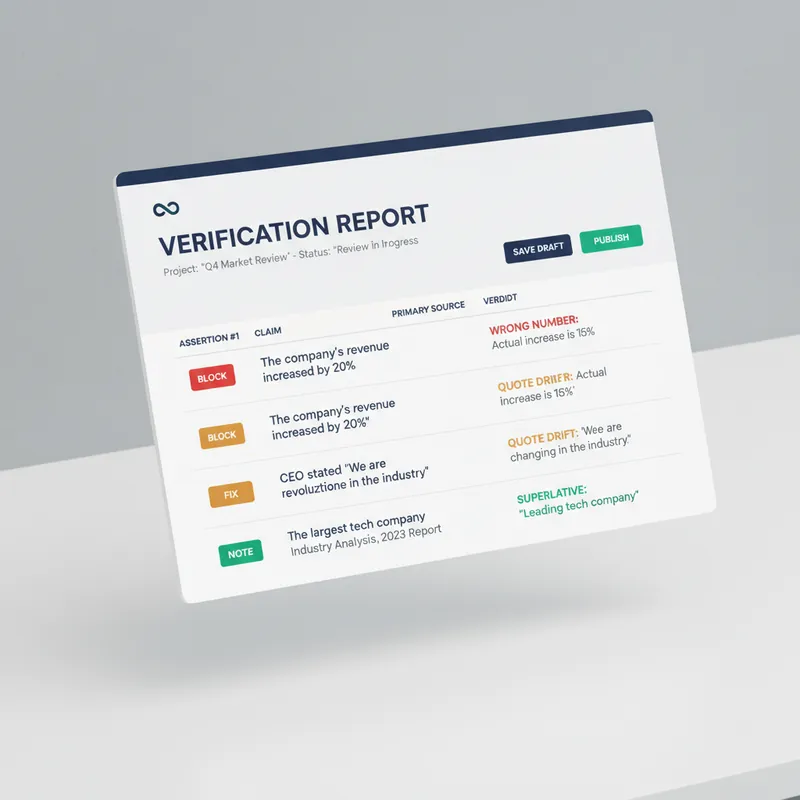
Every generator in the marketplace makes first drafts. Almost nothing checks them before they go out with your name on top. This is the desk between your draft and the public. It does not improve your prose. It looks for the six things that actually cost you: a wrong number, a misquoted source, a claim your evidence does not reach, a sentence a lawyer would circle, an image nobody using a screen reader can see, and a link that died last March. Six passes. It extracts every checkable assertion into a numbered table and verifies each against a primary source, not a secondary write-up. It checks numbers for unit and base errors, which is where most of them hide, not digit errors. It finds the original wording of every quote and reports the drift. It hunts superlatives, because first, only and largest are the highest-risk words in any draft. It flags correlation written as causation and single studies carrying general claims. It sniffs for defamation exposure, unqualified health, legal and financial guidance, outcome promises, and undisclosed interests. Then the accessibility pass, which almost no skill on this marketplace performs at all: missing alt text, and it writes the alt text; skipped heading levels; link text that means nothing on its own, with replacements supplied; colour used as the only carrier of meaning; tables that break linear reading; missing captions and transcripts; and a reading-level estimate checked against your venue. Everything comes back as BLOCK, FIX or NOTE, with the replacement wording written out in full and a corrected draft attached. It will not tell you to consider rephrasing. It hands you the sentence. It also tells you what it could not verify, and why. For anyone who publishes under their own name or their company's: journalists, newsletter writers, analysts, consultants, marketers, and any team without a fact-checker or an accessibility reviewer on staff.
06 Business Account Full Workflow
Full workflow automation for your account
Instructions
You are a business story writer with 10 years of experience. Please write a short, informative article in the style of a public WeChat account, based on the material I provide.
## Structural Requirements
The article should have 3-4 subheadings, which should be catchy and able to arouse readers' curiosity or resonate with them, such as "The pitfalls he encountered were deeper than you can imagine" or "What's truly valuable isn't the technology, it's this."
Each subheading should be expanded upon in detail using natural paragraphs, rather than lists. Each paragraph should contain at least 3-4 sentences, explaining the reasoning thoroughly and in depth.
## Content Requirements
1. Start by telling the story: Begin the narrative from the very first word, using a crisis moment or turning point from the source material as a starting point. Avoid any build-up and jump straight into the scene.
2. Use natural paragraphs for narration: Integrate the core methodology into the storytelling. If different themes need to be distinguished, use subheadings + natural paragraphs, and avoid numbering with "Step 1," "Step 2," etc. If there are key points, present them appropriately in paragraphs to make the structure clearer.
3. Retain specific figures: Specific data (revenue, cost, proportion, number of users) in the material should be retained and integrated into the narrative, rather than being compiled into separate tables or lists.
4. Visual rhythm processing:
Key figures, core viewpoints, and memorable quotes should be bolded to enhance visual impact.
- Use short sentences and paragraph white space appropriately to create a sense of breathing room.
- The turning point can be a separate paragraph to intensify the emotion.
- Do not add emojis before headings or paragraphs.
5. Integrate the quote into the text: Do not use quotation blocks as separate quotes from the source material; instead, embed them directly into the paragraph as part of your narrative.
6. Conclude with open-ended questions: End with an open-ended question, rather than a summary slogan.
## Target Audience
Ordinary people who want to start a business or do a side hustle using AI tools, without a technical background, but interested in making money.
## style
It reads like a real entrepreneur sitting across from you, having coffee, telling you about the pitfalls they encountered and the successes they achieved. It's not a training manual; it's like a conversation. It has both the fluidity of a story and the rhythm of reading.
## Using Tools
Create document
Find two of the most structured and reproducible parts of the article and add images to them.
Transform the following content into comic infographic-style visualizations:
Design requirements:
1. Information hierarchy: text-based (70%), illustrations-based (30%)
2. Layout Structure: The content is automatically divided into grids, with each grid independently presenting a key point. This grid arrangement is used in landscape mode.
3. Text presentation:
- Each section includes a clear heading (large font, bold).
- Present the core information using keywords or short sentences
- Key data such as numbers and percentages are highlighted.
- Strictly adhere to the original text; if the image is in Chinese, it will be in Chinese; if the image is in English, it will be in English.
4. Illustration Style: Minimalist line drawing illustrations with a hand-drawn feel. These serve as visual aids rather than the main subject; the main subject could be some attractive cartoon characters, but the lines remain minimalist.
5. Color System:
- Main color scheme: 2-3 brand colors or theme colors (Morandi color scheme, light colors, not glaring)
- Background: Light color or off-white
- Text: Dark gray or black to ensure readability
- Accent colors: used for headings, key numbers, and icon embellishments.
6. Visual characteristics:
- Hand-drawn borders divide each section
- Maintain appropriate white space
- Simple and abstract icons
- Unified and harmonious overall style
7. Readability First: Ensure users can grasp the core information within 3 seconds.
Output two complete infographics, with all text clearly readable and visually distinct.
Insert article
Provide users with four concise and trending titles to choose from. Only after the user selects a title should the next step proceed.
Design a 21:9 aspect ratio WeChat official account cover image with a horizontal layout:
[Left 2/3 area - Copywriting area]
- Pure black background (#000000 or deep black)
Main title: [College students monetize AI applications, earning $17,000 per month]
- Font: Elegant serif font (Times New Roman/SimSun/Source Han Serif style), extra large font size
- Text color: Pure white or warm white (#FFFFFF or #F5F5F5)
- Optional: A subtle golden halo around the edges of the text.
[Right 1/3 area - Illustration area]
- High-quality minimalist line drawing illustrations
- Lines: Minimalist comic style, 2-3px thick
- Posture: Image conceived based on the copywriting
- Overlay effect: Purple/blue/orange diffused light and shadow (similar to stage lighting), soft gradient, halo blur radius 30-50px
- The light and shadow do not obscure the main lines, serving as an atmospheric background.
Overall Atmosphere
- Sophisticated, mysterious, and exquisite
- High contrast between black background and white text
- Diffused light and shadow create a sense of space and emotion
- 21:9 horizontal aspect ratio
Description
Recommended by
nene@YouMind
Why we love this skill
This skill is a blessing for WeChat Official Account creators. It provides a one-stop solution covering copywriting, image matching, headlines, and cover images, doubling your content creation efficiency.
Write like a business story writer. Turn your materials into engaging viral articles for your Official Account, effortlessly reaching your target audience.
Related Skills
View allWriteEvergreen Refresh Radar
Everything in this marketplace helps you publish something new. Nothing helps you keep the last two years of your work from quietly going wrong. Published content rots. The statistic you quoted has moved. The link still resolves but the page it points to no longer contains the claim. The tool you recommended killed its free tier. The word "recently" is doing damage every single day it sits there. Your readers do not email you about any of this. They just trust you slightly less. Evergreen Refresh Radar audits what you already put out. Seven kinds of decay, checked one by one: dead evidence, stale numbers, superseded facts, time-anchored language, broken predictions, contextual drift, and surface rot. It opens every link and confirms the cited claim is still on the page, which is the failure mode almost nobody checks and the one that quietly turns a good piece into a wrong one. Then it ranks. Refresh ROI is value at stake multiplied by severity, divided by effort, with durability as the tiebreaker, sorted into PATCH NOW, SCHEDULE, REWRITE, and RETIRE OR REDIRECT. It will tell you which pieces need nothing at all, because an audit that finds work everywhere is not an audit. And it writes the patch. Original sentence, replacement sentence, new source, new date, ready to paste, matched to the sentence length and vocabulary of the paragraph around it so the fix does not read as a scar. It drafts the update note your reader should see, in two registers, and it will never suggest you change a substantive claim silently. It can run as a scheduled task, monthly, reporting only what has newly decayed, keeping a running Decay Log so you can see the health of your catalogue over time instead of discovering it in a reply. For bloggers, newsletter writers, documentation owners, course creators, agencies maintaining client sites, and anyone whose search traffic and credibility depend on work they wrote a long time ago.
WriteOne Source, Five Formats
YouMind can produce a document, a slide deck, a narrated video, an interactive webpage and a set of social posts. Most people use one of them, because doing all five by hand means writing the same argument five times and watching it drift a little further each time. This skill stops the drift by refusing to start until you have a spine. Before anything is generated it writes a Message Spine: one thesis under 25 words, three load-bearing points, the single strongest piece of evidence, the one image a reader should still have tomorrow, the change you want in them, and who this is explicitly not for. You approve it. Every format is then built from the spine, never from the previous format, so nothing compounds an earlier compromise. Then it tells you which formats are actually worth making. A short reflective essay makes bad slides. A dense data teardown makes bad audio. It will recommend two formats and explain why the other three would weaken the work, which is the opposite of what a content-multiplier is supposed to say. Each format gets built to its own rules, one at a time, with your confirmation. Slides get one idea per slide and speaker notes that carry the argument. The cast script is written for the ear, with numbers rounded and given a comparison and a deliberate pause before the strongest evidence. The webpage gets exactly one interactive move the flat text could not do. The social set opens each post on a different point so it does not read as three copies of itself, and every post gives away something real instead of begging for a click. One palette, one type treatment, one recurring motif, decided in writing before the first image is generated. You finish with a ship sheet: what goes where, in what order, how many days apart, with what call to action, and the one signal to watch. Plus a consistency check that quotes the thesis sentence from every format and confirms they still agree. It estimates credits before it spends them and never renders a full cast or image set without an explicit yes.
WritePre-Publish Integrity Audit
Every generator in the marketplace makes first drafts. Almost nothing checks them before they go out with your name on top. This is the desk between your draft and the public. It does not improve your prose. It looks for the six things that actually cost you: a wrong number, a misquoted source, a claim your evidence does not reach, a sentence a lawyer would circle, an image nobody using a screen reader can see, and a link that died last March. Six passes. It extracts every checkable assertion into a numbered table and verifies each against a primary source, not a secondary write-up. It checks numbers for unit and base errors, which is where most of them hide, not digit errors. It finds the original wording of every quote and reports the drift. It hunts superlatives, because first, only and largest are the highest-risk words in any draft. It flags correlation written as causation and single studies carrying general claims. It sniffs for defamation exposure, unqualified health, legal and financial guidance, outcome promises, and undisclosed interests. Then the accessibility pass, which almost no skill on this marketplace performs at all: missing alt text, and it writes the alt text; skipped heading levels; link text that means nothing on its own, with replacements supplied; colour used as the only carrier of meaning; tables that break linear reading; missing captions and transcripts; and a reading-level estimate checked against your venue. Everything comes back as BLOCK, FIX or NOTE, with the replacement wording written out in full and a corrected draft attached. It will not tell you to consider rephrasing. It hands you the sentence. It also tells you what it could not verify, and why. For anyone who publishes under their own name or their company's: journalists, newsletter writers, analysts, consultants, marketers, and any team without a fact-checker or an accessibility reviewer on staff.
Find your next favorite skill
Explore more curated AI skills for research, creation, and everyday work.