
Professional English UI Copy
Colloquial Chinese to natural English UI copy
Instructions
Description
Recommended by
Shuting@YouMind
Why we love this skill
This tool follows mainstream design standards, accurately converting casual requirements into professional, native UI copy. It supports multiple component types and style switching, making it a powerful helper for building international product interfaces.
Essential for product managers going global! Based on authoritative copywriting guidelines from Apple, Google, and others, transforms colloquial Chinese product requirement descriptions into natural, concise English UI copy. Users only need to input the shortest Chinese description (e.g., 'Delete item confirmation') and component context (e.g., button/popup/toast), and get 1-3 English UX copy options in different styles, maintaining product consistency. Minimal input yields optimal results.
Related Skills
View all Write
WriteVideo copywriting for social media
Analyze a video or transcript immediately, prepare evidence-based and platform-native multi-platform titles and copy, and recommend an editable SOCIAL MEDIA PUBLISH WORKSPACE webpage with 9:16 previews while keeping a concise plain-text copy document available as an alternative.
 Write
WriteEvergreen Refresh Radar
Everything in this marketplace helps you publish something new. Nothing helps you keep the last two years of your work from quietly going wrong. Published content rots. The statistic you quoted has moved. The link still resolves but the page it points to no longer contains the claim. The tool you recommended killed its free tier. The word "recently" is doing damage every single day it sits there. Your readers do not email you about any of this. They just trust you slightly less. Evergreen Refresh Radar audits what you already put out. Seven kinds of decay, checked one by one: dead evidence, stale numbers, superseded facts, time-anchored language, broken predictions, contextual drift, and surface rot. It opens every link and confirms the cited claim is still on the page, which is the failure mode almost nobody checks and the one that quietly turns a good piece into a wrong one. Then it ranks. Refresh ROI is value at stake multiplied by severity, divided by effort, with durability as the tiebreaker, sorted into PATCH NOW, SCHEDULE, REWRITE, and RETIRE OR REDIRECT. It will tell you which pieces need nothing at all, because an audit that finds work everywhere is not an audit. And it writes the patch. Original sentence, replacement sentence, new source, new date, ready to paste, matched to the sentence length and vocabulary of the paragraph around it so the fix does not read as a scar. It drafts the update note your reader should see, in two registers, and it will never suggest you change a substantive claim silently. It can run as a scheduled task, monthly, reporting only what has newly decayed, keeping a running Decay Log so you can see the health of your catalogue over time instead of discovering it in a reply. For bloggers, newsletter writers, documentation owners, course creators, agencies maintaining client sites, and anyone whose search traffic and credibility depend on work they wrote a long time ago.
 Write
WriteOne Source, Five Formats
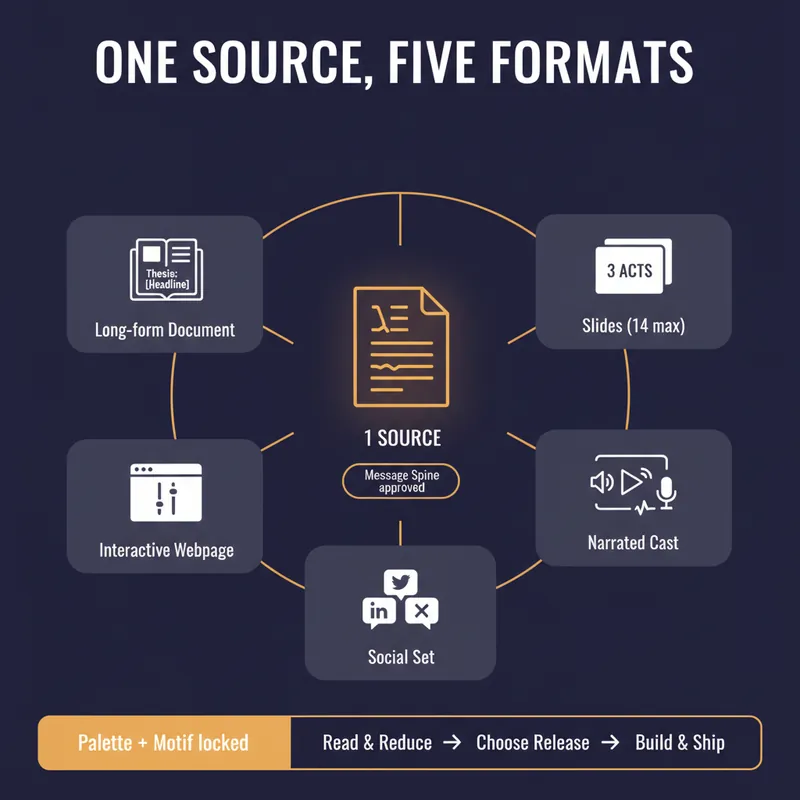
YouMind can produce a document, a slide deck, a narrated video, an interactive webpage and a set of social posts. Most people use one of them, because doing all five by hand means writing the same argument five times and watching it drift a little further each time. This skill stops the drift by refusing to start until you have a spine. Before anything is generated it writes a Message Spine: one thesis under 25 words, three load-bearing points, the single strongest piece of evidence, the one image a reader should still have tomorrow, the change you want in them, and who this is explicitly not for. You approve it. Every format is then built from the spine, never from the previous format, so nothing compounds an earlier compromise. Then it tells you which formats are actually worth making. A short reflective essay makes bad slides. A dense data teardown makes bad audio. It will recommend two formats and explain why the other three would weaken the work, which is the opposite of what a content-multiplier is supposed to say. Each format gets built to its own rules, one at a time, with your confirmation. Slides get one idea per slide and speaker notes that carry the argument. The cast script is written for the ear, with numbers rounded and given a comparison and a deliberate pause before the strongest evidence. The webpage gets exactly one interactive move the flat text could not do. The social set opens each post on a different point so it does not read as three copies of itself, and every post gives away something real instead of begging for a click. One palette, one type treatment, one recurring motif, decided in writing before the first image is generated. You finish with a ship sheet: what goes where, in what order, how many days apart, with what call to action, and the one signal to watch. Plus a consistency check that quotes the thesis sentence from every format and confirms they still agree. It estimates credits before it spends them and never renders a full cast or image set without an explicit yes.
Professional English UI Copy
Colloquial Chinese to natural English UI copy
Instructions
Description
Recommended by
Shuting@YouMind
Why we love this skill
This tool follows mainstream design standards, accurately converting casual requirements into professional, native UI copy. It supports multiple component types and style switching, making it a powerful helper for building international product interfaces.
Essential for product managers going global! Based on authoritative copywriting guidelines from Apple, Google, and others, transforms colloquial Chinese product requirement descriptions into natural, concise English UI copy. Users only need to input the shortest Chinese description (e.g., 'Delete item confirmation') and component context (e.g., button/popup/toast), and get 1-3 English UX copy options in different styles, maintaining product consistency. Minimal input yields optimal results.
Related Skills
View allWriteVideo copywriting for social media
Analyze a video or transcript immediately, prepare evidence-based and platform-native multi-platform titles and copy, and recommend an editable SOCIAL MEDIA PUBLISH WORKSPACE webpage with 9:16 previews while keeping a concise plain-text copy document available as an alternative.
WriteEvergreen Refresh Radar
Everything in this marketplace helps you publish something new. Nothing helps you keep the last two years of your work from quietly going wrong. Published content rots. The statistic you quoted has moved. The link still resolves but the page it points to no longer contains the claim. The tool you recommended killed its free tier. The word "recently" is doing damage every single day it sits there. Your readers do not email you about any of this. They just trust you slightly less. Evergreen Refresh Radar audits what you already put out. Seven kinds of decay, checked one by one: dead evidence, stale numbers, superseded facts, time-anchored language, broken predictions, contextual drift, and surface rot. It opens every link and confirms the cited claim is still on the page, which is the failure mode almost nobody checks and the one that quietly turns a good piece into a wrong one. Then it ranks. Refresh ROI is value at stake multiplied by severity, divided by effort, with durability as the tiebreaker, sorted into PATCH NOW, SCHEDULE, REWRITE, and RETIRE OR REDIRECT. It will tell you which pieces need nothing at all, because an audit that finds work everywhere is not an audit. And it writes the patch. Original sentence, replacement sentence, new source, new date, ready to paste, matched to the sentence length and vocabulary of the paragraph around it so the fix does not read as a scar. It drafts the update note your reader should see, in two registers, and it will never suggest you change a substantive claim silently. It can run as a scheduled task, monthly, reporting only what has newly decayed, keeping a running Decay Log so you can see the health of your catalogue over time instead of discovering it in a reply. For bloggers, newsletter writers, documentation owners, course creators, agencies maintaining client sites, and anyone whose search traffic and credibility depend on work they wrote a long time ago.
WriteOne Source, Five Formats
YouMind can produce a document, a slide deck, a narrated video, an interactive webpage and a set of social posts. Most people use one of them, because doing all five by hand means writing the same argument five times and watching it drift a little further each time. This skill stops the drift by refusing to start until you have a spine. Before anything is generated it writes a Message Spine: one thesis under 25 words, three load-bearing points, the single strongest piece of evidence, the one image a reader should still have tomorrow, the change you want in them, and who this is explicitly not for. You approve it. Every format is then built from the spine, never from the previous format, so nothing compounds an earlier compromise. Then it tells you which formats are actually worth making. A short reflective essay makes bad slides. A dense data teardown makes bad audio. It will recommend two formats and explain why the other three would weaken the work, which is the opposite of what a content-multiplier is supposed to say. Each format gets built to its own rules, one at a time, with your confirmation. Slides get one idea per slide and speaker notes that carry the argument. The cast script is written for the ear, with numbers rounded and given a comparison and a deliberate pause before the strongest evidence. The webpage gets exactly one interactive move the flat text could not do. The social set opens each post on a different point so it does not read as three copies of itself, and every post gives away something real instead of begging for a click. One palette, one type treatment, one recurring motif, decided in writing before the first image is generated. You finish with a ship sheet: what goes where, in what order, how many days apart, with what call to action, and the one signal to watch. Plus a consistency check that quotes the thesis sentence from every format and confirms they still agree. It estimates credits before it spends them and never renders a full cast or image set without an explicit yes.
Find your next favorite skill
Explore more curated AI skills for research, creation, and everyday work.