YouMind Style Background Image
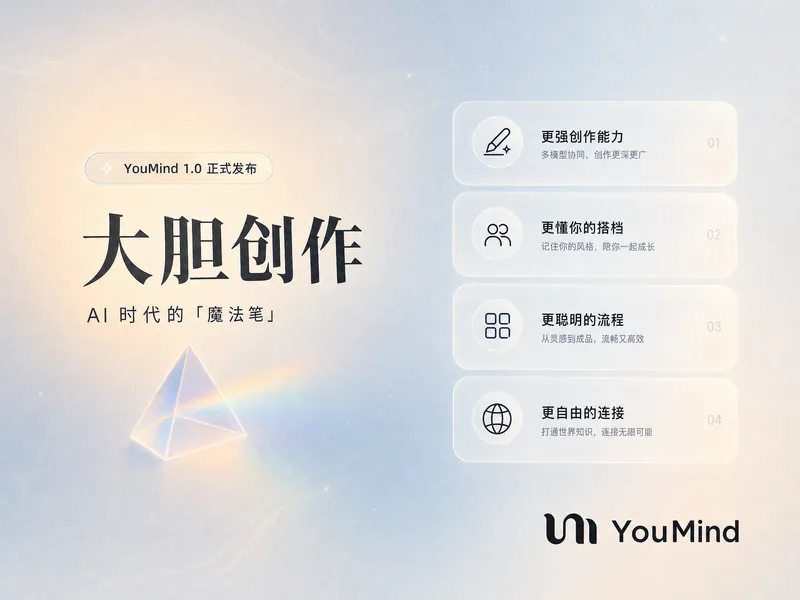
Generate a YouMind brand style abstract image for background use. Font Guidelines: Use <Libre Baskerville> for English titles and <Source Sans> for Chinese titles.
Featured by
Lynne Lau
Why we love this skill
This skill crafts stunning, abstract background images with a sophisticated color palette. Its unique text integration, adapting fonts for Chinese characters, makes it truly stand out.
Author
Tiffany Yuehan Tan
Categories
Instructions
The author has set the instructions to private. Below is a brief overview.
This skill generates unique abstract digital paintings, perfect for those seeking modern and visually appealing backgrounds or artistic elements. It caters to designers, content creators, and anyone looking for custom abstract art with a contemporary aesthetic. The skill creates images with a soft, dreamlike quality, featuring blurred gradient art, organic flowing shapes, and smooth brushstrokes. It focuses on natural color transitions and soft edges, employing an asymmetric composition with overlapping abstract forms. You can expect a subtle grain texture, a sense of depth, and soft, diffused lighting, all contributing to a minimalist yet engaging visual experience. The primary color palette includes specific blue and yellow tones against a beige background with a slight orange gradient, evoking a vintage feel. After the initial image generation, you have the option to personalize the artwork further by adding custom text. The skill intelligently selects appropriate fonts for optimal readability, whether your text is in English or Chinese. This allows for the creation of bespoke digital art that can serve as a striking visual for various creative projects.
Related Skills
View allInfographic Maker
Say goodbye to the hassle of manually creating charts. Simply provide your structured data, and Infographic Maker can generate high-quality PNG infographics with a single click. It features 6 built-in chart types (timeline, flowchart, leaderboard, scale chart, comparison chart, funnel chart) and 5 meticulously crafted visual styles (Business Blue, Creative Color, Dark Tech, Elegant Warm, Minimalist Black and White), easily covering all scenarios from annual reports to social media. Supporting Instagram Stories (9:16), Feed (4:5), and Square (1:1) sizes, it lets your data speak for itself.
Data Visualization
Generate visualizations based on user-provided data that conform to the Storytelling with Data (SWD) principle. Triggering conditions: This skill must be used when a user provides data and requests "draw a chart," "generate a chart," "visualize," "make a graph," or "show me this data," or uploads CSV/Excel/spreadsheet data and wants to see a graphical representation. Even if the user only says "analyze this data" and the data is suitable for visualization, this skill should still be used to generate a chart.
Every Classic-Modern Conflict Cover
The article's core ideas are transformed into a visual impact. The collision of classical engraving and modern symbols creates the Every.to-style cover, characterized by dark emphasis, high contrast, wordless composition, and a strong sense of artistry.
YouMind Style Background Image
Generate a YouMind brand style abstract image for background use. Font Guidelines: Use <Libre Baskerville> for English titles and <Source Sans> for Chinese titles.
Featured by
Lynne Lau
Why we love this skill
This skill crafts stunning, abstract background images with a sophisticated color palette. Its unique text integration, adapting fonts for Chinese characters, makes it truly stand out.
Author
Tiffany Yuehan Tan
Categories
images
Instructions
The author has set the instructions to private. Below is a brief overview.
This skill generates unique abstract digital paintings, perfect for those seeking modern and visually appealing backgrounds or artistic elements. It caters to designers, content creators, and anyone looking for custom abstract art with a contemporary aesthetic. The skill creates images with a soft, dreamlike quality, featuring blurred gradient art, organic flowing shapes, and smooth brushstrokes. It focuses on natural color transitions and soft edges, employing an asymmetric composition with overlapping abstract forms. You can expect a subtle grain texture, a sense of depth, and soft, diffused lighting, all contributing to a minimalist yet engaging visual experience. The primary color palette includes specific blue and yellow tones against a beige background with a slight orange gradient, evoking a vintage feel. After the initial image generation, you have the option to personalize the artwork further by adding custom text. The skill intelligently selects appropriate fonts for optimal readability, whether your text is in English or Chinese. This allows for the creation of bespoke digital art that can serve as a striking visual for various creative projects.
Related Skills
View allInfographic Maker
Say goodbye to the hassle of manually creating charts. Simply provide your structured data, and Infographic Maker can generate high-quality PNG infographics with a single click. It features 6 built-in chart types (timeline, flowchart, leaderboard, scale chart, comparison chart, funnel chart) and 5 meticulously crafted visual styles (Business Blue, Creative Color, Dark Tech, Elegant Warm, Minimalist Black and White), easily covering all scenarios from annual reports to social media. Supporting Instagram Stories (9:16), Feed (4:5), and Square (1:1) sizes, it lets your data speak for itself.
Data Visualization
Generate visualizations based on user-provided data that conform to the Storytelling with Data (SWD) principle. Triggering conditions: This skill must be used when a user provides data and requests "draw a chart," "generate a chart," "visualize," "make a graph," or "show me this data," or uploads CSV/Excel/spreadsheet data and wants to see a graphical representation. Even if the user only says "analyze this data" and the data is suitable for visualization, this skill should still be used to generate a chart.
Every Classic-Modern Conflict Cover
The article's core ideas are transformed into a visual impact. The collision of classical engraving and modern symbols creates the Every.to-style cover, characterized by dark emphasis, high contrast, wordless composition, and a strong sense of artistry.
Find your next favorite skill
Explore more curated AI skills for research, creation, and everyday work.