3x3 Photo Collage
Generate 3x3 photo collages for portraits by age and gender
Description
Want to create a unique 3x3 photo collage for a specific character? This tool makes it easy. Simply provide the person's gender and approximate age, then choose from eight curated styles — from 'Spring Floral Whispers' and 'Midsummer Light and Shadow' to 'Vintage Film' and 'Dreamy Portrait' — to infuse your photos with seasonal charm or artistic flair. Based on the character info and selected style, we'll intelligently generate detailed image creation instructions. These instructions precisely describe the person's clothing, pose, and overall vibe, with careful attention to detail to ensure professional composition and visual impact. Finally, combined with a reference photo you upload, we'll use advanced AI image generation to create your personalized 3x3 collage. Whether for social media sharing or as a unique avatar wall, it perfectly showcases the character's appeal and makes your photo display stand out.
Related Skills
View all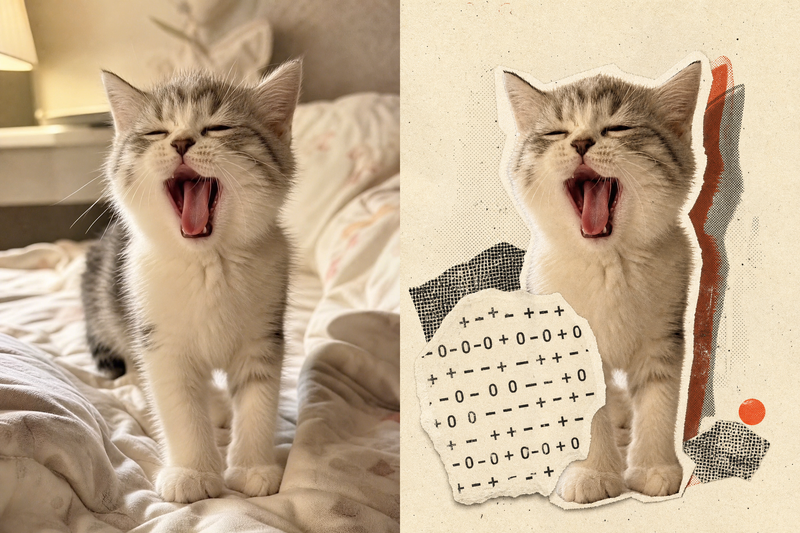
Retro Collage Art
This skill transforms your uploaded photos into striking retro archival art pieces, especially adept with portraits, still life, or landscape photography. It uses a unique 'garbled sticker' and 'print glitch' style to perform a tense visual reconstruction while strictly preserving the original subject's outline, pose, and position. The system precisely identifies the core subject in the frame, using warm white fiber-paper-textured garbled silhouettes, halftone dot-matrix backgrounds, and misregistered offset shapes to create a handcrafted collage rhythm. Visually, the skill aims for an authentic archival texture, with fine paper grain, screen-print ink, and photocopy noise. Through clever misregistration and localized fading, it infuses the image with a warm, aged archival oxidation feel while retaining about half of the original colors and key details. This approach ensures the subject remains recognizable while the interplay of black, warm white, and accent colors from the original creates a forward-looking yet nostalgic visual expression, perfect for unique art posters, personalized social media avatars, or design-forward visual assets.
 Image
ImageReality Blend Artist Pro
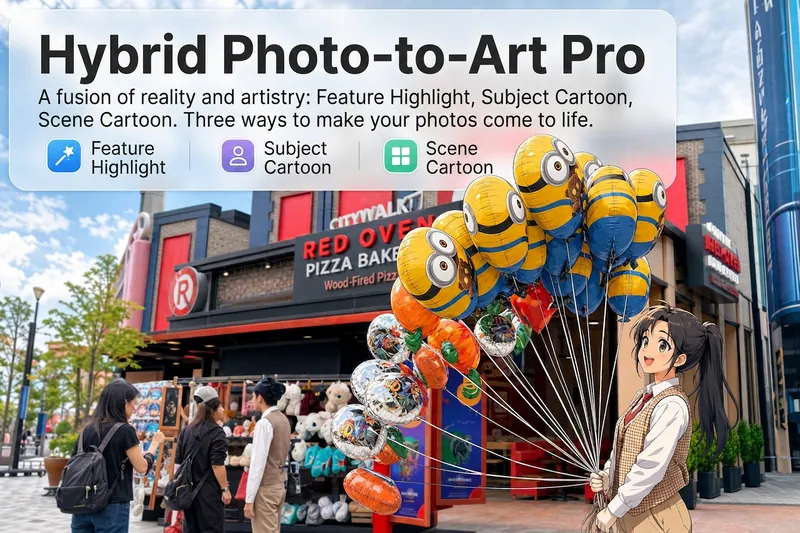
Upload a photo, and AI first reads it like a visual analyst across five dimensions: what the subject is, how it is composed, its color palette, where the visual focus lies, and what emotion it conveys. It then tells you where a hand-drawn treatment would have the most impact and how to make it look best. Four real-and-drawn blend modes, four ways to play: 🔹 Local Accents — Keep the overall image realistic while AI selects 2–3 local areas to replace with a hand-drawn style. Patterns on a sign, the coffee cup in someone’s hand, or a few flowers peeking out from a flower bed—just enough to give the photo a sense of life. Choose from 4 hand-drawn styles: pencil sketch / watercolor wash / sticker doodle / clay relief. 🔹 Subject Anime — Turn a person, animal, or object into an anime-style subject while keeping the background’s realistic photographic texture. Choose from 5 anime styles: action manga / American superhero comics / Ghibli-style / Korean webtoon / Chinese ink wash. It feels like an anime character has stepped into the real world. 🔹 Environment Anime — Reverse the approach: keep the subject realistic while transforming the surrounding environment into an anime style. The contrast of being in a real world surrounded by a 2D universe is instantly amplified. 🔹 Selective Color Light Trails — Convert the image to black-and-white grayscale while keeping selected objects in their original, highly saturated colors. Clean white detail outlines surround the colored objects, extending into flowing, curling, psychedelic agate-like color trails that naturally follow the scene’s direction. Retro collage × surreal art turns a single photo into a movie poster in an instant. Each mode × 2 blending methods: Gradient Feathering (a natural transition between real and illustrated, like ink spreading through paper) / Hand-Drawn Border (a white outline, like a sticker placed on the image). No blind image generation—you're in control at every step. AI analyzes first → recommends an approach → you confirm → then it generates, helping avoid wasted results. For portrait photos, faces and facial features are automatically avoided and are not replaced with hand-drawn elements. The number of local areas is limited to 2–3, with professional constraints on their position and size—the result is a finishing touch, not a collage. 4 modes · 16 styles · 2 blending methods = 32 real-and-drawn combinations. The same photo can take on completely different moods.
 Image
ImagePortrait Freedom-2-Step Prompt
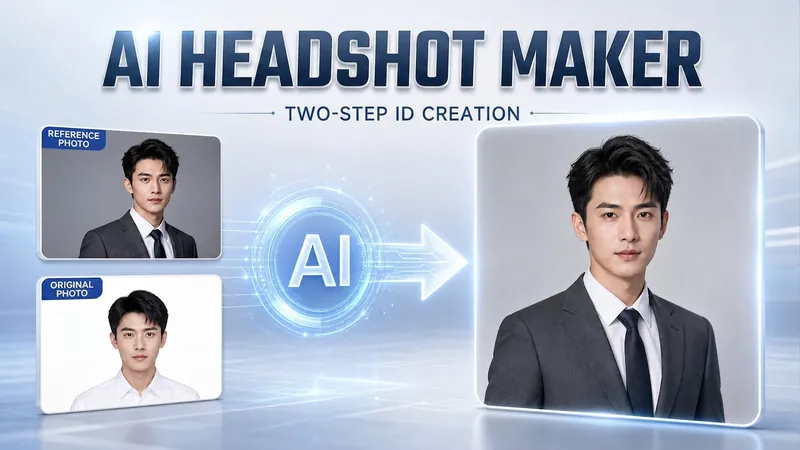
Generate a high-end portrait that is uniquely yours from a single reference image. Many people creating AI portraits upload a selfie and say 'Generate a high-end professional headshot for me,' but often end up with a face that doesn't look like them, a style that is template-like and generic, plastic-looking skin, and makeup and clothing that don't match their personality. The root problem is asking the AI to simultaneously guess 'what you look like' and 'what style to use'—it fails at both. This skill breaks it down into two stable steps: First, you provide a single reference image (professional headshot, magazine portrait, black-and-white film, modern Chinese style, etc.). Instead of immediately generating an image, the AI deconstructs its 'photographic language' like a photographer—analyzing lighting, composition, focal length, background, color palette, mood, and texture—and then writes two complete prompt sets for male and female versions separately. Clothing, makeup, hairstyle, and pose are all written differently by gender, fundamentally avoiding disasters like 'putting a man in a silk camisole.' Second, you choose your set of prompts and pair it with a clear photo of yourself: the reference image handles the style, while your photo handles the identity—preserving your face shape, features, age perception, and expression, then applying the professional photographic quality from the reference. The result is a portrait that is unmistakably you with a cinematic quality. The reference image controls the style, your photo controls the identity—it's that simple. Changing the reference image changes the direction. ID photos, professional headshots, magazine covers, black-and-white film—one workflow handles them all, completely eliminating the homogeneity and plastic feel of AI portraits. Target audience: professionals needing a headshot/ID photo/personal brand portrait, social media influencers, job seekers, and anyone who wants a high-end portrait that is truly their own.
3x3 Photo Collage
Generate 3x3 photo collages for portraits by age and gender
Description
Want to create a unique 3x3 photo collage for a specific character? This tool makes it easy. Simply provide the person's gender and approximate age, then choose from eight curated styles — from 'Spring Floral Whispers' and 'Midsummer Light and Shadow' to 'Vintage Film' and 'Dreamy Portrait' — to infuse your photos with seasonal charm or artistic flair. Based on the character info and selected style, we'll intelligently generate detailed image creation instructions. These instructions precisely describe the person's clothing, pose, and overall vibe, with careful attention to detail to ensure professional composition and visual impact. Finally, combined with a reference photo you upload, we'll use advanced AI image generation to create your personalized 3x3 collage. Whether for social media sharing or as a unique avatar wall, it perfectly showcases the character's appeal and makes your photo display stand out.
Related Skills
View allRetro Collage Art
This skill transforms your uploaded photos into striking retro archival art pieces, especially adept with portraits, still life, or landscape photography. It uses a unique 'garbled sticker' and 'print glitch' style to perform a tense visual reconstruction while strictly preserving the original subject's outline, pose, and position. The system precisely identifies the core subject in the frame, using warm white fiber-paper-textured garbled silhouettes, halftone dot-matrix backgrounds, and misregistered offset shapes to create a handcrafted collage rhythm. Visually, the skill aims for an authentic archival texture, with fine paper grain, screen-print ink, and photocopy noise. Through clever misregistration and localized fading, it infuses the image with a warm, aged archival oxidation feel while retaining about half of the original colors and key details. This approach ensures the subject remains recognizable while the interplay of black, warm white, and accent colors from the original creates a forward-looking yet nostalgic visual expression, perfect for unique art posters, personalized social media avatars, or design-forward visual assets.
ImageReality Blend Artist Pro
Upload a photo, and AI first reads it like a visual analyst across five dimensions: what the subject is, how it is composed, its color palette, where the visual focus lies, and what emotion it conveys. It then tells you where a hand-drawn treatment would have the most impact and how to make it look best. Four real-and-drawn blend modes, four ways to play: 🔹 Local Accents — Keep the overall image realistic while AI selects 2–3 local areas to replace with a hand-drawn style. Patterns on a sign, the coffee cup in someone’s hand, or a few flowers peeking out from a flower bed—just enough to give the photo a sense of life. Choose from 4 hand-drawn styles: pencil sketch / watercolor wash / sticker doodle / clay relief. 🔹 Subject Anime — Turn a person, animal, or object into an anime-style subject while keeping the background’s realistic photographic texture. Choose from 5 anime styles: action manga / American superhero comics / Ghibli-style / Korean webtoon / Chinese ink wash. It feels like an anime character has stepped into the real world. 🔹 Environment Anime — Reverse the approach: keep the subject realistic while transforming the surrounding environment into an anime style. The contrast of being in a real world surrounded by a 2D universe is instantly amplified. 🔹 Selective Color Light Trails — Convert the image to black-and-white grayscale while keeping selected objects in their original, highly saturated colors. Clean white detail outlines surround the colored objects, extending into flowing, curling, psychedelic agate-like color trails that naturally follow the scene’s direction. Retro collage × surreal art turns a single photo into a movie poster in an instant. Each mode × 2 blending methods: Gradient Feathering (a natural transition between real and illustrated, like ink spreading through paper) / Hand-Drawn Border (a white outline, like a sticker placed on the image). No blind image generation—you're in control at every step. AI analyzes first → recommends an approach → you confirm → then it generates, helping avoid wasted results. For portrait photos, faces and facial features are automatically avoided and are not replaced with hand-drawn elements. The number of local areas is limited to 2–3, with professional constraints on their position and size—the result is a finishing touch, not a collage. 4 modes · 16 styles · 2 blending methods = 32 real-and-drawn combinations. The same photo can take on completely different moods.
ImagePortrait Freedom-2-Step Prompt
Generate a high-end portrait that is uniquely yours from a single reference image. Many people creating AI portraits upload a selfie and say 'Generate a high-end professional headshot for me,' but often end up with a face that doesn't look like them, a style that is template-like and generic, plastic-looking skin, and makeup and clothing that don't match their personality. The root problem is asking the AI to simultaneously guess 'what you look like' and 'what style to use'—it fails at both. This skill breaks it down into two stable steps: First, you provide a single reference image (professional headshot, magazine portrait, black-and-white film, modern Chinese style, etc.). Instead of immediately generating an image, the AI deconstructs its 'photographic language' like a photographer—analyzing lighting, composition, focal length, background, color palette, mood, and texture—and then writes two complete prompt sets for male and female versions separately. Clothing, makeup, hairstyle, and pose are all written differently by gender, fundamentally avoiding disasters like 'putting a man in a silk camisole.' Second, you choose your set of prompts and pair it with a clear photo of yourself: the reference image handles the style, while your photo handles the identity—preserving your face shape, features, age perception, and expression, then applying the professional photographic quality from the reference. The result is a portrait that is unmistakably you with a cinematic quality. The reference image controls the style, your photo controls the identity—it's that simple. Changing the reference image changes the direction. ID photos, professional headshots, magazine covers, black-and-white film—one workflow handles them all, completely eliminating the homogeneity and plastic feel of AI portraits. Target audience: professionals needing a headshot/ID photo/personal brand portrait, social media influencers, job seekers, and anyone who wants a high-end portrait that is truly their own.
Find your next favorite skill
Explore more curated AI skills for research, creation, and everyday work.