
给文章配图大师
给WORD配图大师
Description
Generate Guizang-style material illustrations, labeled explanatory visuals, material-styled chart illustrations, and data-first editorial images from articles, notes, product concepts, workplace reports, creator posts, tutorials, school materials, humanities topics, science explanations, screenshots, or chart data. Use when the user asks for 配图, 带字插图, 解释图, 图解插画, 概念拆解图, 图表美化, 数据图美化, 3D 图表, 汇报配图, 内容配图, 小学课文配图, 生物/化学/物理解释图, 人文类配图, process/loop/system diagrams, or wants GPT-Image / image generation to create supporting images that can sit inside social cards, docs, slides, PPTs, or posts.
Related Skills
View all
Article Illustration Master
Generate fun hand-drawn style illustrations based on Chinese article content. Supports three modes: no IP, custom IP, and auto-generated IP. You can use commercial IPs, customer-provided character reference images, or automatically create entirely new original characters. Trigger commands: 配图, 给文章配图, 帮我配图, illustration
 Image
ImageBatch Article Illustration 2.0
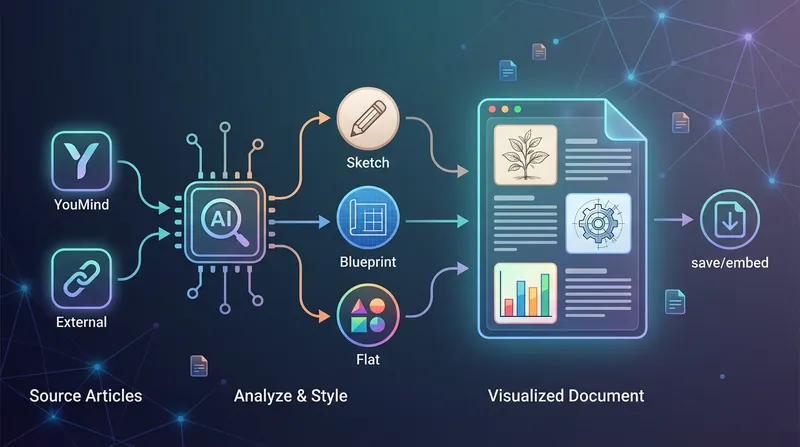
This is an intelligent visual enhancement tool designed for content creators. It deeply understands the flow of your text and automatically creates high-quality supporting illustrations for key paragraphs of your articles. Whether your content resides in a personal knowledge base or you need to process externally imported long-form articles, it accurately identifies core concepts, turning abstract text into concrete visual language and significantly improving the reading experience and shareability of your content. The tool offers three distinct visual styles to suit different creation scenarios: a fresh and lively minimalist hand-drawn style fits essays and popular science; a rigorous and professional architectural blueprint style is the ideal choice for technical documents and research reports; and a modern flat illustration style perfectly matches the aesthetic needs of social media accounts and knowledge notes. For long-form content, it also intelligently suggests illustration layouts to ensure a reasonable visual distribution with key points highlighted. During generation, you can flexibly choose how images are produced. You can have the generated illustrations seamlessly embedded directly into the original document paragraphs for automated layout, or you can opt to receive a standalone image resource package for manual distribution. This end-to-end collaboration, from content analysis to visual generation, makes your writing more impactful and complex ideas instantly clear.
 Image
ImageWatercolor Engineering Sketch
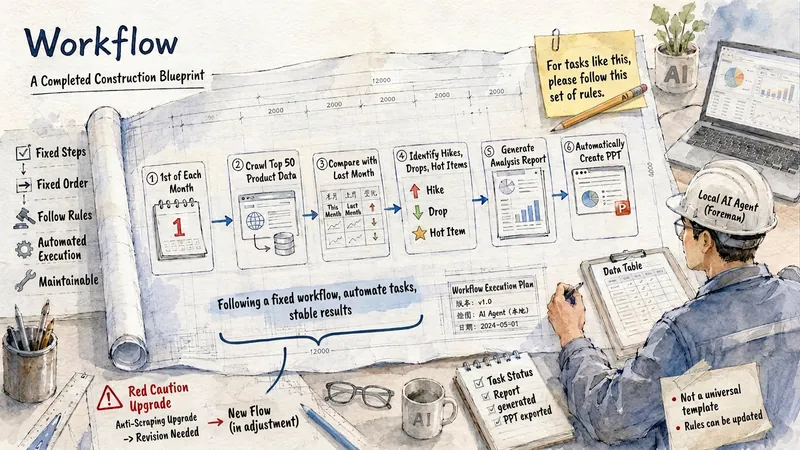
Quickly convert text content into watercolor engineering sketch illustrations with a paper texture. Users simply input the content they wish to express, and the Skill generates images featuring light watercolor, engineering sketches, and fine-line annotation styles, adding short, readable titles or keywords based on the content. Supports Chinese, English, and mixed Chinese-English content. Default output is landscape 4:3 images; you can also freely specify aspect ratios such as 3:4, 1:1, and 16:9. Suitable for illustrations in knowledge notes, WeChat Official Account articles, social media, course content, concept explanations, and work reports.
给文章配图大师
给WORD配图大师
Description
Generate Guizang-style material illustrations, labeled explanatory visuals, material-styled chart illustrations, and data-first editorial images from articles, notes, product concepts, workplace reports, creator posts, tutorials, school materials, humanities topics, science explanations, screenshots, or chart data. Use when the user asks for 配图, 带字插图, 解释图, 图解插画, 概念拆解图, 图表美化, 数据图美化, 3D 图表, 汇报配图, 内容配图, 小学课文配图, 生物/化学/物理解释图, 人文类配图, process/loop/system diagrams, or wants GPT-Image / image generation to create supporting images that can sit inside social cards, docs, slides, PPTs, or posts.
Related Skills
View allArticle Illustration Master
Generate fun hand-drawn style illustrations based on Chinese article content. Supports three modes: no IP, custom IP, and auto-generated IP. You can use commercial IPs, customer-provided character reference images, or automatically create entirely new original characters. Trigger commands: 配图, 给文章配图, 帮我配图, illustration
ImageBatch Article Illustration 2.0
This is an intelligent visual enhancement tool designed for content creators. It deeply understands the flow of your text and automatically creates high-quality supporting illustrations for key paragraphs of your articles. Whether your content resides in a personal knowledge base or you need to process externally imported long-form articles, it accurately identifies core concepts, turning abstract text into concrete visual language and significantly improving the reading experience and shareability of your content. The tool offers three distinct visual styles to suit different creation scenarios: a fresh and lively minimalist hand-drawn style fits essays and popular science; a rigorous and professional architectural blueprint style is the ideal choice for technical documents and research reports; and a modern flat illustration style perfectly matches the aesthetic needs of social media accounts and knowledge notes. For long-form content, it also intelligently suggests illustration layouts to ensure a reasonable visual distribution with key points highlighted. During generation, you can flexibly choose how images are produced. You can have the generated illustrations seamlessly embedded directly into the original document paragraphs for automated layout, or you can opt to receive a standalone image resource package for manual distribution. This end-to-end collaboration, from content analysis to visual generation, makes your writing more impactful and complex ideas instantly clear.
ImageWatercolor Engineering Sketch
Quickly convert text content into watercolor engineering sketch illustrations with a paper texture. Users simply input the content they wish to express, and the Skill generates images featuring light watercolor, engineering sketches, and fine-line annotation styles, adding short, readable titles or keywords based on the content. Supports Chinese, English, and mixed Chinese-English content. Default output is landscape 4:3 images; you can also freely specify aspect ratios such as 3:4, 1:1, and 16:9. Suitable for illustrations in knowledge notes, WeChat Official Account articles, social media, course content, concept explanations, and work reports.
Find your next favorite skill
Explore more curated AI skills for research, creation, and everyday work.