Why we love this skill
It can instantly transform your photos into works of art, using minimalist lines to outline a wonderful new world, with endless creativity and a strong visual impact.
Instructions
# Lines
Simply add line art to the photo according to the following requirements. Do not ask questions or provide explanations.
## Visual Style
- Lines: White/Black, Simple, Clean
- Main elements: Lines forming figures/animals/plants/everyday objects
- Proportion: The proportions and perspective of the subject must match the scene in the photograph.
- Integration: The subject interacts naturally and effectively with the scene in the photo, as if it had always existed.
- Overall: The subject and the photograph complement each other, forming a scene story.
- Imagination: The fusion of the subject and the photograph needs to be unexpected yet logical, and imaginative.
## Repeatedly Instructed and Ordered
- Do not modify the content of the original image; only add lines.
- No fill color allowed; use only lines to represent shapes.
## Output
- Directly output the edited image; no further explanation needed.
description
Add some fun line art to your photos. Different models will produce different effects. You can copy the prompts to create your own skills and try it out. Feel free to modify and create; have fun! MIT
Related Skills
View all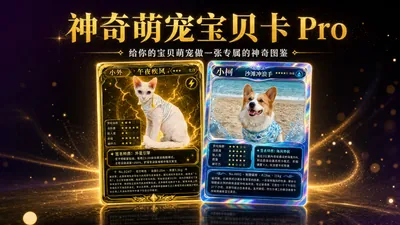
Amazing Pet Codex Pro | Pet Codex
Upload a photo of your pet, and AI will automatically analyze its features to generate a Pokémon-style collectible character card—including elemental affinity, personality profile, signature traits, and a pet biography, with rarity randomly selected. Create a personalized magical encyclopedia for your adorable pet. 🐱 Just made one for my orange tabby—AI analyzed its fur color and personality, matched it with Fire affinity, maxed out its gluttony index to 5 stars, and named its signature trait "Snack Radar," lol. 🐶 Made another one for my friend's Corgi, Thunder affinity, legendary level! The rainbow holographic border is breathtaking. What can this skill do? - 📸 Upload photos of any pet (cat/dog/hamster/rabbit/bird) - 🧠 AI analyzes pet characteristics + actively collects personality/habit information to generate a personalized profile - 🔥 Matches 18 elemental affinity types (fire/water/grass/electric/psychic/ghost...) - ⭐ 5 star-level personality profiles (gluttonous/active/clingy/good-looking/destructive) - ✦ 1 signature trait (pet's signature superpower) - 📖 Fun pet biography (based on your pet's real story) - 🎴 Five-tier rarity card draw system: Common → Rare → Epic → Legendary → Mythical Beast, Mythical Beast probability is only 3% - 🔄 You can redraw if you're not satisfied, every time is a brand new card opening experience - 📚 Multiple cards can be combined into a pet collection poster, post it on social media and see what kind of adorable and affectionate pet your furry friend is🎴 Create a unique and magical illustrated guide for your adorable pet.

Little Red Book trending graffiti cover generator
Based on the original photo's facial expressions, poses, background, and white space, it intelligently performs natural retouching, title design, hand-drawn doodles, sticker outlines, and cover composition, generating realistic, lifelike, and clickable Xiaohongshu-style creative posters. Suitable for knowledge sharing, personal branding, video covers, content publishing, and social media images.
Paper-like artistic collage design poster
To generate a WeChat official account cover image with a paper-like, minimalist, collage-style design and poster-like effect, first confirm the user's nickname as the signature, then generate prompts and directly use a raw image tool to produce the image.
📸 Lines
Why we love this skill
It can instantly transform your photos into works of art, using minimalist lines to outline a wonderful new world, with endless creativity and a strong visual impact.
Instructions
# Lines
Simply add line art to the photo according to the following requirements. Do not ask questions or provide explanations.
## Visual Style
- Lines: White/Black, Simple, Clean
- Main elements: Lines forming figures/animals/plants/everyday objects
- Proportion: The proportions and perspective of the subject must match the scene in the photograph.
- Integration: The subject interacts naturally and effectively with the scene in the photo, as if it had always existed.
- Overall: The subject and the photograph complement each other, forming a scene story.
- Imagination: The fusion of the subject and the photograph needs to be unexpected yet logical, and imaginative.
## Repeatedly Instructed and Ordered
- Do not modify the content of the original image; only add lines.
- No fill color allowed; use only lines to represent shapes.
## Output
- Directly output the edited image; no further explanation needed.
description
Add some fun line art to your photos. Different models will produce different effects. You can copy the prompts to create your own skills and try it out. Feel free to modify and create; have fun! MIT
Related Skills
View allAmazing Pet Codex Pro | Pet Codex
Upload a photo of your pet, and AI will automatically analyze its features to generate a Pokémon-style collectible character card—including elemental affinity, personality profile, signature traits, and a pet biography, with rarity randomly selected. Create a personalized magical encyclopedia for your adorable pet. 🐱 Just made one for my orange tabby—AI analyzed its fur color and personality, matched it with Fire affinity, maxed out its gluttony index to 5 stars, and named its signature trait "Snack Radar," lol. 🐶 Made another one for my friend's Corgi, Thunder affinity, legendary level! The rainbow holographic border is breathtaking. What can this skill do? - 📸 Upload photos of any pet (cat/dog/hamster/rabbit/bird) - 🧠 AI analyzes pet characteristics + actively collects personality/habit information to generate a personalized profile - 🔥 Matches 18 elemental affinity types (fire/water/grass/electric/psychic/ghost...) - ⭐ 5 star-level personality profiles (gluttonous/active/clingy/good-looking/destructive) - ✦ 1 signature trait (pet's signature superpower) - 📖 Fun pet biography (based on your pet's real story) - 🎴 Five-tier rarity card draw system: Common → Rare → Epic → Legendary → Mythical Beast, Mythical Beast probability is only 3% - 🔄 You can redraw if you're not satisfied, every time is a brand new card opening experience - 📚 Multiple cards can be combined into a pet collection poster, post it on social media and see what kind of adorable and affectionate pet your furry friend is🎴 Create a unique and magical illustrated guide for your adorable pet.
Little Red Book trending graffiti cover generator
Based on the original photo's facial expressions, poses, background, and white space, it intelligently performs natural retouching, title design, hand-drawn doodles, sticker outlines, and cover composition, generating realistic, lifelike, and clickable Xiaohongshu-style creative posters. Suitable for knowledge sharing, personal branding, video covers, content publishing, and social media images.
Paper-like artistic collage design poster
To generate a WeChat official account cover image with a paper-like, minimalist, collage-style design and poster-like effect, first confirm the user's nickname as the signature, then generate prompts and directly use a raw image tool to produce the image.
Find your next favorite skill
Explore more curated AI skills for research, creation, and everyday work.