
Skill Evaluator
A reference for evaluating AI Skills
Skill Evaluator
A reference for evaluating AI Skills
Showcase
Description
Enter the name, link, or instructions for the AI Skill to evaluate, then conduct an evidence-based initial quality review in real-world usage scenarios. Keep the six-question quick test (4 positive, 1 negative, and 1 ambiguous), and separately verify automatic selection and execution after explicit invocation; successful manual invocation does not count as successful automatic triggering. Use direct scoring across five dimensions: triggering 30%, execution 25%, cost 15%, robustness and boundaries 15%, and safety 15%. Distinguish between evidence from this test, historical run evidence, static checks, and unverified items. Do not provide an overall score or star rating when key evidence is incomplete. Assess safety based on data access, external transmission, and operational authorization—not on the author's identity or endorsement. Block recommendations in cases of serious unauthorized access. Produce a one-page, conclusion-first report showing the tested scope, unverified items, and prioritized improvement suggestions, and automatically create a record. Say “deep review” to add independent repeat tests and source checks; the budget will be confirmed before execution. This Skill only evaluates and provides recommendations; it does not automatically modify the Skill being evaluated. Suitable for quality checks of self-created Skills, rechecks of installed Skills, and pre-installation screening of marketplace Skills; the six-question results do not represent full certification.
Recommended by
Shuting@YouMind
Why we love this skill
An evidence-based framework that separates automatic selection from explicit execution, scores only traceable results, and includes safety risks and process efficiency in its conclusions.
Related Skills
View all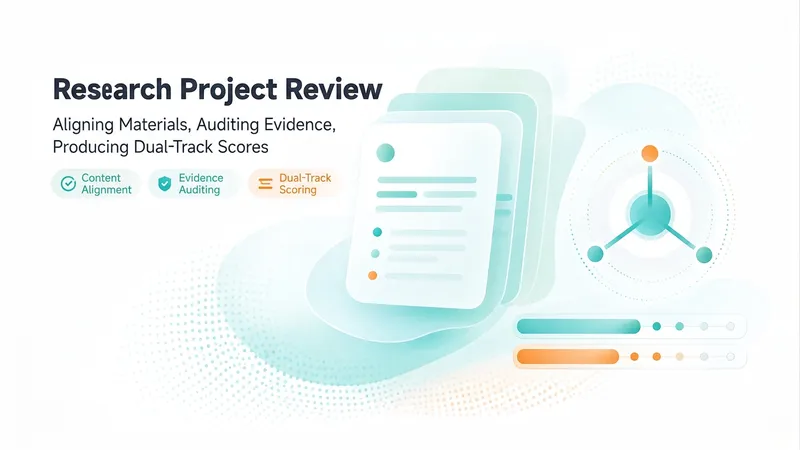
Research Review Assistant
An expert assistant for university-level research project reviews. Provide the materials for N projects in a given category. Each project includes three types of files: a proposal, a form-check summary or interim review form, and supporting evidence. File names may be scrambled, mismatched, or changed, and files may be DOCX, XLSX, PDF, or image files. Supporting evidence may be bundled into one file or provided as multiple separate files. This Skill then completes the following steps: ① Content-anchor alignment—extracts the project or center name, principal investigator, affiliated school, and project period from within the documents; matches the three-part file set for each project; and flags items requiring review when file names do not match their contents. ② Evidence normalization—whether bundled or separate, breaks materials into “atomic evidence items” and creates a coded ledger for each item with one of four status labels: complete, needs verification, missing, or questionable. This avoids judging the strength of the evidence by file count. ③ Three-dimensional item-by-item audit—evaluates each piece of evidence for relevance, authenticity, and completeness, then reconciles it against the commitments in the proposal and the self-reported results in the interim review form. ④ Dual-track scoring and comparative ranking—uses the five weighted criteria in Appendix 2 as the reporting standard and the five dimensions of the interim review as a reference standard. The two systems remain independent and are not combined, and all projects are ranked and grouped into tiers. ⑤ Delivers a structured review draft with “score + review comments” that can be pasted directly into the official form, and can generate an interactive scoring webpage when needed. Huali’s current standards are used by default. Users can confirm or revise the criteria, weights, and reference materials before work begins, or upload replacements. There are two confirmation checkpoints: first for alignment and the evidence ledger, then for scoring and ranking. When materials cannot be identified, the user is prompted to confirm. For project completion reviews, two additional hard requirements apply: first, the correspondence between the proposal’s expected outcomes and the documented evidence must be verified. If the evidence does not include an expected outcome listed in the proposal, the project automatically fails. Second, template issues are distinguished between using the completely wrong template, which results in failure, and partial formatting inconsistencies, which result in only a small deduction.
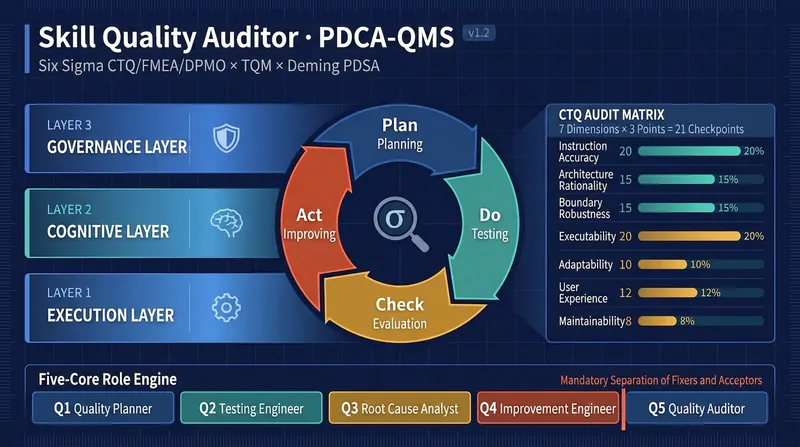
Skill Quality Audit (PDCA-QMS)
Evaluate Skills using a quality management system based on management science, not an off-the-cuff checklist. Based on Six Sigma CTQ/FMEA/DPMO × TQM × Deming PDSA cycle, through the Plan-Do-Check-Act four phases, it provides: a quality scorecard with Sigma level, a defect priority table ranked by RPN, root cause analysis down to the instruction design layer, and the full Skill text after Poka-Yoke correction. The fixer and reviewer are forcibly separated, and scores only increase, never decrease. v2.0 additions: ① Quantitative contract – closed enumeration of structural unit counting (only phase level), K-value gradient anti-scoring lock, Sigma table lookup with log axis interpolation, and full zero-padding to prevent division by zero, ensuring scores are reproducible and undistorted; ② Quality level × disposal path dual-axis gate, eliminating the contradiction of 'unqualified but recommended for release' labels; ③ Diagnostic mode – say 'only a report' or 'don't modify yet', then run through P-D-C and stop at Check, without modifying your script; ④ Output contract – pass/fail points fold, evidence limited to 50 characters, phase word count limits, values must include calculation process. When to use: evaluate whether a Skill is good, diagnose why its output is unstable, systematically optimize an existing Skill, benchmark multiple Skills, pre-release quality inspection of Skill drafts, or only want a diagnostic report without modifying the draft. Trigger words: detect skill quality, skill quality check, quality audit, rate a skill, PDCA optimize skill, skill health check, evaluate this skill, skill defect analysis, diagnose only without repair, pre-release skill quality check, skill benchmarking.
Image Generation Grandmaster
If you want to extract production-ready image-generation Skills from reference images on YouMind in one streamlined process, this is the grandmaster-level option. Creating a new Skill costs around 300 credits, turning you into an image-generation Skill-making machine and helping you avoid Skills that cost thousands. With reference images, you can build what you need yourself. Personally tested and effective; see the task examples for details. It distills the visual mechanisms in reference images into reusable, testable image-generation Skills. The subject can change while the composition, spatial logic, material appearance, and visual hierarchy are preserved, rather than simply copying the original image. It is suited to creators and teams that need to establish a consistent visual style, reuse design principles, or evaluate existing generation Skills. Use it to compile visual rules, test existing Skills, calibrate based on feedback, run historical regressions, and publish versions. It clearly identifies the scope of application, fixed invariants, adjustable variables, adaptation rules, and common failure modes. It also distinguishes between an image that is high quality and one that truly preserves the visual mechanism, helping you identify why a generated result has deviated from the underlying rules. The final results may include a structured visual specification, an independent Skill, a test plan or audit report, along with calibration patches, regression results, and release records. When image generation or visual inspection is unavailable, complete test prompts are retained and the pending-verification status is clearly indicated. Once confirmed, rules, failure diagnoses, and version information can continue to be recorded in YouMind for future maintenance and reuse.
Information
- Version
- v4
- Last updated
- Runtime credits
- Usage-based
- Models
- Auto
