Family Portrait Composite
Turn separate photos into one frame-worthy portrait
Family Portrait Composite
Turn separate photos into one frame-worthy portrait
Showcase
Description
Your family is spread across different cities, everyone can’t make it home for the holidays, or an older family member has trouble going downstairs—so you never got that group photo.【Family Portrait Composite】combines several separately taken portraits into one: matching the lighting direction and color temperature, arranging people by their real heights, and coordinating clothing colors. It outputs both portrait and landscape versions, with suggestions for printing and framing. Strict rules: it only uses the real photos you provide and never generates nonexistent people; it does not alter facial features or body shapes; and the final composite should look as if everyone was photographed together in the same session.
Best for
For families who want to turn separately taken photos into a printable, frame-ready family portrait.
How to use this Skill
Provide your input
Provide clear portraits of each family member, their height or standing order, and your preferred background. You can also specify the intended use and whether to leave room for text.
Run the Skill
Choose Family Portrait Composite, confirm the people’s arrangement and background preference, then submit the photos.
Review your result
Receive one portrait and one landscape composite family portrait, along with recommendations for print size, paper, and framing margins.
Related Skills
View all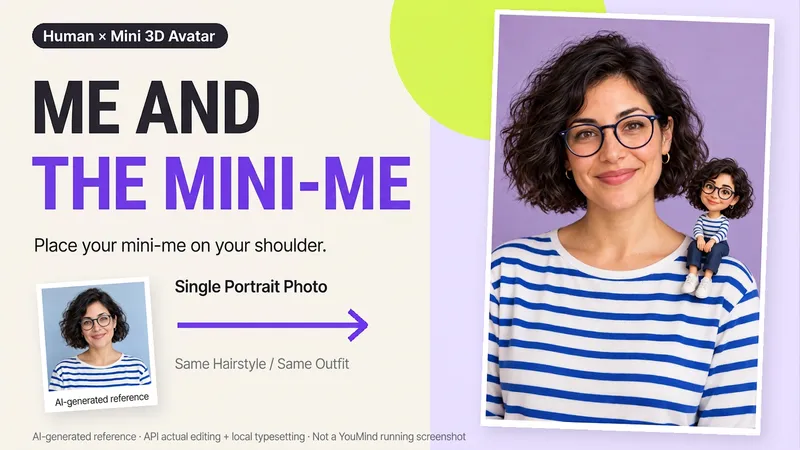 Image
Me and My Mini Me
What would it look like to have a tiny version of yourself sitting on your shoulder? Upload a clear photo of one person to create a creative portrait featuring the real person alongside a mini 3D double. One keeps the look of a photograph, while the other becomes a detailed little designer toy, with matching hair, glasses, and outfit so the two forms feel connected. What you can get: ① Shoulder companion: By default, the double sits on your shoulder, with you and your mini self looking at the camera together. ② Matching features: Focuses on visible details from the reference, including hairstyle, glasses, accessories, clothing colors, and patterns. ③ Clean final image: Defaults to a 2:3 vertical format, a soft studio background, and no text—one image to start. ④ Further adjustments: Ask to change the background or adjust the double’s size or pose, with priority given to continuing the version you already approved. Great for personal profiles, birthday keepsakes, and social sharing. The double is an artistic miniature version of the same person, not a real parent-and-child photo. You can also create fictional characters from text. The final image depends on the image tools and usage available on the current platform. Generative editing may change details of the person; exact preservation of the original photo, 100% likeness, and flawless hand structure are not guaranteed. If the tool is unavailable, this will be stated clearly and a complete prompt will be provided.
 Image
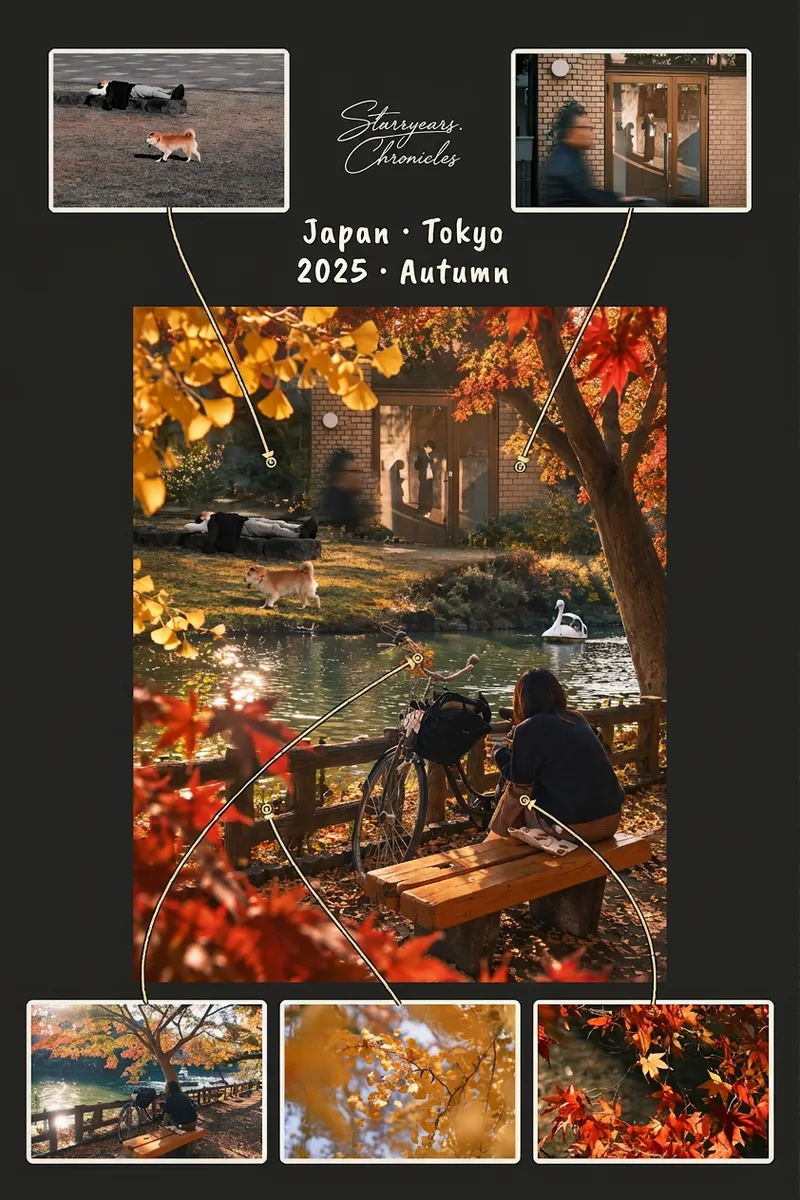
S.020 Starryear Photo Story
Combine exactly five photos into one continuous, realistic vertical story scene and deliver two finished images: an undecorated standalone main scene, plus a display collage with five numbered thumbnails, fine-line arrows, and space for copy. Ideal for travel records, family memories, character stories, or five-photo composites with multi-scene narratives—not ordinary photo grids or contact sheets. The main scene uses a 2:3 vertical 4K composition and fully preserves recognizable people, animals, objects, buildings, environmental structures, and important details from all five source photos. It does not arbitrarily add, remove, duplicate, or replace source content, while aiming to retain the original photos’ realistic colors, lighting, and spatial logic. The five photos are organized into one scene that can be read as a whole, rather than as four disconnected panels. The display collage uses thumbnails directly from the original photos, with clear connecting lines pointing to the corresponding content in the main scene. If you provide text, the display will reproduce it as written, without adding a title, date, byline, or watermark. If the five photos cannot be combined without omitting or adding content, the conflict will be clearly explained instead of being filled in through guesswork.
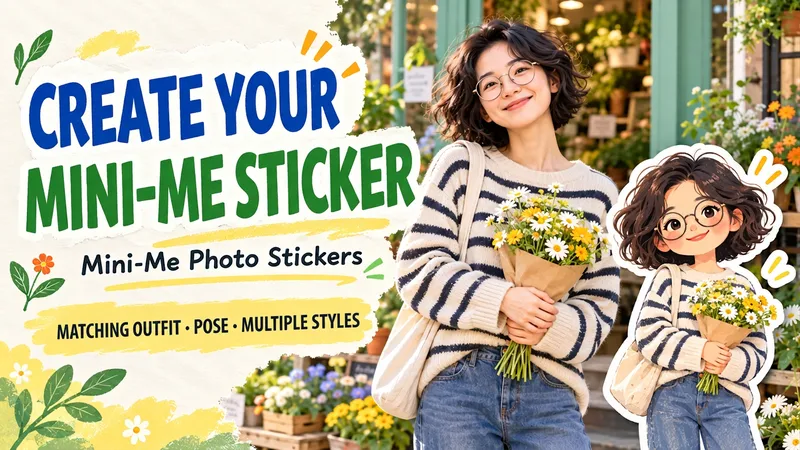
Photo Avatar Sticker
Upload a photo and add a miniature sticker of the person featuring the same outfit and pose, with pixel, paper, or clay styles available. Upload a portrait photo to turn your hairstyle, glasses, outfit, expression, and handheld items into an illustrated miniature avatar placed right next to your real photo. Great for travel memories, daily outfits, friend keepsakes, and profile pictures. Jump right in with three styles: • Pixel Arcade: Crisp pixels and retro color blocks to make everyday life look like a video game frame. • Paper Illustration: Layered paper and warm lines to turn photos into handmade stories. • Clay Doll: Matte textures and rounded details for a cute little miniature you. By default, each photo generates a "real photo plus avatar" image without added text, keeping the original photo's aspect ratio. You can adjust the avatar position, orientation, and short title, or request a standalone avatar sticker. If you don't have a photo, you can describe a fictional character for a demo. You can say: "Use this photo to make a pixel avatar, keep the clothes and camera, no text." or "Make a paper illustration, put the small avatar in the bottom left, and don't block my hand." The process checks visible features, clothing colors, poses, and props, then verifies avatar placement and material. Requires an environment with image generation or reference editing capabilities. Generative editing may alter original details, and similarity depends on the photo and model. Maintaining original pixels and separate transparent PNGs depends on the environment's compositing and transparency output.
Information
- Version
- v2
- Last updated
- Runtime credits
- Usage-based
- Models
- Auto
- Use cases
- Images & designLifestyle & entertainment
- What you get
- Image
